
이 페이지는 앱이나 개발자의 공식 페이지가 아니며, 정보 제공 및 논평을 목적으로 작성된 독립 편집 간행물입니다. 명시적으로 달리 언급되지 않는 한, 해당 앱이나 개발자는 MWM, Apple, Google Play, 앱 퍼블리셔 또는 앱 개발자와 제휴, 보증, 후원, 승인 또는 공식적으로 연결되어 있지 않으며, 이 페이지의 어떤 내용도 해당 앱이 MWM의 서비스를 사용하여 개발되었음을 의미하지 않습니다. 모든 상표, 로고, 스크린샷 및 기타 콘텐츠는 해당 소유자의 자산입니다.

Link to Windows
아이폰은 더 이상 당신의 손 안에 갇혀 있지 않다. 이 앱은 물리적 제약을 무의미하게 만들고, 폰의 기능을 PC 위로 강제하는 비범한 힘을 제공하는 것으로 확인된다.
다운로드
25M+사용자 평점
총 평가 수
37.5K개발사
카테고리
Productivity지원 언어
33최신 버전
1.26031.21크기
98.9 MB출시일
2023년 2월 28일Link to Windows 앱 심층 분석
iPhone과 Windows PC 간의 원활한 연결을 위한 핵심 기능 평가
파일 공유
이 앱은 사용자가 iPhone과 PC 간에 파일을 손쉽게 공유할 수 있는 기능을 제공하여, 문서, 사진 등 다양한 데이터를 기기 간에 효율적으로 이동시킬 수 있도록 돕습니다.
문자 메시지 전송 및 확인
이 기능을 통해 사용자는 PC 화면에서 직접 문자 메시지를 읽고 답장할 수 있으며, 키보드를 사용하여 보다 빠르고 편리하게 소통할 수 있습니다.
PC에서 전화 걸기 및 받기
이 도구는 사용자가 PC를 통해 iPhone으로 걸려오는 전화를 받고, PC에서 직접 전화를 걸 수 있도록 지원하여 멀티태스킹 환경에서 효율적인 커뮤니케이션을 가능하게 합니다.
알림 관리 및 확인
이 앱은 사용자가 iPhone의 모든 알림을 PC에서 실시간으로 확인하고 관리할 수 있게 하여, 중요한 정보를 놓치지 않고 업무 흐름을 유지하는 데 도움을 줍니다.
자주 묻는 질문
에 대해 알아야 할 모든 것 Link to Windows
Can I make calls from my PC using "Link to Windows"?
Yes, the "Link to Windows" app enables you to make and receive calls directly from your Windows PC when your iPhone is connected via the Phone Link feature.
Does "Link to Windows" show iPhone notifications on my PC?
Yes, "Link to Windows" allows you to manage and view your iPhone's notifications directly on your connected Windows PC through the Phone Link feature.
Can I send text messages from my PC with "Link to Windows"?
Yes, the "Link to Windows" app enables users to read and reply to text messages from their iPhone directly through their connected Windows PC.
Does "Link to Windows" display my iPhone contacts on the PC?
Yes, the "Link to Windows" app provides the ability to view your iPhone contacts directly on your connected Windows PC.
How do I share files between my iPhone and PC using "Link to Windows"?
"Link to Windows" facilitates file sharing between your iPhone and PC. The app displays received files and offers a file share option to another paired device.
What iOS version is required for "Link to Windows"?
"Link to Windows" requires an iPhone running iOS 16 or higher to support the Phone Link feature connection with a Windows PC.
What are the PC requirements for the Phone Link feature with "Link to Windows"?
The Phone Link feature requires a PC with Bluetooth Low Energy (BLE) support running Windows 10 (May 2019 Update or later) or Windows 11.
Is "Link to Windows" available for iPad or Mac?
No, "Link to Windows" is not available for iPad (iPadOS) or MacOS. It exclusively supports iPhone and Windows PC integration.
How do I connect my iPhone to my PC using the "Link to Windows" app?
To connect, open the Phone Link app on your PC and follow the instructions. You can scan a QR code from your PC or proceed without one to link your device.
How does the "Link to Windows" app maintain connection with my PC?
The "Link to Windows" app automatically connects your iPhone to a paired PC when it is within range. Ensure your PC is nearby and Bluetooth is activated.
Where can I find the Microsoft Terms of Use for the "Link to Windows" app?
The Microsoft Terms of Use for the "Link to Windows" app are located at the provided link: https://go.microsoft.com/fwlink/?LinkID=246338.
Does the "Link to Windows" app have a privacy statement?
Yes, the "Link to Windows" app adheres to a Privacy Statement, which users can access via the link: https://go.microsoft.com/fwlink/?LinkID=248686.
What is "Link to Windows"?
"Link to Windows" is an app that connects your iPhone to the Phone Link feature on your Windows PC. It provides instant access to phone content directly from your computer.
다음 스크린샷과 설명은 앱의 공식 스토어 목록에서 직접 가져온 것이며 앱 개발자의 자산입니다.
앱 스토어
스크린샷

PC에서 통화 관리
이 앱은 PC 화면에서 'Call on PC' 창을 통해 걸려온 전화를 수신하거나 발신할 수 있으며, 동시에 iPhone 화면에서도 동일하게 진행 중인 통화를 제어할 수 있습니다.
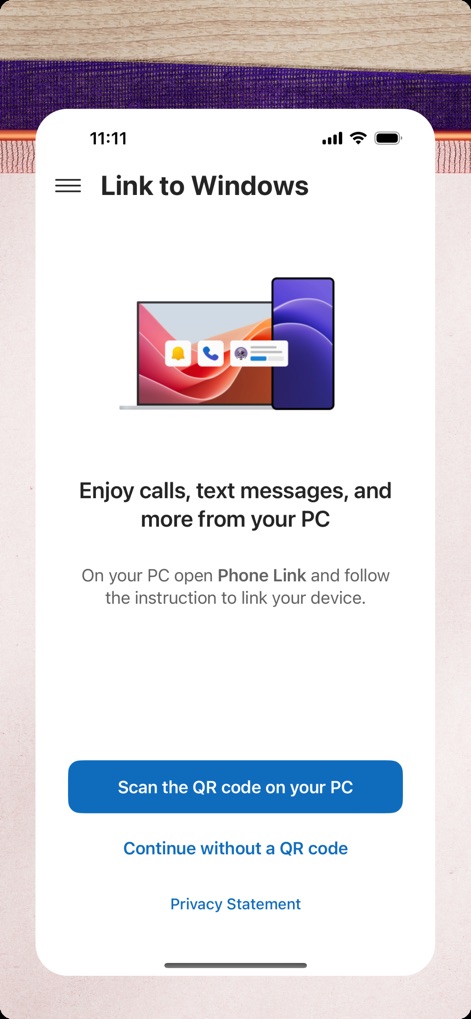
PC와 아이폰 연결
사용자는 'Link to Windows' 앱 시작 화면에서 PC와의 간편한 연결 방법을 안내받을 수 있으며, PC에서 QR 코드를 스캔하는 버튼을 통해 즉시 페어링을 시작할 수 있습니다.
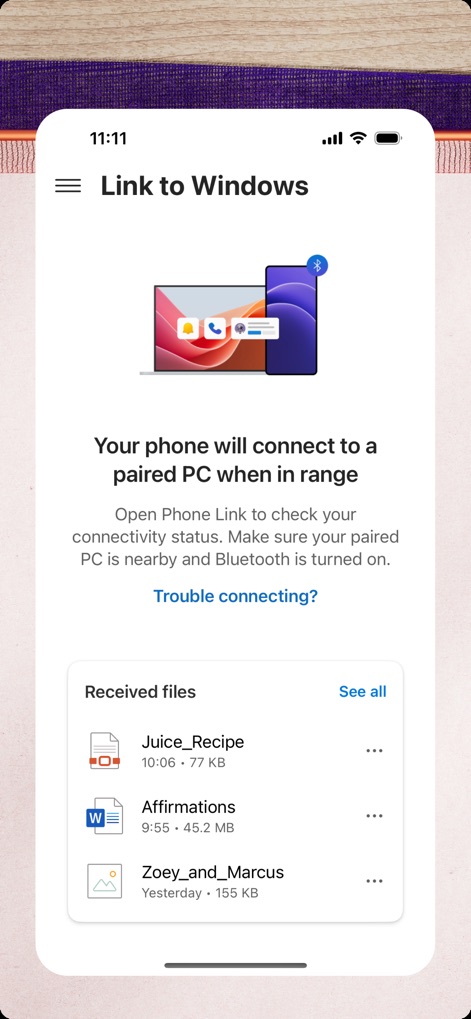
연결 및 파일 확인
이 도구는 연결 상태를 나타내는 블루투스 아이콘을 통해 장치 간의 원활한 연결을 시각적으로 보여주며, 'Received files' 목록에서 PC로 전송받은 파일들을 쉽게 찾아볼 수 있습니다.
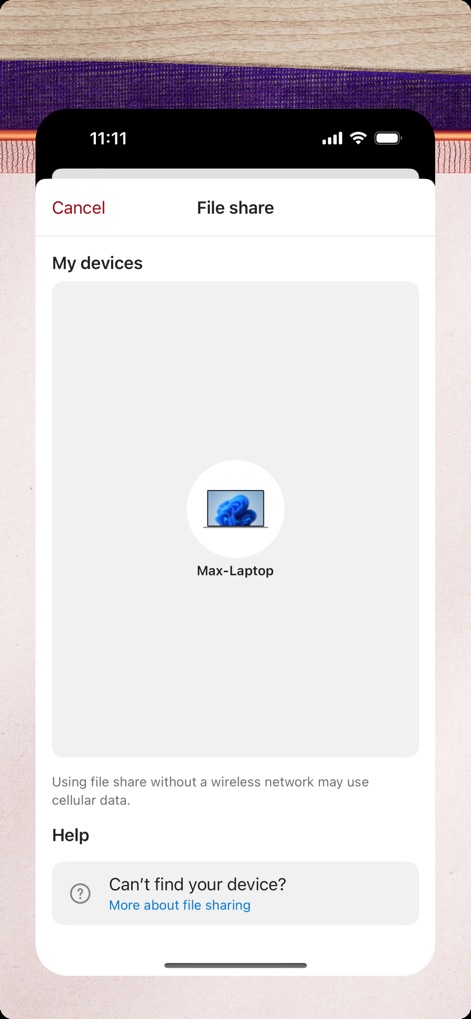
간편한 파일 전송
'File share' 인터페이스는 사용자가 연결된 'Max-Laptop' 장치 아이콘을 선택하여 파일을 전송하도록 돕고, 무선 네트워크 없이 공유 시 발생할 수 있는 데이터 사용량에 대한 안내를 제공합니다.
설명
Download




이 페이지는 앱이나 개발자의 공식 페이지가 아니며, 정보 제공 및 논평을 목적으로 작성된 독립 편집 간행물입니다. 명시적으로 달리 언급되지 않는 한, 해당 앱이나 개발자는 MWM, Apple, Google Play, 앱 퍼블리셔 또는 앱 개발자와 제휴, 보증, 후원, 승인 또는 공식적으로 연결되어 있지 않으며, 이 페이지의 어떤 내용도 해당 앱이 MWM의 서비스를 사용하여 개발되었음을 의미하지 않습니다. 모든 상표, 로고, 스크린샷 및 기타 콘텐츠는 해당 소유자의 자산입니다.