
이 페이지는 앱이나 개발자의 공식 페이지가 아니며, 정보 제공 및 논평을 목적으로 작성된 독립 편집 간행물입니다. 명시적으로 달리 언급되지 않는 한, 해당 앱이나 개발자는 MWM, Apple, Google Play, 앱 퍼블리셔 또는 앱 개발자와 제휴, 보증, 후원, 승인 또는 공식적으로 연결되어 있지 않으며, 이 페이지의 어떤 내용도 해당 앱이 MWM의 서비스를 사용하여 개발되었음을 의미하지 않습니다. 모든 상표, 로고, 스크린샷 및 기타 콘텐츠는 해당 소유자의 자산입니다.


instax mini Link
이 앱은 당신의 디지털 이미지를 만질 수 있는 무언가로 변환시키는 도구입니다. 화면 속 순간들을 현실 세계로 끄집어내는 능력을 부여합니다.
다운로드
2.5M+사용자 평점
총 평가 수
98.7K개발사
카테고리
Photo & Video지원 언어
10최신 버전
7.0.2크기
937.5 MB출시일
2019년 9월 29일이 분석은 instax mini Link 앱이 제공하는 핵심 기능들을 심층적으로 탐구하여, 사용자들이 디지털 이미지를 물리적 추억으로 전환하는 방식을 어떻게 혁신하는지 평가합니다.
instax mini Link 앱 분석: 창의적인 순간을 위한 다기능 인쇄 도구
instaxAiR™
이 앱은 기능 버튼을 누른 채 프린터로 공중에 그림을 그리며 사용자의 창의력을 표현할 수 있게 해줍니다.
프레임 인쇄 / 콜라주 인쇄
이 도구는 이미지에 재미있고 창의적인 프레임을 추가하거나 여러 사진을 하나의 instax™ 사진으로 조합하여 콜라주를 만들 수 있는 기능을 제공합니다.
instax AiR Studio™
이 앱은 증강 현실(AR) 콘텐츠로 공간을 장식하고, 장식된 AR 콘텐츠와 함께 사진을 찍을 수 있도록 지원합니다.
간편 인쇄
이 앱은 스마트폰 이미지를 간편하게 출력할 수 있으며, 동영상에서도 출력 기능을 제공합니다.
클릭 투 콜라주
사용자는 3초 간격으로 6장의 이미지를 연속 촬영하여 포토부스 경험을 즐길 수 있습니다.
콘텐츠 인쇄 모드
이 앱은 Pinterest® 앱이나 스마트폰 사진 앱에 저장된 이미지를 직접 가져와서 출력 전 시뮬레이션하고 인쇄할 수 있도록 해줍니다.
매치 테스트
사용자는 궁합 테스트 기능을 통해 완벽한 짝을 찾으며 재미있는 경험을 할 수 있습니다.
instax 카메라™
이 도구는 프린터의 전원 버튼을 셔터로 사용하여 스마트폰으로 원격 촬영을 가능하게 합니다.
자주 묻는 질문
에 대해 알아야 할 모든 것 instax mini Link
What is the instax mini Link app?
The instax mini Link app connects to FUJIFILM instax mini Link™ series printers via Bluetooth, enabling smartphone image and video printing and creative features.
Which instax mini Link printers are compatible with the instax mini Link app?
The instax mini Link app is compatible with the FUJIFILM instax mini Link™ printer series, including Link, Link 2, Link 3, and Link+.
How do I print photos using the instax mini Link app?
Yes, the instax mini Link app's Simple Print feature allows users to easily print images and videos directly from their smartphone via Bluetooth connection to the printer.
Can I add frames to my photos with the instax mini Link app?
Yes, the instax mini Link app includes a Frame Print feature that allows users to add fun, creative frames to their images before printing.
Does the instax mini Link app offer a collage printing option?
Yes, the instax mini Link app features Collage Print, which combines multiple photos into a single instax™ print for a stylish look.
How can I take photos remotely using the instax mini Link app?
The instax mini Link app features an instax Camera™ mode, enabling users to take photos with their smartphone remotely by using the printer's power button as a shutter release.
What is instax AiR Studio in the instax mini Link app?
instax AiR Studio allows users to decorate their space with AR content and capture photos with these decorated AR effects. It provides built-in 3D AR effects to create unique images.
How does the Click to Collage feature work in the instax mini Link app?
The Click to Collage feature creates a photobooth experience by taking a series of six images at three-second intervals, automatically combining them into an instant collage.
Does the instax mini Link app have a "Match Test" feature?
Yes, the instax mini Link app includes a "Match Test" feature designed to help users find their perfect match.
Can I print images from Pinterest with the instax mini Link app?
Yes, the instax mini Link app's Content Printing Mode allows users to import images and content saved in the Pinterest® app or their smartphone's photo app for printing.
What is the instaxAiR™ feature for the instax mini Link 2 printer?
The instaxAiR™ feature, exclusive to the instax mini Link 2™, allows users to draw in the air with the printer by pressing and holding its feature button, showcasing creativity.
What operating systems does the instax mini Link app support?
The instax mini Link app supports iOS 17.0 or later.
Can I preview prints before printing with the instax mini Link app?
Yes, the instax mini Link app allows users to simulate image content within various display options before printing, such as a photo in a frame or on a wall.
Does the instax mini Link app support different appearance modes?
Yes, the instax mini Link app allows users to switch appearance modes, including Dark Mode and Light Mode, to match the stock image. This applies to Link, Link 2, Link 3, and Link+ models.
What is "Design Print" in the instax mini Link app?
Design Print is an exclusive feature for the instax mini Link+™ printer within the instax mini Link app, engineered for text-rich layouts and intricate illustrative artwork, such as magazines or posters.
다음 스크린샷과 설명은 앱의 공식 스토어 목록에서 직접 가져온 것이며 앱 개발자의 자산입니다.
앱 스토어
스크린샷
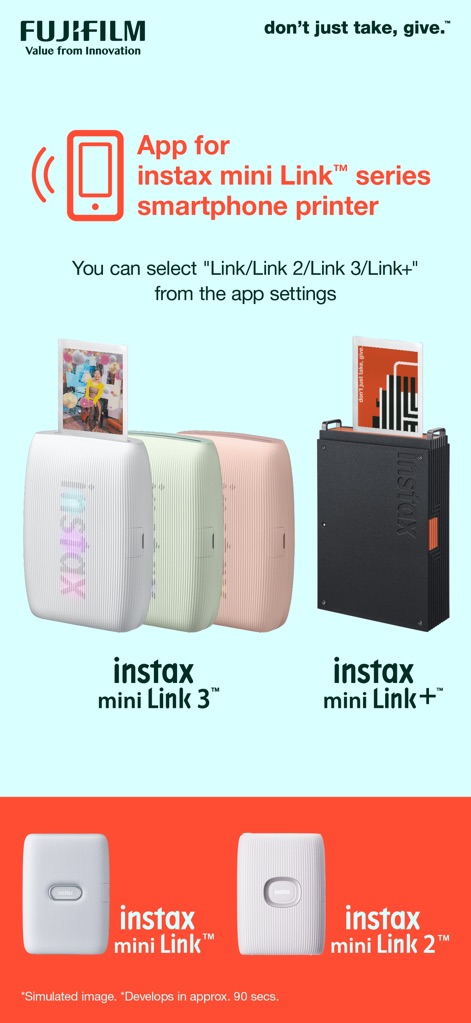
이 앱은 다양한 instax mini Link™ 프린터 모델을 지원하며, 스크린샷은 'instax mini Link 3™'와 'instax mini Link+™' 프린터의 모습을 보여줍니다.
프린터 모델 연결

instax AiR Studio™는 사용자의 사진에 증강현실(AR) 효과를 더해주며, 화면 속 모델 주변에 떠다니는 풍선과 다양한 AR 장식들이 연출된 모습을 확인할 수 있습니다.
증강현실 스튜디오

이 앱은 instax AiR Studio™ 사용을 위한 세 단계 지침을 제공하며, '배경', '장식', '효과'와 같은 옵션을 통해 맞춤형 AR 이미지를 생성하고 인쇄된 결과물을 확인할 수 있습니다.
AR 스튜디오 활용법

'Click to Collage' 모드는 사용자가 3초 간격으로 연속 촬영한 여러 이미지를 하나의 콜라주로 결합할 수 있도록 지원하며, 화면에서는 다양한 표정의 연속 촬영 이미지와 완성된 콜라주 인쇄본을 확인할 수 있습니다.
순간 포착 콜라주

이 앱은 'Simple Print' 기능으로 블루투스를 통해 스마트폰 이미지를 간편하게 인쇄할 수 있게 하며, 'Frame Print'를 활용하여 하트 무늬 프레임과 반짝이는 효과 같은 다채로운 디자인을 사진에 추가할 수 있습니다.
간편한 인쇄 옵션

'Collage Print' 기능은 사용자가 여러 장의 사진을 결합하여 스타일리시한 인쇄물을 만들 수 있도록 지원하며, 'instax™ Camera'는 프린터를 기울여 줌을 조절하고 전원 버튼을 셔터로 활용하는 방식을 보여줍니다.
콜라주 및 카메라

이 앱은 'Appearance Mode'로 사용자가 다크 모드와 라이트 모드 간에 인터페이스를 전환할 수 있도록 하며, 'Collect' 기능은 Pinterest® 또는 스마트폰 갤러리에서 이미지를 앱으로 대량 가져오는 과정을 보여줍니다.
맞춤형 앱 설정

이 앱의 'Simulate' 기능은 사용자가 인쇄 전 이미지가 액자나 벽면에 어떻게 보일지 미리 확인할 수 있도록 하며, 'Selectable print modes'에서는 섬세한 'Design Print'와 일상적인 'Simple Print'를 선택하여 사용할 수 있습니다.
미리보기 및 인쇄
설명
Download
비슷한 앱
유사한 기능과 사용자 경험을 가진 앱

instax mini Evo
FUJIFILM Corporation

Canon Mini Print
Canon U.S.A., Inc.

Polaroid
Polaroid International B.V.

SELPHY Photo Layout
Canon Inc.

KODAK Photo Printer
Prinics Co., Ltd

Phomemo
PHOMEMO PTE. LTD.

Epson Creative Print
Seiko Epson Corporation

HP Sprocket
C&A Marketing Inc.
NokoPrint - Mobile Printing
NokoPrint LLC
이 페이지는 앱이나 개발자의 공식 페이지가 아니며, 정보 제공 및 논평을 목적으로 작성된 독립 편집 간행물입니다. 명시적으로 달리 언급되지 않는 한, 해당 앱이나 개발자는 MWM, Apple, Google Play, 앱 퍼블리셔 또는 앱 개발자와 제휴, 보증, 후원, 승인 또는 공식적으로 연결되어 있지 않으며, 이 페이지의 어떤 내용도 해당 앱이 MWM의 서비스를 사용하여 개발되었음을 의미하지 않습니다. 모든 상표, 로고, 스크린샷 및 기타 콘텐츠는 해당 소유자의 자산입니다.