
이 페이지는 앱이나 개발자의 공식 페이지가 아니며, 정보 제공 및 논평을 목적으로 작성된 독립 편집 간행물입니다. 명시적으로 달리 언급되지 않는 한, 해당 앱이나 개발자는 MWM, Apple, Google Play, 앱 퍼블리셔 또는 앱 개발자와 제휴, 보증, 후원, 승인 또는 공식적으로 연결되어 있지 않으며, 이 페이지의 어떤 내용도 해당 앱이 MWM의 서비스를 사용하여 개발되었음을 의미하지 않습니다. 모든 상표, 로고, 스크린샷 및 기타 콘텐츠는 해당 소유자의 자산입니다.


다운로드
750k+사용자 평점
총 평가 수
12.2K개발사
카테고리
Photo & Video지원 언어
21최신 버전
3.5.1크기
682.3 MB출시일
2024년 3월 5일Luminar는 인공지능 기반의 직관적인 편집 환경을 통해 애플 기기 사용자에게 최적화된 사진 보정 경험을 제공합니다.
Luminar: 이미지 에디터 및 향상 도구 분석
강력한 AI 기반 스마트 보정 도구
사용자가 복잡한 수작업 없이도 인공지능의 힘을 빌려 사진의 하늘, 인물, 구조, 조명 등을 손쉽게 최적화하고 전문가 수준의 결과물을 얻을 수 있도록 돕습니다.
애플 기기와의 완벽한 통합
이 도구는 아이폰, 아이패드, Vision Pro 등 애플 기기에 최적화되어 있으며, Apple Pencil 지원을 통해 정밀한 편집이 가능하고, 사용자에게 일관되고 효율적인 워크플로우를 제공합니다.
직관적인 터치 기반 사용자 인터페이스
이 앱은 부드러운 슬라이더와 회전 다이얼 등 직관적인 제스처와 터치 반응형 인터페이스를 제공하여 사용자가 쉽고 빠르게 편집 작업을 수행하고 창의력을 발휘할 수 있도록 지원합니다.
RAW 파일 지원 및 고급 수동 조정
이 앱은 RAW 파일 편집을 지원하며, 커브, 디테일 조정과 같은 정밀한 수동 제어 기능을 제공하여 사용자가 이미지 품질을 최대한 유지하고 자신만의 예술적 비전을 실현할 수 있도록 합니다.
방해 요소 제거 및 배경 블러
이 앱은 이미지에서 원치 않는 요소를 손쉽게 제거하고, 배경을 예술적으로 블러 처리하여 피사체에 집중도를 높이는 기능을 제공하여 사진의 완성도를 향상시킵니다.
다양한 스타일 필터 및 흑백 변환
사용자는 다양한 사진 필터 컬렉션을 통해 독특한 스타일을 적용하거나, 컬러 사진을 깊이 있는 흑백 작품으로 변환하여 이미지에 특별한 분위기와 감성을 더할 수 있습니다.
자주 묻는 질문
에 대해 알아야 할 모든 것 Luminar: Image Editor&Enhancer
What is Luminar Mobile AI Photo Editor?
Luminar Mobile is an all-in-one, on-the-go photo editor and creative companion for iPhone, iPad, and Vision Pro. It offers powerful AI-driven tools and an interactive interface for an engaging photo editing experience.
Which devices are compatible with Luminar Mobile AI Photo Editor?
Luminar Mobile is compatible with iPhone, iPad, and Vision Pro. It is optimized for devices running iOS/iPadOS 17 and newer. On iPad 6-gen, certain advanced features are unavailable.
Does Luminar Mobile AI Photo Editor offer AI photo enhancements?
Yes, Luminar Mobile features several AI enhancements, including SkyAI, EnhanceAI, StructureAI, RelightAI, SkinAI, and BodyAI. These tools provide smart, cutting-edge photo editing capabilities.
How does SkyAI work in Luminar Mobile AI Photo Editor?
SkyAI seamlessly replaces dull skies with brilliant ones, creating impressive backdrops. Users can select new skies from available options within the app.
Can I remove unwanted objects with Luminar Mobile AI Photo Editor?
Yes, Luminar Mobile includes an "Erase" tool. This feature allows users to effortlessly remove distracting elements from photos, placing focus on the main subjects.
What subscription options are available for Luminar Mobile AI Photo Editor?
Luminar Mobile offers a 1-week subscription, a 12-month subscription with a 7-day free trial, and a lifetime license. Subscriptions auto-renew unless canceled.
Is there a free trial for Luminar Mobile AI Photo Editor?
Yes, Luminar Mobile offers a 7-day free trial, which is included specifically with the 12-month subscription plan. After the trial, users are charged the yearly subscription fee.
Can Luminar Mobile AI Photo Editor edit RAW photos?
Yes, Luminar Mobile supports RAW file editing. Users can edit RAW photos directly on their mobile device, preserving maximum image quality and flexibility in post-processing.
Does Luminar Mobile AI Photo Editor have a feature to reshape body parts?
Yes, Luminar Mobile includes BodyAI. This AI tool allows users to realistically shape a subject’s midsection by either adding or removing volume for desired results.
How does EnhanceAI work in Luminar Mobile AI Photo Editor?
EnhanceAI improves photo quality with a single slide, adjusting color, tone, and clarity for professional results in seconds. It allows simultaneous adjustment of up to a dozen controls.
Can I get professional photo effects with Luminar Mobile AI Photo Editor?
Yes, Luminar Mobile provides "Photo Filters" and "Presets." These features offer a diverse collection of effects and allow users to achieve pro-level edits in a single tap.
What iOS version does Luminar Mobile AI Photo Editor require?
Luminar Mobile is optimized for devices running iOS/iPadOS 17 and newer. It requires this operating system version for full functionality.
Does Luminar Mobile AI Photo Editor work with Apple Pencil?
Yes, Luminar Mobile integrates seamlessly with Apple devices. On the iPad, users can add personal touches using the Apple Pencil for sharper details and convenient edits.
How can I manage my Luminar Mobile AI Photo Editor subscription?
You can manage your Luminar Mobile subscription and turn off auto-renewal by accessing your Account Settings after purchase. This allows control over billing preferences.
Does Luminar Mobile AI Photo Editor have a privacy policy?
Yes, Luminar Mobile has a privacy policy. It is available for review at https://skylum.com/legal, providing details on data handling and user privacy.
다음 스크린샷과 설명은 앱의 공식 스토어 목록에서 직접 가져온 것이며 앱 개발자의 자산입니다.
앱 스토어
스크린샷

이 도구는 Before/After 비교를 통해 이미지 변화를 즉시 보여주며, 사용자는 슬라이더로 자동 색상 및 톤 조정을 할 수 있습니다.
스마트 자동 보정

이 기능은 인물 사진의 빛 조절을 세밀하게 가능하게 하며, 흐린 배경의 개선을 통해 피사체를 돋보이게 합니다.
조명 완벽 제어

사용자는 하늘 교체 기능을 통해 평범한 하늘을 극적으로 바꾸고, 다양한 하늘 옵션 중에서 선택하여 분위기를 연출할 수 있습니다.
환상적인 하늘 연출

이 앱은 원치 않는 객체 제거를 손쉽게 처리하며, 간편한 브러시 선택으로 제거할 영역을 정확하게 지정할 수 있습니다.
불필요한 요소 제거
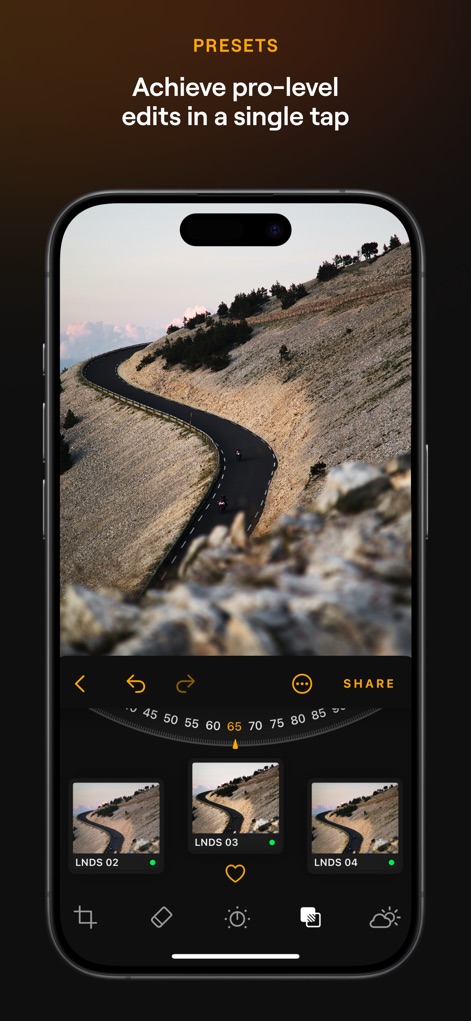
이 기능은 전문가급 사전 설정을 한 번의 탭으로 적용하며, 슬라이더 강도 조절을 통해 효과의 강도를 미세하게 조절할 수 있습니다.
전문가 필터 적용

이 AI는 피부 결점 자동 보정을 제공하여 깨끗한 피부를 연출하고, 매끄러운 피부 표현으로 인물 사진의 완성도를 높입니다.
완벽한 피부 보정
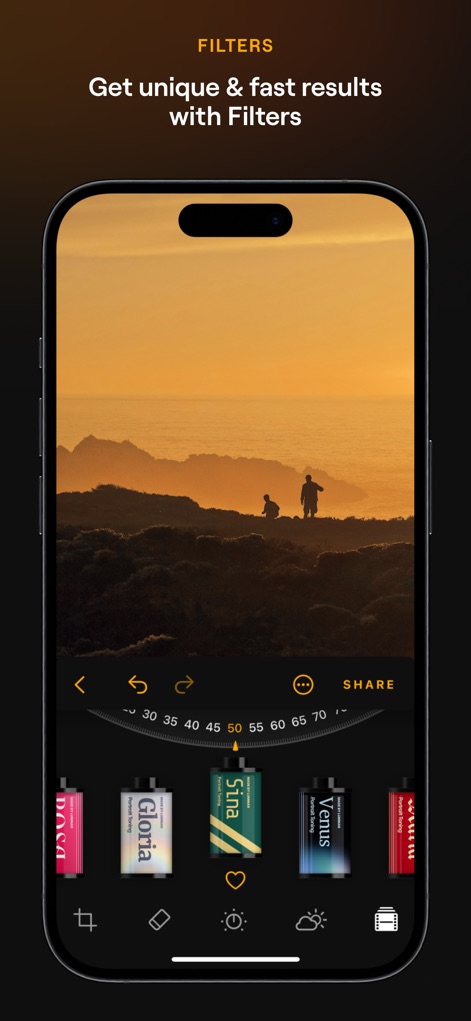
사용자는 다양한 필터 컬렉션을 탐색하여 독특한 스타일을 더하고, 감성적인 색감 표현으로 사진에 깊이를 부여할 수 있습니다.
개성 있는 필터
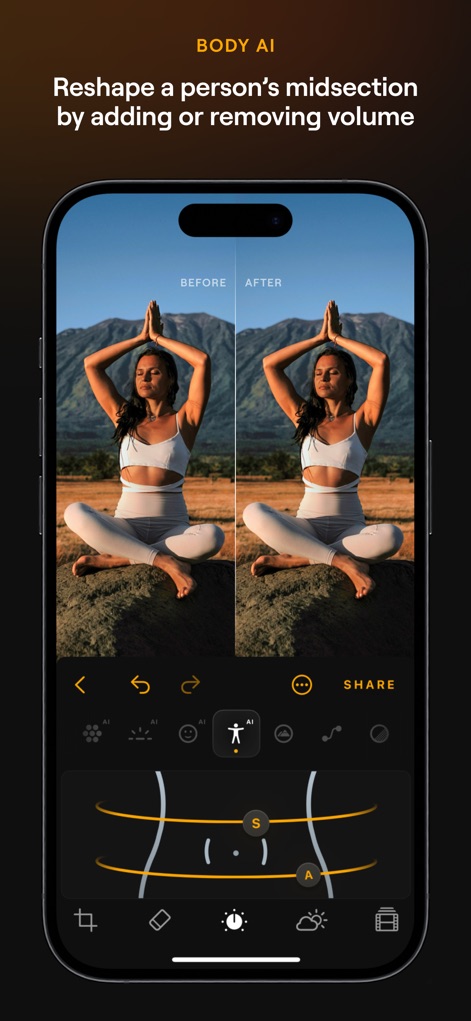
이 도구는 신체 비율 자연스러운 보정을 지원하여 조화로운 실루엣을 만들며, 볼륨 추가 및 제거를 통해 원하는 체형을 구현합니다.
자연스러운 체형 보정

이 기능은 이미지 디테일 강화를 통해 숨겨진 요소를 부각시키고, 대비 및 질감 개선으로 사진의 입체감을 더합니다.
구조 강화 및 선명도
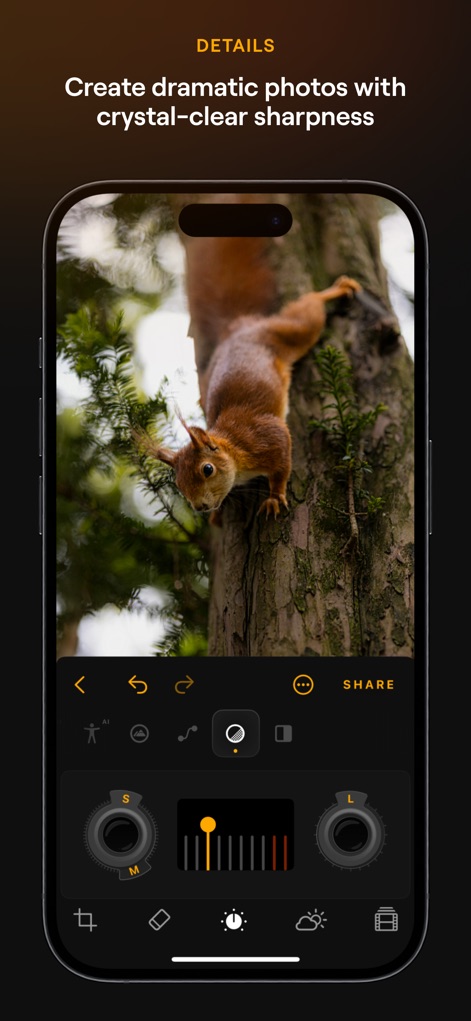
사용자는 선명도 미세 조정을 통해 이미지의 모든 세부를 또렷하게 만들고, 섬세한 디테일 강조로 사진의 생동감을 높일 수 있습니다.
디테일 선명하게
설명
Download
비슷한 앱
유사한 기능과 사용자 경험을 가진 앱

EPIK - AI Photo & Video Editor
SNOW Corporation

Citrus: AI 1 Tap Perfect Photo
Wemagine.ai LLP

SnapEdit: Photo Editor AI
SilverAI Joint Stock Company

Background Eraser 〜 Stickers
handyCloset Inc.

PhotoScan by Google Photos
Google LLC

Magic Eraser - Remove Object
Creatix Technology Global Limited

Magic Eraser Background Editor
Honk Honk Punch Pty Ltd

ProKnockOut-Cut Paste Photos
Shenzhen Qianhai Happy Tour Network Technology Co., Ltd.

Background Eraser - Remove BG*
SHANTANU PTE. LTD.
이 페이지는 앱이나 개발자의 공식 페이지가 아니며, 정보 제공 및 논평을 목적으로 작성된 독립 편집 간행물입니다. 명시적으로 달리 언급되지 않는 한, 해당 앱이나 개발자는 MWM, Apple, Google Play, 앱 퍼블리셔 또는 앱 개발자와 제휴, 보증, 후원, 승인 또는 공식적으로 연결되어 있지 않으며, 이 페이지의 어떤 내용도 해당 앱이 MWM의 서비스를 사용하여 개발되었음을 의미하지 않습니다. 모든 상표, 로고, 스크린샷 및 기타 콘텐츠는 해당 소유자의 자산입니다.