이 페이지는 앱이나 개발자의 공식 페이지가 아니며, 정보 제공 및 논평을 목적으로 작성된 독립 편집 간행물입니다. 명시적으로 달리 언급되지 않는 한, 해당 앱이나 개발자는 MWM, Apple, Google Play, 앱 퍼블리셔 또는 앱 개발자와 제휴, 보증, 후원, 승인 또는 공식적으로 연결되어 있지 않으며, 이 페이지의 어떤 내용도 해당 앱이 MWM의 서비스를 사용하여 개발되었음을 의미하지 않습니다. 모든 상표, 로고, 스크린샷 및 기타 콘텐츠는 해당 소유자의 자산입니다.
Measure Map Pro
엔지니어, 계약자 및 토지 소유자를 위한 궁극의 매핑 유틸리티입니다. 지구 곡률 정확도로 복잡한 둘레 및 면적을 계산하고 AutoCAD, KML 및 GIS 형식으로 즉시 내보냅니다.
주요 수치
다운로드
99K+
사용자 평점
4.4/5
총 평가 수
2K+
개발사
Blue Blink One, SL
카테고리
Utilities
지원 언어
10
최신 버전
13.10.5
크기
239.0 MB
출시일
2011년 6월 22일
기능
손안의 전문가 수준 매핑
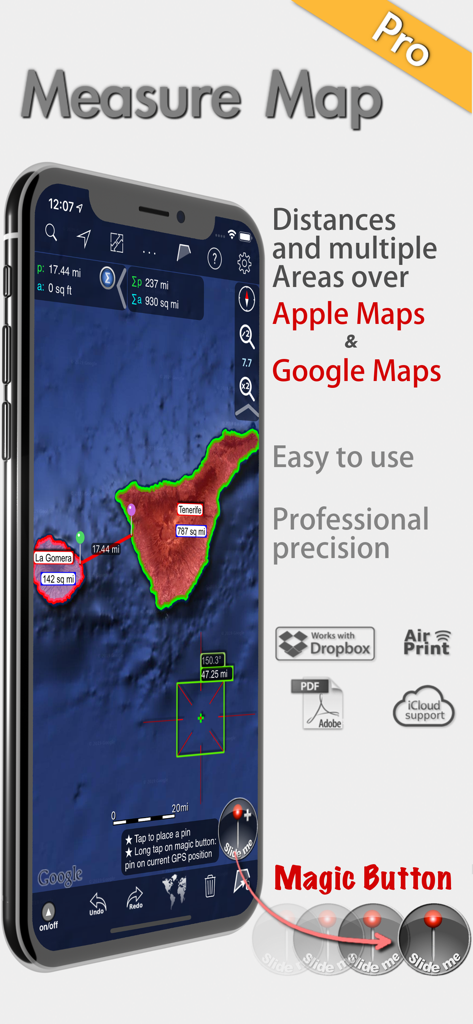
고해상도 위성 기술로 줄자를 교체하세요. 모바일 장치에서 직접 정확한 면적, 둘레 및 거리를 계산하여 현장 방문 시간을 절약하세요.
레이저처럼 정확한 측정
작은 건물 발자국부터 수천 에이커에 달하는 거대한 목장까지, 미터 이하의 정확도로 지구 곡률을 고려하여 측정합니다.
업계 표준 내보내기
DXF(AutoCAD), SHP(Shapefiles), KML 또는 CSV로 데이터를 즉시 내보내어 현장 측정을 전문 CAD 또는 GIS 워크플로우에 원활하게 통합합니다.
다음 스크린샷과 설명은 앱의 공식 스토어 목록에서 직접 가져온 것이며 앱 개발자의 자산입니다.
앱 스토어
스크린샷
Measure Map Pro 앱이 위성 지도에서 전문가 수준의 면적 및 거리 측정을 보여주는 모습
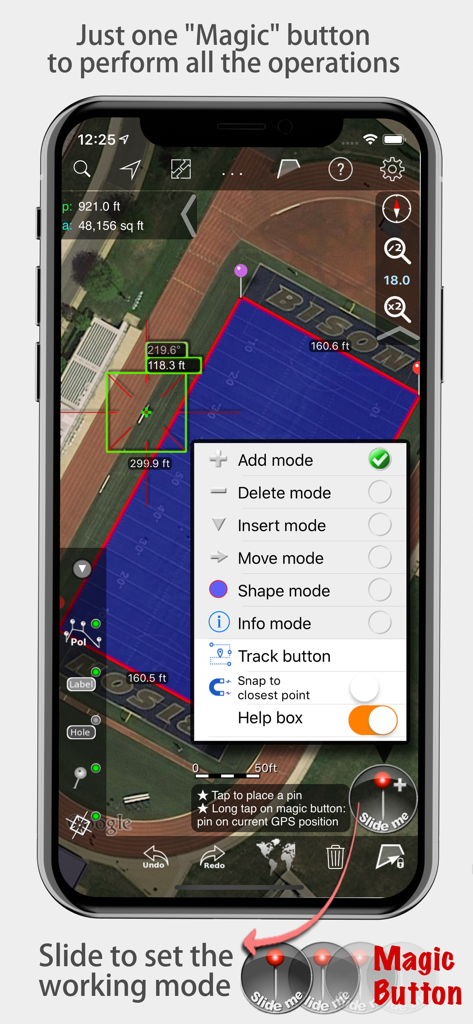
Measure Map Pro 앱이 마법 버튼 메뉴가 열린 상태로 위성 지도에서 면적 및 거리 측정값을 표시하는 모습
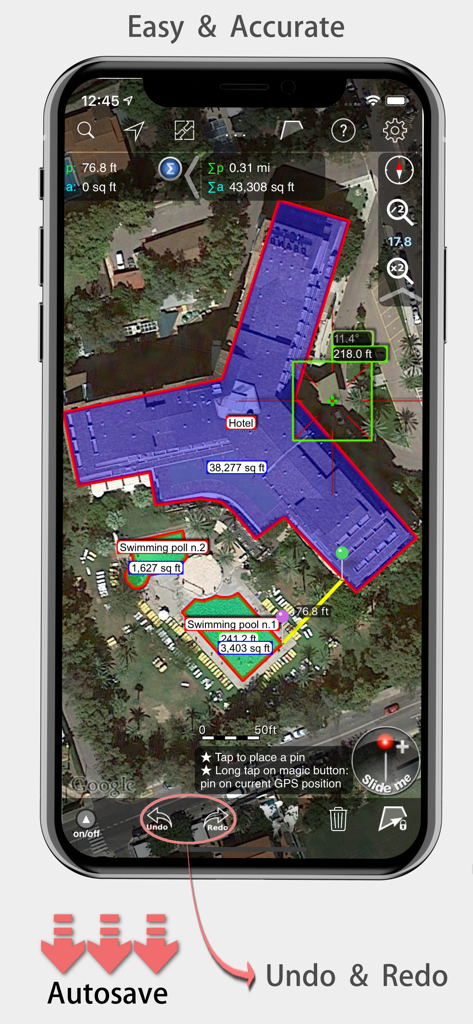
Measure Map Pro 모바일 앱이 위성 지도에서 호텔 건물의 정확한 면적 및 거리 측정값을 표시하는 모습
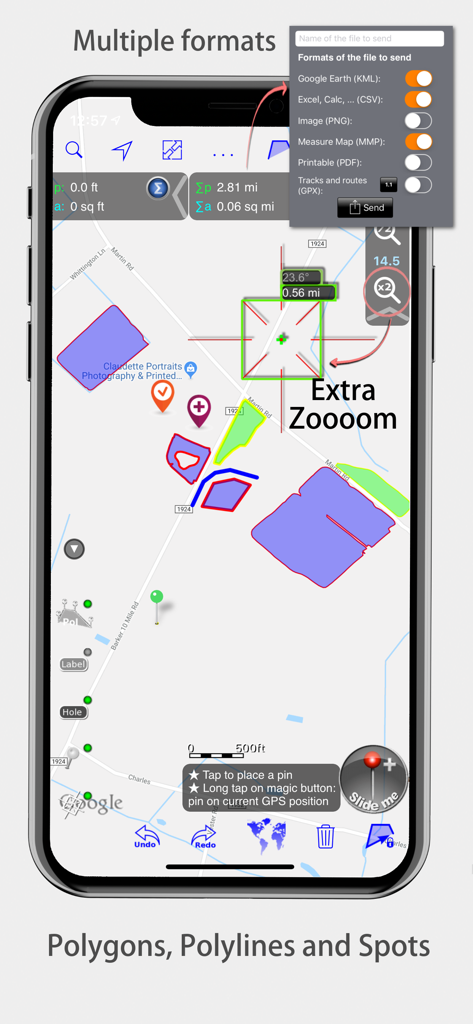
Measure Map Pro 인터페이스에 지도 다각형 및 내보내기 형식이 표시됨
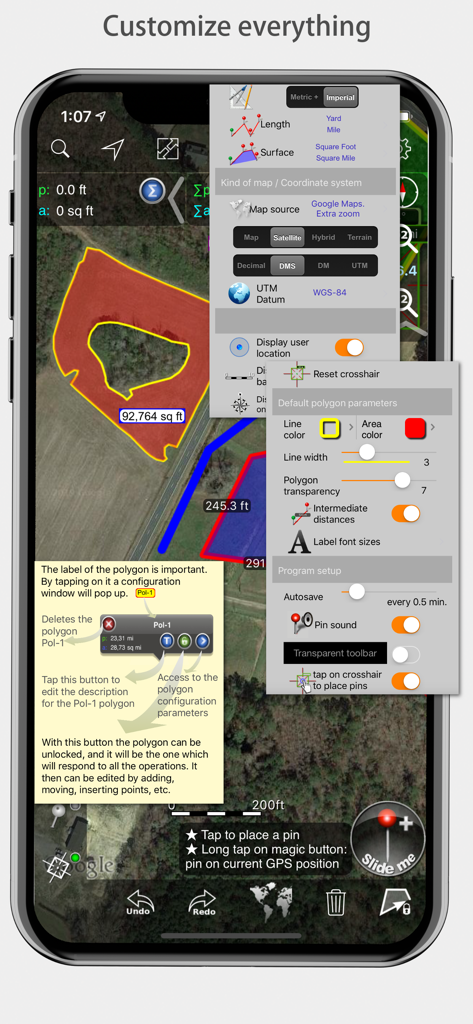
Measure Map Pro 모바일 앱 인터페이스에 측정 및 지도 스타일에 대한 다양한 사용자 정의 메뉴가 표시됨
설명
Measure Map Pro lets you quickly and easily measure multiple distances, perimeters and areas with laser sharp precision!. Use it for small areas or large, then share with coworkers. Click “...More” to learn why you should download this App today!
Calculate surface areas, buildings, plots, floors, forest areas or dimensions for fencing, sports tours, trips or anything you need for field work without having to go to the spot to take measurements. Only one finger to calculate with astonishing accuracy all these measurements over satellite images.
That’s what Measure Map Pro is for, to put a powerful, portable measuring tool right in the palm of your hand. Your iPhone, iPod touch or iPad can now provide you with totally precise measurements of any distance, from as small as one tenth of a meter to as big as thousands of kilometers or miles, even taking the curvature of the earth’s surface into account when measuring. It does all that, fast and effortlessly.
Just one "magic" button for all the operations to easily place points without loosing it's professional accuracy.
Some impressive features you get in Measure Map Pro (some of them via in-app purchase):
* Autosave
* Attractive, smooth, easy navigation and use
* For iPhone and iPad
* Apple or G00GLE Maps with extra zoom level.
* Displays Maps View: Map, Satellite, Hybrid and Terrain.
* Undo and redo operations as needed
* AirPrint and iCloud support
* More maps with extra zoom level through in-app purchase: Bing, Here, and ArcGIS. And Open Street, Open Cycle, World Street and more in the future
* Operations: Add, delete intermediate pins, insert between pins, move pins, get info.
* Circles and rectangles
* Multiple areas and routes on screen
* Display of altitude above sea level, azimuth and angle
* Calculates azimuth or bearing
* Search for current location, text (villages, places of interest, etc.)
* Length units: meters, kilometers, feet, yards, miles, nautical miles, ken, ri, bù, lǐ
* Surface units: square meters and kilometers, ares, hectares, square foot, square yards, square miles, acres, fanegas (Valencian, Castilian or Colombian), tsubo, bu, so, lí, mǔ
* Intermediate distances between pins can be displayed
* Attach pictures to points
* Ability to select color and thickness of the perimeter line.
* Ability to select the color and transparency of the selected area.
* Working format: Measure Map, KMZ, KML (G00GLE Earth), CSV (Excel), Autocad (DXF), Shape (SHP), GPX, Image (PNG) and PDF
* Export and import of surfaces and routes via e-mail, iTunes, AirDrop and Dropbox.
* Save to photo album
* Download surfaces and routes from the Internet.
* Calculates multiple areas and routes simultaneously
* Ability to create inner polygons as "holes".
* Drawing of shapes: circle and rectangle.
* More maps with extra zoom level through in-app purchase
* Calculates azimuth or bearing
* Attach pictures to points
* Displays altitude above sea level, azimuth and angle.
* Imports KML, KMZ and GPX format files besides exporting them.
* Track mode: drops pins on current GPS position at regular intervals.
(Continued use of GPS running in the background can dramatically decrease battery life)
* Coordinate system DM
* Apple Pencil drawing mode (with iPad Pro)
* Image layers
If precise measurements are important to you, this is the app you need. You won’t find one that is better, more accurate and easier to use.
이 페이지는 앱이나 개발자의 공식 페이지가 아니며, 정보 제공 및 논평을 목적으로 작성된 독립 편집 간행물입니다. 명시적으로 달리 언급되지 않는 한, 해당 앱이나 개발자는 MWM, Apple, Google Play, 앱 퍼블리셔 또는 앱 개발자와 제휴, 보증, 후원, 승인 또는 공식적으로 연결되어 있지 않으며, 이 페이지의 어떤 내용도 해당 앱이 MWM의 서비스를 사용하여 개발되었음을 의미하지 않습니다. 모든 상표, 로고, 스크린샷 및 기타 콘텐츠는 해당 소유자의 자산입니다.