
이 페이지는 앱이나 개발자의 공식 페이지가 아니며, 정보 제공 및 논평을 목적으로 작성된 독립 편집 간행물입니다. 명시적으로 달리 언급되지 않는 한, 해당 앱이나 개발자는 MWM, Apple, Google Play, 앱 퍼블리셔 또는 앱 개발자와 제휴, 보증, 후원, 승인 또는 공식적으로 연결되어 있지 않으며, 이 페이지의 어떤 내용도 해당 앱이 MWM의 서비스를 사용하여 개발되었음을 의미하지 않습니다. 모든 상표, 로고, 스크린샷 및 기타 콘텐츠는 해당 소유자의 자산입니다.


MP3 Converter - Extract MP3
동영상을 고품질 오디오로 변환하고, 트렌디한 GIF를 만들고, 즉석에서 콘텐츠를 편집하세요. 차세대 크리에이터를 위해 설계된 빠르고 강력하며 모바일 우선적인 툴킷입니다.
다운로드
153K+사용자 평점
총 평가 수
0개발사
카테고리
Productivity지원 언어
20최신 버전
3.0.0크기
97.3 MB출시일
2024년 6월 20일하나의 앱, 무한한 창의적 가능성
앱 간 전환은 이제 그만. 모바일 우선 라이프스타일을 위해 제작된 강력한 툴킷으로 고품질 미디어를 편집, 변환 및 제작하세요.
전문가 수준의 오디오 추출
모든 동영상을 즉시 고품질 MP3 또는 WAV로 변환하세요. 트렌디한 사운드를 저장하고 맞춤 벨소리를 만드는 데 완벽합니다.
보편적 형식 변환
'지원되지 않는 파일' 오류는 이제 그만. 해상도 및 파일 크기 최적화와 함께 MP4, MOV, MKV 등을 변환하세요.
자주 묻는 질문
에 대해 알아야 할 모든 것 MP3 Converter - Extract MP3
MP3 Converter - Extract MP3 앱의 주요 기능은 무엇인가요?
MP3 Converter - Extract MP3 앱은 Universal Media Workshop이라고도 하며 포괄적인 멀티미디어 솔루션을 제공합니다. 비디오 및 오디오 변환, 비디오 편집, GIF 제작 기능을 제공합니다.
Universal Media Workshop은 어떤 비디오 형식을 변환할 수 있나요?
Universal Media Workshop은 MP4, AMV, AVI, MOV, TS, GIF, MPG, M4V, MKV, WMV, 3GP와 같은 형식의 비디오를 변환합니다. 해상도 및 비트 전송률 조정도 제공합니다.
MP3 Converter - Extract MP3 앱은 오디오를 MP3 형식으로 변환할 수 있나요?
네, Universal Media Workshop 앱은 오디오를 MP3, WAV, AAC 및 기타 형식으로 변환합니다. 사용자 정의 가능한 설정으로 최대 10가지 대상 오디오 형식을 지원합니다.
Universal Media Workshop은 비디오에서 GIF를 어떻게 생성하나요?
이 앱은 루핑, 되감기, 가변 속도 옵션으로 비디오 클립을 동적인 GIF 이미지로 변환합니다. 창의적인 GIF를 위해 사용자 정의 해상도, 프레임 속도 및 자르기를 허용합니다.
MP3 Converter - Extract MP3 앱에서 어떤 비디오 편집 도구를 사용할 수 있나요?
Universal Media Workshop은 편집, 분할, 자르기, 비디오 복제, 음소거 및 캡션 지정 도구를 제공합니다. 또한 전문적인 창작 경험을 위해 GIF 및 오디오 변환 기능을 통합합니다.
Universal Media Workshop 앱은 이전 변환 및 편집 기록을 유지하나요?
네, 이 앱은 처리된 모든 비디오 파일의 명확한 기록을 유지합니다. 사용자는 과거의 변환 및 편집 프로젝트를 쉽게 보고, 이름을 바꾸고, 공유하거나 다운로드할 수 있습니다.
Universal Media Workshop 앱으로 비디오 및 오디오 재생 속도를 조절할 수 있나요?
네, Universal Media Workshop 앱은 오디오 및 비디오 재생 속도 조절을 모두 지원합니다. 사용자는 0.1배속에서 10배속까지 속도를 정밀하게 제어할 수 있습니다.
MP3 Converter - Extract MP3 앱으로 비디오 및 오디오를 자르거나 트리밍할 수 있나요?
네, Universal Media Workshop 앱을 사용하면 비디오 및 오디오 파일을 자유롭게 자르고 트리밍할 수 있습니다. 이 기능은 원하는 세그먼트에 대한 정밀한 편집을 지원합니다.
다음 스크린샷과 설명은 앱의 공식 스토어 목록에서 직접 가져온 것이며 앱 개발자의 자산입니다.
앱 스토어
스크린샷
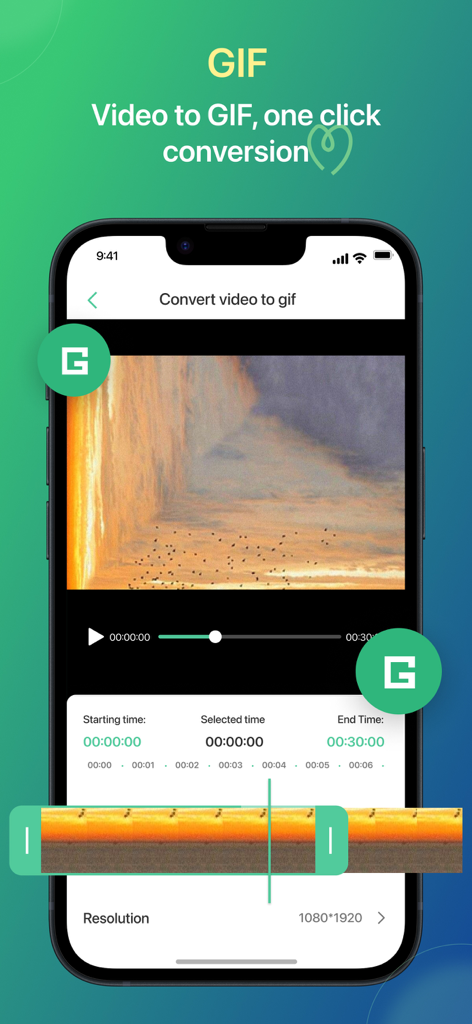
트리밍 및 해상도 설정이 있는 동영상을 GIF로 변환하는 모바일 앱 인터페이스
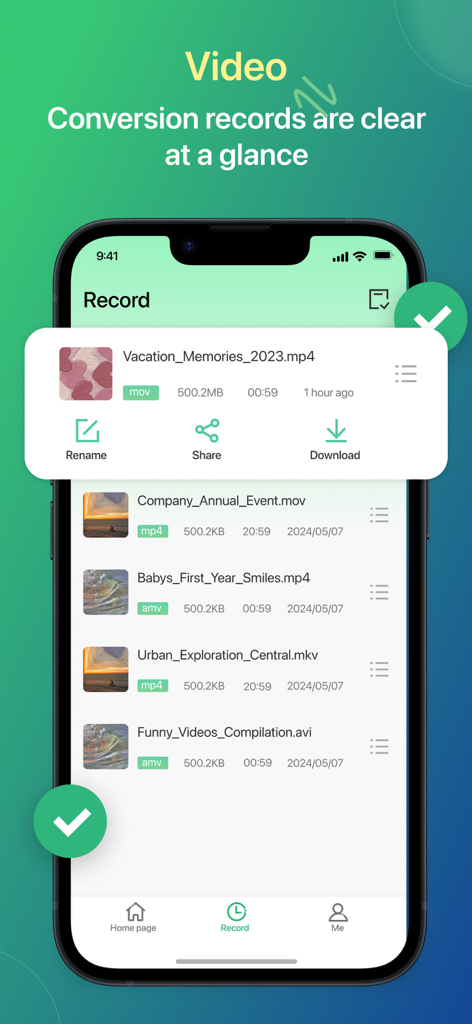
이름 변경, 공유 및 다운로드 옵션이 있는 변환된 동영상 파일 목록을 보여주는 모바일 앱 화면
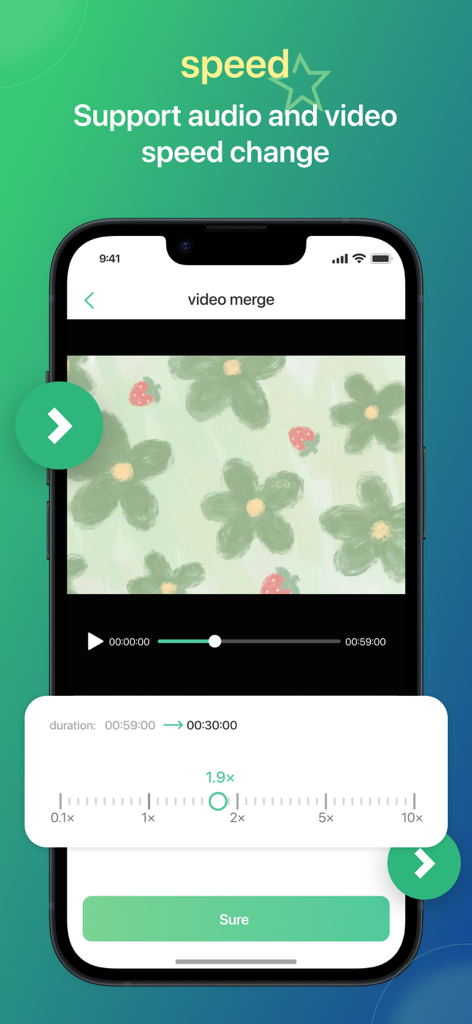
슬라이더가 1.9배속으로 설정된 동영상 속도 조절 도구를 보여주는 모바일 앱 화면
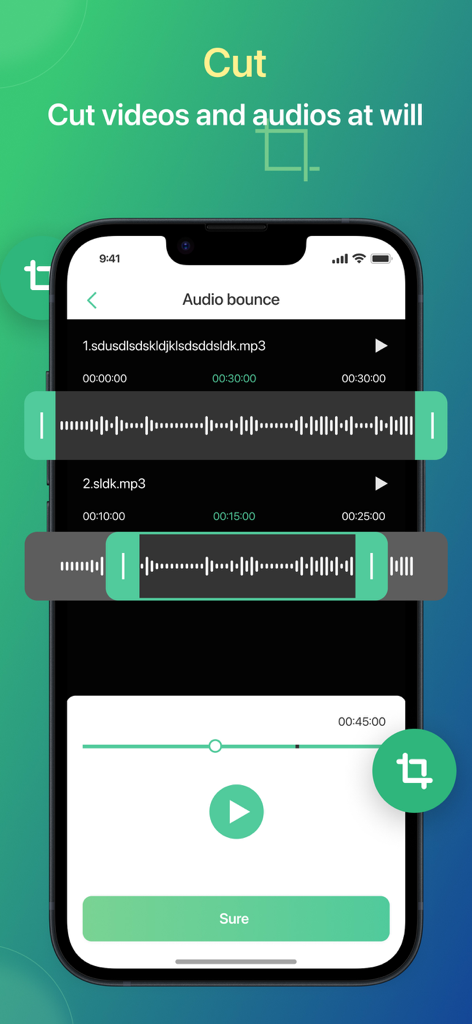
파형이 있는 오디오 파일 자르기 및 트리밍을 위한 모바일 앱 인터페이스
설명
Download
비슷한 앱
유사한 기능과 사용자 경험을 가진 앱

iConv - Video & PDF Converter
琛 王

Convert PDF to Word OCR
Tu Phan

PDF Converter – Photos to PDF
SMDA GROUP SP. Z OO

Toolbox by Paperclip
WuHan Paperclip Technology Co., Ltd.

Video Converter and Compressor
Inverse.AI

Video Converter & Compressor
WEBDIA INC.

全能格式转换王-视频音频转换图片文件格式处理
大为 方

PDF Converter: Convert to PDFㅤ
Roberto Hayes

The Document Converter
Float Tech, LLC
이 페이지는 앱이나 개발자의 공식 페이지가 아니며, 정보 제공 및 논평을 목적으로 작성된 독립 편집 간행물입니다. 명시적으로 달리 언급되지 않는 한, 해당 앱이나 개발자는 MWM, Apple, Google Play, 앱 퍼블리셔 또는 앱 개발자와 제휴, 보증, 후원, 승인 또는 공식적으로 연결되어 있지 않으며, 이 페이지의 어떤 내용도 해당 앱이 MWM의 서비스를 사용하여 개발되었음을 의미하지 않습니다. 모든 상표, 로고, 스크린샷 및 기타 콘텐츠는 해당 소유자의 자산입니다.