이 페이지는 앱이나 개발자의 공식 페이지가 아니며, 정보 제공 및 논평을 목적으로 작성된 독립 편집 간행물입니다. 명시적으로 달리 언급되지 않는 한, 해당 앱이나 개발자는 MWM, Apple, Google Play, 앱 퍼블리셔 또는 앱 개발자와 제휴, 보증, 후원, 승인 또는 공식적으로 연결되어 있지 않으며, 이 페이지의 어떤 내용도 해당 앱이 MWM의 서비스를 사용하여 개발되었음을 의미하지 않습니다. 모든 상표, 로고, 스크린샷 및 기타 콘텐츠는 해당 소유자의 자산입니다.
ProMovie Recorder +
노출, 초점 및 오디오에 대한 완벽한 수동 제어 기능을 활용하세요. 세계적인 크리에이터들이 신뢰하는 고비트레이트 도구로 최대 120FPS의 놀라운 4K 영상을 녹화하세요.
주요 수치
다운로드
410K+
사용자 평점
4.7/5
총 평가 수
11K+
개발사
Panda Apps Limited
카테고리
Photo & Video
지원 언어
5
최신 버전
1.11.10
크기
4.3 MB
출시일
2016년 12월 13일
기능
내 주머니 속의 시네마틱한 정밀함
iPhone의 전문적인 영상 촬영 기능을 활용하세요. ProMovie Recorder +는 모든 프레임, 픽셀, 사운드 파형을 완벽하게 제어할 수 있게 해주어, '스마트폰 느낌'에서 벗어나 진정한 창작의 자유를 선사합니다.
완벽한 수동 제어
노출, 셔터 속도, ISO, 초점 및 화이트 밸런스를 완벽하게 제어하세요. 설정을 고정하여 모든 컷에서 일관된 조명과 전문적인 구도를 보장합니다.
전문가급 오디오 제어
Bluetooth 또는 USB-C를 통해 외부 마이크를 연결하고, 화면 표시기와 게인 제어 기능을 통해 실시간으로 레벨을 모니터링하여 스튜디오 품질의 사운드를 구현하세요.
다음 스크린샷과 설명은 앱의 공식 스토어 목록에서 직접 가져온 것이며 앱 개발자의 자산입니다.
앱 스토어
스크린샷
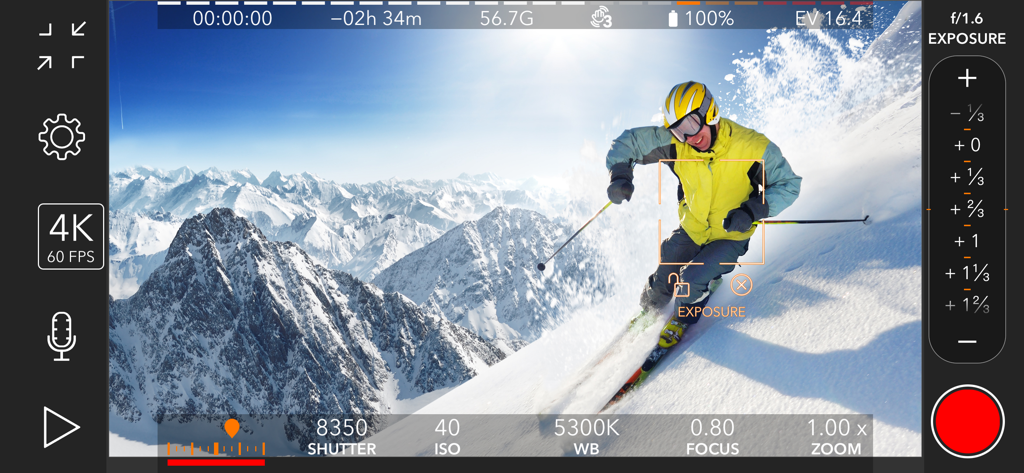
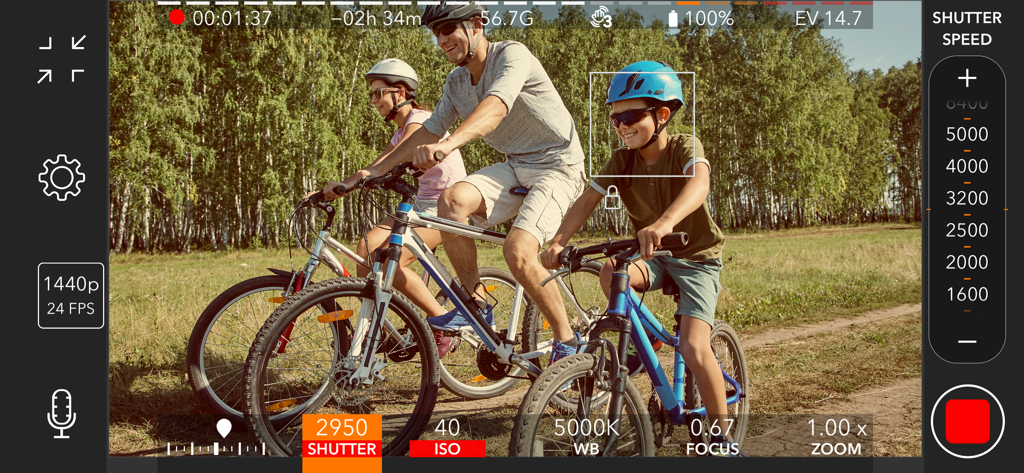
스키 선수를 녹화하는 동안 ISO, 셔터 속도 및 화이트 밸런스에 대한 수동 비디오 제어 기능을 보여주는 ProMovie Recorder + 앱 인터페이스
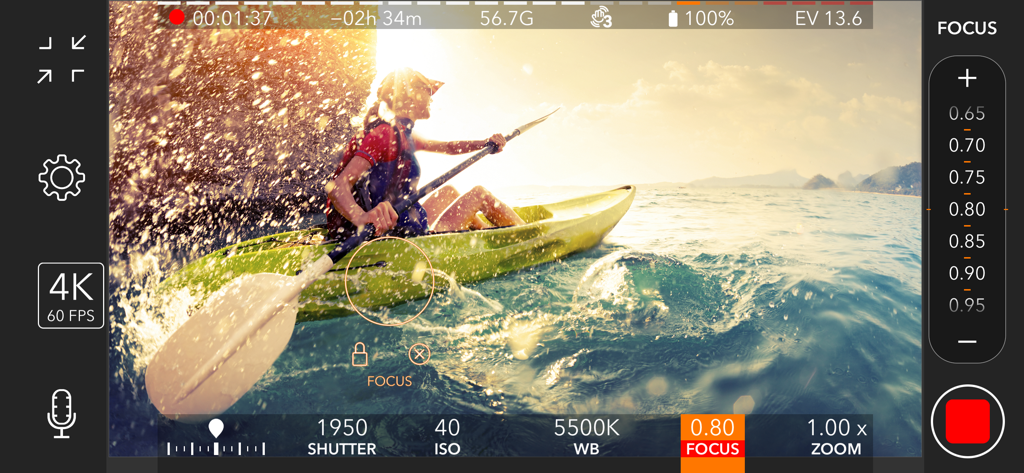
카약 선수를 녹화하는 동안 수동 초점 및 셔터 속도 제어 기능을 보여주는 ProMovie Recorder 앱 인터페이스
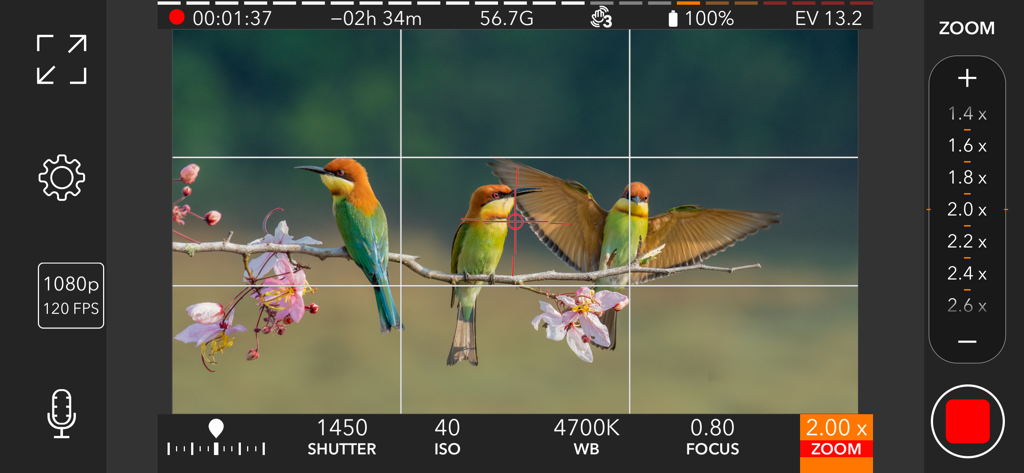
자연을 촬영하는 동안 ISO 및 셔터 속도와 같은 전문적인 수동 비디오 설정을 보여주는 ProMovie Recorder 앱 인터페이스
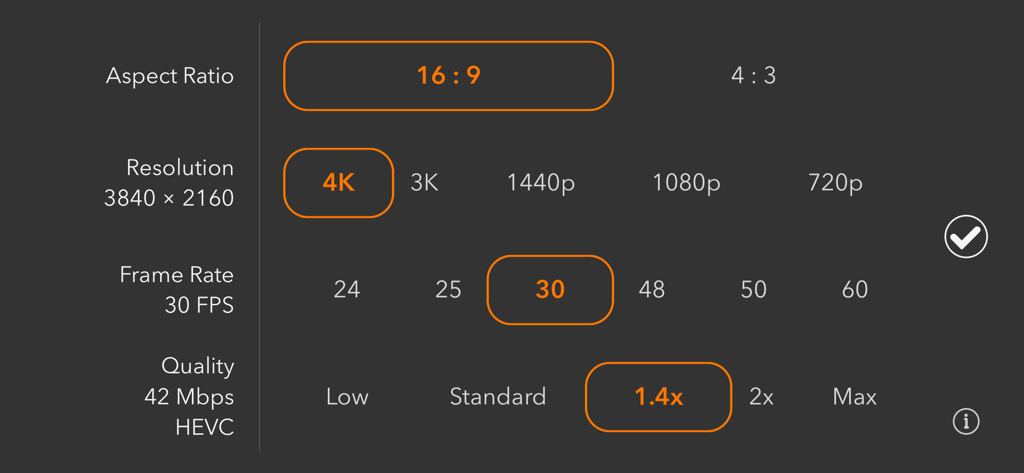
화면 비율, 해상도, 프레임 속도 및 비디오 품질에 대한 수동 선택을 보여주는 ProMovie Recorder 앱 설정 화면
시네마틱한 모바일 비디오 녹화를 위한 수동 셔터 속도 및 초점 제어 기능을 보여주는 ProMovie Recorder + 앱 인터페이스
설명
ProMovie Recorder is a feature-rich yet easy-to-use video camera App for your iPhone and iPad. Take control of exposure, focus, frame rate, and every other aspect of video recording right at your fingertip. Take full advantage of your device's videography capability and create professional clips.
• 4K video recording (up to 120FPS) ¹.
• 1080p video recording (up to 240FPS) ².
• Manual camera control for exposure, shutter speed, ISO, focus, and white balance.
• High-quality video recording with up to 224Mbps bitrate.
• Switch between Ultra Wide, Wide, and Telephoto cameras ³.
Audio features:
• External microphones (Lightning/3.5 mm headphone jack ⁴/Bluetooth).
• Stereo audio recording *.
• Audio monitoring through headphones and Bluetooth headphones.
• On-screen audio level indicator.
• Audio gain control *.
• Supported audio formats: 256 Kbps AAC, 16-bit PCM.
Camera control:
• Separate Exposure Point and Focus Point.
• Exposure compensation.
• Manual control/parameter lock for:
- Shutter Speed/ISO
- Color Temperature
- Focus
• White balance presets.
• White balance calibration with gray cards.
Supported accessories:
• 2.4:1 anamorphic adapters.
• Video rotation/flip for lens accessories.
• External displays connected via Lightning-to-HDMI/VGA adapters.
• Bluetooth remote *.
Other features:
• Grids and cropping guides for easier composition.
• Full-screen modes.
• Level (tilt indicator).
• Both HEVC and H.264 encoding *.
• Standard and Cinematic stabilization mode.
¹
4K @30FPS: iPhone 6s/6s Plus/SE and newer, iPad (2022), iPad Mini (2021 and newer), iPad Air (2020 and newer), iPad Pro 9.7-in., iPad Pro 10.5-in., iPad Pro 12.9-in. (2017 and newer), iPad Pro 11-in. (all models), iPad Pro 13-in.
4K @60FPS: iPhone 8/8 Plus/X and newer, iPad (2022), iPad Mini (2021 and newer), iPad Air (2020 and newer), iPad Pro 12.9-in. (2018 and newer), iPad Pro 11-in. (all models), iPad Pro 13-in.
4K @120FPS: iPhone 16 Pro/16 Pro Max.
²
1080p @30FPS: iPhone 5s and newer, iPad (2017 and newer), iPad Mini (2013 and newer), iPad Air (all models), iPad Pro (all models).
1080p @60FPS: iPhone 6/6 Plus/SE and newer, iPad (2022), iPad Mini (2021 and newer), iPad Air (2020 and newer), iPad Pro 9.7-in., iPad Pro 10.5-in., iPad Pro 12.9-in. (2017 and newer), iPad Pro 11-in. (all models), iPad Pro 13-in.
1080p @120FPS: iPhone 6s/6s Plus/SE and newer, iPad (2022), iPad Mini (2021 and newer), iPad Air (2020 and newer), iPad Pro 9.7-in., iPad Pro 10.5-in., iPad Pro 12.9-in. (2017 and newer), iPad Pro 11-in. (all models), iPad Pro 13-in.
1080p @240FPS: iPhone 8/8 Plus/X and newer, iPad (2022), iPad Mini (2021 and newer), iPad Air (2020 and newer), iPad Pro 12.9-in. (2018 and newer), iPad Pro 11-in. (all models), iPad Pro 13-in.
³
For iPhone and iPad models with Ultra Wide and/or Telephoto cameras.
⁴
Depending on your iPhone/iPad model and microphone connector, some of the following adapters may be required:
• TRS to TRRS adapter
• Lightning to 3.5 mm headphone jack adapter
• USB-C to 3.5 mm headphone jack adapter
* For supported devices only.
Contact us: support@ProMovieApp.com
이 페이지는 앱이나 개발자의 공식 페이지가 아니며, 정보 제공 및 논평을 목적으로 작성된 독립 편집 간행물입니다. 명시적으로 달리 언급되지 않는 한, 해당 앱이나 개발자는 MWM, Apple, Google Play, 앱 퍼블리셔 또는 앱 개발자와 제휴, 보증, 후원, 승인 또는 공식적으로 연결되어 있지 않으며, 이 페이지의 어떤 내용도 해당 앱이 MWM의 서비스를 사용하여 개발되었음을 의미하지 않습니다. 모든 상표, 로고, 스크린샷 및 기타 콘텐츠는 해당 소유자의 자산입니다.