
이 페이지는 앱이나 개발자의 공식 페이지가 아니며, 정보 제공 및 논평을 목적으로 작성된 독립 편집 간행물입니다. 명시적으로 달리 언급되지 않는 한, 해당 앱이나 개발자는 MWM, Apple, Google Play, 앱 퍼블리셔 또는 앱 개발자와 제휴, 보증, 후원, 승인 또는 공식적으로 연결되어 있지 않으며, 이 페이지의 어떤 내용도 해당 앱이 MWM의 서비스를 사용하여 개발되었음을 의미하지 않습니다. 모든 상표, 로고, 스크린샷 및 기타 콘텐츠는 해당 소유자의 자산입니다.


Qustodio Parental Control App
당신은 아이들의 디지털 세계를 완벽하게 통제합니다.
다운로드
1M+사용자 평점
총 평가 수
19.0K개발사
카테고리
Lifestyle지원 언어
8최신 버전
182.35.0크기
149.5 MB출시일
2020년 5월 13일디지털 환경에서 자녀의 안전과 건강한 습관을 위한 포괄적인 솔루션 분석
Qustodio Parental Control 앱 핵심 기능 분석
웹 필터링 및 콘텐츠 차단
이 앱은 사용자가 부적절한 웹사이트(음란물, 도박, 게임 포함)를 차단하고 안전 검색을 강제하여 유해 콘텐츠로부터 자녀를 보호할 수 있게 해줍니다.
스크린 타임 관리
이 도구는 사용자가 자녀의 일일 스크린 타임 제한을 설정하고, 특정 시간 동안 기기 사용을 제한하며, 인터넷 사용을 일시 정지할 수 있도록 지원하여 건강한 디지털 습관을 형성하게 합니다.
앱 차단 및 사용 제한
이 앱은 사용자가 특정 게임 및 앱의 접근을 차단하거나 사용 시간을 제한하여 자녀가 부적절한 앱에 노출되는 것을 방지하고 앱 사용 균형을 유지할 수 있도록 돕습니다.
실시간 위치 추적
이 도구는 GPS 위치 모니터링 기능을 통해 사용자가 자녀의 실시간 위치를 확인하고, 이동 중인 자녀를 추적하여 물리적인 안전을 보장할 수 있게 해줍니다.
온라인 활동 보고서 및 알림
이 앱은 30일간의 온라인 활동 보고서, 웹 활동 알림, 앱 다운로드 알림, 검색 및 메시지 알림을 제공하여 부모가 자녀의 디지털 활동을 포괄적으로 파악할 수 있도록 합니다.
소셜 미디어 모니터링
이 도구는 WhatsApp, Instagram, Line과 같은 주요 소셜 미디어 플랫폼에서의 활동에 대한 알림을 제공하여 사용자가 자녀의 소셜 교류를 모니터링하고 잠재적인 위험을 식별할 수 있도록 합니다.
인터넷 즉시 일시 정지
이 앱은 버튼 클릭 한 번으로 인터넷을 즉시 일시 정지할 수 있는 기능을 제공하여 사용자가 필요할 때 자녀의 온라인 활동을 즉각적으로 제어할 수 있게 해줍니다.
유튜브 활동 모니터링
이 도구는 자녀의 유튜브 시청 활동을 모니터링하여 사용자가 자녀가 어떤 콘텐츠를 시청하는지 파악하고 부적절한 노출을 관리할 수 있도록 지원합니다.
통화 활동 추적
이 앱은 자녀의 통화 활동을 추적하는 기능을 갖추고 있어 사용자가 자녀의 전화 사용 패턴과 연락처를 파악하는 데 도움을 줍니다.
공동 부모 감독 기능
이 앱은 다른 부모나 보호자를 초대하여 자녀의 디지털 활동을 함께 감독하고 규칙을 설정할 수 있는 기능을 제공하여 공동 양육 환경에서 유용합니다.
자주 묻는 질문
에 대해 알아야 할 모든 것 Qustodio Parental Control App
What is Qustodio Parental Control App?
Qustodio Parental Control App is an award-winning tool that helps parents manage their children's digital use. It offers features like screen time limits, app blocking, GPS tracking, and content filtering to ensure online safety.
How does Qustodio Parental Control App monitor social media?
Qustodio Parental Control App provides social media monitoring alerts for platforms such as WhatsApp, Instagram, and Line. It also allows parents to manage access to social media apps like TikTok, Facebook, and Snapchat.
Can I set daily screen time limits with Qustodio Parental Control App?
Yes, Qustodio Parental Control App allows parents to set daily screen time limits for their children. It also enables scheduling restricted times and custom routines for apps and websites.
Does Qustodio Parental Control App include GPS location tracking?
Yes, the Qustodio Parental Control App includes GPS location monitoring, allowing parents to track their child's location. It also enables finding a child's phone and saving favorite places.
How do I get Qustodio Parental Control App working on my child's device?
To use Qustodio Parental Control App, first download it onto your own device. Then, download the companion Kids App Qustodio onto your child’s device(s) for the two apps to work together.
Can Qustodio Parental Control App block games and other apps?
Yes, Qustodio Parental Control App allows parents to block specific games and applications. It also provides the ability to set limits on games and apps for controlled usage.
Does Qustodio Parental Control App send alerts for suspicious activity?
Yes, Qustodio Parental Control App sends various alerts. These include notifications for web activity, blocked websites, search alerts, SMS message alerts, and social monitoring alerts.
Is there a free trial available for Qustodio Parental Control App?
The Qustodio Premium family parental control app offers a free trial period. Any unused portion of this free trial is ended upon purchase confirmation of an annual subscription.
What is the pricing model for Qustodio Parental Control App?
Qustodio Parental Control App offers a basic plan with some features and a premium plan for full access. Premium is available as an annual subscription, charged to your iTunes account upon purchase confirmation.
Does Qustodio Parental Control App allow co-parenting or multi-parent access?
Yes, Qustodio Parental Control App supports co-parenting. It allows users to invite another parent or guardian to monitor and set rules for their child through a multi-parent login.
Does Qustodio Parental Control App sell user data to third parties?
No, Qustodio Parental Control App states explicitly that it does not and will not sell user data to third parties. Child's screen time activity is for parents' eyes only.
Can I pause the internet instantly with Qustodio Parental Control App?
Yes, Qustodio Parental Control App allows parents to pause the internet at the click of a button. This feature helps nurture healthy digital habits.
What languages does Qustodio Parental Control App support?
Qustodio Parental Control App is available in English, Spanish, French, German, Italian, Chinese, Japanese, Dutch, and Brazilian Portuguese.
Can Qustodio Parental Control App track calls and messages?
Yes, Qustodio Parental Control App provides features to track calls and messages. It also offers SMS message alerts and social media monitoring.
Does Qustodio Parental Control App filter inappropriate content on search engines?
Yes, Qustodio Parental Control App enforces safe search. It filters out inappropriate results on search engines like Google, Bing, and YouTube to protect children online.
다음 스크린샷과 설명은 앱의 공식 스토어 목록에서 직접 가져온 것이며 앱 개발자의 자산입니다.
앱 스토어
스크린샷

이 대시보드에서 자녀의 디지털 활동을 한눈에 확인하고, 현재 사용 중인 스크린 타임과(X) 지난 30일간의 활동 요약을(Y) 쉽게 검토할 수 있습니다.
디지털 활동 모니터링

사용자는 각 요일별로 자녀의 스크린 타임 한도를 정하고(X), 특정 시간 동안 앱 사용을 허용하거나 차단할 수 있습니다(Y).
스크린 타임 설정
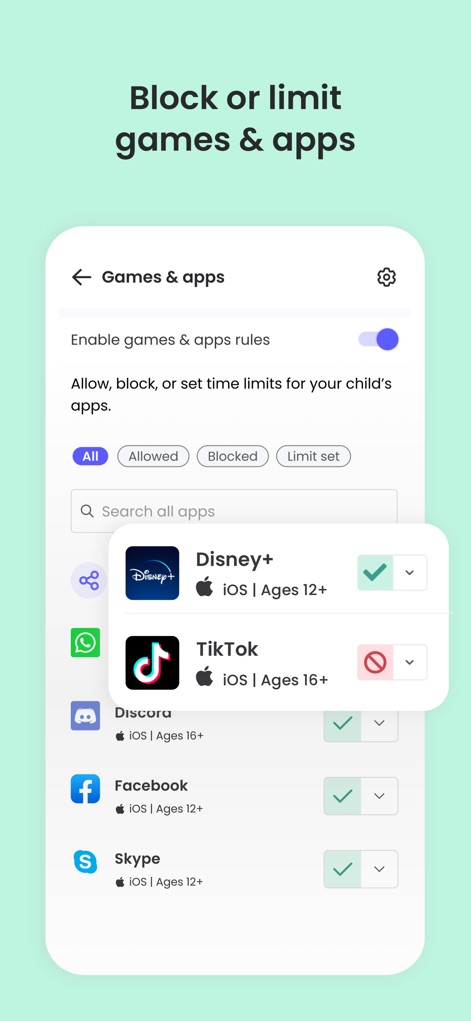
이 도구를 통해 특정 게임과 앱의 사용 규칙을 설정하고(X), 자녀의 TikTok 접근을 차단하거나 다른 앱의 사용을 허용할 수 있습니다(Y).
앱 사용 제한 및 차단
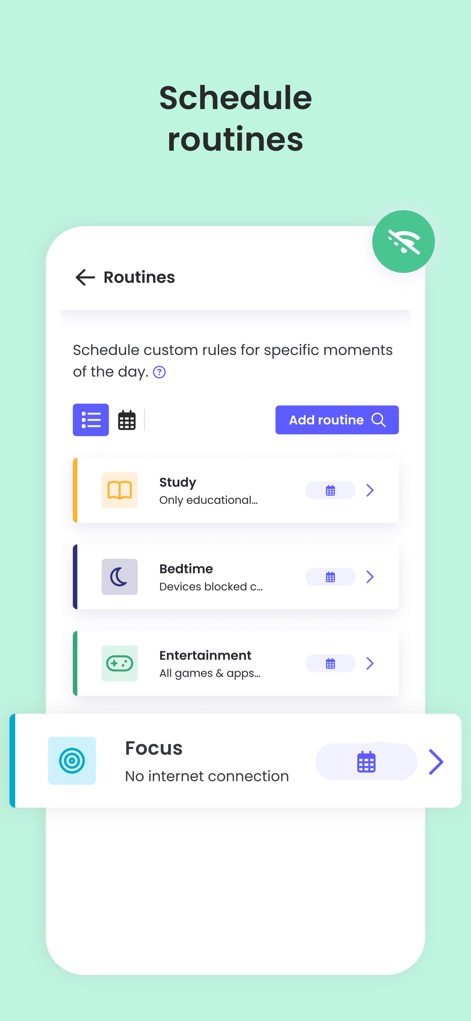
사용자는 학업 시간이나(X) 취침 시간과 같이 자녀를 위한 맞춤 루틴을 쉽게 설정하고, 각 루틴에 따라 특정 앱이나 웹사이트 접근을 관리할 수 있습니다(Y).
맞춤 루틴 설정

이 앱은 자녀의 온라인 활동을 실시간으로 감시하여, 메시지 경고(X) 및 검색 활동 경고(Y)를 통해 잠재적인 문제를 즉시 부모에게 알립니다.
실시간 알림 수신
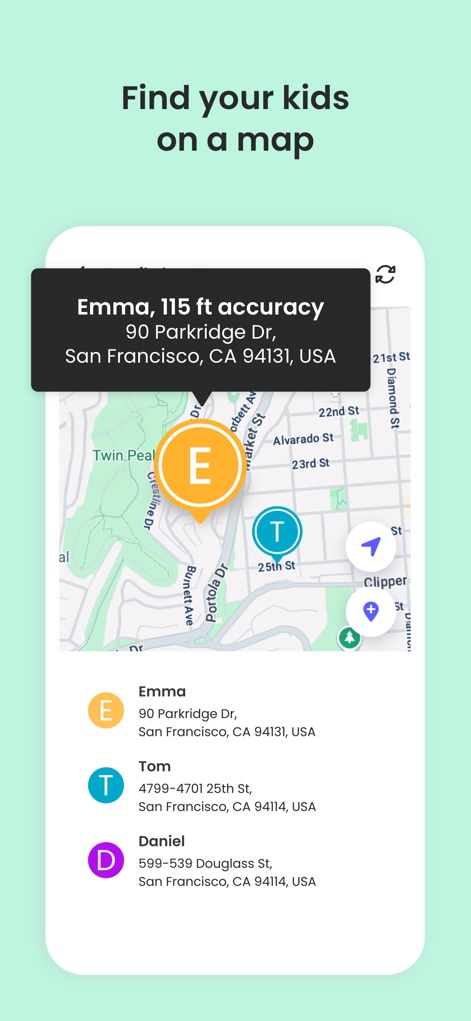
이 도구는 GPS 위치 모니터링을 통해 자녀의 현재 위치를 지도에 정확하게 표시하고(X), 특정 자녀의 상세 주소를(Y) 확인할 수 있도록 돕습니다.
자녀 위치 추적

사용자는 자녀의 통화 및 메시지 활동을 추적하고(X), 특정 번호와의 통화 내역을 확인하거나 원치 않는 연락처를 차단할 수 있습니다(Y).
통화 및 메시지 기록

이 도구를 통해 자녀가 접근할 수 있는 소셜 미디어 플랫폼을 관리하고(X), TikTok과 같은 특정 앱을 차단하거나 다른 소셜 미디어 앱의 접근을 허용할 수 있습니다(Y).
소셜 미디어 관리

사용자는 공동 보호자를 초대하여 자녀의 디지털 활동을 함께 감독할 수 있으며(X), 다른 부모의 프로필 아이콘과 이메일 초대 기능을(Y) 통해 쉽게 협력할 수 있습니다.
공동 보호자 감독

이 앱을 통해 부모는 언제든지 자녀의 인터넷 접근을 즉시 일시정지할 수 있으며(X), 자녀 기기에도 인터넷이 일시정지되었음을 알리는 메시지가(Y) 표시됩니다.
인터넷 즉시 일시정지
설명
Download
비슷한 앱
유사한 기능과 사용자 경험을 가진 앱

Findos - Find My Device
Pollux Bilisim Teknolojileri Sanayi ve Ticaret Limited Sirketi

Boost Family Guard
Smith Micro Software, Inc.

Google Family Link
Google LLC

Findmykids: GPS Phone Tracker
LETEM LTD

Nintendo Switch Parental Cont…
Nintendo Co., Ltd.

Parental Control App Kids360
ANKO SOLUTIONS LLC

JusTalk Kids - Safe Messenger
Ningbo Jus Internet Technology Co., Ltd.

FlashGet Kids:parental control
HONGKONG FLASHGET NETWORK TECHNOLOGY CO., LIMITED

Parental Control App: AirDroid
SAND STUDIO CORPORATION LIMITED
이 페이지는 앱이나 개발자의 공식 페이지가 아니며, 정보 제공 및 논평을 목적으로 작성된 독립 편집 간행물입니다. 명시적으로 달리 언급되지 않는 한, 해당 앱이나 개발자는 MWM, Apple, Google Play, 앱 퍼블리셔 또는 앱 개발자와 제휴, 보증, 후원, 승인 또는 공식적으로 연결되어 있지 않으며, 이 페이지의 어떤 내용도 해당 앱이 MWM의 서비스를 사용하여 개발되었음을 의미하지 않습니다. 모든 상표, 로고, 스크린샷 및 기타 콘텐츠는 해당 소유자의 자산입니다.