Retouch: AI Object Remover

Retouch: AI Object Remover

다운로드: App Store
로고: Retouch: AI Object Remover

Retouch: AI 개체 제거기 – 피드를 위한 손쉬운 완벽함

사진 방해꾼 지우기, 의상 바꾸기, 피부 보정을 한 번의 AI 탭으로 해결하세요. 현대적인 크리에이터를 위해 설계된 전문가 수준의 편집 도구입니다.

개발사

Anthony Durbin

카테고리

Photo & Video

다운로드

1M+

사용자 평점

4.7/5

총 평가 수

14K+

지원 언어

1

여러분의 비전, 완벽하게

이 인터페이스를 사용하는 1M+ 명의 사용자.

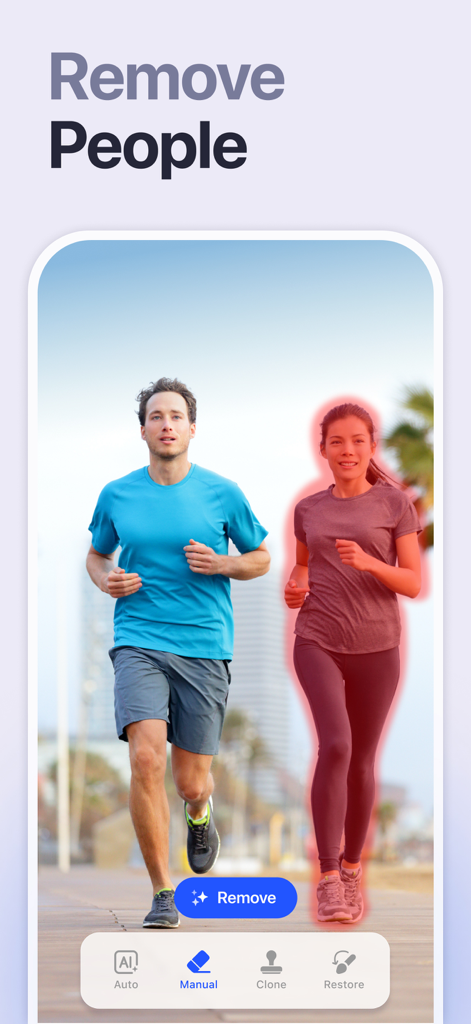
두 명의 조거 사진에서 제거할 여성에게 빨간색으로 표시된 Retouch 앱을 보여주는 스마트폰 인터페이스
두 명의 조거 사진에서 제거할 여성에게 빨간색으로 표시된 Retouch 앱을 보여주는 스마트폰 인터페이스

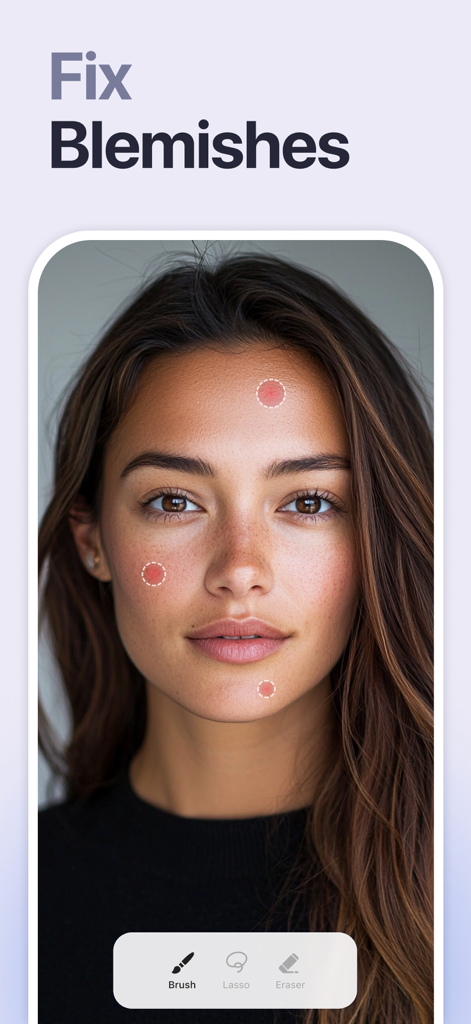
여성 인물 사진에서 AI 잡티 제거 도구를 보여주는 앱 화면
여성 인물 사진에서 AI 잡티 제거 도구를 보여주는 앱 화면

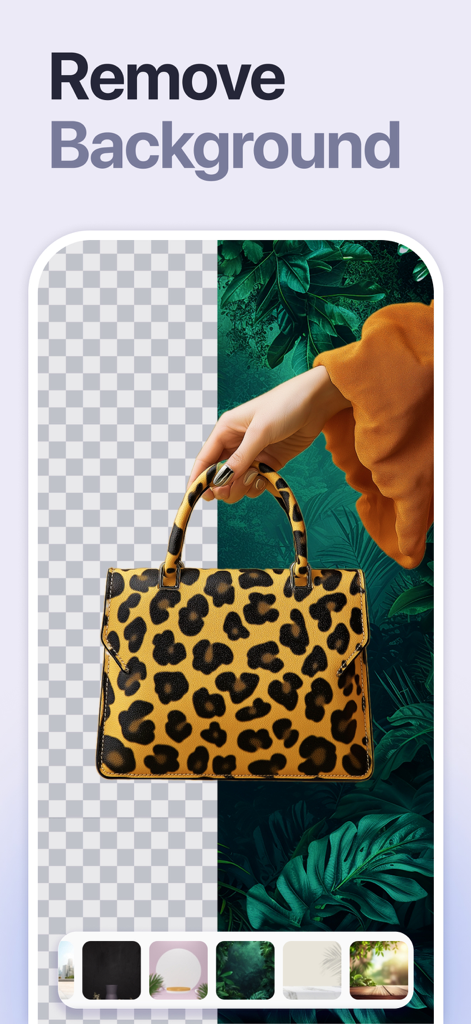
Retouch AI 앱을 사용하여 배경을 제거하고 교체하는 중인 표범 무늬 핸드백
Retouch AI 앱을 사용하여 배경을 제거하고 교체하는 중인 표범 무늬 핸드백

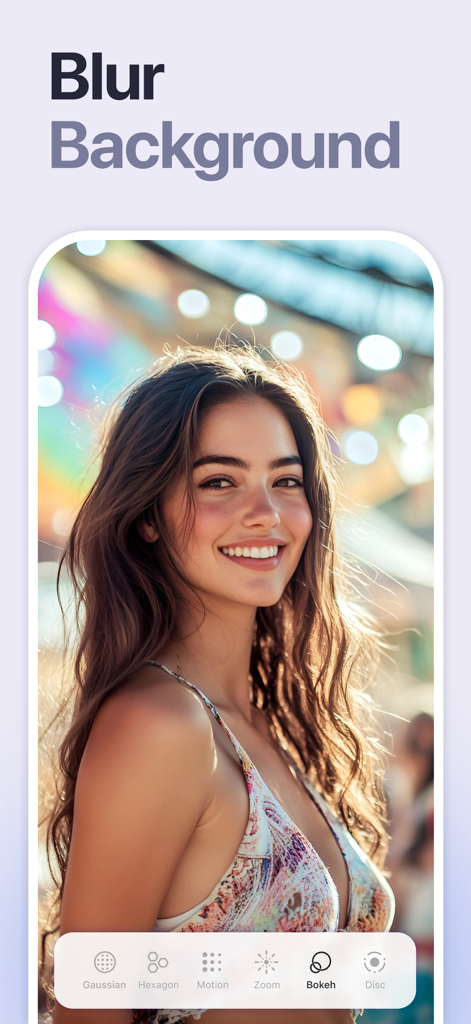
Retouch AI 앱의 배경 흐림 기능으로 화려한 보케 배경을 가진 미소를 짓는 여성
Retouch AI 앱의 배경 흐림 기능으로 화려한 보케 배경을 가진 미소를 짓는 여성

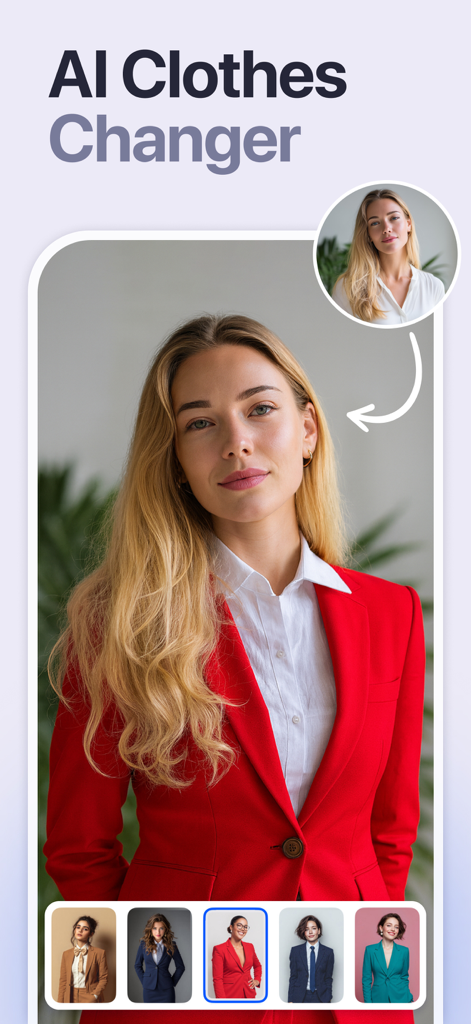
다양한 전문 정장으로 의상을 바꾸기 위해 AI 의류 변경 기능을 사용하는 여성
다양한 전문 정장으로 의상을 바꾸기 위해 AI 의류 변경 기능을 사용하는 여성

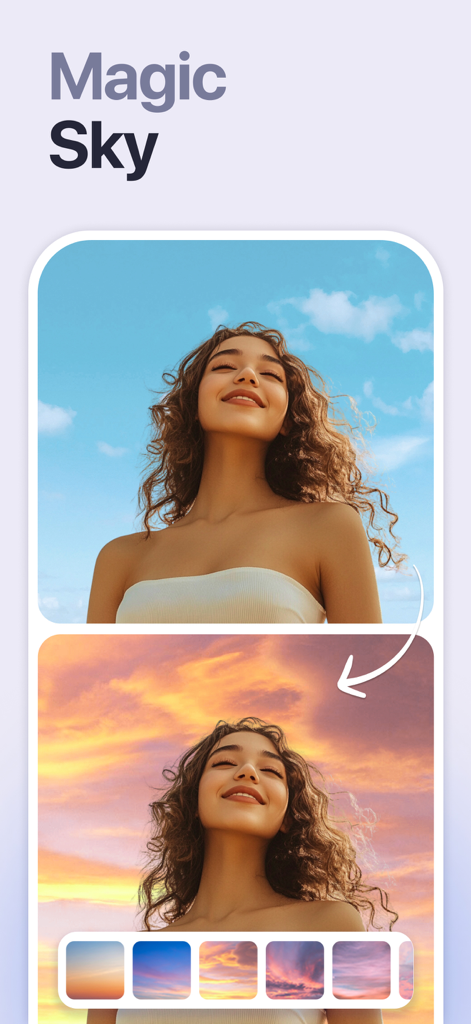
AI 매직 스카이 기능을 사용하여 파란 하늘을 석양으로 바꾸기 전후 비교 사진
AI 매직 스카이 기능을 사용하여 파란 하늘을 석양으로 바꾸기 전후 비교 사진

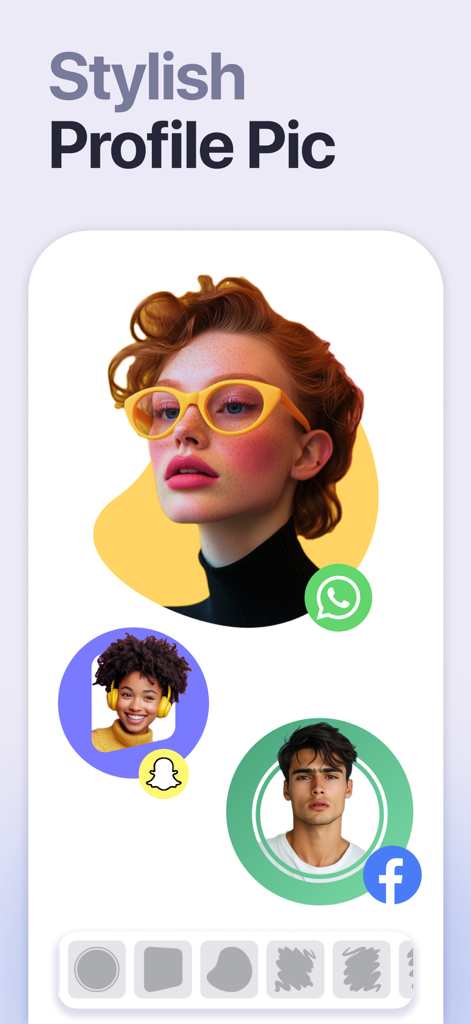
WhatsApp, Snapchat, Facebook용 예술적인 배경의 스타일리시한 프로필 사진 예시

WhatsApp, Snapchat, Facebook용 예술적인 배경의 스타일리시한 프로필 사진 예시

모든 샷을 향상시키세요

이 앱을 돋보이게 하는 도구, 1M+ 명의 사용자가 선택.

🪄

스마트 개체 지우개

지능형 탭 투 리무브 기술로 사진 방해꾼과 지저분한 배경에 작별을 고하세요.

즉각적인 변신

피부를 매끄럽게 하고 최고의 특징을 자연스럽게 향상시키는 AI로 스튜디오 수준의 인물 사진을 얻으세요.

🌅

배경 혁신

즉각적인 하늘 및 배경 교체 기능으로 어디든 이동하거나 깔끔한 제품 사진을 만드세요.

리뷰 분석

사용자 리뷰 인사이트.

감정 점수

15%
부정적

요약

This mobile app receives overwhelmingly negative feedback, primarily due to recent updates that have drastically altered its pricing model. Users frequently complain about the transition from a free or ad-supported model to a mandatory, often expensive, subscription, making it impossible to save edited photos without payment. Many report issues with advertisements not working as an alternative to payment, with one user specifically noting this problem since Autumn 2024. Despite these significant drawbacks, the app's core object removal functionality is still acknowledged as effective, its output quality as good, and its ease of use is praised by some users.

주요 테마

Core Functionality(6)
Historical App Value(5)
Output Image Quality(2)
Ease of Use(2)
AI Features(1)

앱 소개

에 대해 알아야 할 모든 것 Retouch: AI Object Remover.

설명

Remove objects, people or text from photos easily with this ai retouch app. Erase backgrounds of a photo and save as transparent with just one tap. Fix your blemishes also with advanced one-tap-retouch feature. Change your outfit with our advanced ai clothes changer feature instantly. Features Remove Object: Tap or brush away tourists, wires, or stains. Quick Mode erases with AI; Brush & Lasso gives pixel-perfect control. AI Outfit Changer: Try-on new dresses with our outfit generator. Clone Stamp: Sample any clean patch and paint over distractions. Edge-aware blending matches texture, light, and perspective. AI Retouch: One swipe zaps blemishes, smooths skin, sharpens eyes, adds a natural glow, and whitens teeth while preserving pores. Replace Background: Auto-cut subjects and drop them onto built-in scenes, your own images, or transparent PNGs for pro-grade product shots. Background Blur: Pop subjects with DSLR-style depth—Gaussian, Motion, Bokeh, Hexagon, Disc, and more—and adjust focus and strength in real time. Photo Overlay & Double Exposure: Layer textures, designer frames, or a second image, then fine-tune opacity and blend modes for instant magazine vibes. Stylish Portrait: Soft-focus backgrounds, polish facial details, and apply studio color toning for a cover-ready finish. Sky Changer: Auto-detect the horizon and swap gray skies for golden sunsets, auroras, or storm clouds with perfect color matching and crisp edges. Photo Blending: AI isolates your subject and fuses it with artistic overlays; refine with manual brush and eraser for cinematic double exposures. Dripping Portrait: Melt edges into flowing paint drips; pick preset shapes or draw your own, then adjust length, direction, and gradients. Spiral Effects: Wrap subjects in neon coils, glitter ribbons, or dotted trails. Tweak thickness, color, and rotation for instant 3-D pop. Unlimited undo/redo, high-resolution exports, and before/after previews keep every experiment safe and speedy—so you can perfect anything from quick selfies to polished product shots without ever losing a pixel of quality. This app includes advertisement. To enjoy ad free experience and using all premium contents, we are offering a Premium subscription package. Retouch Premium Subscription information • Subscription Length: Weekly, Monthly. • Your payment will be charged to your iTunes Account as soon as you confirm your purchase. • You can manage your subscriptions and turn off auto-renewal from your Account Settings after the purchase. • Your subscription will renew automatically unless you turn off auto-renew at least 24 hours before the end of the current period. • The cost of renewal will be charged to your account 24 hours before the end of the current period. • When canceling a subscription, your subscription will stay active until the end of the period. Auto-renewal will be disabled, but the current subscription will not be refunded. • Any unused portion of a free trial period, if offered, will be forfeited when purchasing a subscription. Privacy policy: https://sites.google.com/view/anthonydurbins/privacy Terms of service: https://sites.google.com/view/anthonydurbins/terms Contact for support, reporting bug or improvement suggestions email: app.care.anthony@gmail.com You may also contact our support team through the app’s settings screen.

최신 버전

5.3

크기

224.3 MB

출시일

2022년 4월 28일

지금까지 가장 멋진 피드를 만들 준비가 되셨나요?

100만 명 이상의 크리에이터가 한 번의 AI 탭으로 방해 요소를 제거하고 모든 세부 사항을 완벽하게 만드는 Retouch를 다운로드하여 지금 바로 여러분의 일상적인 사진을 전문가 수준의 콘텐츠로 바꿔보세요.

다운로드: App Store
FAQ

자주 묻는 질문

에 대해 알아야 할 모든 것 Retouch: AI Object Remover

Retouch: AI Object Remover 앱은 무엇에 사용되나요?

Retouch: AI Object Remover는 AI를 사용하여 사진에서 개체, 사람 또는 텍스트를 쉽게 제거하고, 배경을 지우고, 결점을 수정하고, 의상을 변경하도록 설계된 앱입니다. 다양한 사진 편집 기능을 제공합니다.

Retouch 앱으로 사진에서 원치 않는 개체를 제거할 수 있나요?

네, Retouch: AI Object Remover 앱을 사용하면 사진에서 개체, 사람 또는 텍스트를 제거할 수 있습니다. AI 제거를 위한 빠른 모드와 완벽한 픽셀 제어를 위한 브러시 및 올가미 기능을 제공합니다.

Retouch: AI Object Remover는 AI 의류 변경 기능을 제공하나요?

네, Retouch: AI Object Remover에는 고급 AI 의류 변경 기능이 포함되어 있습니다. 사용자는 의류 생성기를 사용하여 새로운 드레스나 의상을 즉시 착용해 볼 수 있습니다.

Retouch 앱으로 사진 배경을 어떻게 제거하나요?

Retouch 앱을 사용하면 개체를 자동으로 자르고 내장된 장면, 사용자 이미지 또는 투명 PNG 위에 떨어뜨려 배경을 바꿀 수 있습니다. 원클릭으로 배경을 지울 수 있습니다.

Retouch: AI Object Remover는 어떤 종류의 구독을 제공하나요?

Retouch: AI Object Remover는 주간 및 월간 단위의 프리미엄 구독 패키지를 제공합니다. 구독을 통해 광고 없는 경험과 모든 프리미엄 콘텐츠에 액세스할 수 있습니다.

Retouch 프리미엄 구독의 자동 갱신은 어떻게 작동하나요?

현재 기간이 종료되기 최소 24시간 전에 자동 갱신을 끄지 않는 한 Retouch 프리미엄 구독은 자동으로 갱신됩니다. 갱신 비용은 24시간 전에 청구됩니다.

Retouch 앱으로 사진의 결점을 수정할 수 있나요?

네, Retouch 앱에는 결점을 수정하기 위한 고급 AI Retouch 기능이 포함되어 있습니다. 한 번의 스와이프로 잡티 제거, 피부 보정, 눈 선명하게 하기가 가능합니다.

Retouch: AI Object Remover 앱에 광고가 포함되어 있나요?

네, Retouch: AI Object Remover 앱에는 광고가 포함되어 있습니다. 사용자는 광고 없는 경험과 프리미엄 콘텐츠 액세스를 위해 프리미엄 구독 패키지를 구매할 수 있습니다.

Retouch: AI Object Remover의 개인 정보 보호 정책은 어디에서 찾을 수 있나요?

Retouch: AI Object Remover의 개인 정보 보호 정책은 https://sites.google.com/view/anthonydurbins/privacy에서 확인할 수 있습니다. 이 링크는 앱 설명 내에 제공됩니다.

Retouch 앱에서 사용할 수 있는 배경 흐림 옵션은 무엇인가요?

Retouch 앱은 가우시안, 모션, 보케, 육각형 및 디스크 스타일을 포함한 다양한 배경 흐림 옵션을 제공합니다. 사용자는 실시간으로 초점과 강도를 조절할 수 있습니다.

App information, icons, screenshots, and descriptions displayed on this page are sourced from the Apple App Store and are the property of their respective developers. Download estimates and rankings are based on MWM's proprietary models and may not reflect actual figures. This page is provided for informational and analytical purposes only.

Believe this page infringes your intellectual property? File a dispute