
이 페이지는 앱이나 개발자의 공식 페이지가 아니며, 정보 제공 및 논평을 목적으로 작성된 독립 편집 간행물입니다. 명시적으로 달리 언급되지 않는 한, 해당 앱이나 개발자는 MWM, Apple, Google Play, 앱 퍼블리셔 또는 앱 개발자와 제휴, 보증, 후원, 승인 또는 공식적으로 연결되어 있지 않으며, 이 페이지의 어떤 내용도 해당 앱이 MWM의 서비스를 사용하여 개발되었음을 의미하지 않습니다. 모든 상표, 로고, 스크린샷 및 기타 콘텐츠는 해당 소유자의 자산입니다.


Stop Motion Studio
스톱모션 애니메이션은 한때 전문가의 영역이었다. 이제 이 앱은 누구에게나 그 영역의 문을 열어, 당신의 손끝에서 사물을 조종하고 이야기를 만들어내는 절대적인 통제권을 선사한다.
다운로드
12.5M+사용자 평점
총 평가 수
156.5K개발사
카테고리
Photo & Video지원 언어
17최신 버전
25.12크기
179.4 MB출시일
2011년 9월 7일Stop Motion Studio 앱 주요 기능 분석
초보자부터 전문가까지, 모든 창작자를 위한 스톱모션 애니메이션 도구
개인 정보 보호 및 비용 없는 사용
이 앱은 광고, 사용자 추적, 그리고 구독료 없이 사용자의 개인 정보를 보호하며, 창의적인 활동에 집중할 수 있는 안전하고 방해 없는 환경을 제공합니다.
직관적인 애니메이션 제작 환경
이 앱은 사용자가 스톱모션 애니메이션을 쉽게 만들 수 있도록 돕습니다. 경험이 없는 초보자도 복잡한 설정 없이 바로 창작을 시작할 수 있습니다.
학습 리소스 및 튜토리얼
이 도구는 단계별 튜토리얼과 창의적인 팁, 그리고 내장된 매뉴얼을 제공하여 사용자가 스톱모션 애니메이션 기술을 배우고 새로운 아이디어를 얻을 수 있도록 돕습니다.
고품질 내보내기 및 간편한 공유
이 앱은 완성된 애니메이션을 4K 또는 1080p HD 고화질로 내보낼 수 있게 하며, YouTube, TikTok 등 다양한 소셜 미디어 플랫폼에 직접 공유하거나 GIF, iMessage 스티커로 저장할 수 있습니다.
정교한 프레임 편집 도구
이 도구는 양파 스키닝과 애니메이션 가이드로 프레임 정렬을 완벽하게 지원하며, 대화형 타임라인과 프레임별 편집을 통해 사용자가 정교하게 작업을 수행할 수 있도록 합니다.
다양한 시각 효과 및 드로잉 기능
이 앱은 로토스코핑, 내장 드로잉 도구, 텍스트 카드, 말풍선 등을 제공하여 사용자가 창의적인 시각 효과를 추가하고 자신만의 독특한 스타일을 표현할 수 있게 합니다. 또한 그린 스크린 효과로 배경을 자유롭게 변경할 수 있습니다.
오디오 및 사운드 통합
사용자는 앱 내에서 바로 음성 해설을 녹음하고, 음향 효과 및 배경 음악을 추가하거나 개인 라이브러리에서 가져와 작품에 생동감을 불어넣을 수 있습니다.
원격 촬영 및 수동 카메라 제어
사용자는 Apple Watch 또는 다른 모바일 기기를 원격 카메라로 활용하여 편리하게 촬영할 수 있으며, 초점, 노출, ISO 등 수동 카메라 제어 기능을 통해 촬영의 정밀도를 높일 수 있습니다.
자주 묻는 질문
에 대해 알아야 할 모든 것 Stop Motion Studio
What is Stop Motion Studio?
Stop Motion Studio is an Apple-featured app for creating stop motion animation films. It offers powerful creative tools designed for both beginners and experienced animators.
Does Stop Motion Studio offer professional editing features?
Yes, Stop Motion Studio provides professional editing features. These include onion skinning, animation guides, an interactive timeline, frame-by-frame editing, and rotoscoping for precision.
Can I record voiceovers and add music in Stop Motion Studio?
Yes, Stop Motion Studio allows users to record voiceovers directly within the app. It also supports adding sound effects, background music, or importing audio from a personal library.
Does Stop Motion Studio support green screen effects?
Yes, Stop Motion Studio includes green screen effects. This feature enables users to place characters or objects onto any desired background, enhancing creative possibilities.
What export options are available in Stop Motion Studio?
Stop Motion Studio offers various export options. Users can export films in 4K or 1080p HD, share directly to YouTube, TikTok, or save as GIFs or iMessage stickers.
Does Stop Motion Studio require a subscription?
No, Stop Motion Studio explicitly states it has "no subscriptions." The app operates on a model of no ads and no tracking, focusing on user privacy.
Are there any in-app purchases in Stop Motion Studio?
Yes, some features in Stop Motion Studio require in-app purchases to unlock. However, all features are included without additional purchases in the Pro version of the app.
Does Stop Motion Studio track user data?
No, Stop Motion Studio affirms that it conducts "no tracking." The app prioritizes user data privacy and ensures that creativity remains private.
Can I use Stop Motion Studio on multiple Apple devices?
Yes, Stop Motion Studio supports cross-device use. Users can begin projects on an iPhone and seamlessly complete them on a Mac, as work stays in sync.
Does Stop Motion Studio provide tutorials for beginners?
Yes, Stop Motion Studio provides resources for beginners. It includes step-by-step tutorials, creative tips, and a built-in manual for quick guidance and inspiration.
Can Stop Motion Studio add facial expressions to characters?
Yes, Stop Motion Studio offers tools to add facial expressions. Users can apply various expressions or layers to characters within their animation projects.
Does Stop Motion Studio have manual camera controls?
Yes, Stop Motion Studio features full manual camera controls. These controls include adjustments for focus, exposure, ISO, and white balance, allowing precise capture.
Can I use a remote device to capture frames in Stop Motion Studio?
Yes, Stop Motion Studio enables users to employ an Apple Watch or another compatible device as a remote camera. This allows for convenient frame capture.
Does Stop Motion Studio include drawing tools?
Yes, Stop Motion Studio incorporates built-in drawing tools. Additionally, it provides features like text cards and speech bubbles to enhance animated films.
다음 스크린샷과 설명은 앱의 공식 스토어 목록에서 직접 가져온 것이며 앱 개발자의 자산입니다.
앱 스토어
스크린샷
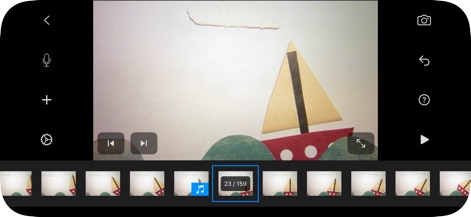
직관적인 타임라인 편집
이 도구는 하단의 프레임 시퀀스를 통해 각 프레임을 직관적으로 관리하며, 중앙의 미리보기 화면에서 진행 중인 애니메이션을 실시간으로 확인할 수 있게 합니다.
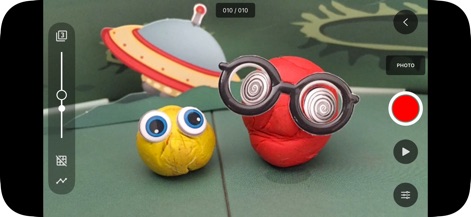
정밀한 촬영 도구
사용자는 화면 왼쪽에 있는 조절 슬라이더로 세밀한 설정을 조정할 수 있으며, 오른쪽의 빨간색 기록 버튼을 통해 편리하게 촬영을 시작할 수 있습니다.

풍부한 오디오 제어
이 앱은 음파형 그래프를 통해 오디오 트랙을 시각적으로 보여주며, '자르기' 및 '페이드'와 같은 정밀한 편집 옵션을 제공하여 완벽한 사운드스케이프를 만듭니다.
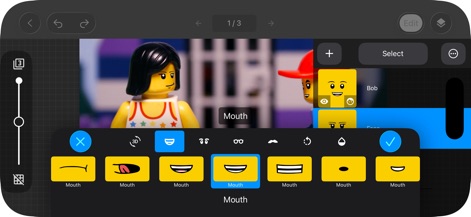
캐릭터 표정 맞춤 설정
이 도구는 다양한 입 모양 옵션을 제공하여 레고 캐릭터의 표정을 쉽게 변경할 수 있으며, 선택 가능한 표정 팔레트를 통해 섬세한 감정 표현이 가능합니다.
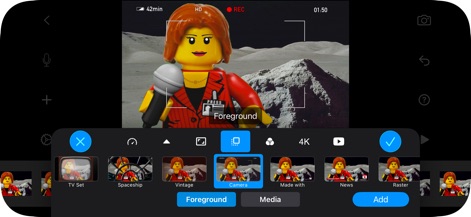
장면 배경 효과
사용자는 그린 스크린 기능을 활용하여 캐릭터를 다양한 배경에 배치할 수 있으며, 하단의 다채로운 필터 선택지를 통해 영상에 독특한 분위기를 더할 수 있습니다.
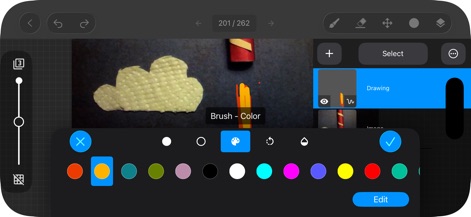
강력한 드로잉 편집
이 앱은 직관적인 색상 팔레트를 제공하여 그림 도구를 손쉽게 사용할 수 있으며, 레이어 관리 기능으로 복잡한 시각적 요소를 효율적으로 구성할 수 있습니다.
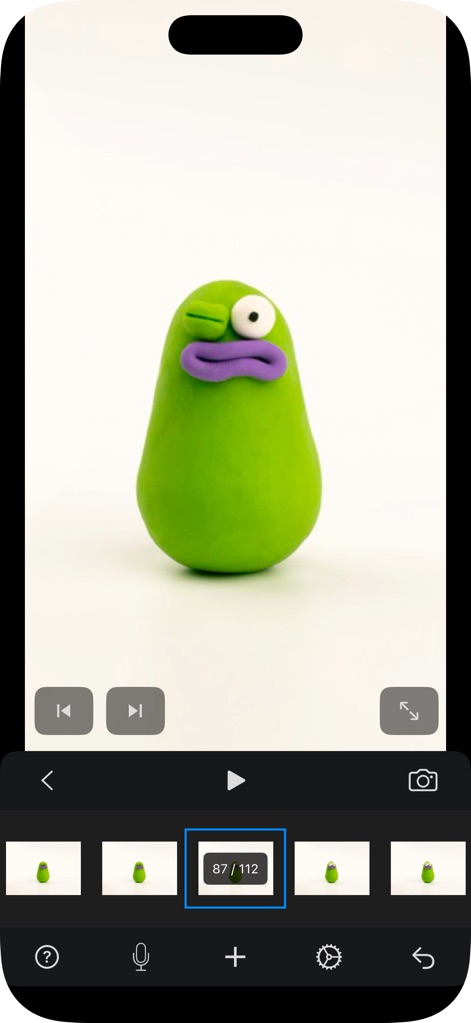
간편한 모바일 애니메이션
이 앱은 세로 모드에서도 전체 화면 미리보기를 제공하여 작업물을 크게 볼 수 있으며, 하단의 프레임 갤러리로 각 프레임을 쉽게 선택하고 관리할 수 있습니다.
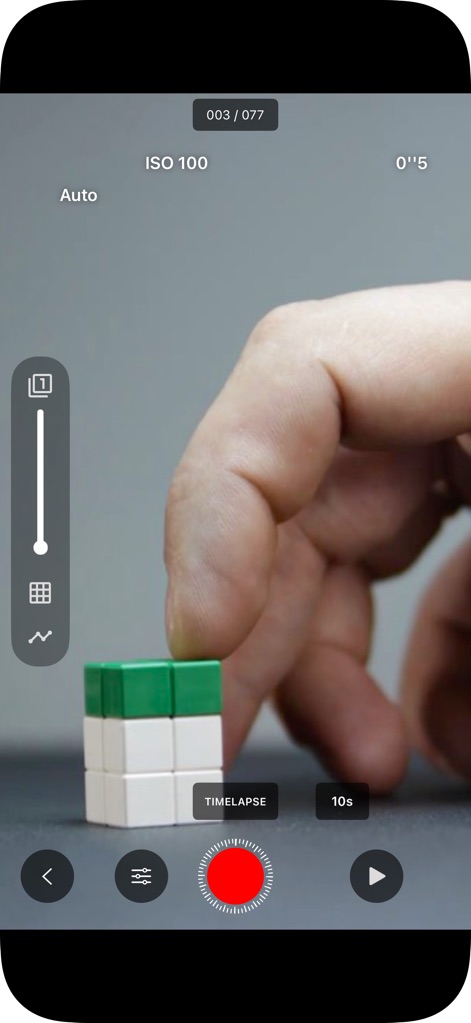
섬세한 카메라 제어
사용자는 수동 ISO 설정으로 촬영 환경을 정밀하게 제어할 수 있으며, 타임랩스 기능을 통해 특정 간격으로 자동으로 프레임을 캡처할 수 있습니다.
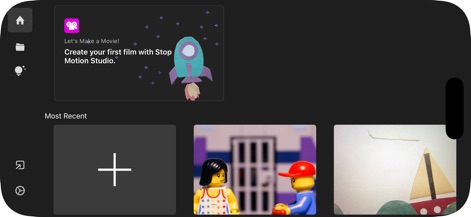
프로젝트 시작 및 관리
이 화면은 새 프로젝트 생성 버튼을 명확하게 보여주어 사용자가 쉽게 작업을 시작하게 하며, 최근 프로젝트 목록을 통해 이전에 진행했던 작업을 빠르게 찾고 이어서 할 수 있습니다.
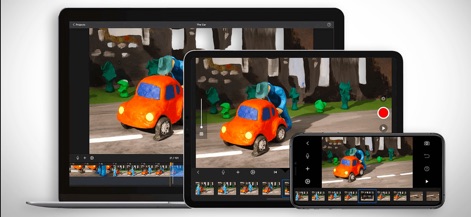
기기 간 완벽한 동기화
이 앱은 다양한 기기에서 동일한 프로젝트를 실행할 수 있게 하여 작업 유연성을 제공하며, 동기화된 편집 환경을 통해 어느 기기에서든 중단 없이 작업을 이어나갈 수 있습니다.
설명
Download
비슷한 앱
유사한 기능과 사용자 경험을 가진 앱
Stick Nodes Pro - Animator
ForTheLoss Games, Inc

FlipaClip: Create 2D Animation
Visual Blasters, LLC

Stick Nodes - Animator
ForTheLoss Games, Inc

Stop Motion Studio Pro
CATEATER, LLC

Animation Creator: Flipbook 2D
CEM SOFTWARE COMPANY LIMITED

2d animation creator, stickman
Trang Phi Thi

Stop Motion Factory
壮 董

FlipArtify - 2D Draw Animation
CEM SOFTWARE COMPANY LIMITED

MotionBook - Draw & Animate
亮 彭
이 페이지는 앱이나 개발자의 공식 페이지가 아니며, 정보 제공 및 논평을 목적으로 작성된 독립 편집 간행물입니다. 명시적으로 달리 언급되지 않는 한, 해당 앱이나 개발자는 MWM, Apple, Google Play, 앱 퍼블리셔 또는 앱 개발자와 제휴, 보증, 후원, 승인 또는 공식적으로 연결되어 있지 않으며, 이 페이지의 어떤 내용도 해당 앱이 MWM의 서비스를 사용하여 개발되었음을 의미하지 않습니다. 모든 상표, 로고, 스크린샷 및 기타 콘텐츠는 해당 소유자의 자산입니다.