
이 페이지는 앱이나 개발자의 공식 페이지가 아니며, 정보 제공 및 논평을 목적으로 작성된 독립 편집 간행물입니다. 명시적으로 달리 언급되지 않는 한, 해당 앱이나 개발자는 MWM, Apple, Google Play, 앱 퍼블리셔 또는 앱 개발자와 제휴, 보증, 후원, 승인 또는 공식적으로 연결되어 있지 않으며, 이 페이지의 어떤 내용도 해당 앱이 MWM의 서비스를 사용하여 개발되었음을 의미하지 않습니다. 모든 상표, 로고, 스크린샷 및 기타 콘텐츠는 해당 소유자의 자산입니다.


Unblur - AI Photo Enhancer
흐릿한 과거는 잊어라. 이 앱은 당신의 모든 픽셀에 생명을 불어넣어, 한때 불가능했던 선명함을 선사한다.
다운로드
500k+사용자 평점
총 평가 수
9.2K개발사
카테고리
Photo & Video지원 언어
1최신 버전
6.0크기
226.6 MB출시일
2023년 4월 12일강력한 AI 기반 이미지 개선 및 복원 솔루션
'Unblur - AI Photo Enhancer' 앱의 주요 기능 분석
AI 기반 사진 선명화 및 품질 향상
이 앱은 사용자의 흐릿하거나 저해상도 사진을 AI 기술로 선명하고 고화질로 변환하여 이미지 품질을 크게 향상시킵니다.
오래된 사진 복원 및 손상 제거
이 도구는 오래된 사진의 흠집을 제거하고 손상된 부분을 복구하여 추억을 되살리고 디지털화할 수 있게 해줍니다.
얼굴 디테일 개선 및 인물 사진 선명화
이 앱은 인물 사진의 얼굴 디테일을 개선하고 초상을 선명하게 만들어 더욱 생생하고 고품질의 결과물을 제공합니다.
흑백 사진 컬러화
이 도구는 오래된 흑백 사진에 자동으로 색상을 입혀 생동감 있는 컬러 사진으로 만들어 시각적 경험을 풍부하게 합니다.
이미지 해상도 AI 업스케일링
이 앱은 AI를 사용하여 이미지의 해상도를 높여, 저해상도 사진을 인쇄나 대형 화면에 적합한 고품질 이미지로 변환합니다.
텍스트를 이미지로 변환 (AI 이미지 생성)
이 도구는 사용자가 입력한 텍스트 설명을 기반으로 인공지능이 독창적인 이미지를 생성하여 창의적인 표현을 가능하게 합니다.
자주 묻는 질문
에 대해 알아야 할 모든 것 Unblur - AI Photo Enhancer
What is Unblur - AI Photo Enhancer?
Unblur - AI Photo Enhancer is an application that uses Artificial Intelligence to fix blurry, low-resolution photos, enhance their quality, and restore old images. It turns them into crystal clear HD.
How does Unblur - AI Photo Enhancer fix blurry photos?
Unblur fixes blurry photos by using Artificial Intelligence to sharpen portraits, de-noise images, and improve face details. It transforms blurry, low-resolution pictures into crystal clear HD.
Can Unblur - AI Photo Enhancer upscale image resolution?
Yes, Unblur - AI Photo Enhancer can upscale image resolution with AI. It turns low-resolution photos into high-definition quality, improving overall clarity and detail.
Does Unblur - AI Photo Enhancer restore old and vintage photos?
Yes, Unblur restores old and vintage photos. It can descratch images to remove damage and colorize old black and white photos, turning them into HD quality.
Can Unblur - AI Photo Enhancer generate art from text?
Yes, Unblur - AI Photo Enhancer can turn words into photos with Artificial Intelligence. Users input text prompts, and the app generates corresponding AI art images.
What are the subscription options for Unblur - AI Photo Enhancer?
Unblur - AI Photo Enhancer offers Premium subscription packages with weekly, monthly, or yearly lengths. These subscriptions provide an ad-free experience and access to all premium content.
How can I manage my Unblur - AI Photo Enhancer subscription?
You can manage your Unblur - AI Photo Enhancer subscription and turn off auto-renewal from your iTunes Account Settings after purchase. Your payment is charged to your iTunes Account.
Does Unblur - AI Photo Enhancer offer a free trial?
Yes, Unblur - AI Photo Enhancer may offer a free trial period. Any unused portion of this trial is forfeited upon purchasing a subscription to the app.
Does Unblur - AI Photo Enhancer offer an ad-free experience?
Yes, Unblur - AI Photo Enhancer offers an ad-free experience through its Premium subscription package. The free version includes advertisements.
What AI filters are available in Unblur - AI Photo Enhancer?
Unblur - AI Photo Enhancer includes AI filters such as 90's Anime, Mini Toy, Clay, and Plush. These filters transform portraits into stylized art.
How can I contact support for Unblur - AI Photo Enhancer?
You can contact support for Unblur - AI Photo Enhancer via email at app.care.anthony@gmail.com, or through the app’s settings screen for reporting bugs or suggestions.
Where can I find the privacy policy for Unblur - AI Photo Enhancer?
The privacy policy for Unblur - AI Photo Enhancer is available at the provided URL: https://sites.google.com/view/anthonydurbins/privacy.
다음 스크린샷과 설명은 앱의 공식 스토어 목록에서 직접 가져온 것이며 앱 개발자의 자산입니다.
앱 스토어
스크린샷
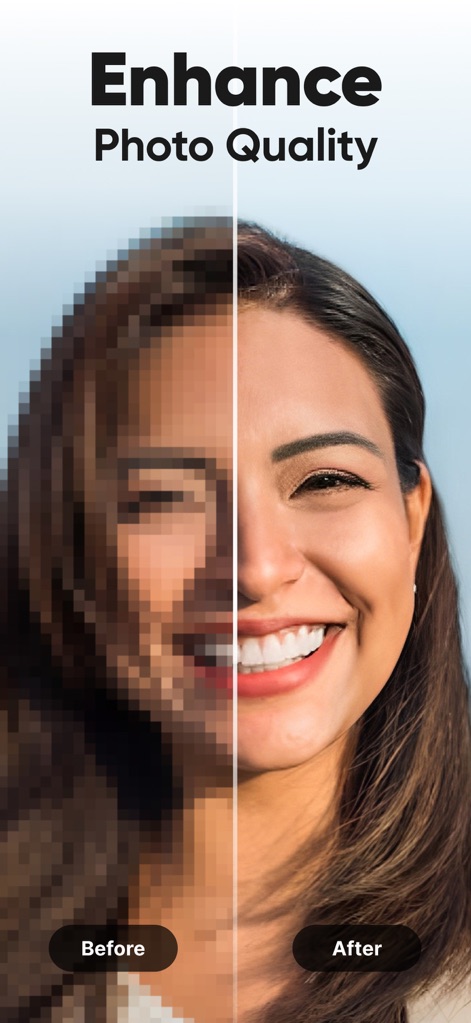
이 앱은 픽셀화된 이미지를 선명한 고화질 사진으로 변환하여, 사용자는 저화질 사진을 깨끗하고 또렷한 이미지로 만들 수 있습니다.
사진 품질 향상
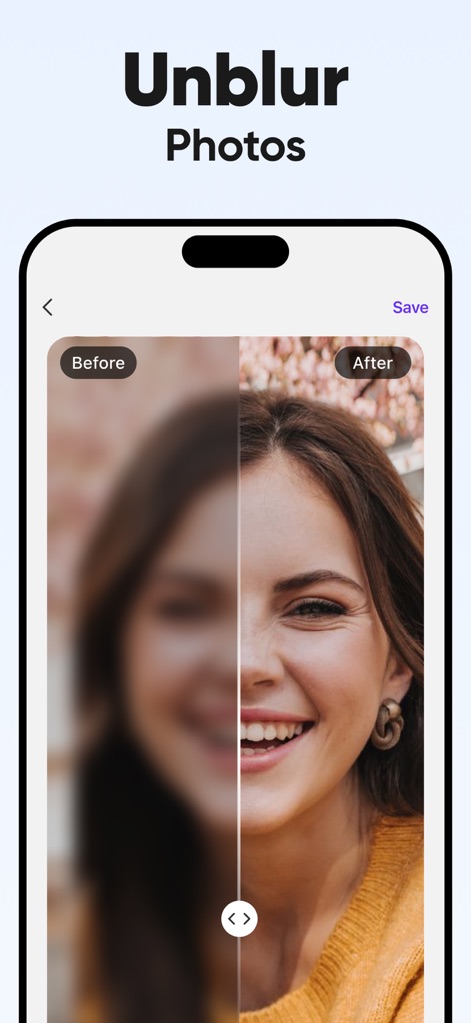
이 도구는 흐릿한 이미지를 선명하게 보정하여, 사용자는 초점이 맞지 않는 부분과 선명해진 얼굴을 명확하게 확인할 수 있습니다.
사진 흐림 제거
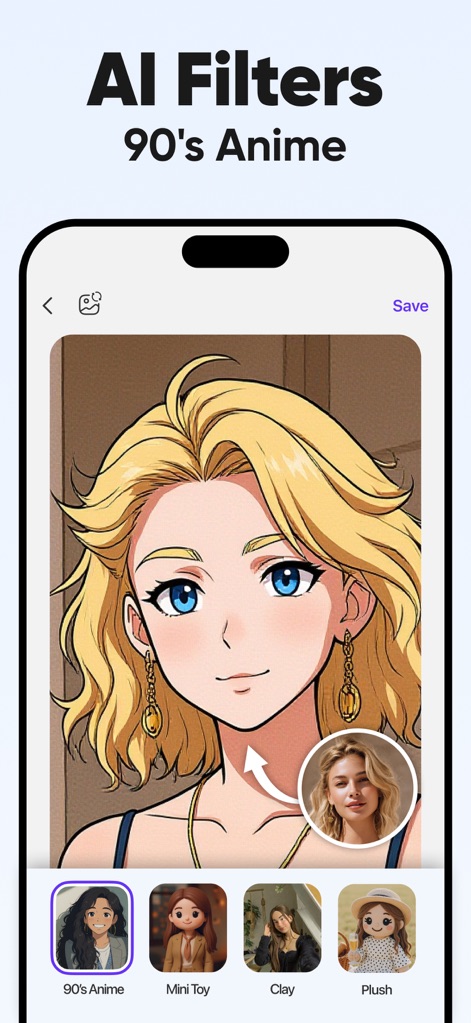
이 앱은 원본 인물 사진을 90년대 애니메이션 스타일로 변환하여, 사용자는 실제 이미지를 독특한 만화 캐릭터로 변경할 수 있습니다.
AI 애니메이션 변환
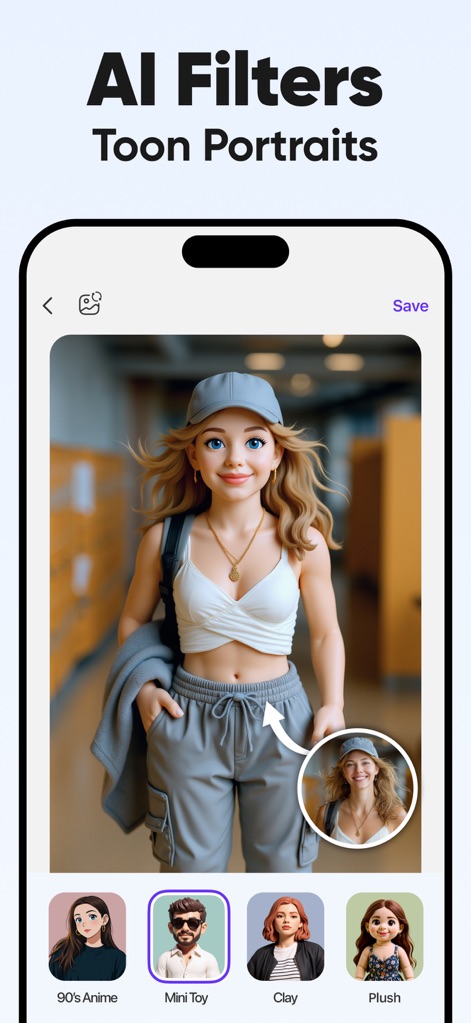
이 도구는 사용자의 사진을 귀여운 툰 포트레이트 스타일로 만들어, 사용자는 실제 인물을 매력적인 3D 만화 캐릭터로 변신시킬 수 있습니다.
AI 툰 초상화
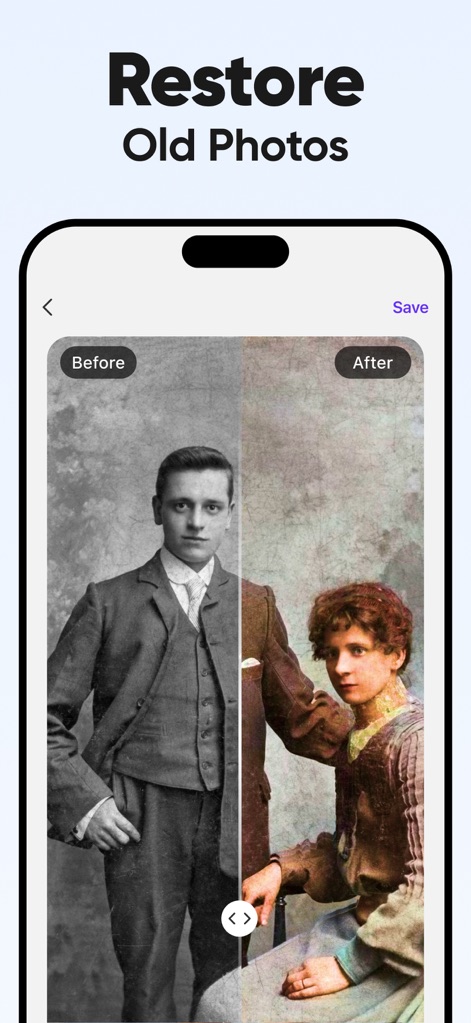
이 앱은 낡고 손상된 흑백 사진을 복원하고 채색하여, 사용자는 바랜 색감과 오래된 질감을 생생한 컬러 이미지로 되돌릴 수 있습니다.
오래된 사진 복원
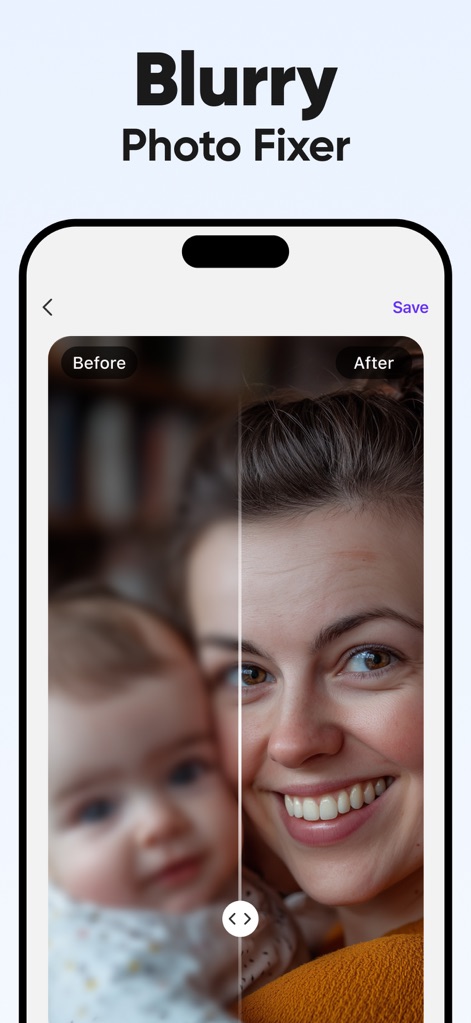
이 도구는 흐릿한 인물 사진을 수정하여, 사용자는 배경의 흐림과 전경의 선명한 얼굴을 명확하게 확인할 수 있습니다.
흐린 사진 수정
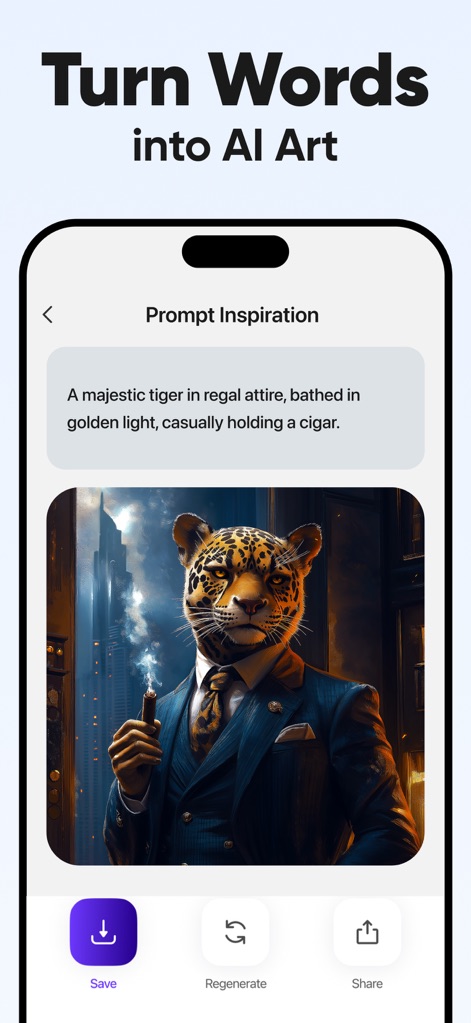
이 앱은 텍스트 설명을 기반으로 이미지를 생성하여, 사용자는 추상적인 아이디어를 구체적인 AI 예술 작품으로 시각화할 수 있습니다.
텍스트 AI 예술
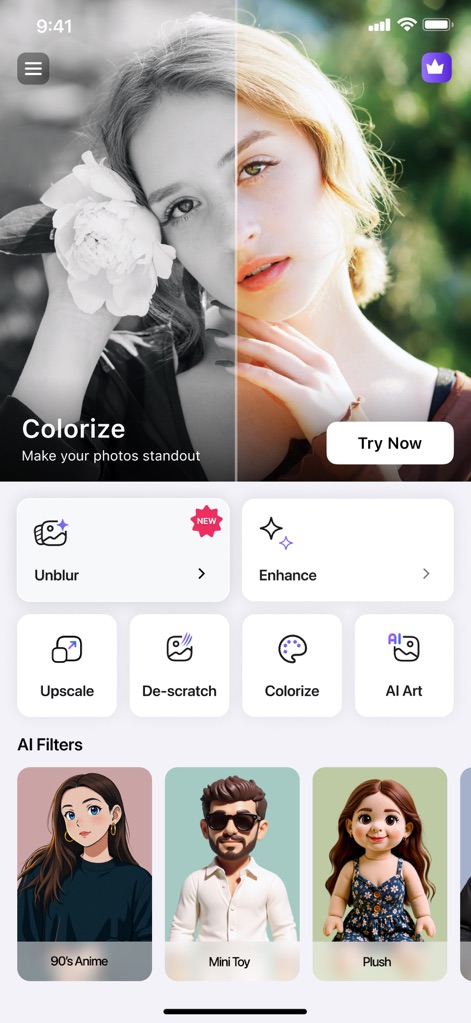
이 앱은 사진 선명화 및 이미지 채색과 같은 핵심 기능을 한곳에 제공하여, 사용자는 다양한 편집 도구와 AI 필터 옵션을 편리하게 탐색할 수 있습니다.
핵심 기능 둘러보기
설명
Download
비슷한 앱
유사한 기능과 사용자 경험을 가진 앱

EPIK - AI Photo & Video Editor
SNOW Corporation

Citrus: AI 1 Tap Perfect Photo
Wemagine.ai LLP

SnapEdit: Photo Editor AI
SilverAI Joint Stock Company

Background Eraser 〜 Stickers
handyCloset Inc.

PhotoScan by Google Photos
Google LLC

Magic Eraser - Remove Object
Creatix Technology Global Limited

Magic Eraser Background Editor
Honk Honk Punch Pty Ltd

ProKnockOut-Cut Paste Photos
Shenzhen Qianhai Happy Tour Network Technology Co., Ltd.

Background Eraser - Remove BG*
SHANTANU PTE. LTD.
이 페이지는 앱이나 개발자의 공식 페이지가 아니며, 정보 제공 및 논평을 목적으로 작성된 독립 편집 간행물입니다. 명시적으로 달리 언급되지 않는 한, 해당 앱이나 개발자는 MWM, Apple, Google Play, 앱 퍼블리셔 또는 앱 개발자와 제휴, 보증, 후원, 승인 또는 공식적으로 연결되어 있지 않으며, 이 페이지의 어떤 내용도 해당 앱이 MWM의 서비스를 사용하여 개발되었음을 의미하지 않습니다. 모든 상표, 로고, 스크린샷 및 기타 콘텐츠는 해당 소유자의 자산입니다.