Yamera (Manual Camera)
다운로드: App Store

이 페이지는 앱이나 개발자의 공식 페이지가 아니며, 정보 제공 및 논평을 목적으로 작성된 독립 편집 간행물입니다. 명시적으로 달리 언급되지 않는 한, 해당 앱이나 개발자는 MWM, Apple, Google Play, 앱 퍼블리셔 또는 앱 개발자와 제휴, 보증, 후원, 승인 또는 공식적으로 연결되어 있지 않으며, 이 페이지의 어떤 내용도 해당 앱이 MWM의 서비스를 사용하여 개발되었음을 의미하지 않습니다. 모든 상표, 로고, 스크린샷 및 기타 콘텐츠는 해당 소유자의 자산입니다.

로고: Yamera (Manual Camera)
다운로드: App Store

Yamera (Manual Camera)

ISO, 초점, 노출을 독립적으로 정밀하게 설정하여 사진 및 4K 동영상의 수준을 높이세요. 자동 모드에 만족하지 말고, 당신의 비전을 그대로 담아내세요.

주요 수치

다운로드

1M+

사용자 평점

4.6/5

총 평가 수

3K+

개발사

AppMadang

카테고리

Photo & Video

지원 언어

3

최신 버전

5.5

크기

5.1 MB

출시일

2015년 1월 27일
기능

완벽한 창의적 제어

AI가 사진을 결정하도록 두지 마세요. Yamera는 iPhone을 전문가용 DSLR로 변환하여 시네마틱 결과물을 위한 정밀한 수동 제어 기능을 제공합니다.

독립적인 수동 재정의

AI 간섭 없이 원하는 노출을 정확하게 캡처하기 위해 ISO, 셔터 속도, 초점을 수동으로 잠금으로써 '자동 짜증'에서 벗어나세요.

전문가급 화이트 밸런스

전문적인 워크플로우와 일관된 후반 작업을 위해 필수적인 내장 회색 카드 보정 도구를 사용하여 완벽한 색상 정확도를 달성하세요.

다음 스크린샷과 설명은 앱의 공식 스토어 목록에서 직접 가져온 것이며 앱 개발자의 자산입니다.

앱 스토어

스크린샷
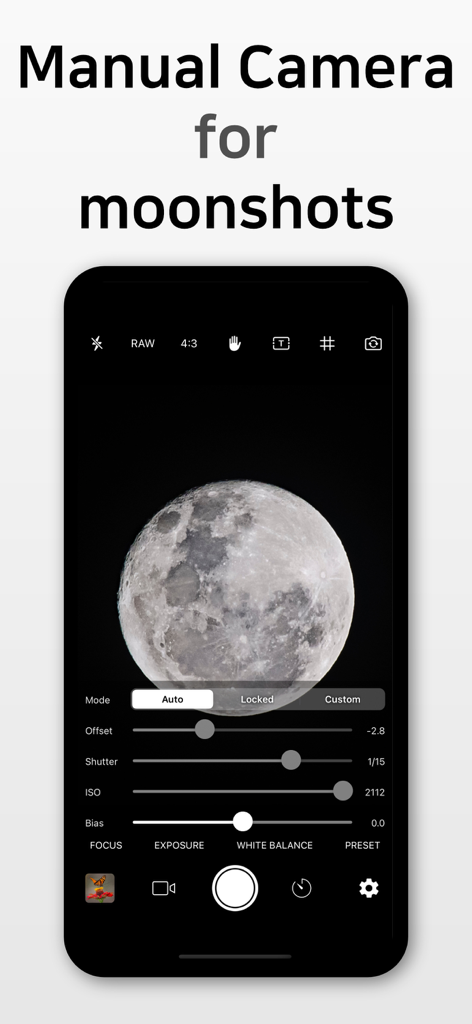
Yamera (Manual Camera) - Yamera 앱 인터페이스는 달 사진 촬영을 위한 수동 노출 및 셔터 제어를 보여줍니다.
Yamera 앱 인터페이스는 달 사진 촬영을 위한 수동 노출 및 셔터 제어를 보여줍니다.

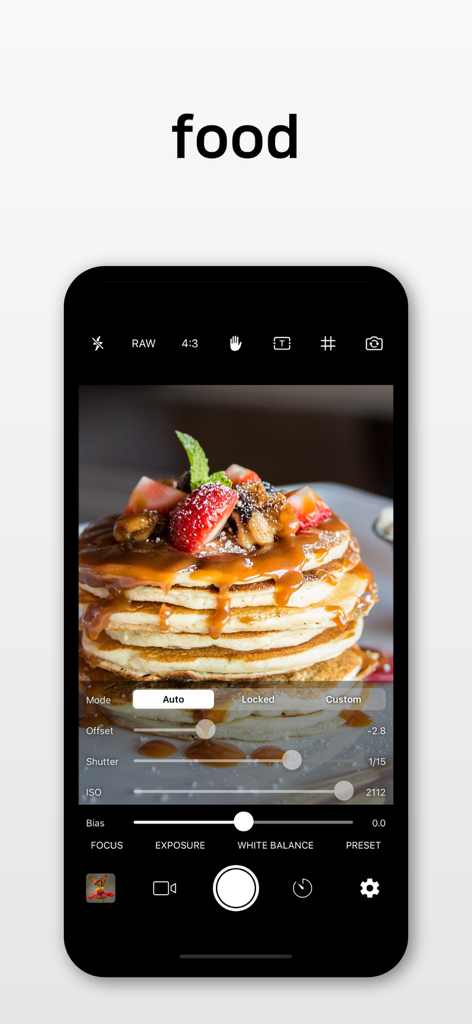
Yamera (Manual Camera) - Yamera 수동 카메라 앱 인터페이스는 음식 사진 촬영을 위한 전문가 수준의 노출 제어를 보여줍니다
Yamera 수동 카메라 앱 인터페이스는 음식 사진 촬영을 위한 전문가 수준의 노출 제어를 보여줍니다

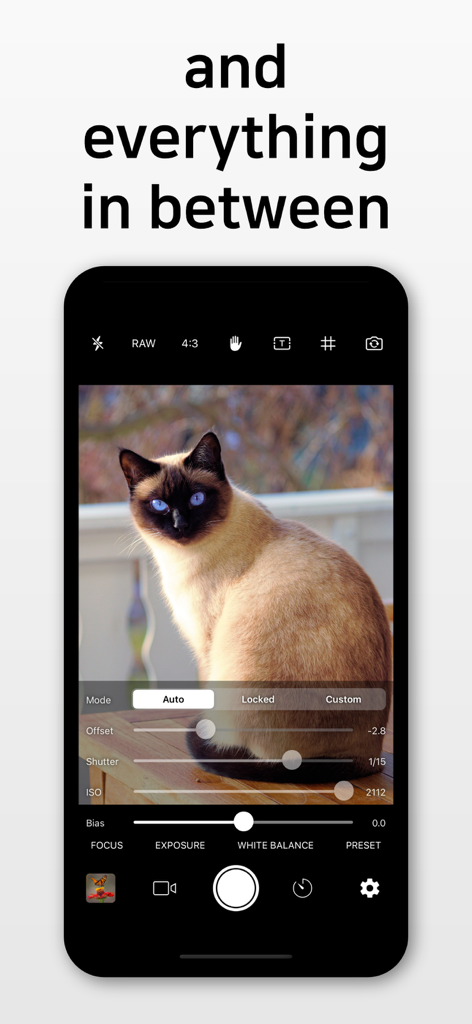
Yamera (Manual Camera) - Yamera 앱 인터페이스는 고양이 사진이 있는 뷰파인더와 함께 ISO 및 셔터 속도와 같은 수동 노출 제어를 보여줍니다

Yamera 앱 인터페이스는 고양이 사진이 있는 뷰파인더와 함께 ISO 및 셔터 속도와 같은 수동 노출 제어를 보여줍니다

설명

* Custom exposure for your iPhone/iPad Camera * Full independent control of Focus, Exposure and White Balance -------------------------------------- Yamera - Full Manual Camera 【Introduction】 * Yamera is a powerful camera app with full control over your image. * Quickly and simply adjust all parameters of your image. * No more tapping and hoping automatic can understand what you want. 【Full Manual Control】 * Shutter * ISO * White Balance * Focus * Exposure Compensation * Gray Card : Place a gray card in the center of the screen (more than 50% size). It will automatically adjust White Balance parameters. 【Photo Camera Features】 * Auto/Manual control of Focus/Exposure/WhiteBalance * Timer Shot * Digital zoom (6x) * Stabilization * Date Stamp * EXIF metadata * GeoTag * Flash (On/Off/Auto) * Front-camera mirroring 【Video Camera Features】 * 4K video recording * Slo-mo video recording * Take a photo while recording a video * Auto/Manual control of Focus/Exposure/WhiteBalance * Digital zoom (6x) * Stabilization * Max frame-rate recording * App Library (see the below) 【Tip】 * URL Scheme = Yamera:// 【App Library】 * In any situation, your photo/video is safe. * If something goes wrong, the photo/video is automatically saved into 'App Library'. * One of the following reasons can cause an error. - First, the app cannot access Photos. In this case, please go to Settings -> Choose the app -> Grant Photos access rights. - Second, there is no enough disk space. Please check the space. 【App Library - How to Use】 * You can extract files stored in App Library. Please follow the below steps. [1] Connect your iPhone/iPad to PC via USB cable. [2] Run iTunes. [3] Select iPhone/iPad on the menu. [4] Select Application on the menu. [5] Select the app on the bottom menu. [6] Files will be displayed on the right-side. Please copy the files to your PC.

Download

다운로드: App Store

이 페이지는 앱이나 개발자의 공식 페이지가 아니며, 정보 제공 및 논평을 목적으로 작성된 독립 편집 간행물입니다. 명시적으로 달리 언급되지 않는 한, 해당 앱이나 개발자는 MWM, Apple, Google Play, 앱 퍼블리셔 또는 앱 개발자와 제휴, 보증, 후원, 승인 또는 공식적으로 연결되어 있지 않으며, 이 페이지의 어떤 내용도 해당 앱이 MWM의 서비스를 사용하여 개발되었음을 의미하지 않습니다. 모든 상표, 로고, 스크린샷 및 기타 콘텐츠는 해당 소유자의 자산입니다.






