
이 페이지는 앱이나 개발자의 공식 페이지가 아니며, 정보 제공 및 논평을 목적으로 작성된 독립 편집 간행물입니다. 명시적으로 달리 언급되지 않는 한, 해당 앱이나 개발자는 MWM, Apple, Google Play, 앱 퍼블리셔 또는 앱 개발자와 제휴, 보증, 후원, 승인 또는 공식적으로 연결되어 있지 않으며, 이 페이지의 어떤 내용도 해당 앱이 MWM의 서비스를 사용하여 개발되었음을 의미하지 않습니다. 모든 상표, 로고, 스크린샷 및 기타 콘텐츠는 해당 소유자의 자산입니다.


다운로드
2.5M+사용자 평점
총 평가 수
16.7K개발사
카테고리
Utilities지원 언어
10최신 버전
13.2크기
57.0 MB출시일
2022년 8월 19일테크 분석가가 평가한 모바일 파일 관리 솔루션의 주요 이점
ZArchiver 앱 핵심 기능 분석
광범위한 압축/해제 형식 지원
이 앱은 ZIP, RAR, 7z 등 주요 압축 파일 형식을 압축하고 해제하는 기능을 제공하여 광범위한 파일 관리 요구 사항을 충족시킵니다.
대용량 파일 크기 최적화
이 도구는 대용량 파일을 효과적으로 압축하여 모바일 장치의 저장 공간을 절약하고, 파일을 더 빠르고 효율적으로 공유할 수 있도록 돕습니다.
멀티미디어 파일 압축 및 관리
사용자는 사진과 비디오 파일을 효율적으로 압축하여 저장 공간을 절약하고, 디지털 콘텐츠를 손쉽게 관리 및 공유할 수 있습니다.
다양한 문서 및 폴더 관리
이 앱은 PDF, XLS, TXT 등의 문서 파일과 전체 폴더를 쉽고 빠르게 압축하거나 압축 해제할 수 있는 기능을 제공합니다.
간편한 원클릭 압축/해제
이 도구는 직관적인 인터페이스와 원클릭 기능을 통해 사용자가 파일을 빠르고 편리하게 압축하거나 압축을 해제할 수 있게 해줍니다.
효율적인 파일 공유 준비
이 앱은 압축된 파일을 이메일이나 메시징 앱을 통해 다른 사람에게 쉽게 보내기 위한 준비 과정을 간소화하여 공유 효율성을 높입니다.
자주 묻는 질문
에 대해 알아야 할 모든 것 ZArchiver
What is ZArchiver used for?
ZArchiver is a file compressor and zip file opener. It extracts and compresses various file types, including documents, photos, and videos, reducing their size and managing archives.
Which file types can ZArchiver compress and extract?
ZArchiver compresses and extracts doc, docx, ppt, pptx, xls, xlsx, pdf, txt, 7z, Rar, photos, and videos. It also reads Rar files.
Does ZArchiver offer a subscription for its features?
Yes, ZArchiver offers auto-renewing subscriptions for ad-free access. Options include weekly ($2.99), 1-month ($4.99), and 1-year ($29.49) durations.
How can I remove ads in the ZArchiver app?
Users can remove ads in the ZArchiver app by purchasing an auto-renewing subscription. This provides access to all app features without advertisements.
Can I share files using the ZArchiver app?
Yes, ZArchiver allows users to share files and folders after compressing them. The app also supports Wi-Fi transfer, as shown on the "Send File" screen.
Does ZArchiver allow file management operations like deleting or renaming?
Yes, ZArchiver provides file management options. Users can rename, move, copy, send, archive, and delete files directly within the application interface.
How do I compress files using the ZArchiver application?
Users open the app, select desired photos, videos, or documents, and then compress them using the zip tool within ZArchiver.
Where can I find the Privacy Policy for ZArchiver?
The Privacy Policy for ZArchiver is available at the provided link: https://zipunzipextractor.blogspot.com/2022/08/privacy-policy.html.
다음 스크린샷과 설명은 앱의 공식 스토어 목록에서 직접 가져온 것이며 앱 개발자의 자산입니다.
앱 스토어
스크린샷
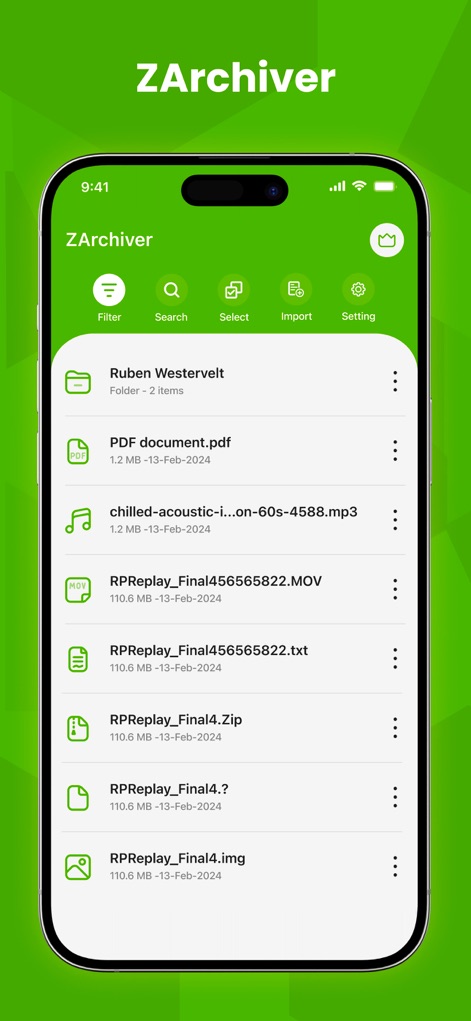
사용자는 다양한 파일 형식의 정돈된 파일 목록을 한눈에 확인할 수 있으며, 상단의 필터 및 검색 옵션으로 원하는 파일을 손쉽게 찾을 수 있습니다.
깔끔한 파일 관리
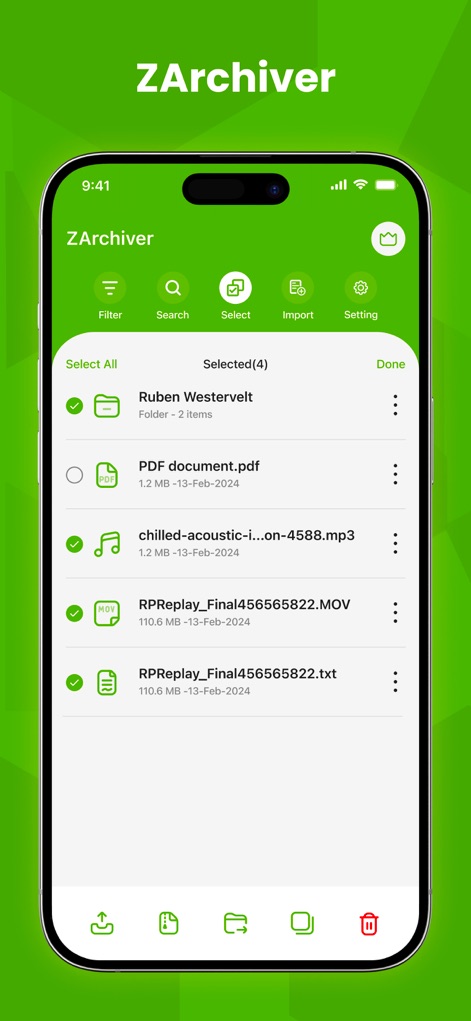
이 앱은 다중 파일 선택 기능을 제공하여 사용자가 여러 파일을 동시에 관리할 수 있도록 하며, 하단의 직관적인 액션 바를 통해 압축, 이동, 삭제 등 다양한 작업을 수행할 수 있습니다.
간편한 다중 선택
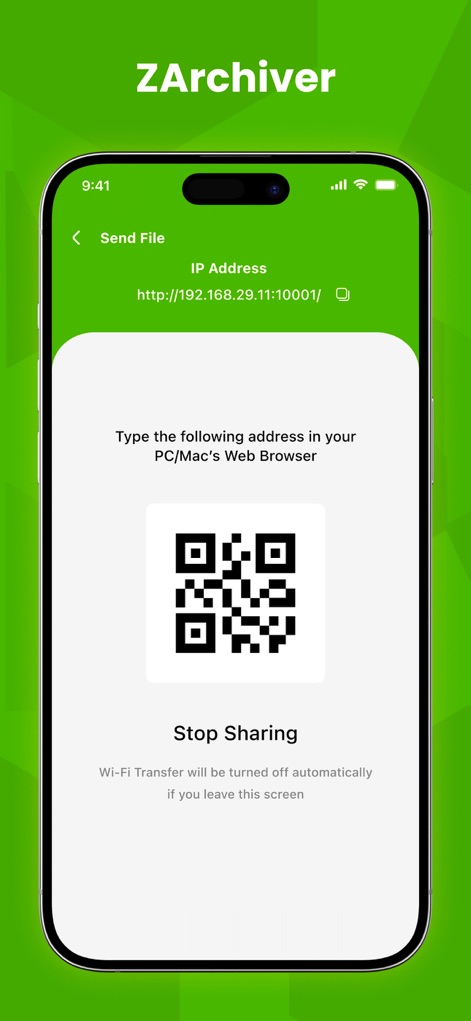
사용자는 Wi-Fi 파일 전송 기능을 통해 복잡한 과정 없이 장치 간 파일을 공유할 수 있으며, QR 코드 스캔을 활용하여 손쉽게 연결하고 파일을 주고받을 수 있습니다.
무선 파일 공유
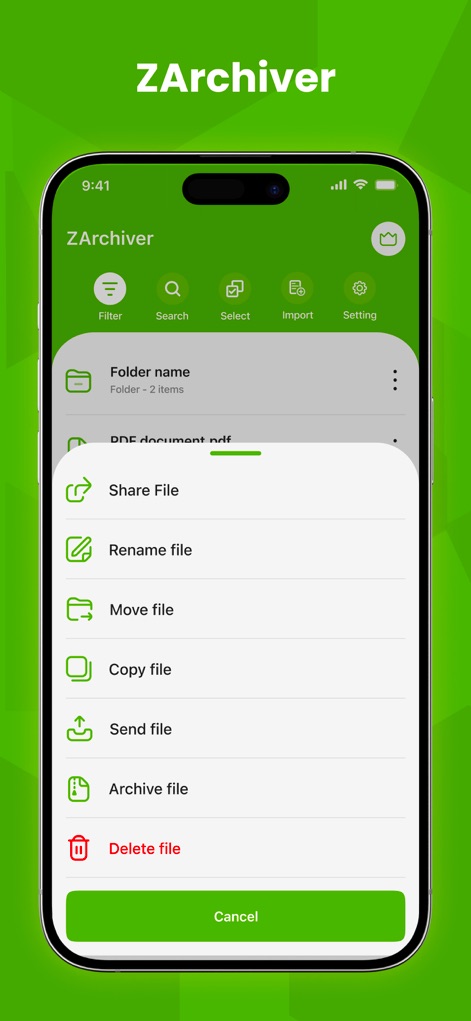
특정 파일에 대한 컨텍스트 메뉴를 통해 사용자는 파일 공유, 이름 변경, 이동, 그리고 압축(Archive)과 같은 다양한 파일 관리 기능을 즉시 실행할 수 있습니다.
강력한 파일 도구
설명
Download
비슷한 앱
유사한 기능과 사용자 경험을 가진 앱

Unzip – ZIP RAR 7Z Extractor
Little Sweet Technology Co., Ltd.

Unzip - zip,rar,7z file opener
书勇 贾

Zip & RAR File Extractor
PENGHUI ZHAO

iZip – Zip Unzip Unrar
ComcSoft Corporation

Zip, RAR, 7z File Extractor
FANGZHOU INTERACTIVE TECHNOLOGY CO., LIMITED

ZArchiver: UnZip, UnRar, 7Z
TIMON SOFTWARE SOLUTIONS COMPANY LIMITED

iRAR - zip,rar,7z file opener
书敏 贾

Zip & RAR & 7z File Extractor
琳 胡

MT管理器
瑞 胡
이 페이지는 앱이나 개발자의 공식 페이지가 아니며, 정보 제공 및 논평을 목적으로 작성된 독립 편집 간행물입니다. 명시적으로 달리 언급되지 않는 한, 해당 앱이나 개발자는 MWM, Apple, Google Play, 앱 퍼블리셔 또는 앱 개발자와 제휴, 보증, 후원, 승인 또는 공식적으로 연결되어 있지 않으며, 이 페이지의 어떤 내용도 해당 앱이 MWM의 서비스를 사용하여 개발되었음을 의미하지 않습니다. 모든 상표, 로고, 스크린샷 및 기타 콘텐츠는 해당 소유자의 자산입니다.