
This page is not an official page of the app or its developer, but an independent editorial publication created for informational and commentary purposes. Unless expressly stated otherwise, neither the app nor its developer is affiliated with, endorsed by, sponsored by, authorized by, or otherwise officially connected with MWM, Apple, Google Play, the app publisher, or the app's developer, and nothing on this page implies that the app was developed using MWM's services. Any trademarks, logos, screenshots, and other content remain the property of their respective owners.


Music Editor Cut MP3 Converter
Audio chaos? It empowers users to sculpt sound into submission, turning unruly clips into polished tracks.
Downloads
2.5M+User Rating
Total Ratings
37.6KPublisher
Category
MusicLocales
23Latest Version
1.4.33Size
328.9 MBFirst Released
Jan 31, 2023A Comprehensive Analysis of Core Functionalities for Audio Customization
Software Evaluation: Music Editor Cut MP3 Converter
Precise Audio Trimming
It allows users to cut audio with millisecond precision, enabling the creation of custom ringtones or short clips for social media.
Video to Audio Conversion
The app provides functionality to extract audio from video files, perfect for creating custom sound clips or listening to music from video content.
Voice Transformation
This tool features various voice effects, allowing users to alter vocal pitch, tone, and speed for creative or humorous audio content.
Multi-track Audio Mixing
It allows users to combine multiple audio tracks, splice different segments, and insert sound effects to produce more complex and layered compositions.
Universal Audio Converter
The app provides extensive format conversion capabilities, ensuring audio compatibility across various devices and platforms.
Audio Dynamics Control
This tool features granular control over audio volume, speed, and pitch, enabling fine-tuning of sound characteristics for desired effects.
Advanced Audio Equalizer
It allows users to adjust sound frequencies with a built-in equalizer, providing diverse sound effects and enhancing audio quality.
Audio Compression & Optimization
The app provides tools to compress audio files, reducing their size for easier sharing or uploading while allowing control over output parameters.
Frequently Asked Questions
Everything you need to know about Music Editor Cut MP3 Converter
What is the Music Editor Cut MP3 Converter app?
Music Editor Cut MP3 Converter, also known as Super Sound, is a powerful audio editor. It supports functions like audio editing, cutting, splicing, mixing, format conversion, and voice changing to create music and ringtones.
Can Music Editor Cut MP3 Converter convert video to audio?
Yes, Music Editor Cut MP3 Converter converts video files to audio. This feature allows users to extract audio from videos and listen to them as desired.
Does the Music Editor Cut MP3 Converter app include a voice changer?
Yes, Music Editor Cut MP3 Converter offers a voice changer. Users can alter their voice to male, elderly, or robot, and customize tone, pitch, and speed for creative effects.
What audio editing features are available in Music Editor Cut MP3 Converter?
Music Editor Cut MP3 Converter provides audio mixing, fade in/out effects, volume adjustment, tone and tempo changes, and audio speed modification for comprehensive editing.
How do I cut audio with precision in Music Editor Cut MP3 Converter?
Music Editor Cut MP3 Converter enables precise audio cutting in milliseconds. Users can perform multiple cuts, save specific segments, or choose to keep or delete selected audio parts.
Can I combine multiple audio files using Music Editor Cut MP3 Converter?
Yes, Music Editor Cut MP3 Converter supports splicing, which combines two or more audio files into a single track. This creates combined songs or audio compositions.
Which audio formats does Music Editor Cut MP3 Converter support for conversion?
Music Editor Cut MP3 Converter supports various audio formats for conversion, including MP3, AAC, WAV, FLAC, M4A, and AMR, ensuring broad compatibility.
Is Music Editor Cut MP3 Converter a subscription-based service?
Yes, Music Editor Cut MP3 Converter operates on an auto-renewable subscription model. It offers both monthly and yearly subscription durations for users.
How can I cancel my Music Editor Cut MP3 Converter subscription?
You can cancel your Music Editor Cut MP3 Converter auto-renewal subscription through your iPhone account settings. Cancellation must occur at least 24 hours before the current period ends.
Does Music Editor Cut MP3 Converter app offer an equalizer?
Yes, Music Editor Cut MP3 Converter includes an equalizer feature. This allows users to apply various sound effects to customize their audio output.
Does the Music Editor Cut MP3 Converter app provide multitrack editing?
Yes, Music Editor Cut MP3 Converter supports multitrack editing. This feature, indicated by a crown icon, allows users to layer and mix multiple audio streams simultaneously.
Can I create ringtones with the Music Editor Cut MP3 Converter app?
Yes, Music Editor Cut MP3 Converter enables users to create ringtones. You can set your edited audio files as personalized ringtones directly within the app.
What new features are available in the Music Editor Cut MP3 Converter app?
Recent additions to the Music Editor Cut MP3 Converter app include 'Remove vocals' and 'Noise suppressor,' marked as new features in the main interface.
The following screenshots and description are sourced directly from the app's official store listing and are the property of the app developer.
App Store
Screenshots
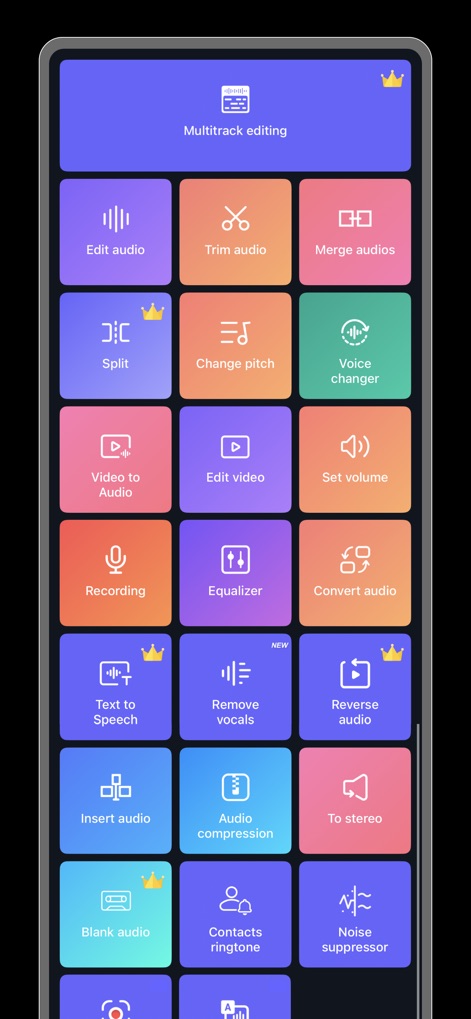
Discover the extensive array of features available, from 'Multitrack editing' to advanced 'Voice changer' capabilities, all organized for intuitive access.
Comprehensive Toolkit

See how this tool provides a visual multitrack interface for precise audio manipulation and recording, allowing users to effortlessly 'Split' and 'Trim' segments.
Multitrack Mastery

This screen showcases core audio adjustments, enabling users to easily apply 'Fade in' and 'Fade out' effects or instantly activate the 'Voice changer'.
Core Editor Controls

Experience the app's millisecond-accurate trimming interface, allowing users to define precise 'start and end points' on the detailed audio waveform for perfect cuts.
Precise Trimming

This feature allows users to effortlessly convert 'video files to audio', providing a clear preview thumbnail and a simple 'Save' option for extracted tracks.
Media Conversion

Explore the dynamic 'Voice changer' capabilities, offering intuitive sliders for 'Tone, Tempo, and Speed' adjustments alongside fun preset options like 'Robot' or 'Minions'.
Voice Transformation

The app simplifies audio merging, allowing users to combine multiple tracks with indicated 'Fade in&Fade out' options, previewing the result on a clear timeline.
Audio Merging
Description
Download
More Like This
Apps with similar features and user experience
Ringtones Maker - the ring app
苏娟 陈

LittyTone:Ringtone & AI Voice
Shenzhen Chuangyuan Huaqi technology Co., LTD

Garage Ringtones for iPhone
Appflow Software - FZCO

ClipTone: Ringtone & AI Cover
BUD TECHNOLOGIES, PTE. LTD.

Mp3 Cutter - M4a, Music Cutter
TOWER OF HANOI SOFTWARE COMPANY LIMITED

Ringtone Maker & MP3 Converter
Oleksandr Pylaiev

Ringtone Maker +
迪刚 宋
Any Ringtones
Ion Danilov

Ringtone Maker Garage
TwinBit Ltd
This page is not an official page of the app or its developer, but an independent editorial publication created for informational and commentary purposes. Unless expressly stated otherwise, neither the app nor its developer is affiliated with, endorsed by, sponsored by, authorized by, or otherwise officially connected with MWM, Apple, Google Play, the app publisher, or the app's developer, and nothing on this page implies that the app was developed using MWM's services. Any trademarks, logos, screenshots, and other content remain the property of their respective owners.