
This page is not an official page of the app or its developer, but an independent editorial publication created for informational and commentary purposes. Unless expressly stated otherwise, neither the app nor its developer is affiliated with, endorsed by, sponsored by, authorized by, or otherwise officially connected with MWM, Apple, Google Play, the app publisher, or the app's developer, and nothing on this page implies that the app was developed using MWM's services. Any trademarks, logos, screenshots, and other content remain the property of their respective owners.


LittyTone:Ringtone & AI Voice
Stop settling for basic ringtones. Extract audio from TikToks, trim with surgical precision, and set custom alerts in one tap. Elevate your iPhone's aesthetic with the ultimate creator-first sound studio.
Downloads
278K+User Rating
Total Ratings
1K+Publisher
Category
MusicLocales
22Latest Version
1.2.0Size
13.7 MBFirst Released
Mar 24, 2025Your Aesthetic, Your Sound
Stop settling for basic default alerts. LittyTone gives you the power to turn viral videos, trending memes, and AI creations into signature ringtones in seconds.
Turn Content into Audio
Grab audio directly from your screen recordings or social media clips. If you can watch it, you can make it your next notification sound.
Surgical Waveform Editing
Zero in on the perfect beat or quote with frame-level accuracy. Use professional fades to ensure your ringtone loops flawlessly.
Frequently Asked Questions
Everything you need to know about LittyTone:Ringtone & AI Voice
How does LittyTone create custom ringtones?
LittyTone enables users to craft personalized iPhone ringtones from videos and songs. Users extract audio, then trim it with frame-level accuracy using the waveform editor. The trimmed clip saves as a ringtone in one tap.
Does LittyTone extract audio from videos?
Yes, LittyTone seamlessly extracts crystal-clear audio from any video source. Users convert video content into audio to create custom ringtones and sounds directly within the app.
How does LittyTone ensure precise audio trimming?
LittyTone provides a waveform editor for surgical audio trimming. Users pinpoint start and end points with frame-level accuracy. This ensures precise customization for ringtone creation and editing.
Can LittyTone directly set ringtones on an iPhone?
Yes, LittyTone offers an iOS-Integrated Workflow. Users save trimmed clips as ringtones directly to their iPhone in one tap. This simplifies the process of applying custom sounds.
What audio editing features does LittyTone include?
LittyTone offers advanced audio editing features. Users mix and match audio clips, adjust fade effects, and preview edits in real-time. This provides creative freedom for personalized ringtone creation.
Does LittyTone offer a free trial for premium features?
Yes, LittyTone offers a 3-Day Full Access Trial. Users test premium features, including unlimited clip length and advanced audio filters, during this introductory period.
What are LittyTone's subscription options?
LittyTone provides flexible auto-renewing subscription plans. Users choose between weekly or yearly subscriptions, with pricing adjusted according to region. These plans unlock unlimited creativity.
Does LittyTone have a prank call feature?
Yes, LittyTone includes a prank call feature. Users set up calls with custom caller names, optional locations, and scheduled timing (e.g., 5s, 30s) for entertainment.
Can LittyTone generate AI voice sounds from text?
Yes, LittyTone creates AI voice sounds. Users type text into an "Audio Content" box, and the app converts it into a perfect voice. This allows for customized audio messages.
How can users contact LittyTone support?
Users find support for LittyTone by contacting support@chuangyuanhuaqi.com. This email address provides direct assistance for any inquiries or issues.
Where is LittyTone's privacy policy located?
The privacy policy for LittyTone is available at https://chrome-daphne-6f1.notion.site/Privacy-Policy-1b324b3184d780248bacfcc185affb7b. This link ensures transparency regarding data handling and user privacy.
The following screenshots and description are sourced directly from the app's official store listing and are the property of the app developer.
App Store
Screenshots
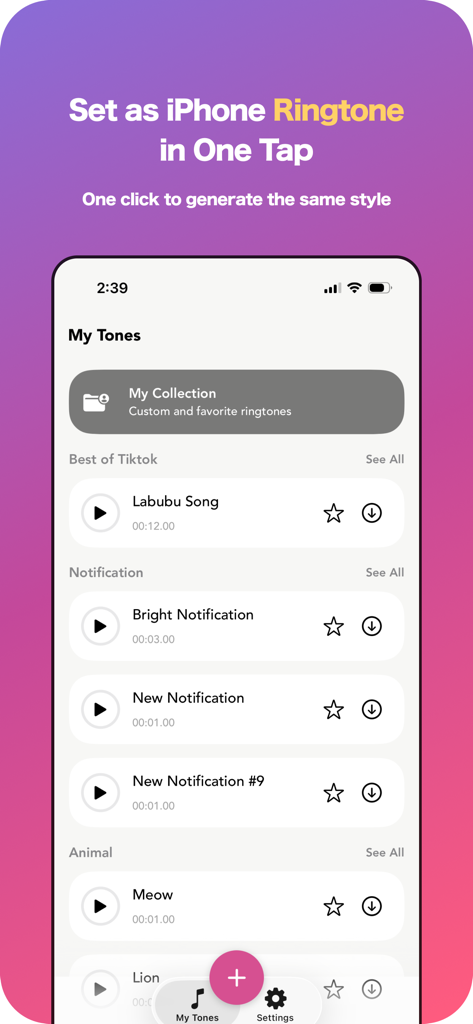
Interface of LittyTone app for setting iPhone ringtones with a list of TikTok songs and notification sounds.
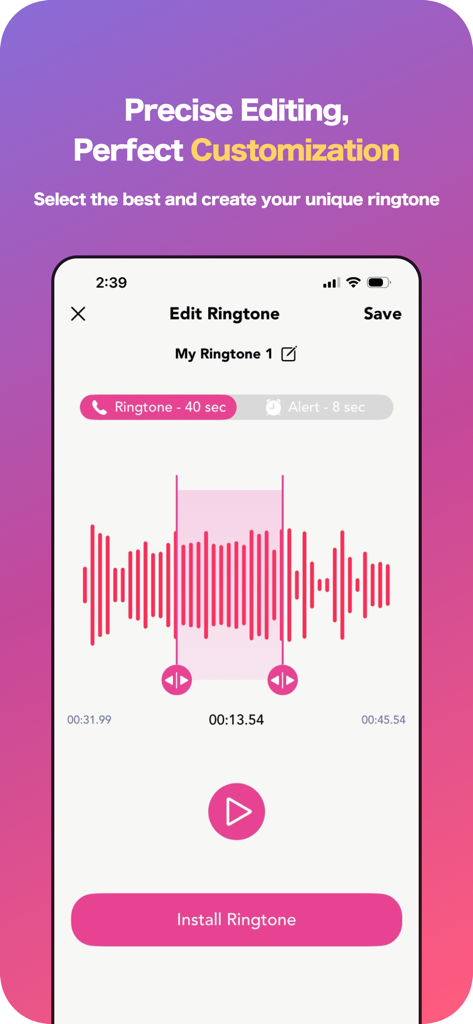
Mobile app screen showing a pink audio waveform editor for precise ringtone trimming and customization.
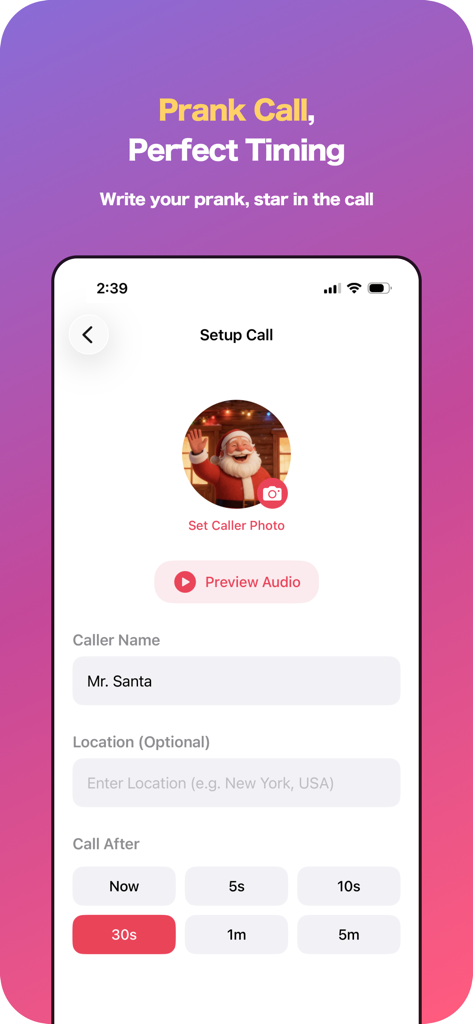
Interface for setting up a scheduled prank call with custom caller photo name and timer
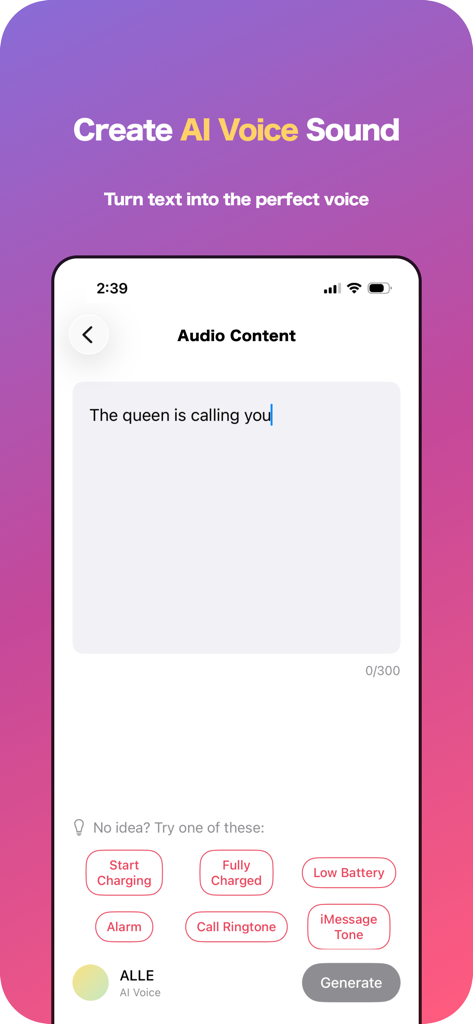
LittyTone app interface showing AI voice creation from text for custom ringtones and notification sounds.
Description
Download
More Like This
Apps with similar features and user experience
Ringtones Maker - the ring app
苏娟 陈
Garage Ringtones for iPhone
Appflow Software - FZCO

ClipTone: Ringtone & AI Cover
BUD TECHNOLOGIES, PTE. LTD.
Music Editor Cut MP3 Converter
Dream United, Ltd.

Mp3 Cutter - M4a, Music Cutter
TOWER OF HANOI SOFTWARE COMPANY LIMITED

Ringtone Maker & MP3 Converter
Oleksandr Pylaiev

Ringtone Maker +
迪刚 宋
Any Ringtones
Ion Danilov
Ringtone Maker Garage
TwinBit Ltd
This page is not an official page of the app or its developer, but an independent editorial publication created for informational and commentary purposes. Unless expressly stated otherwise, neither the app nor its developer is affiliated with, endorsed by, sponsored by, authorized by, or otherwise officially connected with MWM, Apple, Google Play, the app publisher, or the app's developer, and nothing on this page implies that the app was developed using MWM's services. Any trademarks, logos, screenshots, and other content remain the property of their respective owners.