
This page is not an official page of the app or its developer, but an independent editorial publication created for informational and commentary purposes. Unless expressly stated otherwise, neither the app nor its developer is affiliated with, endorsed by, sponsored by, authorized by, or otherwise officially connected with MWM, Apple, Google Play, the app publisher, or the app's developer, and nothing on this page implies that the app was developed using MWM's services. Any trademarks, logos, screenshots, and other content remain the property of their respective owners.


Mp3 Cutter - M4a, Music Cutter
Audio editing just got a brutal simplicity update. This app hands users direct control over their sound, ditching complexity for raw editing power.
Downloads
5M+User Rating
Total Ratings
20.8KPublisher
Category
MusicLocales
33Latest Version
1.15Size
102.7 MBFirst Released
Apr 10, 2019An evaluation of core functionalities catering to mobile audio customization and personalization.
Key Feature Analysis: Mp3 Cutter - M4a, Music Cutter
Precise Audio Trimming
The app provides precise tools for cutting and trimming audio files, allowing users to isolate their favorite song segments.
Customizable Sound Outputs
It allows users to save their edited audio clips as custom ringtones, alarm sounds, notification tones, or standalone music tracks.
Intuitive Editing Interface
This tool features intuitive touch-based controls for selecting audio segments, allowing users to trim the ends or remove middle parts with ease.
Multi-Format Support
The app supports a wide array of audio formats including MP3, M4A, AIFF, and WAV, ensuring compatibility with most music libraries.
Live Audio Recording & Editing
This tool features a built-in audio recorder, enabling users to capture live sound and then instantly edit it to create unique clips.
Direct Ringtone Assignment
It provides the functionality to directly set an edited audio clip as the default ringtone or assign it to specific contacts.
Automatic File Discovery
The app simplifies the process of finding audio files by automatically listing all music and sound clips stored on the mobile device and SD cards.
Shareable Creations
It allows users to easily share their custom-created audio clips and ringtones with friends through various sharing options.
Frequently Asked Questions
Everything you need to know about Mp3 Cutter - M4a, Music Cutter
What is Mp3 Cutter - M4a, Music Cutter?
Mp3 Cutter - M4a, Music Cutter is an application for cutting favorite parts of audio songs and music files. It enables users to create ringtones, alarms, notification tones, or new music from edited audio.
What audio formats does Mp3 Cutter - M4a, Music Cutter support?
Mp3 Cutter - M4a, Music Cutter supports MP3, AIFF, WAV, and M4A formats for ringtone creation and editing. The editor is compatible with these and most other music formats.
Can I record live audio with the Mp3 Cutter - M4a, Music Cutter app?
Yes, the Mp3 Cutter - M4a, Music Cutter app allows recording live audio. Users can then edit and trim these recordings to extract desired segments, ideal for custom tones.
How do I create a custom ringtone using Mp3 Cutter - M4a, Music Cutter?
To create a custom ringtone, select a music file or record live audio within Mp3 Cutter. Then, choose the desired segment and save it as a ringtone, alarm, notification, or new song.
Does Mp3 Cutter - M4a, Music Cutter allow trimming and removing parts of audio?
Yes, Mp3 Cutter - M4a, Music Cutter allows precise audio editing. Options include trimming (removing left/right parts) or removing the middle segment. Users define start and end points.
Can I manage and delete tones created with Mp3 Cutter - M4a, Music Cutter?
Yes, Mp3 Cutter - M4a, Music Cutter provides tools to manage created tones. Users can easily delete any tone, and the app prompts with a confirmation alert before deletion.
Can I merge multiple music files with the Mp3 Cutter - M4a, Music Cutter app?
Yes, Mp3 Cutter - M4a, Music Cutter includes a music merger feature. Users can select and combine up to five separate audio files into a single merged track within the app.
Does Mp3 Cutter - M4a, Music Cutter offer audio equalization?
Yes, Mp3 Cutter - M4a, Music Cutter features an audio equalizer. Users can adjust frequency bands manually or apply predefined presets like Flat, Classical, Pop, Rock, and R&B for sound customization.
Can I boost the bass or volume in audio using Mp3 Cutter - M4a, Music Cutter?
Yes, Mp3 Cutter - M4a, Music Cutter offers both bass boost and volume boost functionalities. These audio enhancement options are available directly within the app's player interface.
Where can I find the privacy policy for Mp3 Cutter - M4a, Music Cutter?
The Privacy Policy for Mp3 Cutter - M4a, Music Cutter is located at https://sites.google.com/view/musiccutter-audioeditor/home. The EULA is linked at https://www.apple.com/legal/internet-services/itunes/dev/stdeula.
The following screenshots and description are sourced directly from the app's official store listing and are the property of the app developer.
App Store
Screenshots
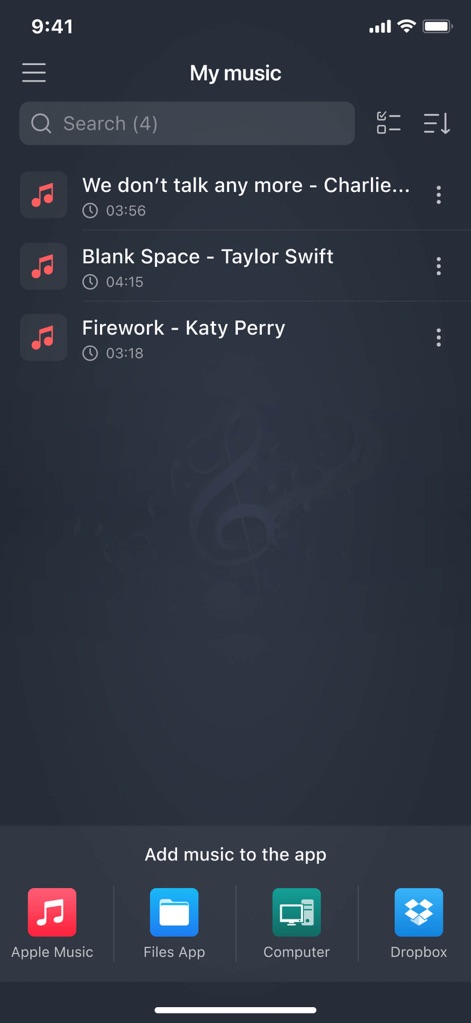
The app seamlessly organizes imported songs and offers diverse integration options for adding music from sources like Apple Music and Dropbox.
Effortless Music Management
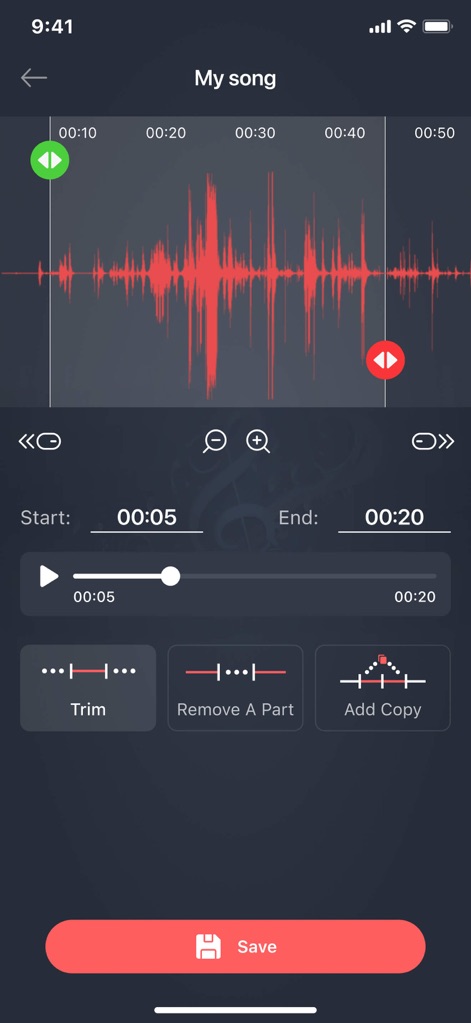
Users can achieve precise cuts using the interactive visual waveform and fine-tune selections with intuitive start and end time selectors.
Precision Audio Editing
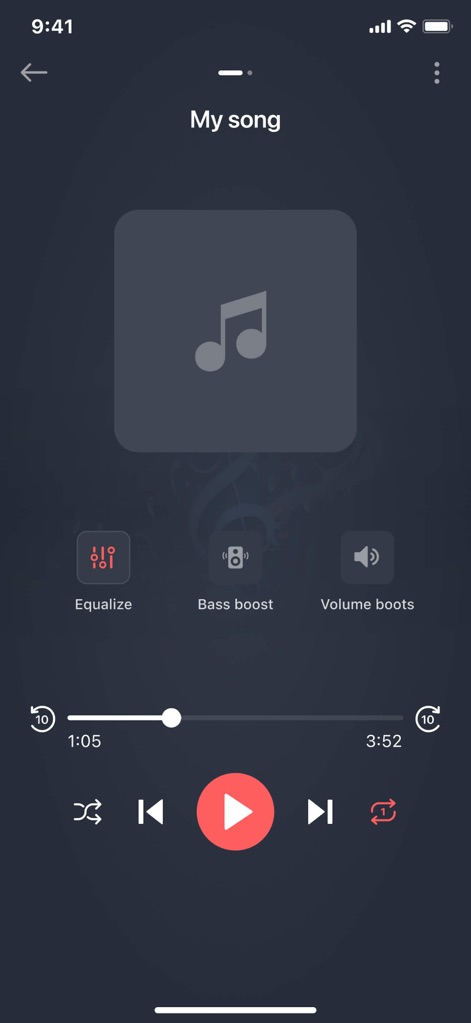
This tool provides clear playback controls and instant access to audio enhancement features like Equalize and Bass Boost for an optimized listening experience.
Enhanced Playback Controls
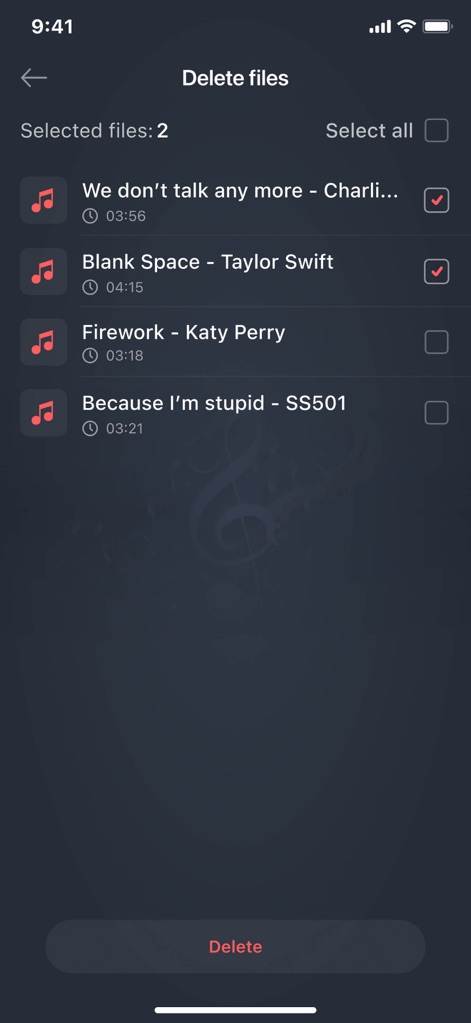
Users can efficiently manage their audio library by employing checkbox selections for multiple files and confirming deletions with a dedicated button.
Streamlined File Management
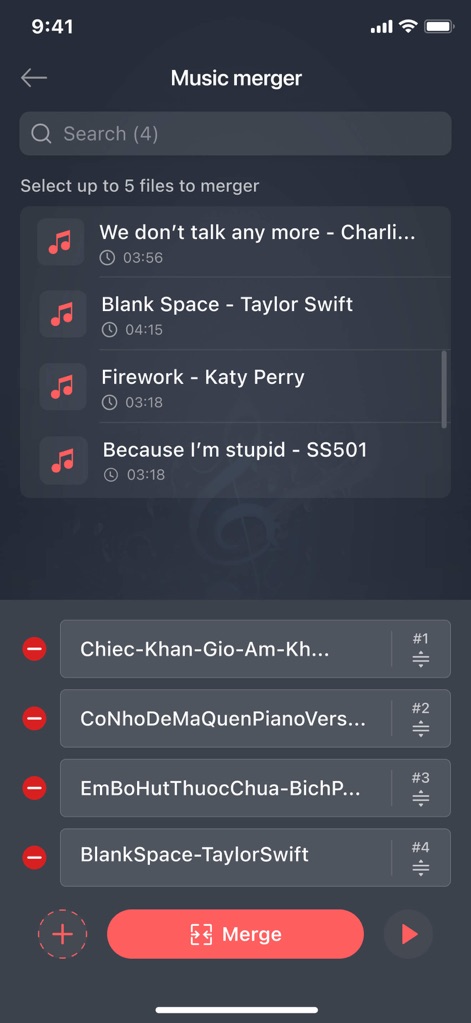
The app facilitates seamless audio merging, allowing users to select multiple songs from their library and arrange the tracks in a customizable order.
Seamless Audio Merging
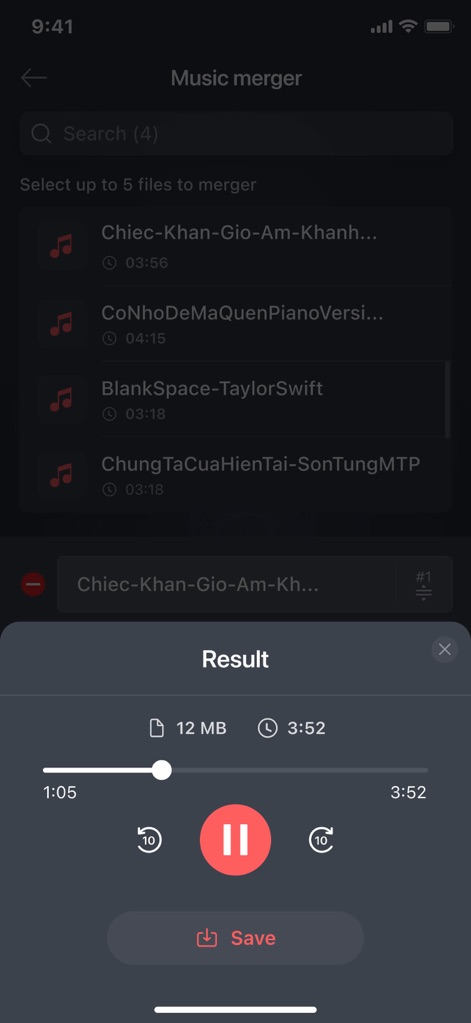
This tool presents the merged audio track with convenient playback controls and a straightforward 'Save' button to finalize the creation.
Merged Track Output
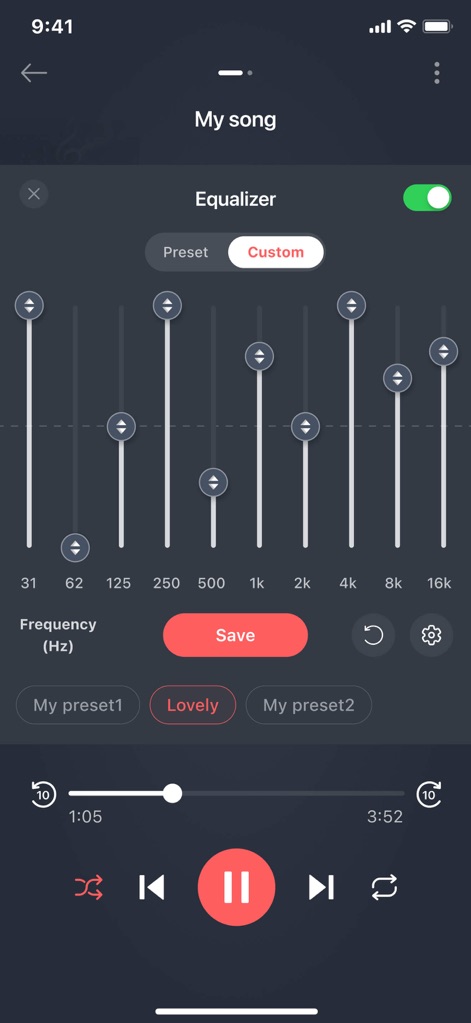
The app provides advanced audio equalization through its multi-band frequency sliders, enabling users to fine-tune sound and save custom presets.
Advanced Audio Equalization
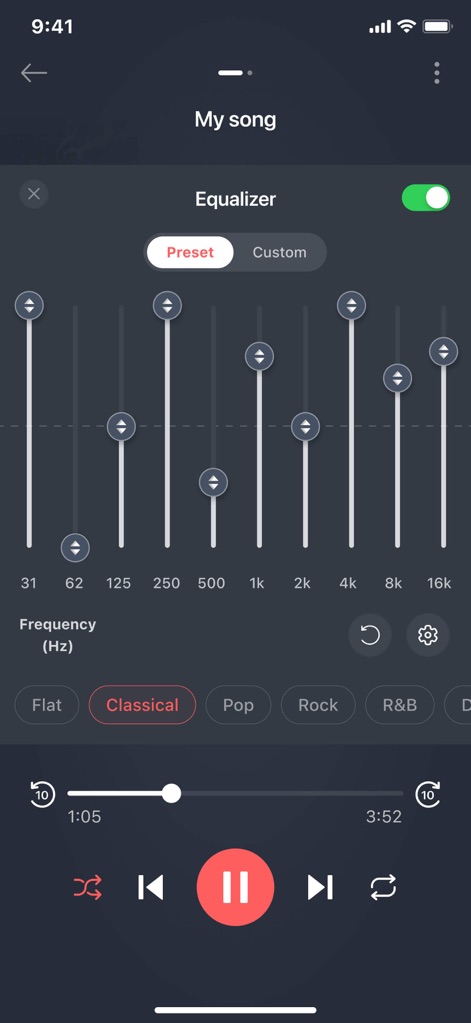
Users can instantly modify their audio with pre-defined genre-based equalizer presets and effortlessly toggle between 'Preset' and 'Custom' modes.
Instant Sound Presets
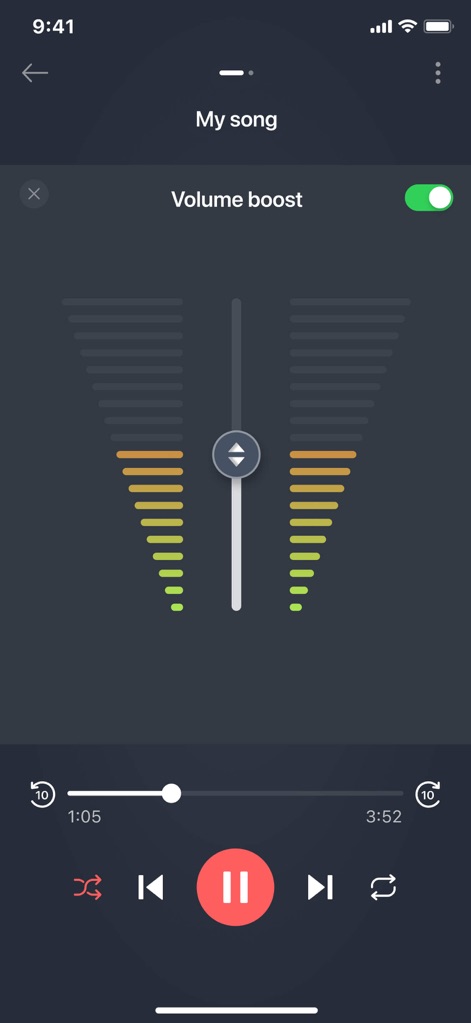
This tool offers dynamic volume control with a responsive central slider and real-time visual indicators to amplify audio levels precisely.
Dynamic Volume Control
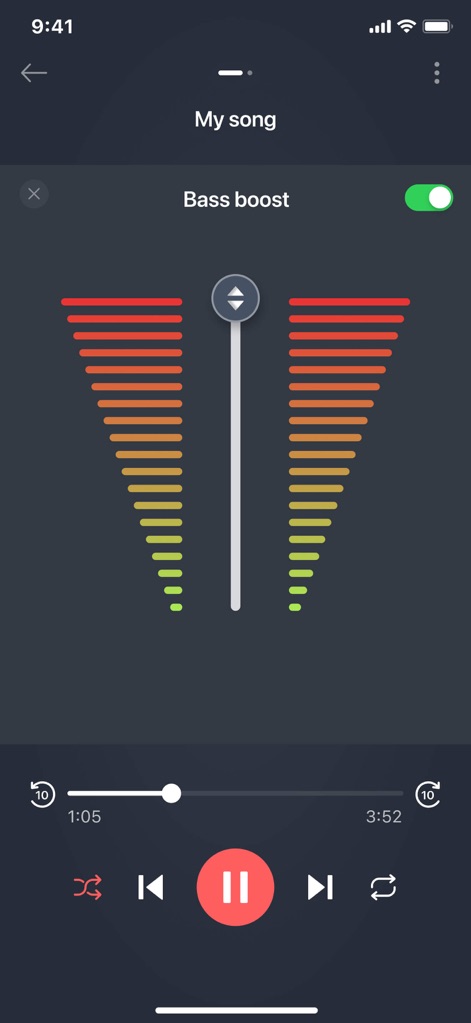
The app allows for deep bass enhancement using a dedicated bass boost slider and provides a clear visual representation of intensified bass levels.
Deep Bass Enhancement
Description
Download
More Like This
Apps with similar features and user experience
Ringtones Maker - the ring app
苏娟 陈

LittyTone:Ringtone & AI Voice
Shenzhen Chuangyuan Huaqi technology Co., LTD

Garage Ringtones for iPhone
Appflow Software - FZCO

ClipTone: Ringtone & AI Cover
BUD TECHNOLOGIES, PTE. LTD.
Music Editor Cut MP3 Converter
Dream United, Ltd.

Ringtone Maker & MP3 Converter
Oleksandr Pylaiev

Ringtone Maker +
迪刚 宋
Any Ringtones
Ion Danilov

Ringtone Maker Garage
TwinBit Ltd
This page is not an official page of the app or its developer, but an independent editorial publication created for informational and commentary purposes. Unless expressly stated otherwise, neither the app nor its developer is affiliated with, endorsed by, sponsored by, authorized by, or otherwise officially connected with MWM, Apple, Google Play, the app publisher, or the app's developer, and nothing on this page implies that the app was developed using MWM's services. Any trademarks, logos, screenshots, and other content remain the property of their respective owners.