
This page is not an official page of the app or its developer, but an independent editorial publication created for informational and commentary purposes. Unless expressly stated otherwise, neither the app nor its developer is affiliated with, endorsed by, sponsored by, authorized by, or otherwise officially connected with MWM, Apple, Google Play, the app publisher, or the app's developer, and nothing on this page implies that the app was developed using MWM's services. Any trademarks, logos, screenshots, and other content remain the property of their respective owners.


希沃白板
Finally, a teaching platform that actually works. This app puts dynamic lessons directly in educators' hands, untethered from the desk.
Downloads
7.5M+User Rating
Total Ratings
9.3KPublisher
Category
EducationLocales
1Latest Version
2.1.52.1Size
159.6 MBFirst Released
May 25, 2019An analytical overview highlighting key functionalities for educators and administrators.
Seewo Whiteboard: Core Features Evaluation
Interactive Courseware Design
The app provides a dedicated interactive courseware tool specifically designed for teaching scenarios, enabling educators to create engaging and dynamic lessons.
Seamless Cross-Device Teaching
This tool features account synchronization between mobile and computer versions, enabling educators to initiate and conduct teaching sessions from either platform.
Mobile Accessibility & Flexibility
It allows users to browse, receive, and share courseware via a mobile version, catering to the need for flexibility and on-the-go lesson management.
Courseware Sharing Capabilities
It enables users to easily share courseware with colleagues or students, facilitating collaboration and distribution of educational content.
Courseware Reception
This tool allows educators to receive courseware from others, promoting easy access to shared resources and collaborative lesson planning.
Courseware Browsing
The app supports efficient browsing of existing courseware, allowing teachers to quickly locate and review teaching materials.
Frequently Asked Questions
Everything you need to know about 希沃白板
What is 希沃白板?
希沃白板 is an interactive courseware tool designed specifically for teaching scenarios. Its mobile version supports browsing, receiving, and sharing courseware.
Does 希沃白板 support mobile teaching?
Yes, 希沃白板 supports mobile teaching. Users can initiate mobile teaching by logging in with the same account used for the PC version.
Is there a PC version of 希沃白板 available?
Yes, there is a PC version of 希沃白板. Further details and access to the PC version are available at easinote.seewo.com.
Does 希沃白板 offer cloud courseware management?
希沃白板 provides cloud courseware management. It offers secure storage and enables users to browse and share files anytime, anywhere.
Can 希沃白板 be used for online teaching research and collaboration?
Yes, 希沃白板 supports online teaching research. It facilitates collective lesson preparation and evaluation, allowing teachers to participate in research activities via their mobile phones.
Does 希沃白板 support dual-screen synchronization for teaching?
Yes, 希沃白板 features dual-screen synchronization for mobile teaching. This provides more flexible teaching methods for educators.
The following screenshots and description are sourced directly from the app's official store listing and are the property of the app developer.
App Store
Screenshots

This initial screen clearly positions the app with its "Born for interactive teaching" motto and showcases the recognizable 希沃白板 branding.
Interactive Teaching Born
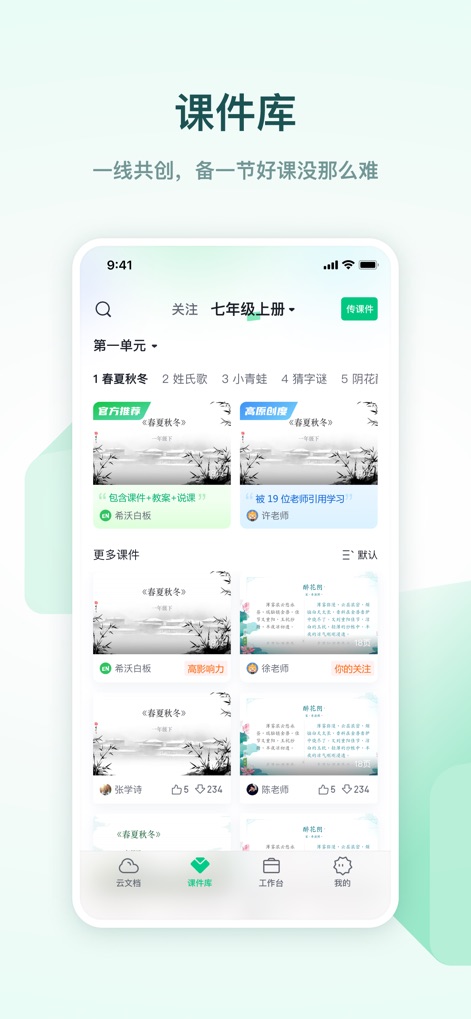
Discover a rich Courseware Library, where users can browse diverse lesson previews and navigate effortlessly using the integrated bottom menu.
Explore Courseware Library
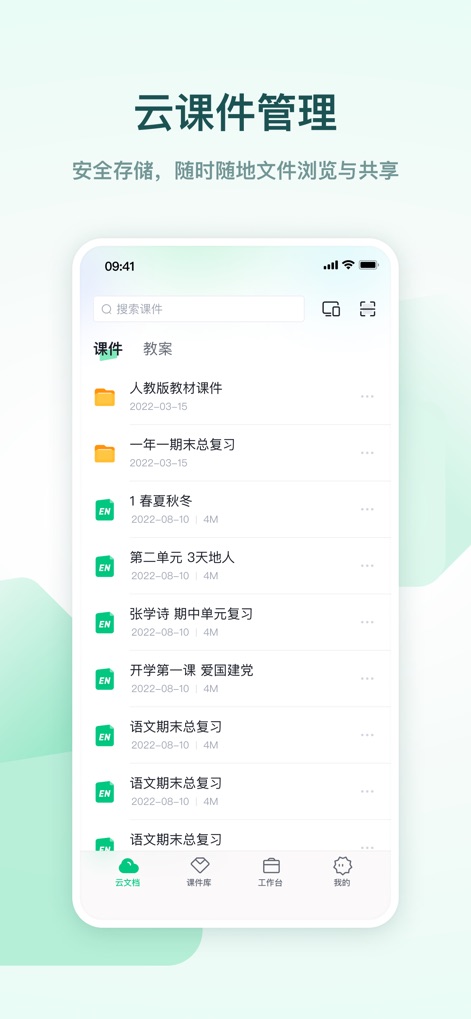
The app facilitates efficient cloud management of courseware, allowing users to organize files with a clear folder structure and view detailed item specifics.
Cloud Courseware Management
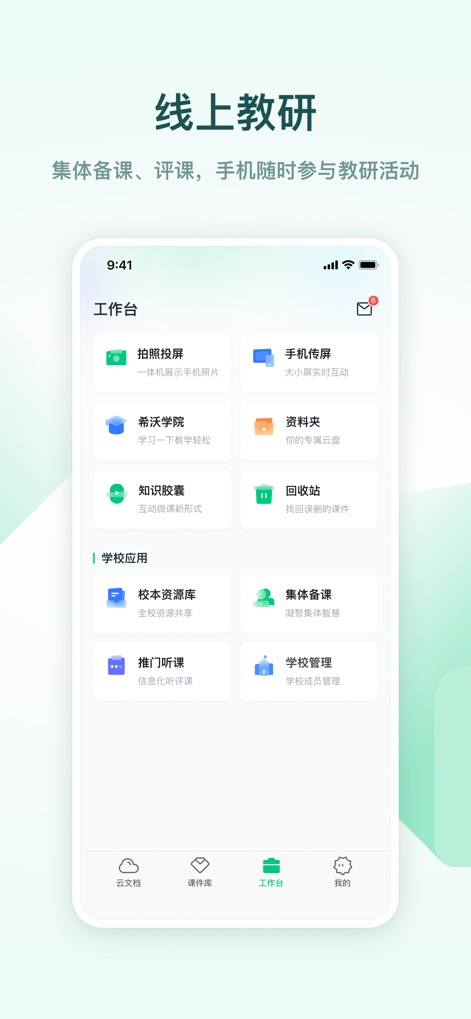
This robust workbench empowers educators with collaborative tools like "集体备课" for group lesson planning and access to the "校本资源库" for school-specific content.
Collaborative Teaching Workbench

Deliver engaging mobile lessons using the intuitive slide preview strip for quick navigation and a prominent display of the active presentation slide.
Seamless Mobile Teaching
Description
Download
More Like This
Apps with similar features and user experience

eduki: Teaching materials
Lehrerkolleg LK GmbH

幼师贝壳(备课)-专业幼教资源平台
XUE HAI SHI BEI EDUCATION TECHNOLOGY CO., LTD.

Wayground
Quizizz Inc

Loquiz
Loquiz OU

Explain Everything Whiteboard
Promethean Ltd.

Kahoot! Play & Create Quizzes
Kahoot ASA

클래스카드
CLASSCARD, Inc.

Puppet Pals 2: School Edition
Polished Play LLC

Make It: Create learning games
Learny Land S.L.
This page is not an official page of the app or its developer, but an independent editorial publication created for informational and commentary purposes. Unless expressly stated otherwise, neither the app nor its developer is affiliated with, endorsed by, sponsored by, authorized by, or otherwise officially connected with MWM, Apple, Google Play, the app publisher, or the app's developer, and nothing on this page implies that the app was developed using MWM's services. Any trademarks, logos, screenshots, and other content remain the property of their respective owners.