
This page is not an official page of the app or its developer, but an independent editorial publication created for informational and commentary purposes. Unless expressly stated otherwise, neither the app nor its developer is affiliated with, endorsed by, sponsored by, authorized by, or otherwise officially connected with MWM, Apple, Google Play, the app publisher, or the app's developer, and nothing on this page implies that the app was developed using MWM's services. Any trademarks, logos, screenshots, and other content remain the property of their respective owners.


aTrust
Protect your digital workspace with adaptive authentication and dynamic access control. Empower your hybrid workforce with a seamless, high-security connection to every corporate application.
Downloads
1M+User Rating
Total Ratings
2K+Publisher
Category
BusinessLocales
2Latest Version
2.516.6Size
120.5 MBFirst Released
Nov 4, 2020Uncompromising Security for Modern Professionals
aTrust bridges the gap between enterprise-grade security and your daily workflow, enabling secure access to corporate resources without the friction of traditional security tools.
Frictionless Remote Access
Access secure internal applications and databases instantly from your iPhone or iPad, whether you are at home, in a cafe, or on the move.
Zero-Trust Verified
Advanced SPA protection and adaptive authentication ensure that only authorized users access sensitive data, keeping your company safe from evolving threats.
Frequently Asked Questions
Everything you need to know about aTrust
What is Sangfor aTrust?
Sangfor aTrust is an application based on the zero trust architecture. It provides core security capabilities to safeguard digital transformation, addressing complex internal threats and blurred security boundaries for enterprises and institutions.
What security features does aTrust provide?
aTrust offers core security capabilities including SPA protection, adaptive authentication, dynamic endpoint environment detection, app access verification, permission baselines, and dynamic access control to safeguard digital transformation.
How does aTrust implement a zero trust architecture?
aTrust is based on the zero trust architecture. It implements core security capabilities like adaptive authentication, dynamic endpoint environment detection, and dynamic access control to secure digital transformation and manage internal threats.
How do I connect to a server using the aTrust app?
Users connect by entering a server address or scanning a QR code. The app automatically adds the server address after scanning the login QR code from a web page to initiate connection.
Does aTrust offer dynamic endpoint environment detection?
Yes, Sangfor aTrust provides dynamic endpoint environment detection. This is a core security capability designed to enhance protection by assessing the security posture of accessing devices.
Is app access verification a feature of aTrust?
Yes, aTrust includes app access verification as a core security capability. This ensures that only authorized applications can access protected resources, enhancing overall security.
Can I log in to aTrust using a QR code?
Yes, the aTrust app allows users to log in by scanning a QR code. This option is available from the "Me" section as "Scan QR Code to Log In."
Does aTrust include network diagnosis features?
Yes, the aTrust app offers network diagnosis tools. This feature is accessible within the "Me" section to assist users in troubleshooting connection or network-related issues.
The following screenshots and description are sourced directly from the app's official store listing and are the property of the app developer.
App Store
Screenshots
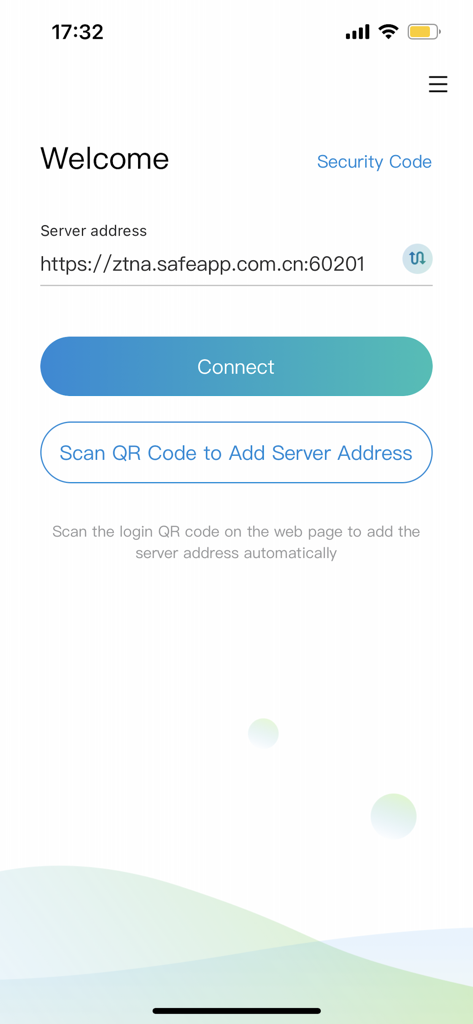
atrust app welcome screen showing server address input field and connect button
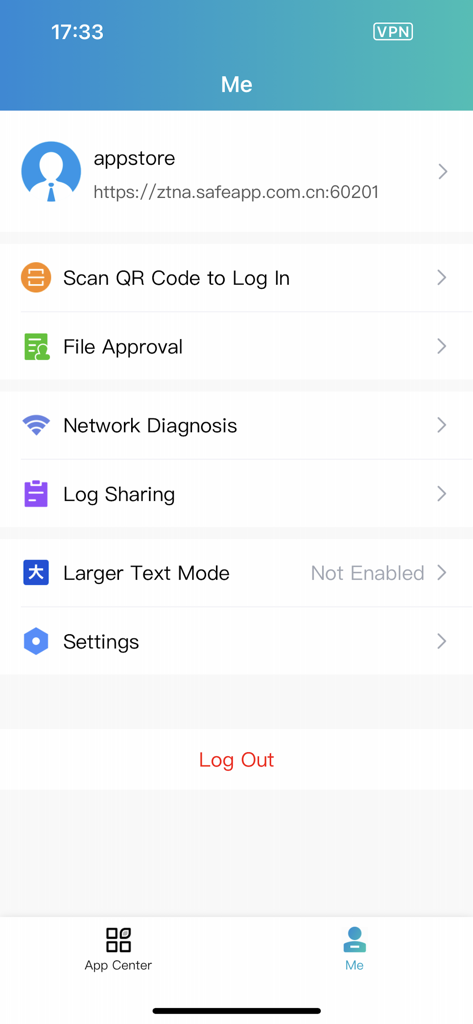
User profile screen of the aTrust app showing account settings and enterprise security tools
Description
Download
More Like This
Apps with similar features and user experience

WatchGuard AuthPoint
WatchGuard Technologies Inc.

Multifactor
MULTIFAKTOR, OOO

Smart Log On
Acceptto Corporation

Kavach Authentication
Tirender Wig

Aladdin 2FA
Aladdin R.D. ZAO

RSA Authenticator (SecurID)
RSA Security

Google Smart Lock
Google LLC

FortiToken Mobile
Fortinet, Inc

X5 Ключ
Closed Joint Stock Company"Trade House"Perekrestok
This page is not an official page of the app or its developer, but an independent editorial publication created for informational and commentary purposes. Unless expressly stated otherwise, neither the app nor its developer is affiliated with, endorsed by, sponsored by, authorized by, or otherwise officially connected with MWM, Apple, Google Play, the app publisher, or the app's developer, and nothing on this page implies that the app was developed using MWM's services. Any trademarks, logos, screenshots, and other content remain the property of their respective owners.