
This page is not an official page of the app or its developer, but an independent editorial publication created for informational and commentary purposes. Unless expressly stated otherwise, neither the app nor its developer is affiliated with, endorsed by, sponsored by, authorized by, or otherwise officially connected with MWM, Apple, Google Play, the app publisher, or the app's developer, and nothing on this page implies that the app was developed using MWM's services. Any trademarks, logos, screenshots, and other content remain the property of their respective owners.


RSA Authenticator (SecurID)
Security paralysis? This app eradicates it, empowering users with seamless, ironclad access. Forget passwords. Embrace control.
Downloads
7.5M+User Rating
Total Ratings
3.8KPublisher
Category
BusinessLocales
11Latest Version
4.7.0Size
62.8 MBFirst Released
Jun 8, 2009An Analytical Overview for Enterprise Security Professionals
Key Features of RSA Authenticator (SecurID)
Diverse Multi-Factor Authentication (MFA)
The app provides a wide array of multi-factor authentication (MFA) options, including one-time passcodes, QR codes, code matching, push notifications, biometrics, and hardware authenticators, significantly enhancing account security for enterprises.
Phishing-Resistant Device-Bound Passkeys
This tool features advanced device-bound passkeys that are inherently phishing-resistant, providing robust security and a seamless user experience across various applications and services.
Simplified Passwordless Authentication
It allows users to leverage passkeys for fast, secure, and frictionless passwordless authentication, enabling organizations to minimize risks associated with passwords and improve workforce productivity.
Tailored for Enterprise Security & Compliance
The app is specifically engineered to meet the stringent security, regulatory compliance, and operational demands of large enterprises and highly regulated industries.
Trusted Authentication Across Diverse Environments
This tool delivers a reliable and trusted method for securing authentication, designed to operate effectively regardless of the specific IT environment or infrastructure.
Streamlined & User-Friendly Access
The app is designed to secure digital access while simultaneously streamlining the login process, contributing to enhanced user experience and operational efficiency.
Frequently Asked Questions
Everything you need to know about RSA Authenticator (SecurID)
What is the RSA Authenticator App?
The RSA Authenticator App secures digital life and streamlines access for enterprises and highly regulated industries. It provides trusted authentication regardless of the environment, offering robust multi-factor options.
What multi-factor authentication (MFA) options does the RSA Authenticator App offer?
The RSA Authenticator App offers diverse MFA options. These include one-time passcodes (OTP), QR codes, code matching, push notifications, biometrics, and hardware authenticators for enhanced security and protection.
Does the RSA Authenticator App support passwordless authentication?
Yes, the RSA Authenticator App supports passwordless security through passkeys. Users authenticate with device-bound passkeys for fast, secure, and frictionless access, which reduces risks and boosts productivity.
Is the RSA Authenticator App available to individual users?
No, the RSA Authenticator App is not available to everyone. Your company must be an RSA customer to use it. Users should contact their help desk administrator for registration information.
What applications does the RSA Authenticator App replace or update?
The RSA Authenticator app is an update to the existing SecurID 4.X app. It also serves as a replacement for the SecurID Authenticate 3.9.x app, consolidating authentication services.
Can I use biometrics with the RSA Authenticator App?
Yes, the RSA Authenticator App offers biometric authentication. Users can utilize methods like Face ID for fast and secure access, enhancing the security of their stored credentials.
How does the RSA Authenticator App handle sign-in requests?
The RSA Authenticator App handles sign-in requests through push notifications. Users can then approve the sign-in by matching a code, typing a code, or using other verification methods presented in the app interface.
Can I use QR codes for authentication with the RSA Authenticator App?
Yes, the RSA Authenticator App supports QR code authentication. Users can scan a QR code with their device's camera to initiate registration or complete an authentication process quickly and securely.
The following screenshots and description are sourced directly from the app's official store listing and are the property of the app developer.
App Store
Screenshots

This tool consolidates all user credentials and passkeys, presenting them in a streamlined list view with corresponding one-time passcodes for instant access.
Unified Credential Management

Users can customize their experience by selecting between a dark and light theme, while easily navigating critical functions like the "PinPad token" entry and "QR Scan" feature.
Personalized Interface Options

The app simplifies passwordless security by offering to create and store passkeys directly within "RSA Authenticator" or leveraging "iCloud Keychain" for secure, user-friendly authentication.
Seamless Passkey Creation

This tool delivers real-time "Sign-in request" push notifications directly to the lock screen, allowing users to quickly see authentication prompts and streamline their access process.
Effortless Push Notifications

The app enhances security through a code matching interface, where users confirm their identity by selecting the correct "code" from a set of options and then tapping "Approve" or "Reject".
Secure Code Matching

For flexible authentication, this tool provides a secure "Code" input field for users to manually type in the required code, complemented by clear "Approve" and "Reject" actions.
Manual Code Entry
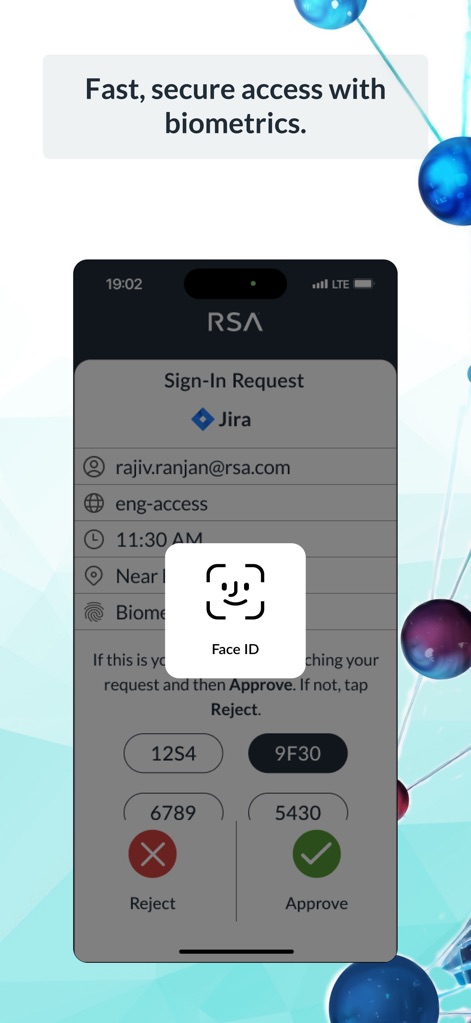
The app integrates advanced biometric security, utilizing "Face ID" for rapid and secure authentication, which is presented within a detailed "Sign-In Request" screen.
Biometric Authentication

This tool offers a streamlined "QR Scan" interface, enabling users to effortlessly "point the camera at the QR code" to initiate quick and secure registration or authentication processes.
Quick QR Code Scan
Description
Download
More Like This
Apps with similar features and user experience

WatchGuard AuthPoint
WatchGuard Technologies Inc.

Multifactor
MULTIFAKTOR, OOO

Smart Log On
Acceptto Corporation

Kavach Authentication
Tirender Wig

Aladdin 2FA
Aladdin R.D. ZAO

Google Smart Lock
Google LLC

FortiToken Mobile
Fortinet, Inc

X5 Ключ
Closed Joint Stock Company"Trade House"Perekrestok

TrustBuilder Authenticator
In-Webo Technologies
This page is not an official page of the app or its developer, but an independent editorial publication created for informational and commentary purposes. Unless expressly stated otherwise, neither the app nor its developer is affiliated with, endorsed by, sponsored by, authorized by, or otherwise officially connected with MWM, Apple, Google Play, the app publisher, or the app's developer, and nothing on this page implies that the app was developed using MWM's services. Any trademarks, logos, screenshots, and other content remain the property of their respective owners.