
This page is not an official page of the app or its developer, but an independent editorial publication created for informational and commentary purposes. Unless expressly stated otherwise, neither the app nor its developer is affiliated with, endorsed by, sponsored by, authorized by, or otherwise officially connected with MWM, Apple, Google Play, the app publisher, or the app's developer, and nothing on this page implies that the app was developed using MWM's services. Any trademarks, logos, screenshots, and other content remain the property of their respective owners.


Authenticator App ⁸
Password amnesia is dead. The app offers users a memory fortress for their digital lives.
Downloads
250k+User Rating
Total Ratings
40Publisher
Category
BusinessLocales
32Latest Version
1.3.1Size
38.9 MBFirst Released
Apr 24, 2025Evaluating core functionalities for enhanced security and memory retention.
Key Features Analysis: Authenticator App ⁸
Secure Password Manager
This tool allows users to securely store and organize all their passwords in one convenient place, making retrieval effortless and preventing forgotten passwords.
Two-Factor Authentication (2FA)
It provides an extra layer of protection through two-factor authentication for all accounts, significantly increasing security and ensuring a safer online experience.
Frequently Asked Questions
Everything you need to know about Authenticator App ⁸
What is Authenticator App?
Authenticator App is a security application designed to enhance password management and improve password recall by providing password tests, a secure password manager, and two-factor authentication.
How does Authenticator App enhance password recall?
Authenticator App helps improve password recall through engaging Password Recall Tests, which are designed to strengthen memory and combat the natural loss of newly learned information over time.
Does Authenticator App store passwords?
Yes, Authenticator App includes a Password Manager feature to securely store and organize all your passwords in one convenient place. This ensures effortless retrieval.
Does Authenticator App provide two-factor authentication (2FA)?
Yes, Authenticator App supports two-factor authentication (2FA). It provides an Authenticator feature to add an extra layer of protection for all your online accounts.
How does the Password Recall Test work within Authenticator App?
The Password Recall Test in Authenticator App challenges your memory by having you input stored passwords. Regular practice helps strengthen recall, combating memory loss as per the Ebbinghaus Memory Curve.
Is Authenticator App secure for protecting my digital identity?
Yes, Authenticator App aims to protect your digital identity by offering secure password management and robust two-factor authentication features to enhance your overall online security.
Where can I find the Terms of Use for Authenticator App?
The Terms of Use for Authenticator App are accessible via the provided link: https://www.agilecodestudio.com/terms. This document outlines the legal agreement for using the application.
How does Authenticator App work?
Authenticator App works by offering three core features: a Password Recall Test to strengthen memory, a secure Password Manager to store credentials, and an Authenticator for two-factor authentication.
The following screenshots and description are sourced directly from the app's official store listing and are the property of the app developer.
App Store
Screenshots
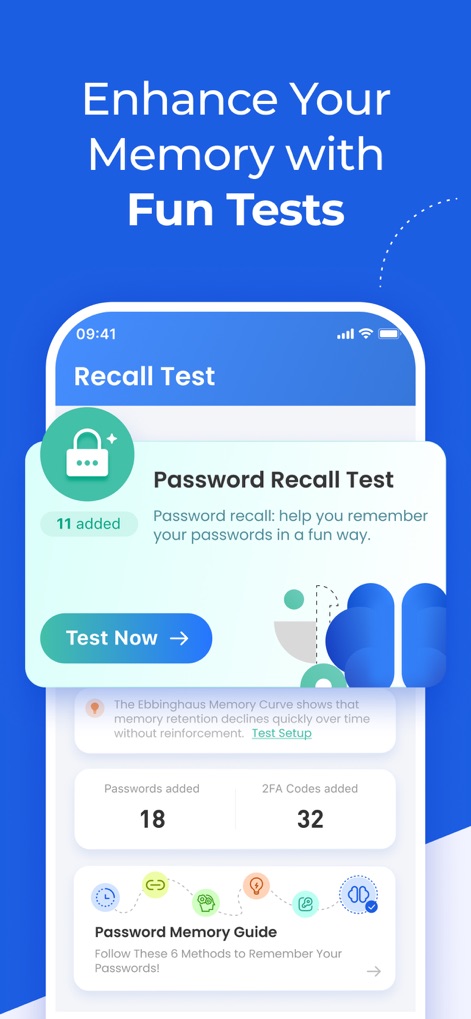
The app introduces users to the 'Password Recall Test' feature and displays key metrics such as 'Passwords added' and '2FA Codes added'.
Password Recall Drills

This view illustrates an ongoing 'Password Recall Test' with positive feedback ('Good Job !') and a secure input field for users to practice recalling specific account passwords.
Memory Reinforcement

The 'Authenticator App' centralizes various accounts, showcasing dynamically generated two-factor authentication codes and an accessible floating action button for adding new entries.
Secure Authenticator Hub

Users can efficiently add new accounts for two-factor authentication by scanning a QR code, followed by a confirmation message for the successfully integrated service like 'Microsoft'.
Effortless 2FA Setup
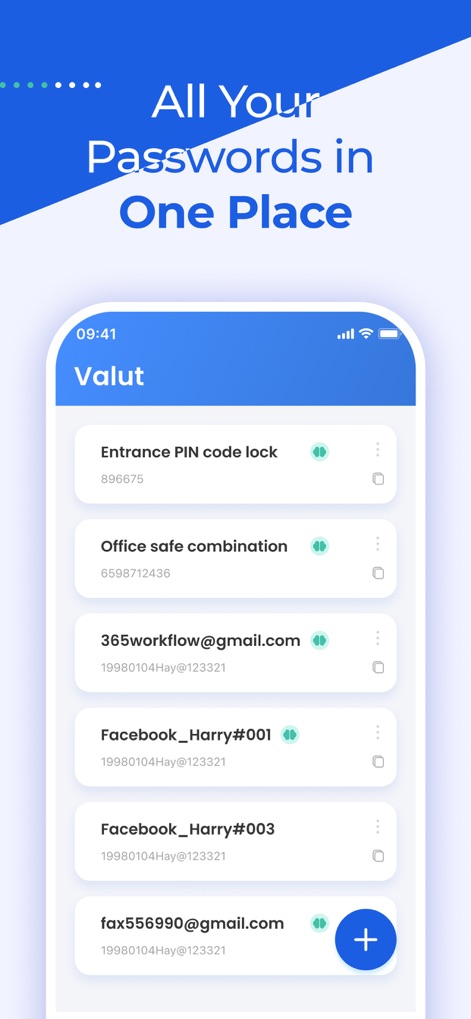
The 'Vault' provides a comprehensive list of stored credentials, from 'Entrance PIN code lock' to multiple 'Facebook' accounts, alongside a convenient floating action button for additions.
Centralized Password Vault

This screen highlights the 'Ebbinghaus Memory Curve' to educate users on memory retention and features a prominent 'Test Now' button for initiating recall practice sessions.
Understanding Memory Decay
This visual presents the app's core value proposition with the bold statement 'Master Your Passwords with Ease!' set against an engaging backdrop of abstract geometric shapes.
Master Passwords Effortlessly
Description
Download
More Like This
Apps with similar features and user experience

Proton Pass - Password Manager
Proton AG

Dashlane Password Manager
Dashlane

Password Manager - mSecure
mSeven Software, LLC

Kepttor Password Manager
MACREL SRL SEMPLIFICATA

DataVault Manager - Encrypted
MIKHAIL SHERSHNEV

Authenticator ·
SMM service, s.r.o.

Bitwarden Password Manager
Bitwarden Inc

Authenticator App ℗
RHO DEVELOPERS LLC

NordPass: Password Manager
Nordvpn S.A.
This page is not an official page of the app or its developer, but an independent editorial publication created for informational and commentary purposes. Unless expressly stated otherwise, neither the app nor its developer is affiliated with, endorsed by, sponsored by, authorized by, or otherwise officially connected with MWM, Apple, Google Play, the app publisher, or the app's developer, and nothing on this page implies that the app was developed using MWM's services. Any trademarks, logos, screenshots, and other content remain the property of their respective owners.