
This page is not an official page of the app or its developer, but an independent editorial publication created for informational and commentary purposes. Unless expressly stated otherwise, neither the app nor its developer is affiliated with, endorsed by, sponsored by, authorized by, or otherwise officially connected with MWM, Apple, Google Play, the app publisher, or the app's developer, and nothing on this page implies that the app was developed using MWM's services. Any trademarks, logos, screenshots, and other content remain the property of their respective owners.


Blackboard
Learning just got a tether. The app untethers users from the desk, pushing education into their pocket.
Downloads
12.5M+User Rating
Total Ratings
1.1MPublisher
Category
EducationLocales
30Latest Version
11.3.1Size
168.5 MBFirst Released
Jan 16, 2015Comprehensive Mobile Functionality for Academic Engagement
Blackboard App: Key Features Analysis
Mobile Grade Access
The app allows users, particularly students, to access grades for courses, assignments, and tests with just a few taps, ensuring they can monitor their academic performance on the go.
Real-Time Course Notifications
This tool provides real-time alerts, notifying users of due-dates, announcements, and other critical course updates instantly.
Assignment & Test Management
It enables students to easily complete and submit assignments, take tests, and track their progress directly from their mobile devices.
Instructor Mobile Grading
The app offers instructors the ability to grade assignments and provide feedback efficiently from their phone or tablet, enhancing grading flexibility.
Instructor Submission Alerts
It allows instructors to set up timely custom alerts for when submissions are ready for grading and for messages from students, ensuring prompt responses.
Interactive Communication
This tool assists instructors in sending course announcements, creating and managing discussion threads, and interacting with student comments to foster active learning.
Instant Course Updates
The app provides students with instant access to view updates and changes made to their courses, keeping them informed without delay.
Mobile Course Material Organization
It facilitates instructors in effortlessly uploading and organizing course materials and assessments directly from their mobile device.
Frequently Asked Questions
Everything you need to know about Blackboard
How do students manage coursework using the Blackboard App?
Yes, students use the Blackboard App to complete and submit assignments, take tests, and track their progress directly within the application, streamlining their educational journey.
Can instructors grade assignments with the Blackboard App?
Yes, instructors can grade assignments and provide feedback directly from their phone or tablet using the Blackboard App, which streamlines the assessment process for efficient course management.
Does the Blackboard App provide notifications for due dates and announcements?
Yes, the Blackboard App provides real-time alerts for due-dates, announcements, and other course updates to keep both students and instructors informed about their courses.
How do I check grades for courses on the Blackboard App?
Students can access grades for courses, assignments, and tests with just a few taps within the Blackboard App, ensuring they stay updated on their academic performance.
Can I manage my course schedule with the Blackboard App?
Yes, the Blackboard App allows users to manage their schedule by viewing due dates and upcoming assignments through its integrated calendar feature, ensuring organized task management.
What does the Blackboard App offer for engaging students?
The Blackboard App enables instructors to send course announcements, create and manage discussion threads, and interact with student comments, fostering active student engagement.
Where can I find the terms of use for the Blackboard App?
The terms of use and privacy information for the Blackboard App are available on the Anthology website, accessible via the link: https://www.anthology.com/trust-center/terms-of-use.
Does the Blackboard App allow access to course content?
Yes, the Blackboard App provides access to course content and modules. Users can navigate into specific courses to view learning materials and activities.
The following screenshots and description are sourced directly from the app's official store listing and are the property of the app developer.
App Store
Screenshots

Users can efficiently track critical academic deadlines through the "Important" alerts section and view future tasks listed under "Upcoming" assignments.
Real-time Updates

The app simplifies course navigation, featuring a prominent "Search your courses" bar for quick lookup and a clear display of "Current" courses with their respective titles.
Course Access Streamlined

This tool organizes learning materials into distinct "Course Content" modules and provides quick access to related information via dedicated "Content," "Calendar," and "Announcements" tabs.
Explore Course Content

Students can easily review their progress by examining detailed "Individual assignment scores" and tracking their comprehensive "Overall course grade percentage" within the gradebook.
Monitor Academic Performance
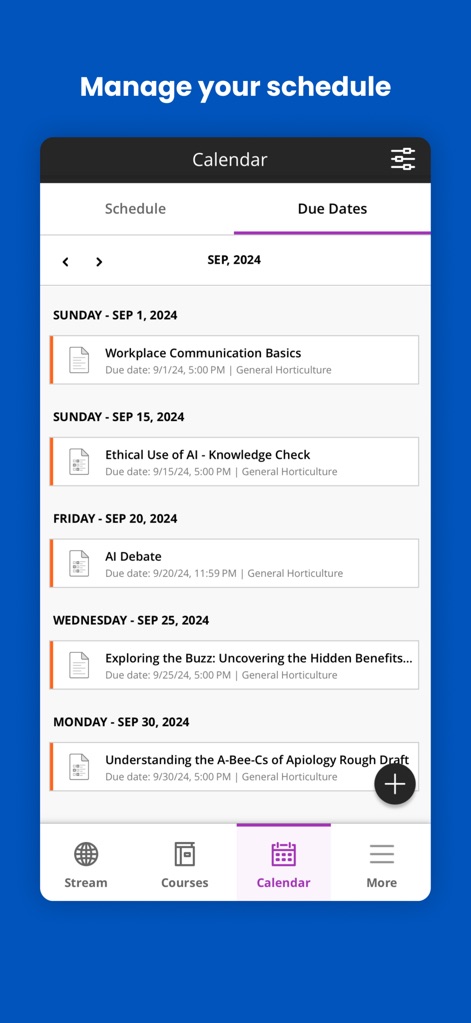
The app helps users manage their time effectively, offering a clear distinction between a general "Schedule" view and a focused list of "Due Dates" for all academic commitments.
Organize Academic Schedule

This tool centralizes communication by presenting clear "Course-specific message threads" and notifying users of new interactions with prominent "New Message indicators."
Instant Messaging Hub
Description
Download
More Like This
Apps with similar features and user experience

ClassDojo
ClassDojo, Inc.

Госуслуги Моя школа
MINKOMSVYAZ ROSSII, FKU

Remind: School Communication
PARENTSQUARE LLC

Agenda Edu SuperApp
Agenda Kids Ltda ME

FAMILIES | TalkingPoints
TalkingPoints Corp

Canvas by Instructure
Instructure, Inc.

ParentSquare
PARENTSQUARE LLC

Brightspace Pulse
D2L Corporation

PowerSchool Mobile
PowerSchool Group LLC
This page is not an official page of the app or its developer, but an independent editorial publication created for informational and commentary purposes. Unless expressly stated otherwise, neither the app nor its developer is affiliated with, endorsed by, sponsored by, authorized by, or otherwise officially connected with MWM, Apple, Google Play, the app publisher, or the app's developer, and nothing on this page implies that the app was developed using MWM's services. Any trademarks, logos, screenshots, and other content remain the property of their respective owners.