
This page is not an official page of the app or its developer, but an independent editorial publication created for informational and commentary purposes. Unless expressly stated otherwise, neither the app nor its developer is affiliated with, endorsed by, sponsored by, authorized by, or otherwise officially connected with MWM, Apple, Google Play, the app publisher, or the app's developer, and nothing on this page implies that the app was developed using MWM's services. Any trademarks, logos, screenshots, and other content remain the property of their respective owners.


BNA+
No more excuses for banking delays. This app cuts through the red tape, putting financial control directly into the user's hand.
Downloads
1M+User Rating
Total Ratings
83.6KPublisher
Category
FinanceLocales
1Latest Version
7.14.xSize
187.9 MBFirst Released
Aug 12, 2021An analytical overview of BNA+'s core functionalities for comprehensive mobile banking and digital wallet solutions.
BNA+ App Evaluation: Key Features
Instant Transfers
The app facilitates immediate money transfers, enabling users to send funds quickly and efficiently to others.
Instant Account Overview
The app provides immediate access to account balances and transaction history, enabling users to stay informed about their financial status at all times.
Bill & Tax Payments
It allows users to conveniently pay a wide range of services and taxes directly from their smartphone, simplifying bill management.
QR Payments
This tool features seamless QR code payments, allowing users to make purchases without carrying physical cash or cards, enhancing convenience and security.
Top-ups (Transport & Mobile)
It allows users to recharge their public transport cards and mobile phone credit from any location, ensuring continuous service.
Cardless Cash Withdrawals
This tool provides the ability to generate extraction orders, allowing users to withdraw cash from ATMs without needing a physical debit card.
Personal Loan Applications
It allows users to apply for personal loans directly through the app, offering quick access to financing options.
Fixed-Term Deposit Management
The app enables users to manage their fixed-term deposits, providing oversight and control over their savings and investments.
Frequently Asked Questions
Everything you need to know about BNA+
What is BNA+?
BNA+ is a mobile application from Banco Nación that allows users to perform banking operations quickly and easily from their cell phone. It offers various financial services.
What banking operations does BNA+ offer?
BNA+ allows users to check balances, pay with QR, transfer funds, pay services and taxes, withdraw money without a card, top up cell phone and transport credit, manage fixed terms, and request personal loans.
How do I register for the BNA+ app?
Yes, you can register for BNA+ using your DNI in a few simple steps. The process to create your wallet takes only minutes.
Can I make transfers with BNA+?
Yes, BNA+ allows users to make immediate transfers. You can transfer funds using an Alias or CBU/CVU from your account.
Does BNA+ support QR payments?
Yes, BNA+ allows users to pay with QR codes. This feature eliminates the need to carry cash for transactions.
Can I pay services and taxes with BNA+?
Yes, BNA+ enables users to pay their services and taxes directly through the application.
How do I manage fixed terms in BNA+?
BNA+ provides functionality to manage your fixed terms directly within the application. This is available under the 'Inversiones' section.
Can I request personal loans through BNA+?
Yes, BNA+ allows users to request personal loans directly from the app. The 'Préstamos' option is available on the main dashboard.
Does BNA+ offer cardless cash withdrawals?
Yes, BNA+ supports cardless cash withdrawals. Users can create extraction orders to withdraw money without needing a physical card.
What is required to create a wallet in BNA+?
To create a wallet in BNA+, you need to have your DNI at hand. The process involves simple steps and takes only a few minutes.
The following screenshots and description are sourced directly from the app's official store listing and are the property of the app developer.
App Store
Screenshots
Discover the BNA+ app's clean initial loading screen and prominent branding as it prepares for user interaction.
App Launch Experience

This introductory screen highlights the clear welcome message and the simple, step-by-step instructions for creating a digital wallet.
Onboarding Simplified

Witness the concise 'Application sent!' confirmation and the clear directive for users to check their email for further wallet activation steps.
Application Confirmation
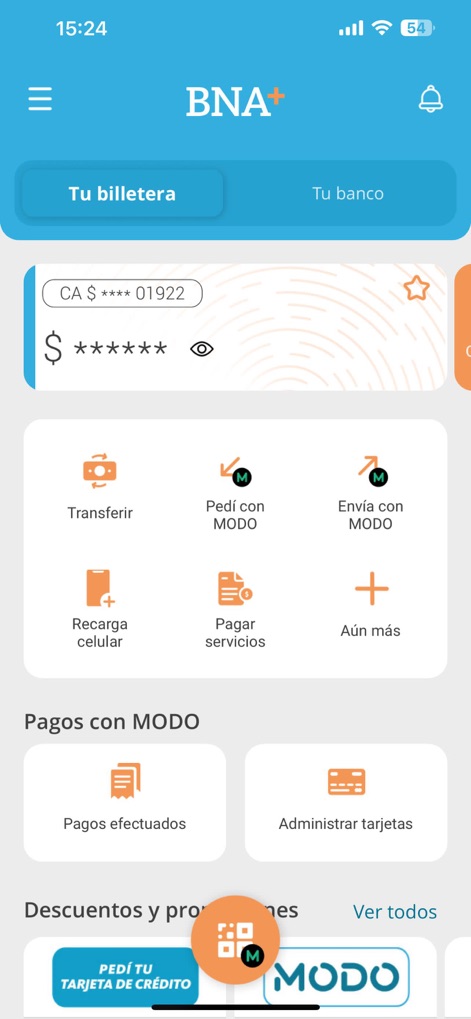
Explore the intuitive dashboard, featuring distinct 'Tu billetera' and 'Tu banco' tabs and convenient quick action buttons for daily financial tasks.
Dashboard Overview

Observe the app's consolidated financial hub, offering direct access to 'Préstamos' and 'Turnos online', alongside a visual representation of 'Tus tarjetas'.
Financial Hub

This screen demonstrates the streamlined transfer process, featuring a dedicated amount input and flexible recipient identification via 'Alias' or 'CBU|CVU'.
Seamless Transfers

Review the comprehensive 'Notificaciones' screen, showcasing a chronological feed of alerts and detailed messages regarding transaction status and user interactions.
Activity Notifications
Description
Download
More Like This
Apps with similar features and user experience

Enpara Bank Cep Şube
Enpara Bank Anonim Sirketi

Alinma App - تطبيق الإنماء
Alinma Bank

Huntington Mobile Banking
The Huntington National Bank, Inc

國泰世華網路銀行CUBE
Cathay United Bank

中國信託行動銀行
CTBC Bank Co., Ltd.

FNB Banking App
FirstRand Bank Limited

Riyad Bank App
Riyad Bank

CIMB OCTO MY
CIMB Bank Berhad

Regions Mobile
Regions Financial
This page is not an official page of the app or its developer, but an independent editorial publication created for informational and commentary purposes. Unless expressly stated otherwise, neither the app nor its developer is affiliated with, endorsed by, sponsored by, authorized by, or otherwise officially connected with MWM, Apple, Google Play, the app publisher, or the app's developer, and nothing on this page implies that the app was developed using MWM's services. Any trademarks, logos, screenshots, and other content remain the property of their respective owners.