CalCs - Calendar Complications

CalCs - Calendar Complications


Download on App Store
Logo of CalCs - Calendar Complications

CalCs - The Ultimate Calendar and Reminder Complications for Apple Watch

Stop reaching for your phone. Get instant access to monthly grids, event lists, and reminders directly on your watch face with complications designed for the organized professional.

Download on App Store

Publisher

Akihiro Usui

Category

Utilities

Downloads

26K+

User Rating

3.6/5

Total Ratings

300

Locales

1

Precision on Your Wrist

Discover the interface used by 26K+ users.
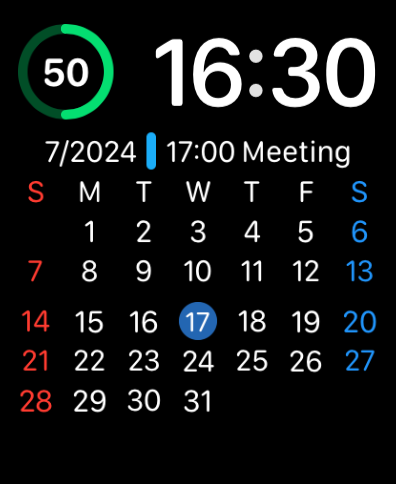
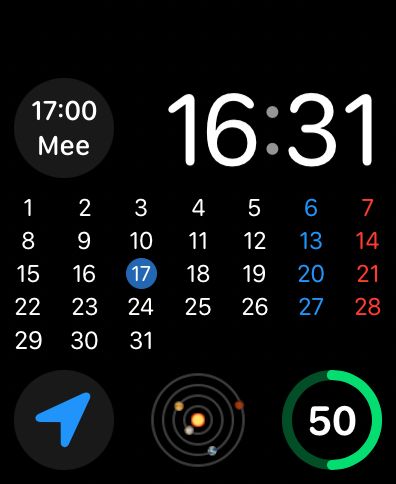
Apple Watch face displaying a full monthly calendar grid and upcoming meeting information

Apple Watch face displaying a full monthly calendar grid and upcoming meeting information

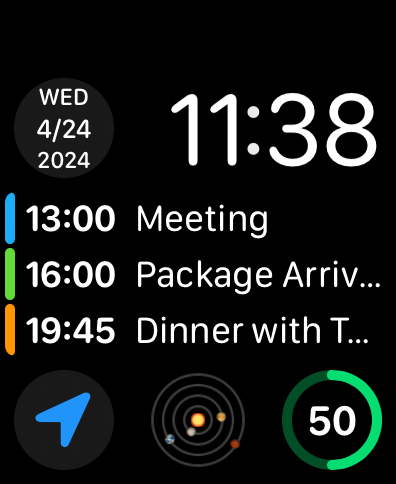
Apple Watch face displaying a list of upcoming events and a date complication

Apple Watch face displaying a list of upcoming events and a date complication

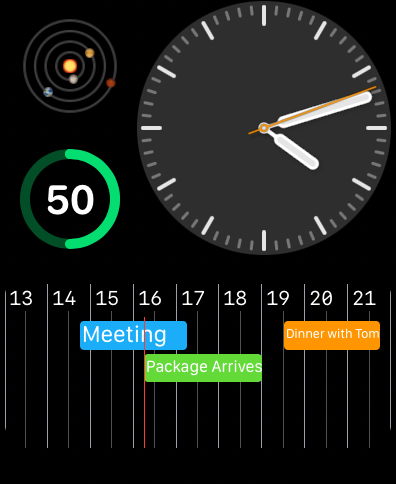
Apple Watch face showing a horizontal calendar timeline with scheduled events and reminders

Apple Watch face showing a horizontal calendar timeline with scheduled events and reminders

Apple Watch face displaying a full monthly calendar grid and appointment details using CalCs complications

Apple Watch face displaying a full monthly calendar grid and appointment details using CalCs complications

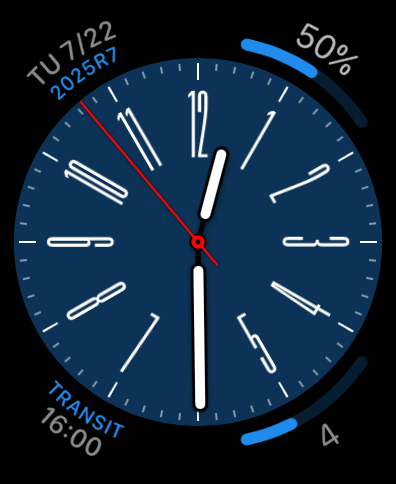
An analog Apple Watch face featuring custom calendar and reminder complications on a blue dial.

An analog Apple Watch face featuring custom calendar and reminder complications on a blue dial.

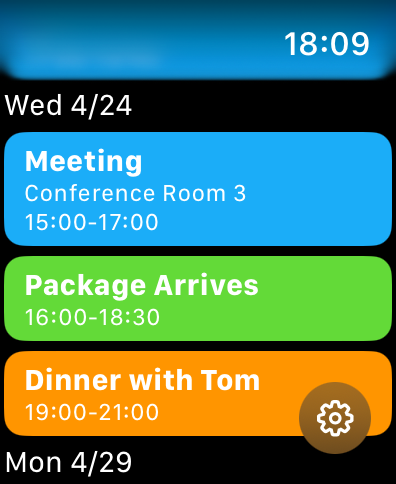
A list of color coded calendar events and reminders on an Apple Watch screen

A list of color coded calendar events and reminders on an Apple Watch screen

Optimize Your Productivity at a Glance

The tools that make this app stand out, trusted by 26K+ users.

📅

Full Monthly Grid View

Bridge the gap in watchOS with a complete monthly overview directly on your watch face, allowing you to check dates and plan ahead in seconds.

High-Density Complications

Maximize your screen real estate with circular, corner, and rectangular formats that show your next event or pending reminder without reaching for your phone.

🛠️

Professional Customization

Tailor your experience by filtering specific calendar lists and setting your preferred week start to match your personal and professional workflow.

About the app

Everything you need to know about CalCs - Calendar Complications.

Description

CalCs (short for "Calendar Complications") is a watchOS-only app that provides various complications related to the calendar. ---Important Notes--- The features built into the main body of this app are limited to listing events/reminders & displaying a monthly calendar. All other features are provided through complications & the Smart Stack. ●If you download CalCs from the iPhone App Store, due to synchronization issues between the iPhone & Apple Watch, CalCs may not appear on the Apple Watch. According to Apple's specifications, watchOS-only apps cannot be re-downloaded from the App Store app on the iPhone. Therefore, please use the App Store app "on your Apple Watch" and follow the steps below to re-download it. ・Scroll to the bottom → "Account" → "Purchased" → "CalCs" → re-download ------------------- Key Features ●Supports a variety of complications such as date display, events/reminders display, & monthly calendar display ・Date Display Displays the current date in various formats. ・Event/Reminder Display Displays events/reminders synced with your iPhone. You can choose whether or not to include all-day events. ・Monthly Calendar Display Displays the monthly calendar in various formats. You can choose to start the week on Monday. It also supports holidays in some areas. ●In the main app, events/reminders, & the monthly calendar are displayed Tapping the complication opens the app, where you can view the list of events/reminders synced with your iPhone, as well as the monthly calendar. *Only incomplete reminders are displayed. *The app currently does not have functionality to add, edit, or delete events/reminders, nor to mark reminders as complete. Please understand. ●Minimal Setting Options To avoid complicating settings on the small Apple Watch screen, the settings only allow you to select which calendar/reminder lists to display. *Notes ・The corner complications, circular complications, & large rectangular complications are supported only on Apple Watch Series 4 & later, so CalCs is not guaranteed to work on Series 3 or earlier models. ・Due to the limitations of watchOS complication display updates, complications may not immediately reflect changes when the date changes or after events or reminders are added or edited on the iPhone. ・After placing a complication for the 1st time, it may take some time for it to actually appear. ・If the complication is not updating, try tapping the complication to open CalCs, as this may refresh the data. ・If the complication is not updated even after launching CalCs, the issue may be resolved by one of the following methods. Please try them. 1. Restart both your iPhone and Apple Watch. 2. Force restart CalCs ① With CalCs open, press and hold the side button. ② When the screen for emergency call and power off appears, press and hold the Digital Crown. 3. Reinstall CalCs ① Press the Digital Crown to display the app list. ② Press and hold CalCs, then tap the × button to delete it when it appears. ③ Launch the App Store app on your Apple Watch. ④ Scroll to the bottom → "Account" → "Purchased" → "CalCs" → Re-download. ・If the complication does not update after force quitting and restarting CalCs, try restarting both your iPhone and Apple Watch, as it may resolve the issue. ・If event information is not displayed on the app's main event/reminder list screen or in complications, it may be because full access to the calendar has not been granted. The issue may be resolved by following the steps below to re-enable full access permission to the calendar. Please give it a try. ①Open the "Privacy & Security" section in the iPhone Settings app & tap "Calendars". ②Change CalCs' calendar access to "None", then select "Add Events Only". ③When you open CalCs, you will be prompted to grant full access, so tap "Allow Full Access".

Latest Version

1.84

Size

4.8 MB

First Released

Apr 24, 2024

Elevate Your Apple Watch Productivity

Stop reaching for your phone. Join thousands of organized professionals who use CalCs to keep their full monthly calendar and reminders exactly where they belong—on their wrist.

Download on App Store

App information, icons, screenshots, and descriptions displayed on this page are sourced from the Apple App Store and are the property of their respective developers. Download estimates and rankings are based on MWM's proprietary models and may not reflect actual figures. This page is provided for informational and analytical purposes only.

Believe this page infringes your intellectual property? File a dispute