
This page is not an official page of the app or its developer, but an independent editorial publication created for informational and commentary purposes. Unless expressly stated otherwise, neither the app nor its developer is affiliated with, endorsed by, sponsored by, authorized by, or otherwise officially connected with MWM, Apple, Google Play, the app publisher, or the app's developer, and nothing on this page implies that the app was developed using MWM's services. Any trademarks, logos, screenshots, and other content remain the property of their respective owners.


Cast Web Videos to TV - iWebTV
Stop squinting. The app empowers users to command web video on their biggest screen, cutting the cord on tiny device viewing.
Downloads
7.5M+User Rating
Total Ratings
192.9KPublisher
Category
Photo & VideoLocales
2Latest Version
2.0.109Size
54.5 MBFirst Released
Jul 11, 2015Key Features and User Impact Assessment
Analysis of Cast Web Videos to TV - iWebTV
Direct Video Streaming
Achieves superior image quality and a better overall viewing experience by directly streaming content to the TV, rather than screen mirroring.
High-Definition Video Playback
Enjoy videos in high definition, up to 4K, for a crystal-clear viewing experience on a larger screen.
Lock Screen Playback Controls
Provides comprehensive playback controls accessible even from the lock screen, ensuring uninterrupted command over media.
Video Queue Management
Allows users to create a playlist by queuing multiple videos, enabling uninterrupted binge-watching sessions.
Integrated Advanced Web Browser
Provides a robust in-app browser with features like ad blocking, tabbed browsing, and popup control for a seamless content discovery experience.
Subtitle Support
Automatically detects subtitles and offers access to a comprehensive subtitle library for movies and TV shows, enhancing accessibility.
Live Stream Compatibility
Facilitates casting of live stream content directly to the TV, allowing users to watch real-time events on a larger display.
Personalized Browser Settings
Users can customize their browsing experience by setting a preferred homepage and bookmarking frequently visited web pages or videos.
Scene Preview Navigation
Offers video previews to quickly navigate and pinpoint specific scenes within a video, improving playback control.
Privacy Enhancements
Includes privacy modes to help users browse and stream content with enhanced anonymity and data protection.
Frequently Asked Questions
Everything you need to know about Cast Web Videos to TV - iWebTV
What is iWebTV?
iWebTV is an application designed to cast any online video to compatible televisions. It supports various devices like Chromecast, Roku, Fire TV, Apple TV, and Samsung TVs.
What devices does iWebTV support for casting?
iWebTV works with Chromecast, Roku, Fire TV, Apple TV (4th Gen), and Samsung TVs (2018 and later models). It also supports Smart TVs from various manufacturers without preliminary setup.
Does iWebTV support high-definition video streaming?
Yes, iWebTV supports HD resolution, including 1080p and up to 4K, depending on the casting device. It sends the actual video stream for optimal quality.
Can I use iWebTV to block ads while browsing?
Yes, iWebTV includes an advanced browser with an ad blocker feature. It also blocks or hides spammy popups to enhance the browsing experience.
Are subtitles available when casting videos with iWebTV?
Yes, iWebTV offers subtitle auto-detection and includes a Movie/TV Subtitle library. Premium Services subscribers get unlimited subtitle downloads.
What is the difference between iWebTV and mirroring apps?
Unlike mirroring apps, iWebTV sends the actual video stream directly to your TV. This method provides significantly better image quality and an improved overall viewing experience.
Does iWebTV offer a subscription for premium features?
Yes, iWebTV offers 'Premium Services' as a subscription for $0.99/month or $9.99/year. This unlocks all premium features, including Cloud Proxy Streaming and unlimited subtitle downloads.
Can I queue multiple videos to play on iWebTV?
Yes, iWebTV is 'Binge-ready' and allows users to queue up several videos. This feature ensures continuous playback for an uninterrupted viewing experience.
Does iWebTV support live streams?
Yes, iWebTV supports live streams, allowing users to cast real-time content from the web to their television.
Can I browse the web directly within the iWebTV app?
Yes, iWebTV features a full-feature web browser. It supports multiple tabs, a search bar, browsing history, and privacy modes.
What privacy features does iWebTV offer?
iWebTV includes privacy modes within its advanced browser. Users can start anonymous or private sessions and clear browsing history, tabs, and videos.
The following screenshots and description are sourced directly from the app's official store listing and are the property of the app developer.
App Store
Screenshots

See how the app transforms online video viewing into a cinematic experience, supporting stunning HD up to 4K resolution on users' TVs.
Big Screen Brilliance

Users can easily locate subtitles for movies and TV shows, while also utilizing the binge-ready queue to line up multiple videos for continuous enjoyment.
Smart Subtitle Finder
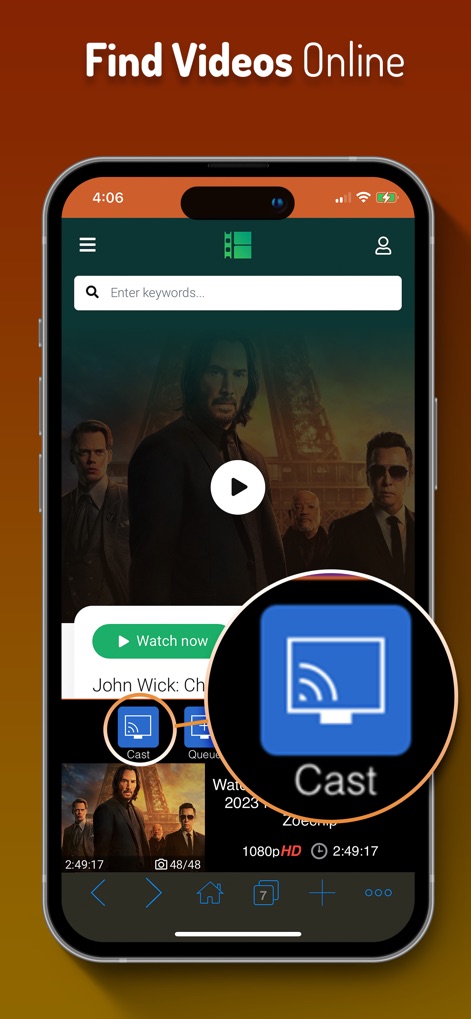
The app simplifies the casting process with a prominent "Cast" button, allowing users to quickly send their selected online videos to their television.
Effortless Video Casting

This tool offers extensive compatibility, connecting seamlessly with popular devices such as Roku TV and Chromecast, ensuring broad access for users.
Universal TV Compatibility

Users maintain full control over their viewing experience with intuitive playback controls and the ability to manage a continuous video queue directly from their device.
Complete Playback Control

The app integrates an advanced web browser featuring powerful tools like an ad blocker and robust privacy modes for secure and uninterrupted online video discovery.
Advanced Web Browser
Description
Download
More Like This
Apps with similar features and user experience



This page is not an official page of the app or its developer, but an independent editorial publication created for informational and commentary purposes. Unless expressly stated otherwise, neither the app nor its developer is affiliated with, endorsed by, sponsored by, authorized by, or otherwise officially connected with MWM, Apple, Google Play, the app publisher, or the app's developer, and nothing on this page implies that the app was developed using MWM's services. Any trademarks, logos, screenshots, and other content remain the property of their respective owners.