
This page is not an official page of the app or its developer, but an independent editorial publication created for informational and commentary purposes. Unless expressly stated otherwise, neither the app nor its developer is affiliated with, endorsed by, sponsored by, authorized by, or otherwise officially connected with MWM, Apple, Google Play, the app publisher, or the app's developer, and nothing on this page implies that the app was developed using MWM's services. Any trademarks, logos, screenshots, and other content remain the property of their respective owners.


Cinemagraph Pro
Stop settling for static. This app transforms mundane photos into mesmerizing motion art, ensuring your content stops the scroll.
Downloads
2.5M+User Rating
Total Ratings
18.5KPublisher
Category
Photo & VideoLocales
9Latest Version
2026.13Size
170.4 MBFirst Released
Jun 24, 2013An evaluation of core functionalities driving visual storytelling and engagement for creative professionals.
Cinemagraph Pro: Key Feature Analysis
Patented Live Masking Technology
This tool features a patented Live Masking method that reveals motion as users paint over a still image, simplifying the creation of complex cinemagraphs.
Advanced Social Sharing & Export
The app offers custom crop and export settings tailored for social posts and ads, including one-tap upload to Facebook Ad Manager, streamlining content distribution.
4K Imagery Support
The app provides the ability to shoot and edit high-quality 4K imagery, ensuring professional-grade output suitable for various platforms.
Seamless Cross-Platform Editing
It allows users to edit on iPhone, iPad, or Mac with iCloud Drive support, ensuring a flexible and continuous workflow across devices.
Image and Text Overlays
This tool features an overlay layer functionality, allowing users to add images and text on top of their cinemagraphs for enhanced branding and storytelling.
Professional Color Grading
It allows users to customize color, light, and tone curves with preset filters, providing professional-grade control over the visual aesthetics of cinemagraphs.
Easy Loop Customization
The app provides simple controls to trim, set bounce or repeat loops with crossfades, and adjust speed, ensuring smooth and engaging motion.
Integrated Tutorials & Community
This tool features video tutorials and curated collections for inspiration, helping users learn new techniques and discover creative possibilities.
Frequently Asked Questions
Everything you need to know about Cinemagraph Pro
What is Cinemagraph Pro?
Cinemagraph Pro is an Apple Design Award-winning app for iOS that defines visual storytelling. It enables users to create professional cinemagraphs, which are hybrids of natural motion and still imagery, directly on iPhone and iPad.
Can I create professional cinemagraphs easily with Cinemagraph Pro?
Yes, Cinemagraph Pro simplifies professional cinemagraph creation. It allows users to produce high-quality, noticeable hybrid motion imagery in seconds, even without extensive photo or video editing expertise.
How does Cinemagraph Pro create motion effects?
Cinemagraph Pro uses a patented Magical Live Masking method. Users paint over a still image to reveal and isolate motion from a video. This process seamlessly blends still and moving elements into a single compelling cinemagraph.
What video sources are supported by Cinemagraph Pro?
Cinemagraph Pro supports importing any video shot on a tripod, including up to 4K resolution on supported devices. Users can also directly capture videos using the in-app camera for cinemagraph creation.
Does Cinemagraph Pro allow adding text and images?
Yes, Cinemagraph Pro features an advanced editing overlay layer. This functionality enables users to add both text and images on top of their cinemagraphs, enhancing creative expression and visual impact.
What are the export options in Cinemagraph Pro?
Cinemagraph Pro offers diverse export options: H.264, HEVC, Live Photo, and GIF. It also provides custom crop and export settings optimized for seamless sharing on various social media platforms and advertising campaigns.
Where can I find tutorials for Cinemagraph Pro?
Cinemagraph Pro provides comprehensive learning resources within the app. These include video tutorials ranging from beginner to advanced levels, along with downloadable tutorial documents for hands-on practice.
Can I browse other cinemagraphs for inspiration in Cinemagraph Pro?
Yes, Cinemagraph Pro features a 'Discover' section. Users can explore creative work on Flixel, browse curated collections, and upload their own cinemagraphs to potentially be featured for community inspiration.
How does Cinemagraph Pro manage subscriptions?
Cinemagraph Pro subscriptions, known as Flixel Plans, are charged to your iTunes Account. They automatically renew monthly or yearly unless auto-renewal is manually disabled at least 24 hours before the current period ends.
Is Cinemagraph Pro compatible with iCloud Drive for file management?
Yes, Cinemagraph Pro supports iCloud Drive. This feature allows users to access and edit their cinemagraph documents seamlessly across different Apple devices, including iPhone, iPad, and Mac, maintaining workflow continuity.
The following screenshots and description are sourced directly from the app's official store listing and are the property of the app developer.
App Store
Screenshots
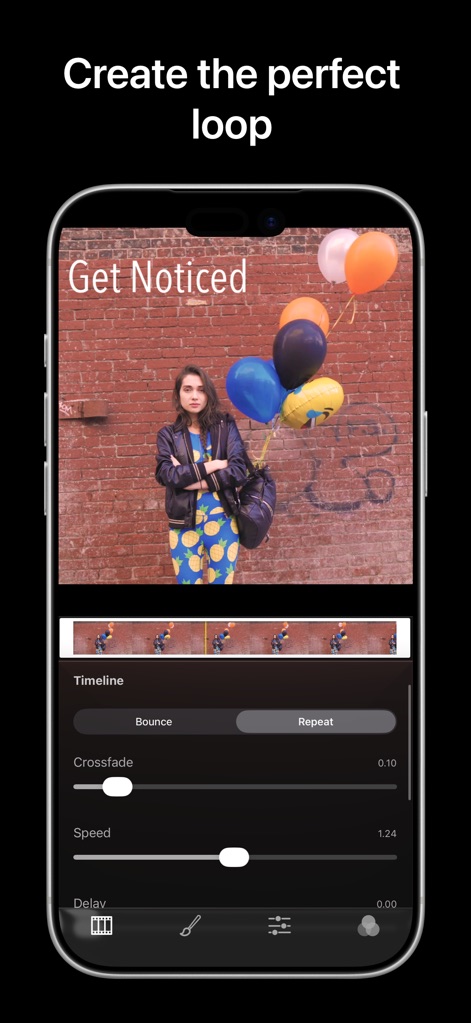
This tool empowers users to meticulously craft motion with the interactive timeline and precise crossfade and speed controls.
Loop Refinement
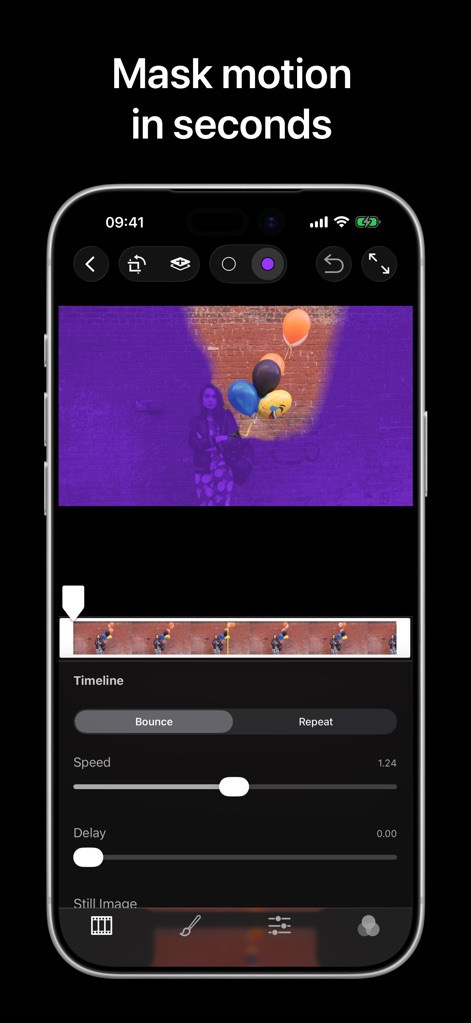
Discover how the app's intuitive interface allows for magical live masking and offers fine-tuned speed and delay adjustments for dynamic motion.
Masking Mastery

Users can refine visual aesthetics with dedicated sliders for temperature and tint, alongside powerful saturation and exposure controls.
Color Correction

The Inspector panel provides robust text input and font selection capabilities, enabling creative professionals to add impactful titles and customize their size and color.
Text Overlays

Explore an extensive range of preset filters through a visual grid of thumbnail previews, allowing users to apply various stylistic effects with ease.
Filter Library

The app offers precise cropping tools with various aspect ratio presets, ensuring content is perfectly framed for any platform or display.
Aspect Ratio Control

Users can effortlessly crop and straighten images using the rotation slider and visual grid, ensuring optimal composition and alignment for every visual.
Transform Canvas

This tool provides comprehensive export options, including social media presets for platforms like TikTok and Instagram, and detailed controls for format and resolution.
Export Flexibility

Seamlessly upload creations to the Flixel community, managing privacy settings and crafting compelling captions for broad reach and engagement.
Flixel Sharing
Description
Download
More Like This
Top-ranked apps in the same category

CapCut: Photo & Video Editor
BYTEDANCE PTE. LTD.

Instagram, Inc.

YouTube
Google LLC

Canva: AI Photo & Video Editor
Canva Pty Ltd

Snapchat
Snap, Inc.

快手
Beijing Kwai Technology Co., Ltd.

Edits: Video Editor
Instagram, Inc.

Meitu- AI Photo & Video Editor
Xiamen Meitu Technology Co., Ltd.

Google Photos: Backup & Edit
Google LLC
This page is not an official page of the app or its developer, but an independent editorial publication created for informational and commentary purposes. Unless expressly stated otherwise, neither the app nor its developer is affiliated with, endorsed by, sponsored by, authorized by, or otherwise officially connected with MWM, Apple, Google Play, the app publisher, or the app's developer, and nothing on this page implies that the app was developed using MWM's services. Any trademarks, logos, screenshots, and other content remain the property of their respective owners.