
This page is not an official page of the app or its developer, but an independent editorial publication created for informational and commentary purposes. Unless expressly stated otherwise, neither the app nor its developer is affiliated with, endorsed by, sponsored by, authorized by, or otherwise officially connected with MWM, Apple, Google Play, the app publisher, or the app's developer, and nothing on this page implies that the app was developed using MWM's services. Any trademarks, logos, screenshots, and other content remain the property of their respective owners.


DayCount
No more forgetting. The app gives users total command over their personal timeline, transforming abstract dates into actionable awareness.
Downloads
5M+User Rating
Total Ratings
31.5KPublisher
Category
ProductivityLocales
14Latest Version
6.0.1Size
194.4 MBFirst Released
Jun 16, 2016Evaluating the core functionalities and their impact on organizational and personal development goals.
DayCount: An Analytical Overview of Key Features
Customizable Event Counters
The app provides highly customizable event counters, allowing users to track significant dates both counting down to upcoming events and counting up from past milestones. It features options for grouping events with custom categories, applying personalized images, and setting recurring events, catering to a visually appealing and organized experience.
Habit and Streak Tracking
This tool features dedicated functionality for tracking daily streaks and building positive habits. It enables users to monitor their progress, work towards their longest runs of productive days, and view these streaks alongside their important events, fostering motivation and personal development.
Advanced Reminder System
It allows users to set flexible reminders at various intervals before or after events, ensuring they never miss critical moments. The app also provides daily summary notifications, highlighting the top 5 events or streaks, which helps in maintaining awareness and motivation.
Customizable Home/Lock Screen Widgets
The app provides highly customizable widgets that can be added to the Home Screen or Lock Screen. These widgets feature various filters, fonts, textures, and borders, offering quick access to important event countdowns and streaks while maintaining a visually engaging experience.
Calendar & Location Integration
This tool features seamless integration for importing events directly from the user's calendar, reducing manual input. It also allows users to save locations to events and open directions in mapping applications, adding practical utility for real-world events.
Cross-Device Sync & Security
It allows users to securely backup and synchronize their events and streaks across multiple Apple devices (iPhone, iPad, Mac), ensuring data consistency. The app also features privacy options like Face ID or Touch ID lock, protecting personal information.
Frequently Asked Questions
Everything you need to know about DayCount
What is DayCount used for?
DayCount helps users track time before and after important events, set reminders, and build positive habits through streaks. It keeps everything clear and manageable.
Can DayCount track time since an event occurred?
Yes, DayCount can track time since important moments using event counters. It displays time in days, hours, minutes, and seconds.
Does DayCount provide countdown timers for future events?
Yes, DayCount provides countdowns for events. It tracks time before an event in days, hours, minutes, and seconds, visible on the main screen.
Can I track my habits and streaks with the DayCount app?
Yes, DayCount allows users to build positive habits by tracking daily streaks and working towards their longest run of productive days, which are viewed alongside events.
Does DayCount offer Home Screen widgets?
Yes, DayCount offers widgets. Users can create customizable widgets with different filters, fonts, textures, and borders to add to their Home Screen or Lock Screen.
Can DayCount send me reminders for events?
Yes, DayCount allows users to set alerts minutes, hours, days, weeks, months, or years before or after events. It also provides daily summary notifications.
Can I secure my events in DayCount with Face ID or Touch ID?
Yes, DayCount provides privacy and security features. Users can lock the app using Face ID or Touch ID to protect their event information.
Does DayCount sync events across multiple Apple devices?
Yes, DayCount supports backup and sync of events and streaks across iPhone, iPad, iPod touch, and Mac, ensuring your data is consistent on all your devices.
Does DayCount offer a free trial for its subscription?
Yes, DayCount offers a free 7-day trial with its auto-renewing yearly subscription. Payment is charged to your iTunes account after the trial concludes.
Is DayCount Premium available as a one-time purchase?
Yes, DayCount Premium is available as an annual subscription or as a lifetime purchase. Users can choose the payment model that best suits their needs.
Can I use custom images for my events in DayCount?
Yes, DayCount allows users to apply images from their device or search Unsplash to customize their event counters.
Does DayCount integrate with my device's calendar?
Yes, DayCount supports importing events directly from your calendar, making it easy to add existing dates to the app.
Does DayCount offer improved text readability options?
Yes, DayCount includes higher contrast options for improved text readability and supports Dynamic Type for enhanced accessibility.
The following screenshots and description are sourced directly from the app's official store listing and are the property of the app developer.
App Store
Screenshots

This tool visually presents 'Days Since' counts with a customizable background image and precise smaller counters for hours, minutes, and seconds.
Track Milestones Effortlessly

Users can see long-term events displayed in months, accompanied by weeks and hours, all against a personal photo background.
Cherished Moments Tracked
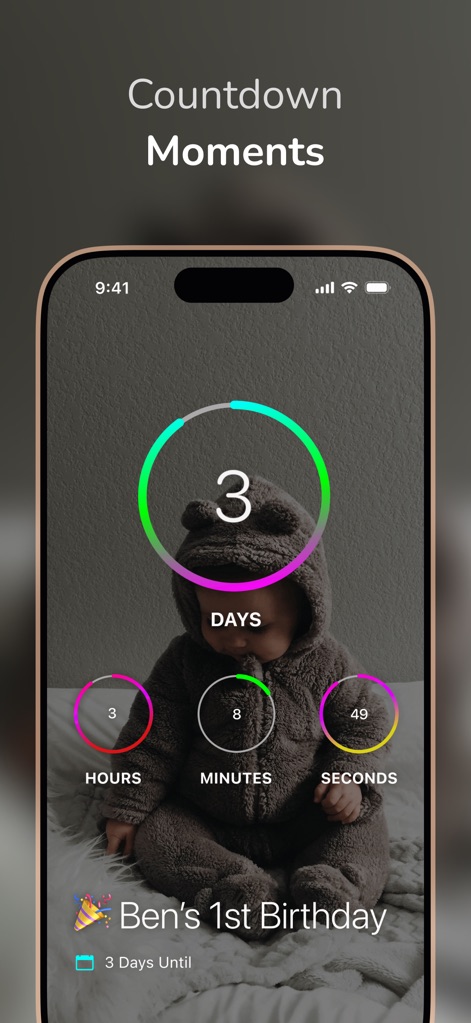
The app features a prominent countdown for upcoming events, showing days until, with supporting hours, minutes, and seconds counters on a relevant background image.
Countdown to Joy
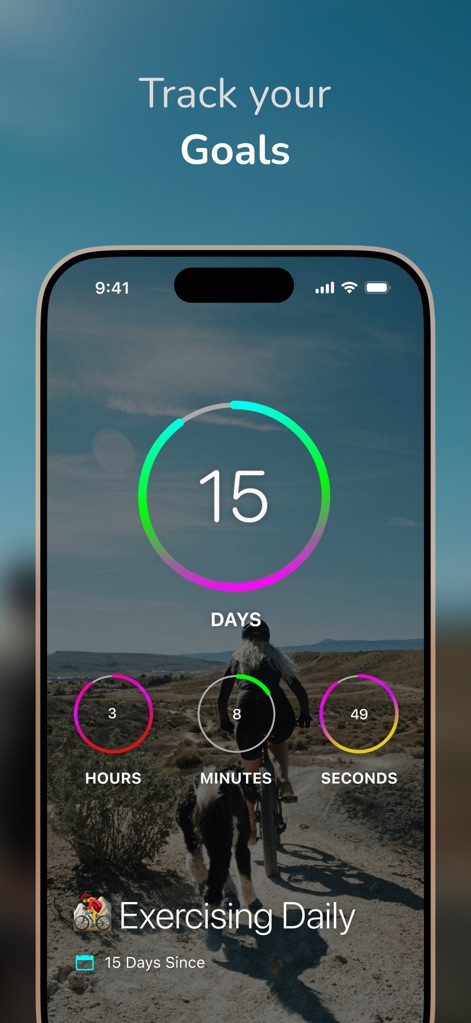
This screenshot illustrates streak tracking with a large day counter and smaller time units, set against a motivational activity-themed background image.
Cultivate Healthy Habits

The app offers a clear countdown display for future events like vacations, featuring a prominent 'days until' counter and a vibrant scenic background image.
Anticipate Future Events

DayCount tracks significant personal achievements like sobriety in months, complete with precise smaller counters for days, hours, and minutes against a calming natural landscape.
Monitor Personal Progress
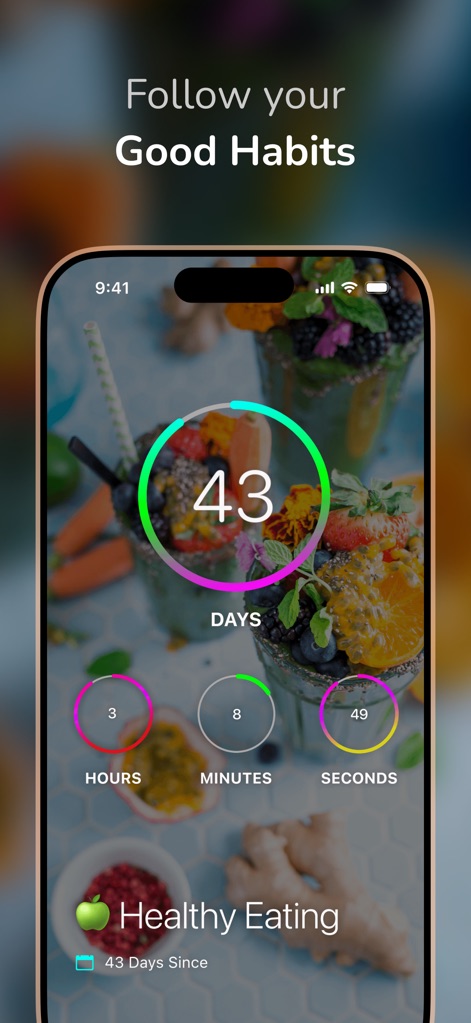
The app showcases habit tracking with a large circular counter for days in a streak, complemented by smaller hourly and minute counters and a relevant healthy food background.
Build Positive Streaks

DayCount effectively displays elapsed time since important appointments like a dentist visit, utilizing a prominent 'days since' counter and a sleek architectural background.
Essential Reminders Visualized
Description
Download
More Like This
Apps with similar features and user experience
倒数日 · Days Matter
iDaily Corp.
Countdown
Find Appiness LLC

Days since - Countdown
Inner Grow Limited
Countdown°
rongsheng li

Days • Countdown & Widgets
MD Apps LTD

Days Matter Air - Countdown
iDaily Corp.
MyDays - Countdown days life
凤 袁

Bears Countdown
Isuru Wanasinghe

Birthday Countdown • Reminder
HAPPYPIXEL - LDA
This page is not an official page of the app or its developer, but an independent editorial publication created for informational and commentary purposes. Unless expressly stated otherwise, neither the app nor its developer is affiliated with, endorsed by, sponsored by, authorized by, or otherwise officially connected with MWM, Apple, Google Play, the app publisher, or the app's developer, and nothing on this page implies that the app was developed using MWM's services. Any trademarks, logos, screenshots, and other content remain the property of their respective owners.