DeDuplicate - Cloud Cleaner

DeDuplicate - Cloud Cleaner


Download on App Store
Logo of DeDuplicate - Cloud Cleaner

DeDuplicate - Cloud Cleaner: Reclaim Your Storage and Stop Paying for Clutter

The smartest way to find and remove identical files across Google Drive, OneDrive, and Dropbox. Fast, secure, and 100% private—we scan your files without ever downloading them.

Publisher

Paolo Pugliese

Category

Utilities

Downloads

6K+

User Rating

4.4/5

Total Ratings

200

Locales

33

Precision Cleaning in Action

Discover the interface used by 6K+ users.
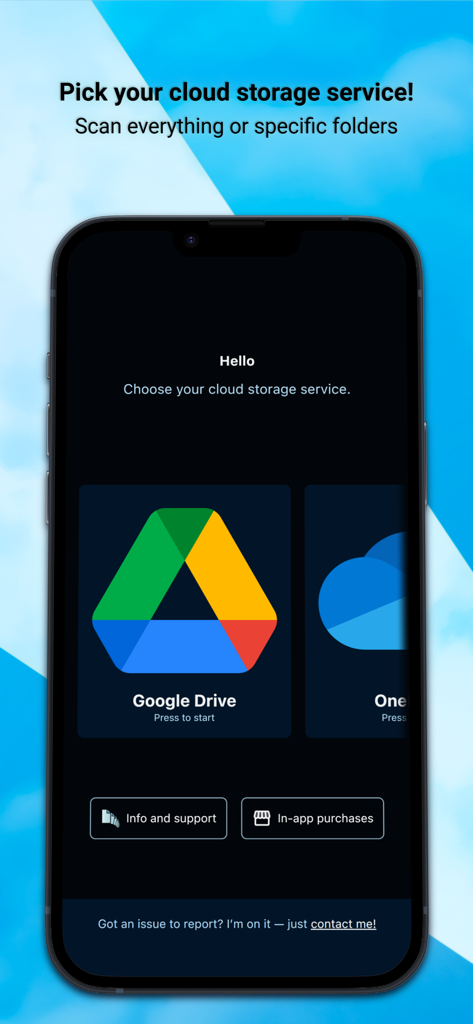
DeDuplicate app interface showing options to select cloud services like Google Drive and OneDrive for duplicate file scanning

DeDuplicate app interface showing options to select cloud services like Google Drive and OneDrive for duplicate file scanning

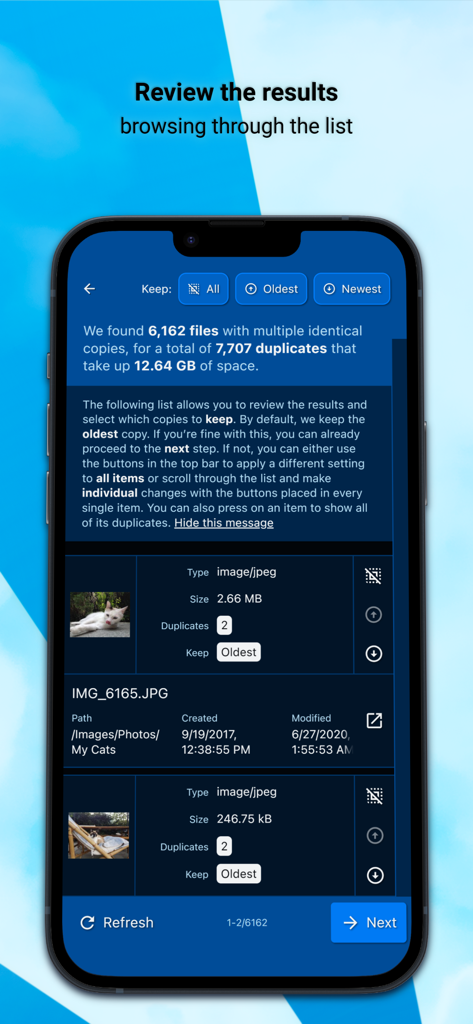
Reviewing a list of detected duplicate image files in the DeDuplicate app to free up cloud storage space.

Reviewing a list of detected duplicate image files in the DeDuplicate app to free up cloud storage space.

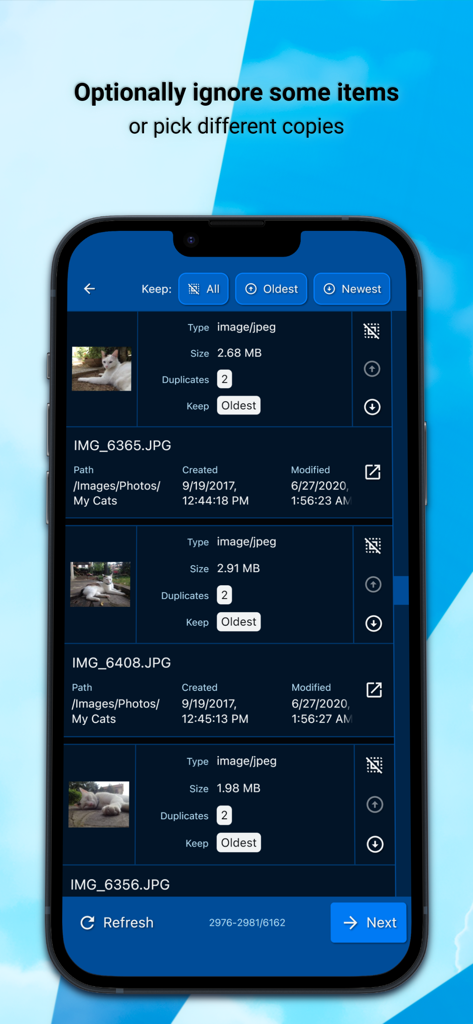
Interface showing duplicate photos with options to select and keep the oldest or newest versions.

Interface showing duplicate photos with options to select and keep the oldest or newest versions.

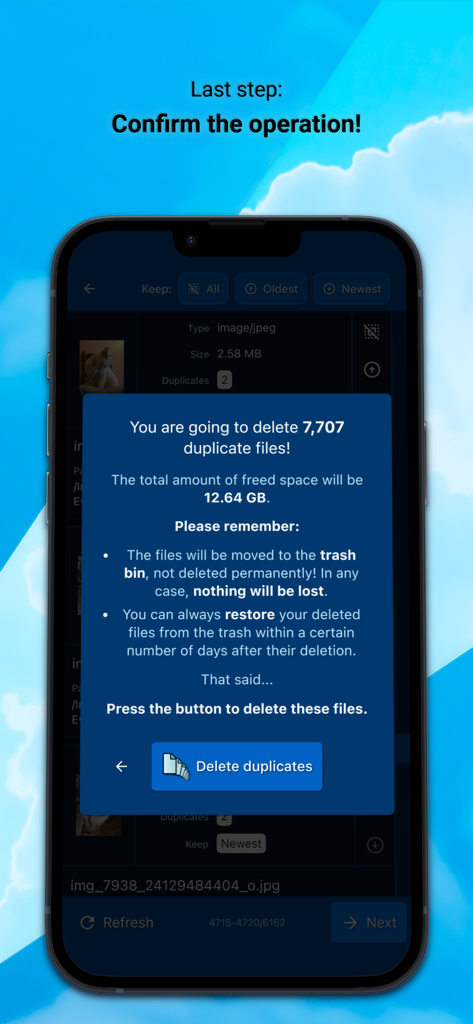
DeDuplicate app confirmation screen showing a summary of duplicate files found and the total storage space to be freed

DeDuplicate app confirmation screen showing a summary of duplicate files found and the total storage space to be freed

Reclaim Your Storage and Digital Peace of Mind

The tools that make this app stand out, trusted by 6K+ users.

🛡️

Privacy-First Local Scanning

Your files remain private. The app connects directly to your cloud providers and processes everything locally on your device, ensuring no third-party servers ever touch your data.

Zero-Download Efficiency

Save your bandwidth and time. DeDuplicate analyzes file metadata and hashes without downloading a single byte of content, making scans incredibly fast and data-cap friendly.

🎯

Bit-for-Bit Matching

Eliminate the guesswork. We use advanced hash values to identify exact duplicates based on content, not just filenames, so you never have to worry about losing unique files.

About the app

Everything you need to know about DeDuplicate - Cloud Cleaner.

Description

Google Drive, OneDrive, Dropbox, and other cloud services don’t offer built-in tools to find and remove duplicates. If you store many files in the cloud, it’s easy to lose control and waste space. Automatic mobile backups make this problem even worse. DeDuplicate scans your cloud storage, finds identical files, and lets you remove the extra copies to free up space. How it works: 1) Log into your account. 2) Choose one or more folders (or the entire drive) and start the scan. Scan time depends on the NUMBER of files, not their size. 3) Review the detected duplicates and optionally ignore some of them. 4) Confirm the operation. What makes DeDuplicate different: • Efficient and fast: files are NOT downloaded. DeDuplicate uses metadata provided by cloud services, so it saves bandwidth, requires no extra storage, and scans are very quick (e.g. ~100,000 files in under 10 minutes, depending on network speed). • Accurate detection: only EXACT duplicates are detected using file hash values. File names are ignored; contents must be identical. • Privacy-first: everything runs locally on your device. The app connects directly to cloud providers, with no intermediary servers and no file data collection. • Cross-platform support. DeDuplicate currently supports the following cloud services: (PERSONAL ACCOUNTS - see notes below!) • OneDrive • Dropbox • Google Drive (∗) • MEGA • Box • pCloud • Yandex.Disk IMPORTANT: DeDuplicate is designed and tested primarily with PERSONAL/CONSUMER ACCOUNTS. Business, school, or enterprise accounts may behave differently and are not fully supported yet. Improving support for those account types is planned for a future update! NOTES ABOUT GOOGLE DRIVE: - Due to recent changes in Google’s requirements for third-party apps, DeDuplicate currently does not have a “verified” status. You can still use Google Drive normally, but signing in requires a small workaround, which is explained step by step inside the app! - Google proprietary file types (such as Google Docs, Google Sheets, etc.) are treated specially by Google Drive and are NOT included in DeDuplicate’s scan. WHY DO YOU NEED THIS APP? Until now, the only practical way to remove duplicates from cloud storage was a very time-consuming workaround: downloading everything to your computer, using one of the many “offline” duplicate-file utilities, and then syncing the changes back to the cloud. In the worst-case scenario, this even means re-uploading everything from scratch. That’s hardly a viable option when you have over 500 GB of unorganized cat pictures :) DeDuplicate is actively developed. If you encounter any issues, please take the time to contact us!

Latest Version

2.7.0

Size

26.0 MB

First Released

Nov 18, 2021

Stop Paying for Digital Clutter

Reclaim gigabytes of space across Google Drive, OneDrive, and Dropbox in minutes. No downloads, no data collection—just a cleaner cloud.

Download on App Store

App information, icons, screenshots, and descriptions displayed on this page are sourced from the Apple App Store and are the property of their respective developers. Download estimates and rankings are based on MWM's proprietary models and may not reflect actual figures. This page is provided for informational and analytical purposes only.

Believe this page infringes your intellectual property? File a dispute