
This page is not an official page of the app or its developer, but an independent editorial publication created for informational and commentary purposes. Unless expressly stated otherwise, neither the app nor its developer is affiliated with, endorsed by, sponsored by, authorized by, or otherwise officially connected with MWM, Apple, Google Play, the app publisher, or the app's developer, and nothing on this page implies that the app was developed using MWM's services. Any trademarks, logos, screenshots, and other content remain the property of their respective owners.


Drive Smarter
Driving just got a digital guardian. The app empowers users with immediate incident control and documented proof.
Downloads
500k+User Rating
Total Ratings
19.4KPublisher
Category
NavigationLocales
1Latest Version
4.9.2Size
554.6 MBFirst Released
Aug 19, 2020An analysis of key features for advanced vehicle safety and evidence management
Drive Smarter App: Core Functionality Evaluation
Automated Mayday Services
It offers in-built Mayday services that automatically trigger in severe collisions, sending details to a designated emergency contact, providing immediate assistance and peace of mind.
Streamlined Insurance Reports
The app provides streamlined reports specifically designed to simplify and expedite insurance claims processing, offering crucial legal protection.
Cloud Storage for Emergency Videos
It automatically stores critical emergency videos securely in the Drive Smarter cloud, ensuring that documented driving evidence is never lost and is accessible for legal protection.
Event-Highlighted Video Timeline
This tool features an organized timeline view of dashcam recordings, intelligently highlighting important events such as possible collisions or impacts for easy review and evidence retrieval.
Instant Cloud Upload via Hotspot
It allows users to instantly upload videos and share time-sensitive data and event information to the Drive Smarter cloud via mobile WiFi hotspots, crucial for real-time evidence backup.
Video Download, Trim & Share
It allows users to conveniently download, trim, and share video clips from their dashcam directly from their smartphone, facilitating quick sharing of evidence with contacts or authorities.
Device Connectivity & Onboarding
The app provides seamless connectivity and streamlined onboarding for select Cobra and Escort devices, allowing for quick setup and configuration as part of the vehicle's dashboard.
Remote Snapshot Functionality
It allows users to remotely take photos via connected cameras with a simple tap on their smartphone screen, offering an additional way to document specific moments or evidence.
Frequently Asked Questions
Everything you need to know about Drive Smarter
What is the Drive Smarter app?
The Drive Smarter app enhances your driving experience by connecting to select Cobra and Escort devices, functioning as a companion for dash cams and radar detectors. It provides features like video management and real-time alerts.
Which devices are compatible with the Drive Smarter app?
The Drive Smarter app is compatible with select Cobra and Escort devices, including Cobra SC-series Dash Cameras. It also supports radar detectors such as the Redline 360c and MAX 360c MKII.
How does Drive Smarter manage Dash Cam video recordings?
Drive Smarter allows users to view recordings stored on their Dash Camera's SD card. Recordings are sorted by timeline, highlighting important events like collisions. Users can download, trim, and share video clips.
Does Drive Smarter offer cloud storage for videos?
Yes, users with mobile WiFi hotspots can connect cameras directly to the Drive Smarter cloud for instant video uploads. Emergency videos are also stored in the Drive Smarter cloud.
What are the Mayday services in the Drive Smarter app?
Drive Smarter's in-built Mayday services automatically trigger in severe collisions. They send details about the current situation to a designated in-case-of-emergency contact.
Does the Drive Smarter app update device firmware?
Yes, the Drive Smarter app helps keep your connected devices' firmware up-to-date. This ensures you enjoy all the latest features offered by your devices.
Can I take photos remotely with my Dash Cam using Drive Smarter?
Yes, the Drive Smarter app features a convenient Snapshot button. This allows you to remotely take photos via your connected cameras with a tap on your smartphone screen.
Does Drive Smarter provide real-time driving alerts?
Yes, Drive Smarter provides integrated live alerts, such as 'Shared Laser' warnings, displayed on a map interface. Users can verify or report on these alerts.
Can I customize settings for my devices in Drive Smarter?
Yes, Drive Smarter allows extensive customization of connected devices. Settings include WiFi, Bluetooth, Hotspot Configuration, Amazon Alexa, GPS, language, user mode, units, and date/time.
Does the Drive Smarter app offer navigation capabilities?
Yes, the Drive Smarter app includes navigation features. It can display routes, speed limits, and estimated travel times to help users find the best routes.
The following screenshots and description are sourced directly from the app's official store listing and are the property of the app developer.
App Store
Screenshots

Users gain crucial awareness with a dynamic map displaying shared laser alerts and immediate feedback options for verifying reports.
Real-time Road Alerts

The app centralizes management for various devices, clearly listing connected dashcams like the SC 100 and radar detectors such as the Redline 360c.
Unified Device Control

Explore a well-organized gallery displaying video thumbnails grouped by date and highlighted events, ensuring quick access to critical driving footage.
Comprehensive Video Archive

This tool allows for deep customization, offering detailed controls for WiFi and Bluetooth connectivity and advanced user mode configurations.
Personalized Device Settings

The Mayday service provides essential assistance, automatically initiating an emergency contact notification and displaying the countdown for dispatch.
Critical Emergency Support
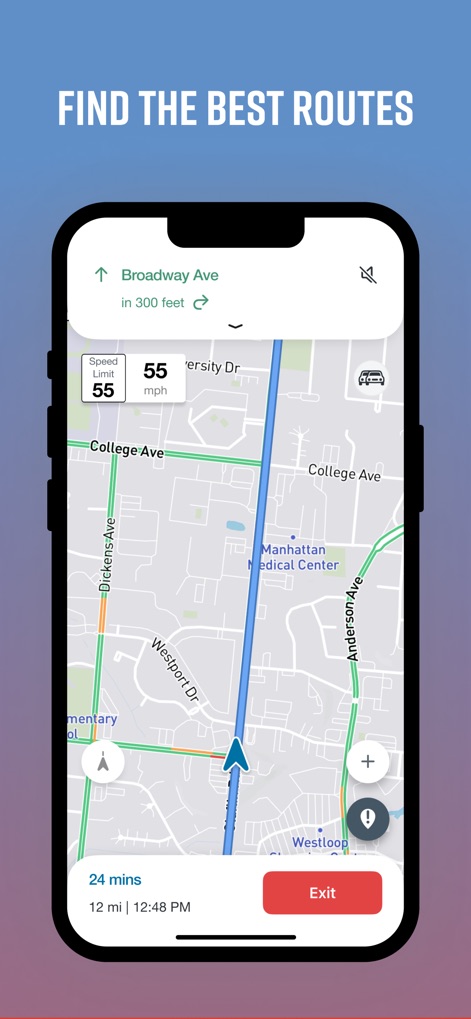
Navigate confidently with this app, which provides clear turn-by-turn directions and prominently displays the current speed limit for safe travel.
Intelligent Route Planning
Description
Download
More Like This
Apps with similar features and user experience

PAPAGO Focus
PAPAGO INC.

GKU GO
Shenzhen Yutu Technology Co., Ltd.

Nice DVR
Shenzhen Xiaozhen Technology Co.,Ltd.

Wolfbox
WOLFBOX TECH, INC.
Garmin Drive™
Garmin International
360 Dash Cam
Beijing Qihoo Technology Co Ltd

TERUNSOUL
chimo inc

MiVue Pro
MiTAC International Corp.
Peztio
Shenzhen Xiaozhen Technology Co.,Ltd.
This page is not an official page of the app or its developer, but an independent editorial publication created for informational and commentary purposes. Unless expressly stated otherwise, neither the app nor its developer is affiliated with, endorsed by, sponsored by, authorized by, or otherwise officially connected with MWM, Apple, Google Play, the app publisher, or the app's developer, and nothing on this page implies that the app was developed using MWM's services. Any trademarks, logos, screenshots, and other content remain the property of their respective owners.