
This page is not an official page of the app or its developer, but an independent editorial publication created for informational and commentary purposes. Unless expressly stated otherwise, neither the app nor its developer is affiliated with, endorsed by, sponsored by, authorized by, or otherwise officially connected with MWM, Apple, Google Play, the app publisher, or the app's developer, and nothing on this page implies that the app was developed using MWM's services. Any trademarks, logos, screenshots, and other content remain the property of their respective owners.


MiVue Pro
Dash cam footage on demand. This app puts incident control directly in the user's hand, ditching SD card fumbling for instant access and management.
Downloads
250k+User Rating
Total Ratings
17.5KPublisher
Category
Social NetworkingLocales
22Latest Version
1.0.318Size
82.8 MBFirst Released
Jun 27, 2017An evaluation of key functionalities enhancing road safety and vehicle security for discerning car owners.
MiVue Pro App: Core Features Analysis
Real-time Incident Video Backup
The app provides instant, automatic backup of incident footage directly to the user's smartphone via Wi-Fi, ensuring crucial evidence is immediately accessible for insurance or legal purposes.
Wireless Over-the-Air Updates
This tool features the ability to update dash cam firmware, speed camera data, and voice versions wirelessly via the smartphone, eliminating the need to remove the memory card and ensuring the device remains current.
Smartphone-based Dash Cam Control
It allows users to conveniently manage dash cam settings and format the memory card directly from their smartphone, simplifying device configuration and maintenance without physical interaction with the dash cam.
Categorized Video Organization
The app organizes recorded videos by date and type (Normal, Event, or Parking mode) into distinct folders, making it easy for users to find and review specific footage efficiently for evidence or personal use.
Frequently Asked Questions
Everything you need to know about MiVue Pro
How does the MiVue Pro app handle incident footage?
The MiVue Pro app automatically saves incident footage to an event folder and sends it to the app via Wi-Fi in real-time. This Wi-Fi video backup does not consume 3G/4G data, using point-to-point transmission.
Can I adjust my dash cam's horizontal level using the MiVue Pro app?
Yes, the MiVue Pro app features a "Live View" function. Users can click "Live View" to adjust the horizontal level of the camera precisely before installation.
Does the MiVue Pro app organize recorded videos?
Yes, the MiVue Pro app organizes videos by date and type. Videos are categorized into "Normal", "Event", and "Parking mode" folders for easy management.
Can I change dash cam settings directly from the MiVue Pro app?
Yes, users can set up their dash cam through the MiVue Pro app. This includes changing settings and formatting the memory card directly using their smartphone.
How does the MiVue Pro app update dash cam firmware?
The MiVue Pro app supports WIFI OTA (Over-the-Air) updates. Users can download and update firmware, speed camera data, and voice versions via their smartphone without removing the memory card.
Does the MiVue Pro app use mobile data for Wi-Fi video backup?
No, the MiVue Pro app's Wi-Fi video backup function does not consume 3G/4G mobile data. It uses point-to-point transmission technology for real-time footage transfer.
Where can I find troubleshooting information for the MiVue Pro app?
Users experiencing connection issues with the MiVue Pro app can refer to the provided FAQ link: https://service.mio.com/M0100/F0110_DownLoad_Faq.aspx?bullid=AllBull&faqid=131685 for troubleshooting guidance.
The following screenshots and description are sourced directly from the app's official store listing and are the property of the app developer.
App Store
Screenshots
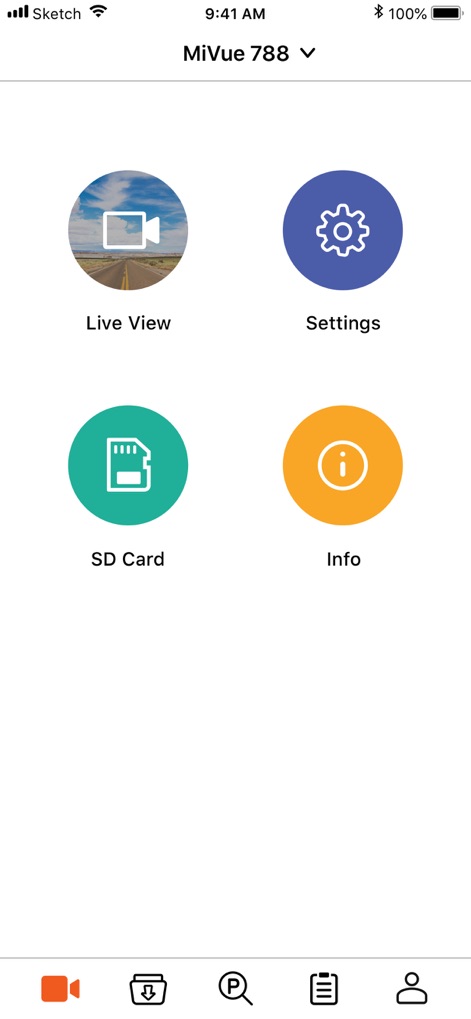
Explore the app's central dashboard, showcasing quick access icons like 'Live View' for real-time monitoring and 'Settings' for seamless device configuration.
Core App Functions

Witness the live camera feed with an adjustable alignment grid, allowing users to fine-tune the dash cam's horizontal level for optimal recording.
Precise Camera Setup

Navigate through an organized video library, featuring distinct tabs for 'Event' and 'Parking' footage, alongside clear date-stamped video entries with thumbnails.
Effortless Footage Access
Description
Download
More Like This
Apps with similar features and user experience

PAPAGO Focus
PAPAGO INC.

GKU GO
Shenzhen Yutu Technology Co., Ltd.

Nice DVR
Shenzhen Xiaozhen Technology Co.,Ltd.

Wolfbox
WOLFBOX TECH, INC.

Garmin Drive™
Garmin International

360 Dash Cam
Beijing Qihoo Technology Co Ltd

Drive Smarter
CEDAR ELECTRONICS HOLDINGS CORP.

TERUNSOUL
chimo inc

Peztio
Shenzhen Xiaozhen Technology Co.,Ltd.
This page is not an official page of the app or its developer, but an independent editorial publication created for informational and commentary purposes. Unless expressly stated otherwise, neither the app nor its developer is affiliated with, endorsed by, sponsored by, authorized by, or otherwise officially connected with MWM, Apple, Google Play, the app publisher, or the app's developer, and nothing on this page implies that the app was developed using MWM's services. Any trademarks, logos, screenshots, and other content remain the property of their respective owners.