
This page is not an official page of the app or its developer, but an independent editorial publication created for informational and commentary purposes. Unless expressly stated otherwise, neither the app nor its developer is affiliated with, endorsed by, sponsored by, authorized by, or otherwise officially connected with MWM, Apple, Google Play, the app publisher, or the app's developer, and nothing on this page implies that the app was developed using MWM's services. Any trademarks, logos, screenshots, and other content remain the property of their respective owners.


Garmin Drive™
No more fumbling. This app gives you command over your drive, turning chaos into clarity.
Downloads
2.5M+User Rating
Total Ratings
14.1KPublisher
Category
NavigationLocales
39Latest Version
4.28.05Size
159.6 MBFirst Released
Oct 17, 2017An evaluation of key functionalities for integrated navigation, safety, and incident management.
Garmin Drive™ App: Core Feature Analysis
Multi-Camera Auto Sync
The app enables wireless connection of up to four dash cams, offering comprehensive, multi-view coverage around the vehicle for enhanced security.
Real-time Navigation Data
The app provides real-time traffic updates, parking availability, advanced weather information, and PhotoLive traffic camera feeds to compatible navigators.
PiP Video Creation for Incident Review
This tool allows users to create picture-in-picture videos from two different dash cam perspectives simultaneously, simplifying incident review and sharing with authorities.
On-Demand Footage Review
It provides quick access to recorded dash cam footage, crucial for incident analysis and legal protection.
Dash Cam Remote Control
The app offers convenient access to camera controls and settings for compatible dash cams.
Mobile Smart Notifications
The app delivers smart notifications from Bluetooth-enabled mobile devices, keeping users informed on the go.
Frequently Asked Questions
Everything you need to know about Garmin Drive™
What is the Garmin Drive app?
The Garmin Drive app is a convenient mobile solution for compatible Garmin automotive navigators and dash cams. It provides real-time traffic and parking information, camera controls, and access to recorded footage for a comprehensive driving experience.
Which devices are compatible with the Garmin Drive app?
The Garmin Drive app is compatible with the latest Garmin automotive navigators and dash cams. Users can visit garmin.com/driveapp for a list of specific supported devices. This ensures proper functionality and feature access.
Does the Garmin Drive app offer real-time traffic updates?
Yes, for compatible navigators, the Garmin Drive app provides real-time information. This includes traffic, parking, advanced weather, and photoLive traffic cameras, enhancing navigation capabilities.
Can the Garmin Drive app manage dash cam footage?
Yes, for compatible dash cams, the Garmin Drive app provides quick access to camera controls, settings, and recorded footage. It also supports the Dash Cam Auto Sync feature for multiple cameras.
How many dash cams can connect to the Garmin Drive app simultaneously?
The Garmin Drive app allows wireless connection of up to four dash cams using its Dash Cam Auto Sync feature. This provides comprehensive video coverage around a vehicle from various viewpoints.
How do I review recorded video in the Garmin Drive app?
Users review recorded video by accessing "Videos and Photos" from the main screen of the Garmin Drive app. The app also allows creating a picture-in-picture video from two camera perspectives.
Does Garmin Drive allow saving dash cam videos?
Yes, the Garmin Drive app provides a "Save Video" option directly from the main interface. Saved items are stored on your camera's storage until removed.
Is Amazon Alexa integrated with the Garmin Drive app?
Yes, Garmin DriveSmart 65/86 and Garmin Speak devices with Amazon Alexa integrate with the Garmin Drive app. This brings Alexa's music, news, and navigation features to your vehicle.
Can I search for destinations using the Garmin Drive app?
Yes, the Garmin Drive app includes a "Where To?" search function on its main screen. This allows users to find and send destinations to their compatible navigation device.
Does the Garmin Drive app offer cloud storage for videos?
Yes, the Garmin Drive app features "Vault" for secure online video storage. This option is accessible from the main app screen and within the settings menu for managing access.
How do I enable or disable audio recording in the Garmin Drive app?
The Garmin Drive app allows users to control audio recording. A clear toggle labeled "Audio Recording is ON" is present on the main screen to easily enable or disable this function.
What are the alternative Garmin apps for older devices?
For older Bluetooth-capable Garmin navigators, the Garmin Smartphone Link app is used. Older Wi-Fi-enabled Garmin dash cams access video footage through the Garmin VIRB app.
The following screenshots and description are sourced directly from the app's official store listing and are the property of the app developer.
App Store
Screenshots

The app's main dashboard allows users to seamlessly connect to devices like "DC Live" and quickly access features such as the "Vault" for secure video storage.
Centralized Device Hub
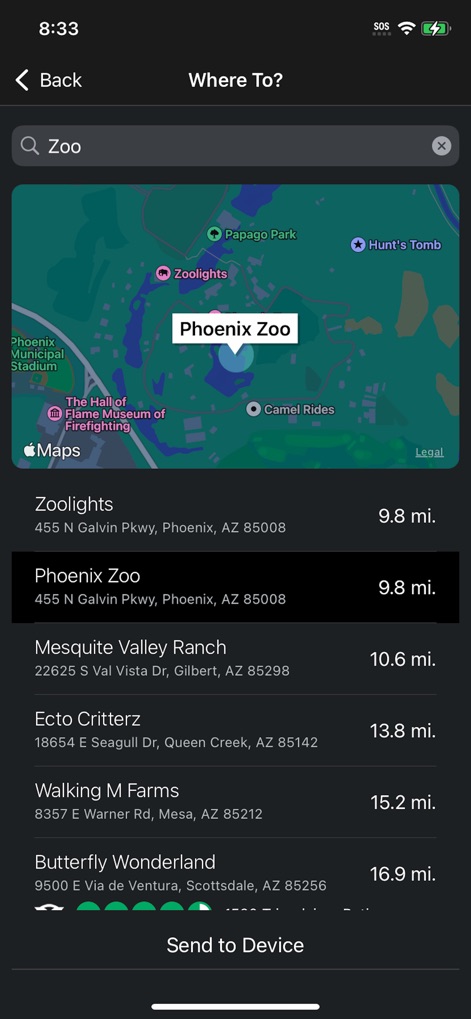
This interface demonstrates a smart "Where To?" search function, helping users pinpoint locations like "Phoenix Zoo" and send them directly to their navigator.
Intuitive Destination Search
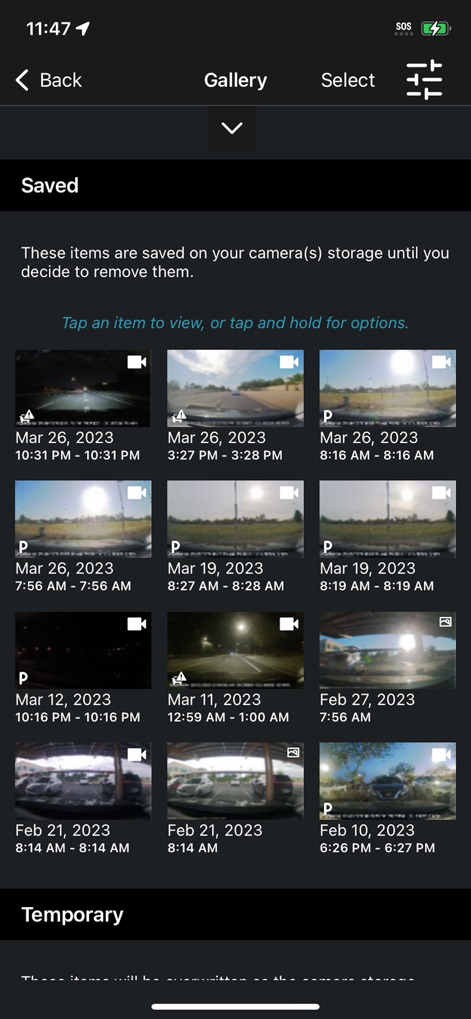
The "Saved" video gallery organizes dash cam recordings with clear timestamps, offering users an efficient way to review and manage their footage.
Comprehensive Video Gallery

Users can precisely trim video segments using the intuitive "trim slider" and export critical moments, with the option to "Include Audio."
Advanced Video Editing
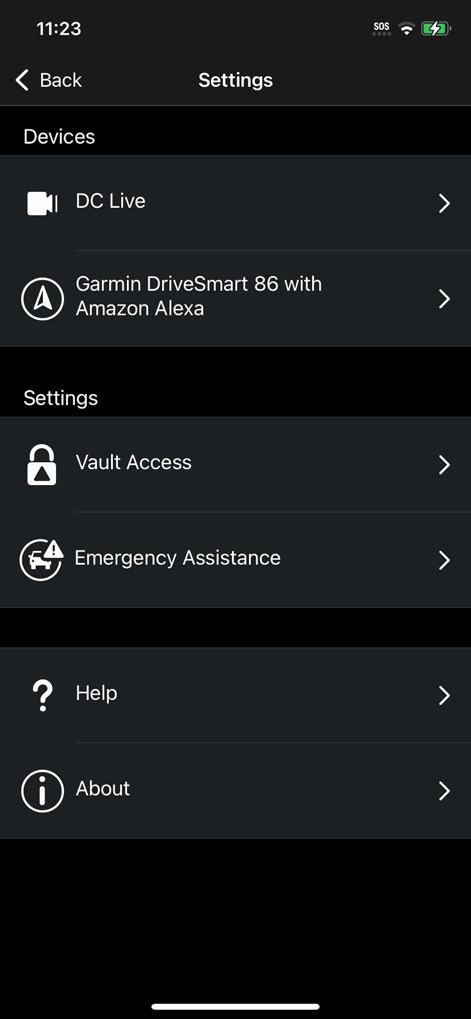
The "Settings" menu provides robust control, allowing users to manage connected "Devices" and configure critical features like "Vault Access."
Tailored App Settings
Description
Download
More Like This
Apps with similar features and user experience

PAPAGO Focus
PAPAGO INC.

GKU GO
Shenzhen Yutu Technology Co., Ltd.

Nice DVR
Shenzhen Xiaozhen Technology Co.,Ltd.
Wolfbox
WOLFBOX TECH, INC.

360 Dash Cam
Beijing Qihoo Technology Co Ltd

Drive Smarter
CEDAR ELECTRONICS HOLDINGS CORP.

TERUNSOUL
chimo inc

MiVue Pro
MiTAC International Corp.
Peztio
Shenzhen Xiaozhen Technology Co.,Ltd.
This page is not an official page of the app or its developer, but an independent editorial publication created for informational and commentary purposes. Unless expressly stated otherwise, neither the app nor its developer is affiliated with, endorsed by, sponsored by, authorized by, or otherwise officially connected with MWM, Apple, Google Play, the app publisher, or the app's developer, and nothing on this page implies that the app was developed using MWM's services. Any trademarks, logos, screenshots, and other content remain the property of their respective owners.