
This page is not an official page of the app or its developer, but an independent editorial publication created for informational and commentary purposes. Unless expressly stated otherwise, neither the app nor its developer is affiliated with, endorsed by, sponsored by, authorized by, or otherwise officially connected with MWM, Apple, Google Play, the app publisher, or the app's developer, and nothing on this page implies that the app was developed using MWM's services. Any trademarks, logos, screenshots, and other content remain the property of their respective owners.


Eurobank Mobile App
This app transforms banking. Users gain total control, turning financial chaos into order from a single screen.
Downloads
750k+User Rating
Total Ratings
143.4KPublisher
Category
FinanceLocales
2Latest Version
6.33.0Size
706.3 MBFirst Released
Mar 27, 2010An evaluation of key functionalities enhancing user experience and financial management for digitally-inclined individuals.
Eurobank Mobile App: Core Features Analysis
Personalized Financial Dashboard
The app provides a consolidated view of all financial information, including account balances, income/expenses, card details, €pistrofi rewards, and access to loan, investment, and insurance products, all from a single dashboard.
Seamless Account Onboarding
The app offers a convenient option for new customers to open a Eurobank account entirely online within 15 minutes, eliminating the need for a physical branch visit.
Effortless Transaction Initiation
It allows users to quickly access and perform various transactions such as fund transfers, bill payments, IRIS Payments, and manage standing orders directly from the dashboard.
Direct Card Control
The app provides comprehensive card management capabilities, enabling users to activate, pay, load, and temporarily deactivate their cards directly from the dashboard.
Digital Product Discovery
It allows users to easily explore and access a wide variety of Eurobank's online products and services for digital purchases directly within the app.
Instant Privacy Mode
This tool features a quick gesture to instantly hide or unhide sensitive account balances and financial details on screen, ensuring privacy in public settings.
Frequently Asked Questions
Everything you need to know about Eurobank Mobile App
What financial information does the Eurobank Mobile App dashboard display?
The Eurobank Mobile App dashboard displays all account balances, current month’s income and expenses, details for each account and card, and the €pistrofi amount earned. It provides a complete financial overview on one screen.
How can I hide my account amounts in the Eurobank Mobile App?
Yes, the Eurobank Mobile App allows users to hide or unhide amounts to protect privacy. This feature can be enabled by navigating to Profile > Settings > App Settings > Flip to Hide, or with a single gesture.
What types of transactions can I perform with the Eurobank Mobile App?
The Eurobank Mobile App facilitates quick transactions including fund transfers, bill payments, IRIS Payments, and managing 'Favourite transactions' and Standing Orders. Users can initiate these from the dashboard or via the red button.
Does the Eurobank Mobile App offer card management features?
Yes, the Eurobank Mobile App offers direct card management from the dashboard. Users can activate, pay, load, and temporarily deactivate their Eurobank cards, personalizing settings with ease. It simplifies card control.
Can new customers open an account using the Eurobank Mobile App?
Yes, new customers can open a Eurobank account in 15 minutes through the Eurobank Mobile App without physically visiting a branch. This feature simplifies the onboarding process for non-customers.
Is the Eurobank Mobile App for personal or business banking?
The Eurobank Mobile App is designed for personal banking. Legal entities requiring business banking services must download and use the separate Eurobank Business App for their specific needs.
The following screenshots and description are sourced directly from the app's official store listing and are the property of the app developer.
App Store
Screenshots
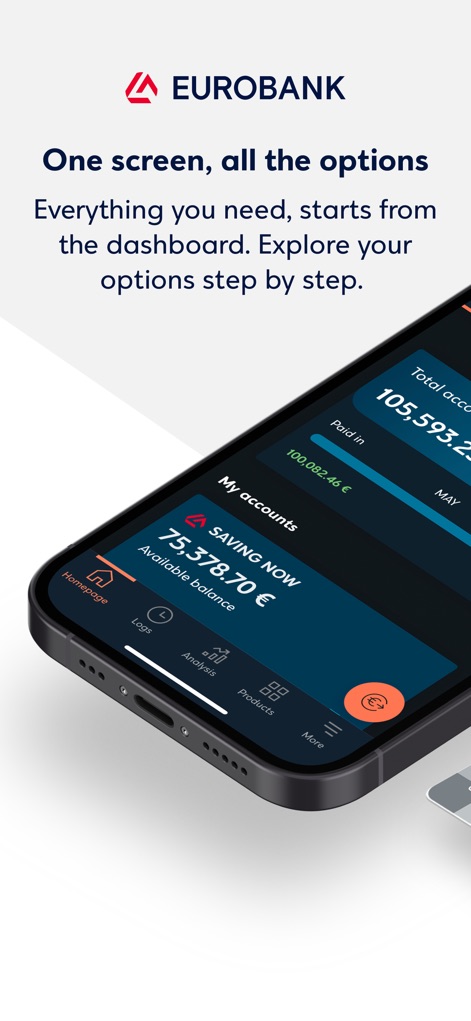
The app consolidates financial details on the main dashboard, displaying total account balance and current month's income/expenses for quick financial insights.
Dashboard Overview

Users can initiate common transactions directly from the dashboard, leveraging quick access buttons for fund transfers and IRIS Payments.
Swift Banking Actions

The app offers immediate access to transactional activities with options like "Transfer funds" and "IRIS Payments", streamlining financial operations.
Instant Transaction Hub

This tool provides a clear financial snapshot, detailing the total account balance and a visual breakdown of income and expenses.
Comprehensive Financial View
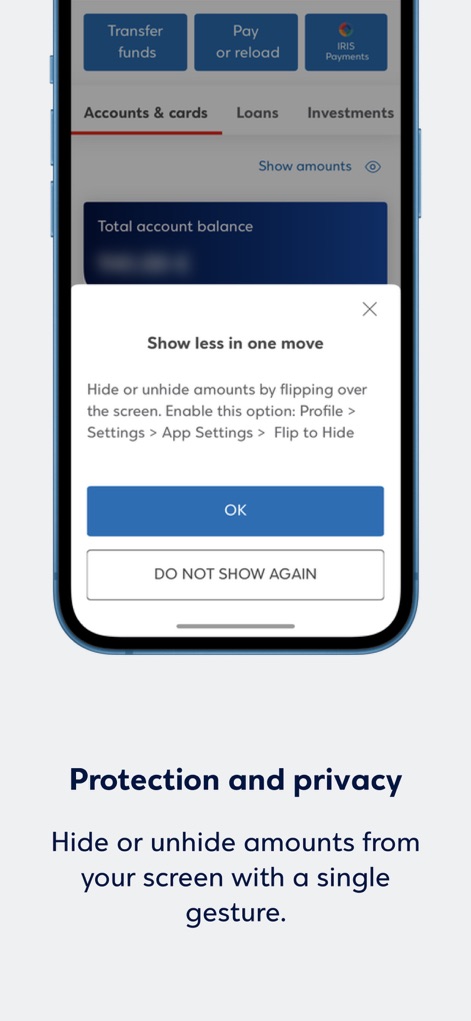
Users can protect sensitive financial data by utilizing the 'Hide amounts' feature, ensuring privacy with a single gesture or setting adjustment.
Privacy Control

The app empowers users with full control over their cards, allowing balance loading and temporary deactivation directly from the dashboard.
Card Management

Users can discover a wide array of financial products and services, browsing through options like e-Prepaid Visa and Credit Cards for instant access.
Product Explorer
Description
Download
More Like This
Apps with similar features and user experience

Enpara Bank Cep Şube
Enpara Bank Anonim Sirketi

Alinma App - تطبيق الإنماء
Alinma Bank

Huntington Mobile Banking
The Huntington National Bank, Inc

國泰世華網路銀行CUBE
Cathay United Bank

中國信託行動銀行
CTBC Bank Co., Ltd.

FNB Banking App
FirstRand Bank Limited

Riyad Bank App
Riyad Bank

CIMB OCTO MY
CIMB Bank Berhad

Regions Mobile
Regions Financial
This page is not an official page of the app or its developer, but an independent editorial publication created for informational and commentary purposes. Unless expressly stated otherwise, neither the app nor its developer is affiliated with, endorsed by, sponsored by, authorized by, or otherwise officially connected with MWM, Apple, Google Play, the app publisher, or the app's developer, and nothing on this page implies that the app was developed using MWM's services. Any trademarks, logos, screenshots, and other content remain the property of their respective owners.