Exif Wizard-Pro
Exif Wizard-Pro
Download on App Store

This page is not an official page of the app or its developer, but an independent editorial publication created for informational and commentary purposes. Unless expressly stated otherwise, neither the app nor its developer is affiliated with, endorsed by, sponsored by, authorized by, or otherwise officially connected with MWM, Apple, Google Play, the app publisher, or the app's developer, and nothing on this page implies that the app was developed using MWM's services. Any trademarks, logos, screenshots, and other content remain the property of their respective owners.


Logo of Exif Wizard-Pro
Download on App Store

Exif Wizard-Pro

Unlock deep image data, edit copyright tags, and streamline your professional workflow with the ultimate Exif reader and FTP manager for iPad and iPhone.

Key Figures

Downloads

184K+

User Rating

3.5/5

Total Ratings

100

Publisher

homedatasheet.com, Inc.

Category

Photo & Video

Locales

1

Latest Version

13.0

Size

1.9 MB

First Released

Mar 21, 2011
Features

Professional Metadata Tools for the Serious Photographer

Exif Wizard-Pro gives you total control over your digital images. Analyze technical specs, safeguard your intellectual property, and streamline your professional workflow directly from your iPad or iPhone.

Deep Metadata Inspection

Access granular technical data like ISO, aperture, and focal length to analyze your performance and master your gear's capabilities.

Professional FTP Workflow

Upload individual shots or entire albums to your private server via passive FTP—ideal for field photojournalists and studio client deliveries.

The following screenshots and description are sourced directly from the app's official store listing and are the property of the app developer.

App Store

Screenshots
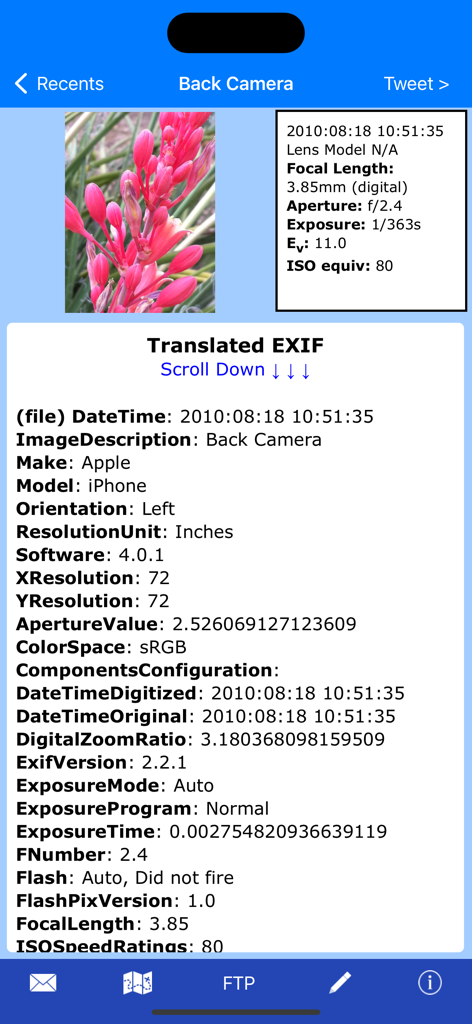
Exif Wizard-Pro - Interface of Exif Wizard Pro displaying comprehensive image metadata and camera technical specifications for a photo

Interface of Exif Wizard Pro displaying comprehensive image metadata and camera technical specifications for a photo

Exif Wizard-Pro - Full resolution photo display in Exif Wizard Pro app
Full resolution photo display in Exif Wizard Pro app

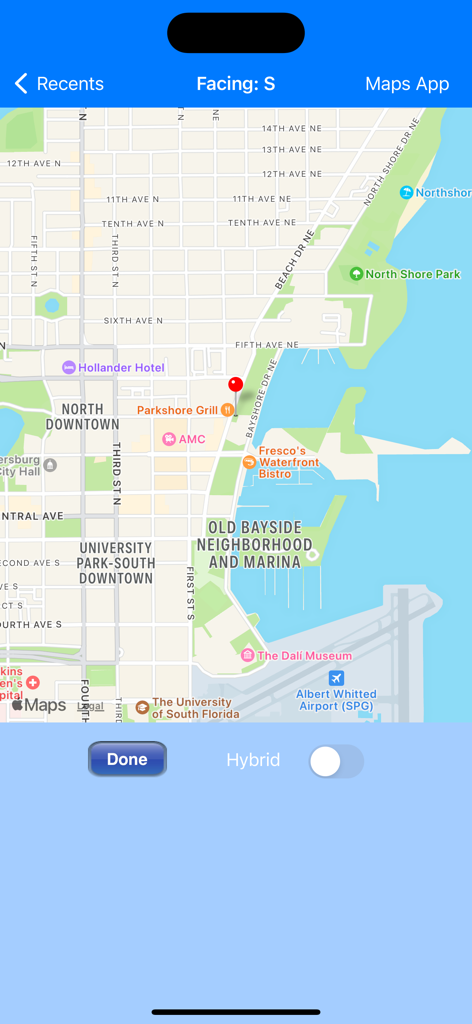
Exif Wizard-Pro - Map interface in Exif Wizard-Pro showing the geotagged location of a photo with a red marker
Map interface in Exif Wizard-Pro showing the geotagged location of a photo with a red marker

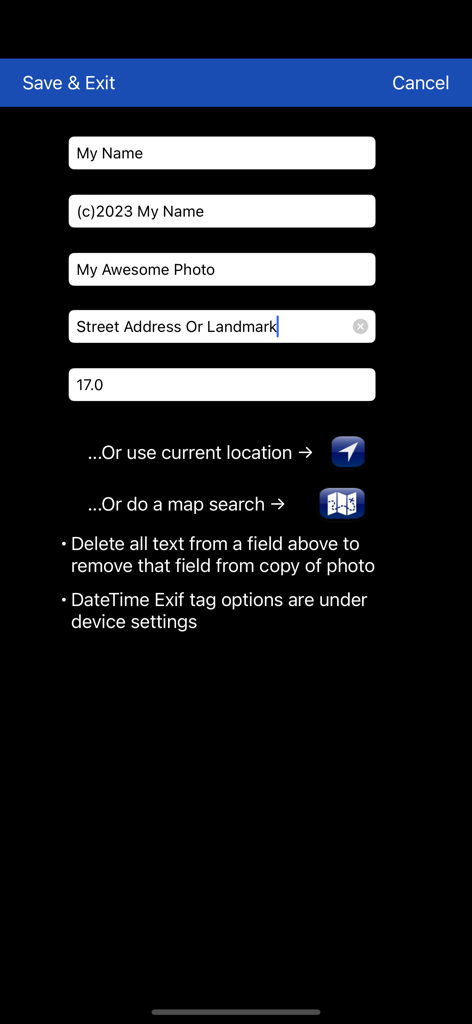
Exif Wizard-Pro - Interface for editing photo metadata fields such as artist, copyright, and GPS information.

Interface for editing photo metadata fields such as artist, copyright, and GPS information.

Description

Exif Wizard-Pro is an Exif reader for photographers who are serious about their digital images. - Work in native screen resolution, portrait & landscape, on your iPad. - Move through an album using left or right finger "swipe" gestures on the preview images - Ability to e-mail photos from within the app which retain their Exif data - Upload images via FTP (passive mode, which virtually every recent server supports) and select your upload directory via a graphical user interface. Send one image at a time, or let Exif Wizard-Pro upload an entire album for you with the touch of a button. - Create a copy of an existing photo with the option to add, modify, or delete some Exif tags (Artist, Copyright, ImageDescription, Software, and GPS Location). Copies are placed at the end of your Recents album (Camera Roll). (JPEG images only) ***iCloud Photo Library Users - In the event a photo you believe is in your iCloud Photo Library fails to load, please open Apple's built-in "Photos" app to verify its presence, then try Exif Wizard-Pro again. Note that it may take several seconds or more to download a photo. ***If you edit a photo in Apple's built-in Photos app, it may become inaccessible to Exif Wizard-Pro. Reverting to original should restore access. FTP security: Exif Wizard-Pro sends FTP data (including your password) unencrypted and, if you choose to store your password, saves it on your mobile device unencrypted. Therefore, you should NOT enter your main server password into Exif Wizard-Pro. If you have not done so already, set up an FTP account with limited access permissions. Consult your sources of technical support for further information. Expectations Management: The process of importing photos from your desktop, laptop, or stand-alone digital camera to your mobile device is controlled by Apple. Some image editing programs, social media sites, and image upload/storage services remove Exif data from photos. Thank you for your understanding. Notes: - Web photos can be stored in your Recents album (Camera Roll) with Exif information by touching and holding the photo, and then touching "Add to Photos" on the action sheet which will appear. - If you experience slow loading of photos for a selected album, go to the "Settings" app (from your home screen) and, in Exif Wizard-Pro's settings, scroll down and turn ON the "Fast Load" switch. *** If Exif Wizard-Pro is not displaying GPS/mapping information for photos you have taken with your iOS device, it may be because you did not enable geotagging when you first used the built-in Camera app. To grant permission now, from your home screen, touch Settings -> Privacy -> Location Services. Make sure the "Location Services" switch at the top of the screen is ON, then scroll down and turn on the switch next to "Camera." Keep in mind that if you enable geotagging, people you transmit your photos to may be able to determine the locations where those photos were taken using any number of mobile and desktop Exif applications.

Download

Download on App Store

This page is not an official page of the app or its developer, but an independent editorial publication created for informational and commentary purposes. Unless expressly stated otherwise, neither the app nor its developer is affiliated with, endorsed by, sponsored by, authorized by, or otherwise officially connected with MWM, Apple, Google Play, the app publisher, or the app's developer, and nothing on this page implies that the app was developed using MWM's services. Any trademarks, logos, screenshots, and other content remain the property of their respective owners.








