
This page is not an official page of the app or its developer, but an independent editorial publication created for informational and commentary purposes. Unless expressly stated otherwise, neither the app nor its developer is affiliated with, endorsed by, sponsored by, authorized by, or otherwise officially connected with MWM, Apple, Google Play, the app publisher, or the app's developer, and nothing on this page implies that the app was developed using MWM's services. Any trademarks, logos, screenshots, and other content remain the property of their respective owners.


Fast Player - video player
No video format stands a chance. This app gives users absolute control over their media library, wherever it resides.
Downloads
2.5M+User Rating
Total Ratings
47.5KPublisher
Category
EntertainmentLocales
49Latest Version
2.11Size
126.6 MBFirst Released
Dec 8, 2017An in-depth analysis of key functionalities and their impact on tech-savvy media consumers.
Fast Player - Video Player: A Comprehensive Technical Evaluation
Comprehensive Casting Capabilities
The app provides extensive support for casting media to external displays through technologies like UPnP/DLNA, AirPlay, Chromecast, and general screen mirroring, ensuring seamless sharing.
Universal Media Format Support
This tool ensures broad compatibility by supporting nearly all video and audio formats, including specialized codecs, for diverse local and streamed media playback.
Versatile Local File Transfer Options
It allows users to transfer local media via multiple methods, including USB (iTunes file sharing), Wi-Fi, and connections to various file servers (SMB, FTP, NFS, SFTP).
Advanced Streaming & IPTV Playback
The app supports parsing and playing M3U8 and M3U playlists, facilitating IPTV stream playback and ensuring compatibility with modern IPv6 networks for streaming video content.
Intuitive Advanced Playback Controls
This tool features a suite of intuitive gesture-based controls, including double-speed playback with a long press, precise scrubbing with swipes, and quick pause/play with a double-tap.
Integrated Cloud Storage Access
It allows users to seamlessly access and manage media files directly from popular cloud storage services such as Google Drive, Dropbox, OneDrive, and iCloud, simplifying content acquisition.
Enhanced Privacy & Security Features
The app provides robust privacy protection, featuring password lock functionality to encrypt and secure private videos, thereby ensuring content confidentiality and user safety.
Customizable Subtitle Management
This tool supports direct downloading of subtitles and the display of custom subtitle files, significantly enhancing accessibility and the overall viewing experience for diverse content.
Frequently Asked Questions
Everything you need to know about Fast Player - video player
What video formats does Fast Player - video player support?
Fast Player supports almost all movie file formats, including mp4, avi, mkv, rmvb, flv, wmv, 3gp, mov, swf, mpeg, and more. It decodes H.264, H.265, MPEG-2, MPEG-4, VP8, VP9, THEORA, XVID, DIVX, FLV, WMV1, and WMV2.
Does Fast Player - video player play all audio formats?
Yes, Fast Player supports almost all audio file formats. This includes mp3, wma, wav, dts, aac, amr, flac, ape, cue, m4a, aiff, caff, ogg vorbis, and lossless music files.
How do I control playback in Fast Player - video player using gestures?
Fast Player utilizes gestures for playback control. Long press to play at double speed, swipe left to go backward, swipe right to go forward, and double-click to pause/play. Gesture controls for brightness, volume, and zoom are also available.
Can Fast Player - video player cast videos to my TV?
Yes, Fast Player supports casting videos to TV. It offers compatibility with UPnP/DLNA, AirPlay, Chromecast, and screen mirroring technologies. All devices must be connected to the same WiFi network.
What methods are available to transfer files to Fast Player - video player?
Fast Player offers multiple file transfer options. These include USB transfer (iTunes file sharing), Wi-Fi transfer, and connecting to file servers such as SMB, FTP, NFS, and SFTP. Cloud drive transfers are also supported.
Does Fast Player - video player integrate with cloud storage services?
Yes, Fast Player integrates with several cloud storage services. Users can transfer files directly from Google Drive, Dropbox, OneDrive, and iCloud to the app.
How does Fast Player - video player protect my privacy?
Fast Player protects user privacy through a password lock feature. This functionality encrypts and secures your videos, ensuring that your content remains private and safe.
What are the in-app purchase options for Fast Player - video player?
Fast Player offers two Professional version in-app purchase options. A Lifetime version is available as a one-time purchase, and a one-year version is offered as an annual auto-renewable subscription.
How do I manage my Fast Player - video player annual subscription?
Users can manage their Fast Player annual subscription through their Account Settings after purchase. Auto-renewal may be turned off there at least 24 hours before the current subscription period ends.
Does Fast Player - video player support playing IPTV playlists?
Yes, Fast Player supports M3U and M3U8 files, allowing for the playback of IPTV playlists. The app also supports playing streaming videos under IPv6 networks.
Can Fast Player - video player open archived files?
Yes, Fast Player supports opening various archive files directly within the application. Compatible formats include zip, rar, and 7z.
Does Fast Player - video player offer file management capabilities?
Yes, Fast Player includes file management capabilities. Users can sort documents and search for specific files directly within the application's interface.
The following screenshots and description are sourced directly from the app's official store listing and are the property of the app developer.
App Store
Screenshots

This screenshot demonstrates the app's extensive format compatibility and its streamlined playback controls for seamless viewing.
Universal Playback Power
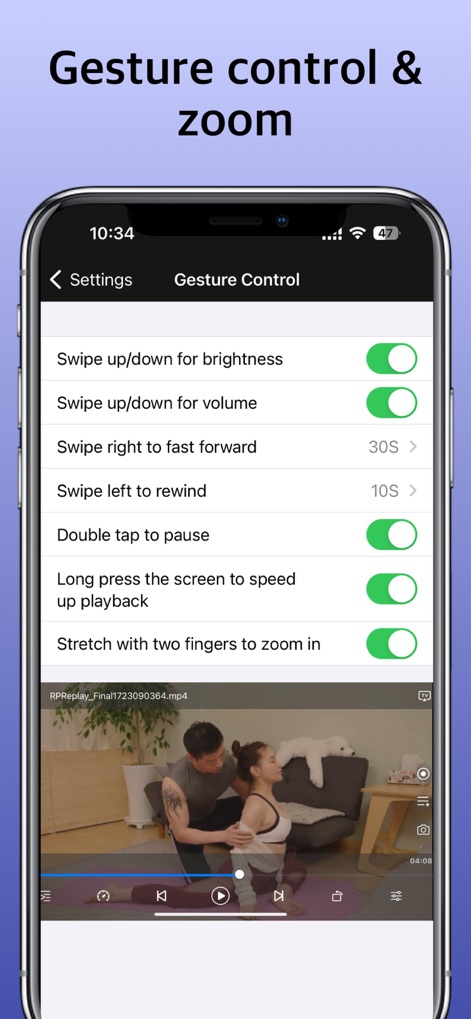
Users can customize their viewing experience with comprehensive gesture controls for actions like adjusting brightness and the two-finger zoom feature.
Intuitive Gesture Mastery
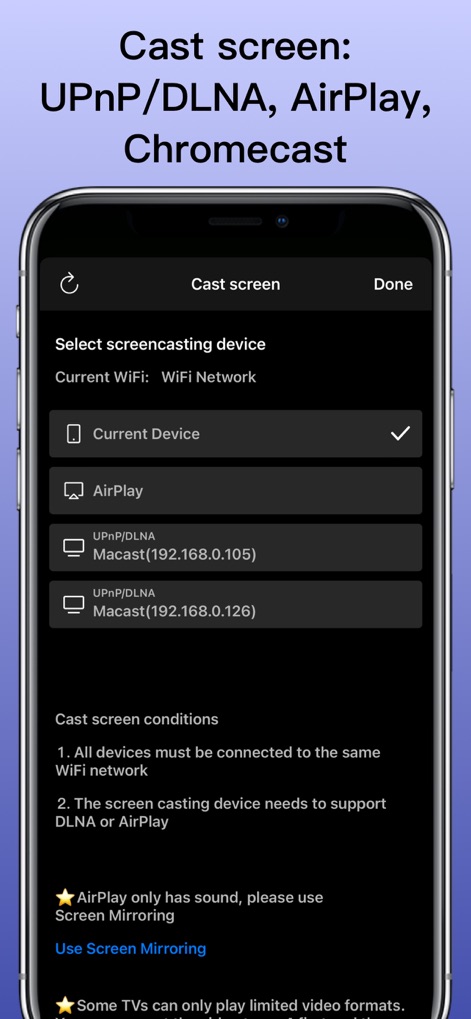
This tool extends content to larger screens by supporting popular casting protocols such as AirPlay and UPnP/DLNA, with a clear interface for device selection.
Seamless Screen Casting

The app provides extensive file transfer capabilities, including convenient Wi-Fi transfer and robust connectivity to various file servers like SMB and FTP.
Versatile File Management

Discover the app's intuitive media library, offering comprehensive file management with clear sorting options and detailed file information for efficient organization.
Organized Media Hub
Description
Download
More Like This
Apps with similar features and user experience

网易爆米花-智能媒体库,全能云盘网盘播放器
Guangzhou NetEase Computer System Co.Ltd

Immich
Hau Tran

飞牛
Guangzhou TR Intelligent Manufacturing Technology Co., Ltd.

nPlayer
Newin Inc.

MiraPlay
悦 刘

NipaPlay
荣广 梁

VidHub -Video Library & Player
Nanjing Oumi Software Development Co., Ltd.

zFuse - Media Player
s-joys Technology Co., Ltd.

Forever Music
ismail Aygn
This page is not an official page of the app or its developer, but an independent editorial publication created for informational and commentary purposes. Unless expressly stated otherwise, neither the app nor its developer is affiliated with, endorsed by, sponsored by, authorized by, or otherwise officially connected with MWM, Apple, Google Play, the app publisher, or the app's developer, and nothing on this page implies that the app was developed using MWM's services. Any trademarks, logos, screenshots, and other content remain the property of their respective owners.