
This page is not an official page of the app or its developer, but an independent editorial publication created for informational and commentary purposes. Unless expressly stated otherwise, neither the app nor its developer is affiliated with, endorsed by, sponsored by, authorized by, or otherwise officially connected with MWM, Apple, Google Play, the app publisher, or the app's developer, and nothing on this page implies that the app was developed using MWM's services. Any trademarks, logos, screenshots, and other content remain the property of their respective owners.


VidHub -Video Library & Player
Your video chaos ends here. The app delivers absolute command over your entire media collection.
Downloads
750k+User Rating
Total Ratings
17.5KPublisher
Category
EntertainmentLocales
10Latest Version
2.2.6Size
151.2 MBFirst Released
May 18, 2023Evaluating core functionalities for advanced media management and playback across Apple ecosystems.
Key Feature Analysis of VidHub - Video Library & Player
Versatile Network & Cloud Integration
It allows users to stream content directly from network shares (SMB/CIFS, WebDav) and major cloud services (Dropbox, Google Drive, OneDrive, etc.), centralizing access to distributed libraries.
Seamless Media Server Integration
The app provides direct connectivity to popular media servers like Emby, Jellyfin, and Plex, consolidating content access within a single interface.
Cross-Platform Ecosystem Support
The app provides seamless integration and data synchronization across iOS, Mac, and Apple TV devices via iCloud, ensuring a consistent user experience.
Robust Media Library Organization
It allows users to efficiently manage their video collections with an intuitive interface, offering customizable sorting and filtering options by type, date, and rating.
Automatic Metadata & Artwork Enrichment
The app automatically enriches the media library with comprehensive metadata and artwork sourced from TMDB, enhancing browsing and discovery.
Extensive Video Format Compatibility
It allows users to play virtually any video file without conversion, supporting a comprehensive range of formats including MKV, AVI, MP4, and WMV.
Advanced High-Quality Playback
The app delivers pristine video quality, supporting HD, 4K, HDR, and various resolutions for an immersive viewing experience.
Comprehensive Subtitle Management
This tool features robust subtitle options, including support for embedded and external formats like SRT and SSA, with easy toggling.
Cloud File Management
The app provides direct control over cloud files, enabling users to download or delete content directly from supported cloud storage services.
Advanced Cloud File Renaming
This tool features sophisticated renaming capabilities for cloud files, including character addition, replacement, and regular expression support.
Frequently Asked Questions
Everything you need to know about VidHub -Video Library & Player
What is VidHub?
VidHub is a feature-packed media player and library manager designed to organize and play various video content types on iOS, Mac, and Apple TV platforms.
Does VidHub support iCloud synchronization for user data?
Yes, VidHub supports data synchronization through iCloud, ensuring your media library and settings are consistent across your iOS, Mac, and Apple TV devices.
What video formats does VidHub play?
VidHub plays a comprehensive range of video formats, including .mkv, .avi, .mp4, .mov, .rmvb, and .wmv, providing broad compatibility for your video collection.
Can VidHub play high-quality videos like 4K or HDR?
Yes, VidHub supports high-quality video playback for HD, 4K, and HDR resolutions, offering a premium viewing experience for diverse video content.
Does VidHub allow access to cloud storage services for videos?
Yes, VidHub supports access to cloud-based video files from services like Dropbox, Google Drive, OneDrive, Baidu Netdisk, and Aliyun disk, among others.
Can VidHub connect to media servers like Plex or Emby?
Yes, VidHub supports direct linking to popular media servers including Emby, Jellyfin, and Plex, integrating your existing server libraries seamlessly.
Does VidHub offer subtitle support for videos?
Yes, VidHub enables you to enable and disable subtitles, supporting both embedded and external formats such as SRT, SSA, and SUB for versatile viewing.
How does VidHub manage and organize video content?
VidHub features built-in media library management tools with an intuitive interface, allowing sorting videos by type, date, and rating for easy organization.
What network sharing protocols does VidHub support?
VidHub supports network sharing capabilities through protocols such as SMB/CIFS and WebDav, enabling access to video files on remote servers.
Can users rename files stored in VidHub's cloud service?
Yes, VidHub supports renaming cloud files, including options to add characters, replace characters, and use regular expressions for flexible management.
The following screenshots and description are sourced directly from the app's official store listing and are the property of the app developer.
App Store
Screenshots

Discover how the app intelligently organizes TV series episodes and displays detailed metadata with episode thumbnails for effortless content browsing.
Smart Library Organization

Experience seamless, high-quality video playback featuring intuitive on-screen controls and comprehensive subtitle options for an optimized viewing experience.
Dynamic Playback Experience
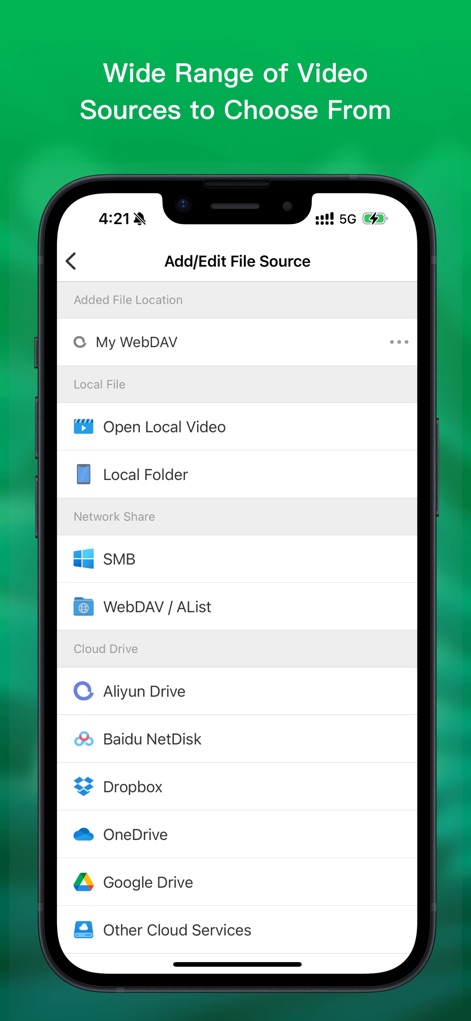
Users can effortlessly access video content from a wide array of sources, supporting robust network sharing protocols like SMB and popular cloud drives such as Google Drive.
Diverse Source Connectivity
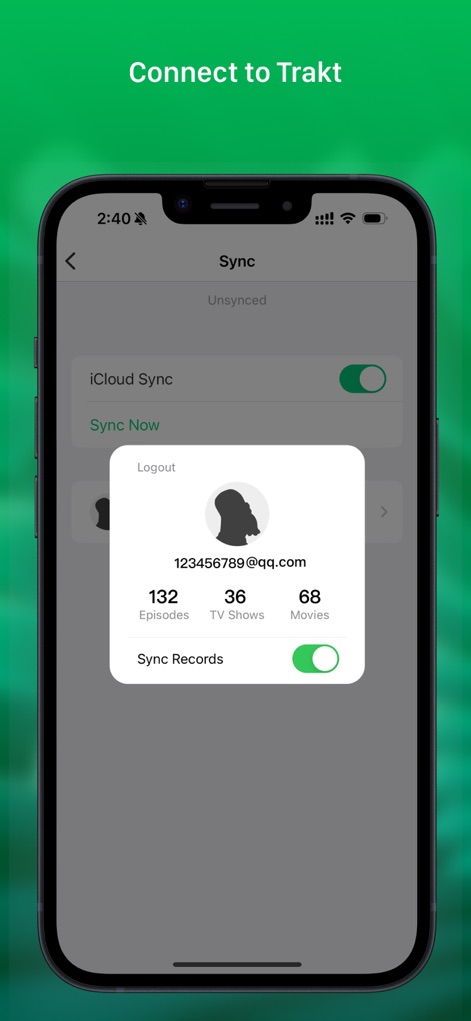
The app offers robust data synchronization through iCloud and integrates with services like Trakt, allowing users to track viewing progress for episodes and movies across devices.
Seamless Sync & Tracking
Description
Download
More Like This
Apps with similar features and user experience

网易爆米花-智能媒体库,全能云盘网盘播放器
Guangzhou NetEase Computer System Co.Ltd

Immich
Hau Tran

飞牛
Guangzhou TR Intelligent Manufacturing Technology Co., Ltd.

nPlayer
Newin Inc.

MiraPlay
悦 刘

NipaPlay
荣广 梁

Fast Player - video player
化媚 席

zFuse - Media Player
s-joys Technology Co., Ltd.

Forever Music
ismail Aygn
This page is not an official page of the app or its developer, but an independent editorial publication created for informational and commentary purposes. Unless expressly stated otherwise, neither the app nor its developer is affiliated with, endorsed by, sponsored by, authorized by, or otherwise officially connected with MWM, Apple, Google Play, the app publisher, or the app's developer, and nothing on this page implies that the app was developed using MWM's services. Any trademarks, logos, screenshots, and other content remain the property of their respective owners.