
This page is not an official page of the app or its developer, but an independent editorial publication created for informational and commentary purposes. Unless expressly stated otherwise, neither the app nor its developer is affiliated with, endorsed by, sponsored by, authorized by, or otherwise officially connected with MWM, Apple, Google Play, the app publisher, or the app's developer, and nothing on this page implies that the app was developed using MWM's services. Any trademarks, logos, screenshots, and other content remain the property of their respective owners.


File Manager & Documents
Storage solved. It gives you the digital control you crave, freeing your device and your mind.
Downloads
500k+User Rating
Total Ratings
8.1KPublisher
Category
UtilitiesLocales
1Latest Version
7.1Size
84.7 MBFirst Released
Nov 25, 2019A software evaluation highlighting key functionalities for iOS users managing digital content.
Analytical Overview: File Manager & Documents App
PC-like File Management
The app offers a comprehensive and familiar file management experience, akin to a desktop PC, directly on iOS devices.
Cloud Storage Integration
This tool allows users to seamlessly store their files on cloud services, effectively freeing up valuable internal storage on their device.
Integrated Web Browser with Direct Download
It features a specialized built-in browser that enables direct downloads of various file types within the application, streamlining content acquisition.
Intuitive Folder Organization
The app provides intuitive folder creation and management capabilities, allowing users to organize their digital content efficiently and logically.
Advanced File Sorting Options
This tool allows users to sort their files by name, date, size, or type, making it easier to navigate and locate specific content quickly.
Focused Media Search & Download
It enables targeted downloading of images and videos by offering special search options to obtain focused and relevant results.
Frequently Asked Questions
Everything you need to know about File Manager & Documents
What is the main purpose of the File Manager & Documents app?
The File Manager & Documents app allows users to manage, browse, and organize downloaded files on their iPhone or iPad. It also offers cloud storage to save internal memory.
Does File Manager & Documents offer cloud storage?
Yes, the File Manager & Documents app allows users to store files on the cloud. This feature saves valuable internal memory on the device.
How much does the Download Manager subscription cost?
The Download Manager subscription offers a weekly plan for $2.99, a monthly plan for $9.99, or a yearly plan for $49.99. Each option includes a 3-day free trial.
Can users organize files into folders with the File Manager & Documents app?
Yes, users can create folders within the File Manager & Documents app to organize all their data in an intuitive way. This helps manage imported and downloaded files efficiently.
Is there a free trial for the Download Manager app?
Yes, the Download Manager subscription includes a 3-day free trial period. Payment is charged to the iTunes Account after the trial, unless canceled.
How can I download files using the File Manager & Documents app?
The File Manager & Documents app includes a specialized built-in browser for direct downloads. Users can also download images or videos with special search options.
How do I cancel my File Manager & Documents subscription?
Users can manage their File Manager & Documents subscription and turn off auto-renewal through their iPhone settings or Account Settings on their device after purchase.
What types of files can the File Manager & Documents app handle?
The File Manager & Documents app handles various file types, including images, videos, documents, audio, archives, and zip files. It also allows sorting by name, date, size, or type.
Where is the privacy policy for the File Manager & Documents app?
The privacy policy for the File Manager & Documents app is available at the provided URL: https://giantbrainsllc.wordpress.com/privacy-policy/.
The following screenshots and description are sourced directly from the app's official store listing and are the property of the app developer.
App Store
Screenshots

This initial screen offers a complete overview of file storages, displaying both internal and cloud usage, alongside clearly defined categories for easy navigation.
Comprehensive File Overview
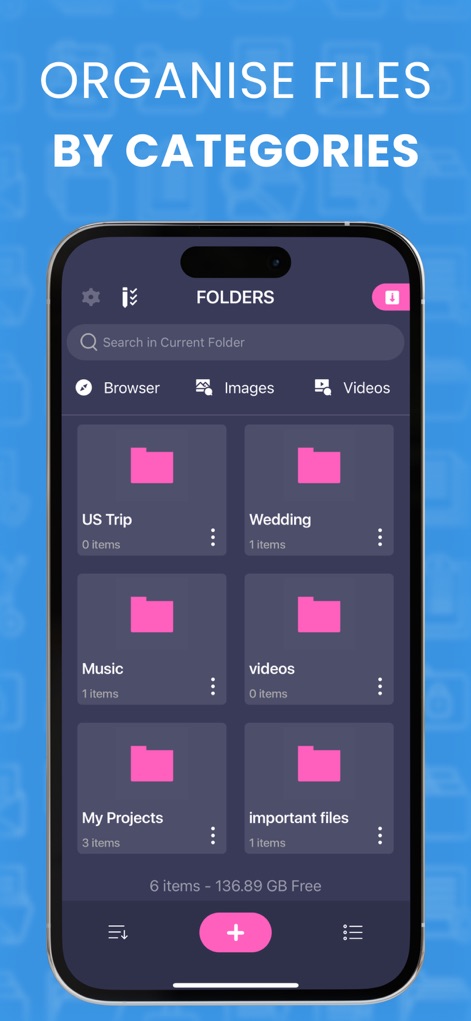
The app presents a user-friendly folder system, allowing users to categorize content into custom folders and sort files by various types like browser content, images, and videos.
Organized Folder System
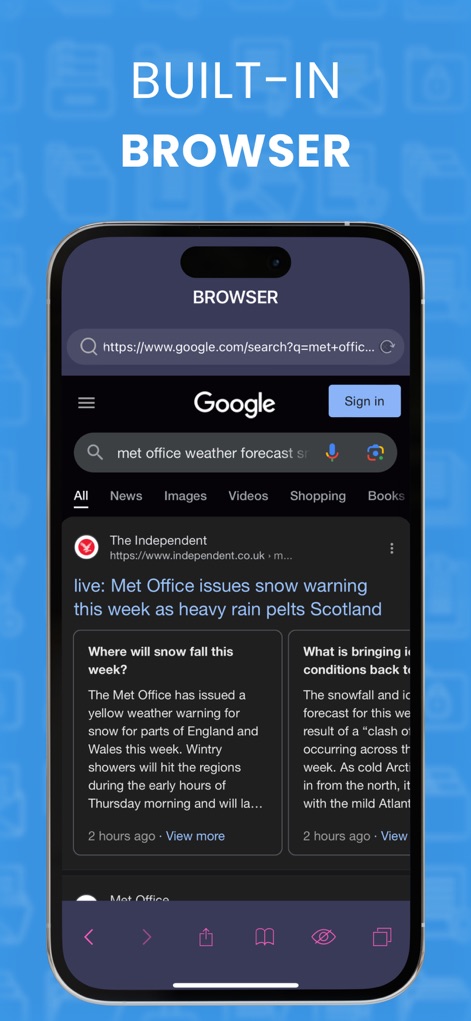
Explore the seamless built-in browser, enabling direct downloads and secure web browsing with accessible navigation controls and an intuitive search bar.
Integrated Web Browser
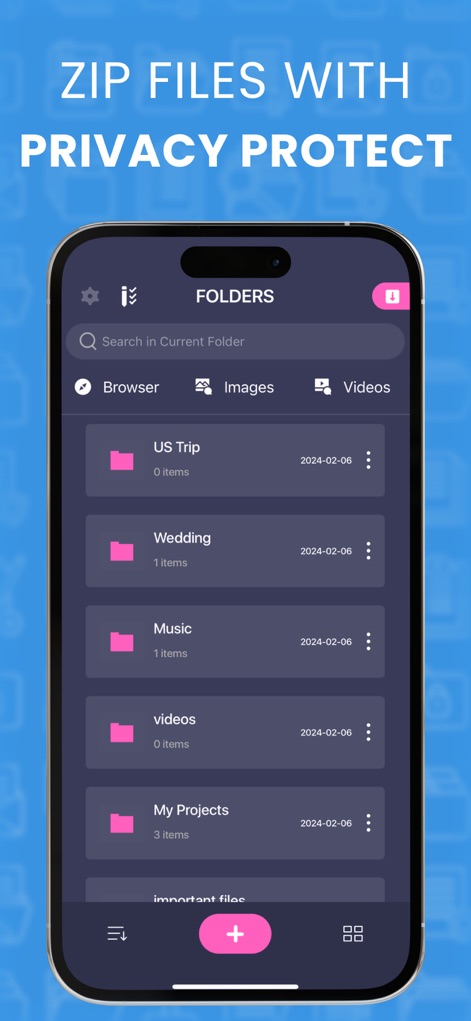
Experience advanced folder management, which allows users to organize files by date and securely zip them with privacy protection features.
Protected Folder Management
Description
Download
More Like This
Apps with similar features and user experience







This page is not an official page of the app or its developer, but an independent editorial publication created for informational and commentary purposes. Unless expressly stated otherwise, neither the app nor its developer is affiliated with, endorsed by, sponsored by, authorized by, or otherwise officially connected with MWM, Apple, Google Play, the app publisher, or the app's developer, and nothing on this page implies that the app was developed using MWM's services. Any trademarks, logos, screenshots, and other content remain the property of their respective owners.