
This page is not an official page of the app or its developer, but an independent editorial publication created for informational and commentary purposes. Unless expressly stated otherwise, neither the app nor its developer is affiliated with, endorsed by, sponsored by, authorized by, or otherwise officially connected with MWM, Apple, Google Play, the app publisher, or the app's developer, and nothing on this page implies that the app was developed using MWM's services. Any trademarks, logos, screenshots, and other content remain the property of their respective owners.


Files - File Manager & Browser
Offline access to information isn't a luxury; it's leverage. This app delivers that edge.
Downloads
2.5M+User Rating
Total Ratings
41.3KPublisher
Category
ProductivityLocales
1Latest Version
8.3.1Size
34.0 MBFirst Released
Jan 8, 2010An in-depth analysis of key functionalities catering to demanding users.
Files - File Manager & Browser: Core Features Evaluation
Robust File Management
The app provides extensive file management capabilities, allowing users to organize, view, and manipulate diverse file types, including extraction of RAR and ZIP archives, extending beyond standard iOS functionalities.
Integrated Offline Web Browser
It allows users to browse the web with features like tabbed browsing, saving web pages for offline access, and a full-screen mode, offering a comprehensive and efficient browsing experience.
Advanced Download Manager
This tool features an advanced download manager that supports fast, resumable downloads, live progress monitoring, and the ability to add arbitrary download links, ensuring efficient acquisition of files.
Comprehensive Document & PDF Viewer
The app offers a comprehensive document viewer supporting various formats (.pdf, .doc, .xls, .ppt, .txt, .html, .rtf) and includes an advanced PDF reader capable of handling large files with text search and link navigation.
Seamless Cloud Integration
It features seamless Dropbox integration, enabling users to upload, download, manage, and sync files directly with their cloud storage, which is crucial for modern professional and academic workflows.
Secure File Transfer Options
The app provides versatile file transfer options, supporting HTTP, FTP, iTunes USB File Sharing, and Wi-Fi transfers, which allows for flexible and efficient movement of files to and from the device.
Inter-app Document Interchange & Safari Integration
It enhances ecosystem integration by allowing other applications to save files directly into the app and by providing a bookmarklet for Mobile Safari to open web links within its own browser, streamlining document handling.
Passcode Lock
The app includes a passcode lock feature, providing an essential layer of security and privacy to protect sensitive documents and data stored within the application.
Frequently Asked Questions
Everything you need to know about Files - File Manager & Browser
What is Files App?
Files App is a mobile application for iPhone and iPod touch, serving as a web browser and file manager. It enables users to save documents for offline access and view various file types.
Can Files App download audio or video content?
No, Files App does not support the downloading of audio or video content. Its primary function is to save and manage documents, images, and web pages for offline viewing.
How do I download files from the web using Files App?
To download files from the web using Files App, navigate to the desired link in the built-in browser. Then, tap and hold on the link to activate the download option.
What file formats does Files App support for viewing?
Files App supports full-screen viewing of .pdf, .doc, .xls, .ppt, .txt, .html, and .rtf file formats. It also allows for extraction of RAR archives and unzipping ZIP files.
Does Files App integrate with Dropbox?
Yes, Files App offers full Dropbox integration. Users can upload, download, and manage their Dropbox files directly within the application, including syncing content to their device.
How can I secure my files in Files App?
Files App provides a passcode lock feature to secure your documents. This ensures that unauthorized users cannot access your saved files and personal data within the application.
Does Files App include a web browser for offline viewing?
Yes, Files App integrates a web browser enabling users to save web pages with images for offline viewing. It also features tabbed browsing, bookmarks, and integrated search.
The following screenshots and description are sourced directly from the app's official store listing and are the property of the app developer.
App Store
Screenshots

See how the app's integrated web browser facilitates direct file downloads and presents a clear action sheet for user choices.
Web Downloads Seamlessly

Users can explore web content and view various file types, all managed within the browser's interface, alongside a convenient bottom navigation bar.
Integrated Browser Power

This tool provides a clear list of ongoing and completed downloads, showcasing live progress bars and file details for efficient management.
Manage Downloads Effortlessly
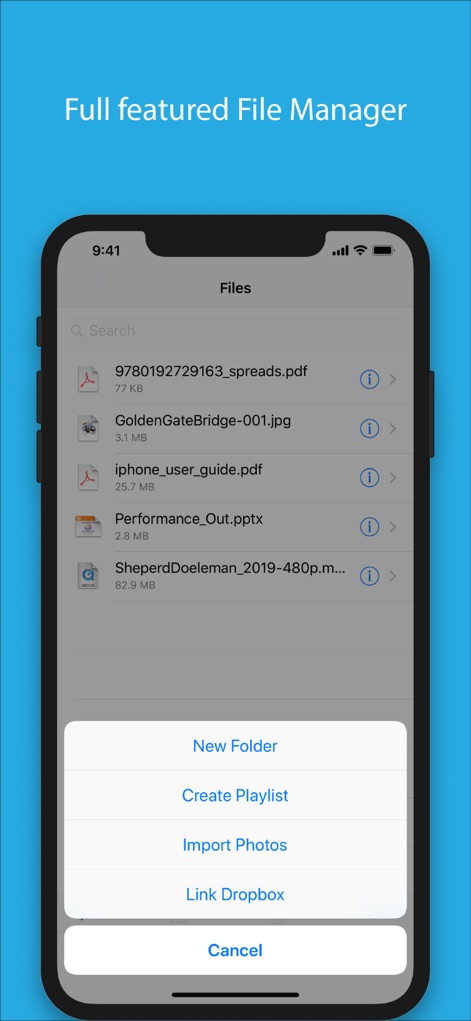
The app's file manager displays diverse document types and offers robust organizational options, including creating new folders and linking to Dropbox.
Organize Files Intuitively
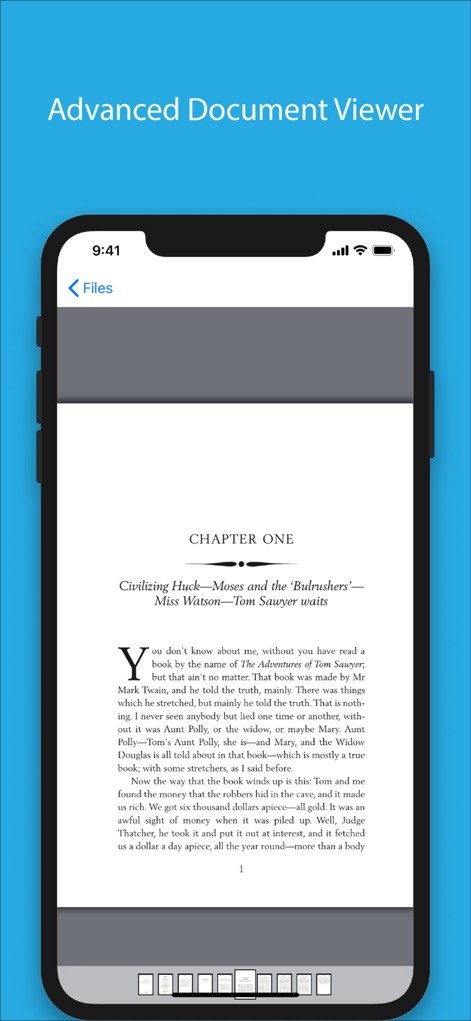
Experience a full-screen document viewer for comfortable reading, complete with text display and a useful thumbnail navigation bar for quick page access.
Enhanced Document Reading
Description
Download
More Like This
Apps with similar features and user experience






This page is not an official page of the app or its developer, but an independent editorial publication created for informational and commentary purposes. Unless expressly stated otherwise, neither the app nor its developer is affiliated with, endorsed by, sponsored by, authorized by, or otherwise officially connected with MWM, Apple, Google Play, the app publisher, or the app's developer, and nothing on this page implies that the app was developed using MWM's services. Any trademarks, logos, screenshots, and other content remain the property of their respective owners.