Flipbook Maker .Analog/digital
Download on App Store

This page is not an official page of the app or its developer, but an independent editorial publication created for informational and commentary purposes. Unless expressly stated otherwise, neither the app nor its developer is affiliated with, endorsed by, sponsored by, authorized by, or otherwise officially connected with MWM, Apple, Google Play, the app publisher, or the app's developer, and nothing on this page implies that the app was developed using MWM's services. Any trademarks, logos, screenshots, and other content remain the property of their respective owners.

Logo of Flipbook Maker .Analog/digital
Download on App Store

Flipbook Maker .Analog/digital

Transform your sketches and photos into unique digital animations in seconds. The easiest way for creators and dreamers to turn Lo-Fi doodles into viral-ready flipbooks.

Key Figures

Downloads

2K+

User Rating

1.7/5

Total Ratings

0

Publisher

MINERVA K.K.

Category

Photo & Video

Locales

2

Latest Version

1.0.4

Size

51.4 MB

First Released

Aug 30, 2023
Features

Bring Your Creativity to Life

The simplest way to turn your sketches, photos, and doodles into shareable flipbook animations. No complex software needed—just your imagination and a few taps.

Analog to Digital Magic

Turn your paper sketches into smooth digital animations. Snap photos or scan your hand-drawn pages to bridge the gap between your sketchbook and the screen.

Total Frame Control

Effortlessly rearrange your images and adjust the flip speed. Find that perfect Lo-Fi rhythm or create a fast-paced stop-motion masterpiece in seconds.

The following screenshots and description are sourced directly from the app's official store listing and are the property of the app developer.

App Store

Screenshots
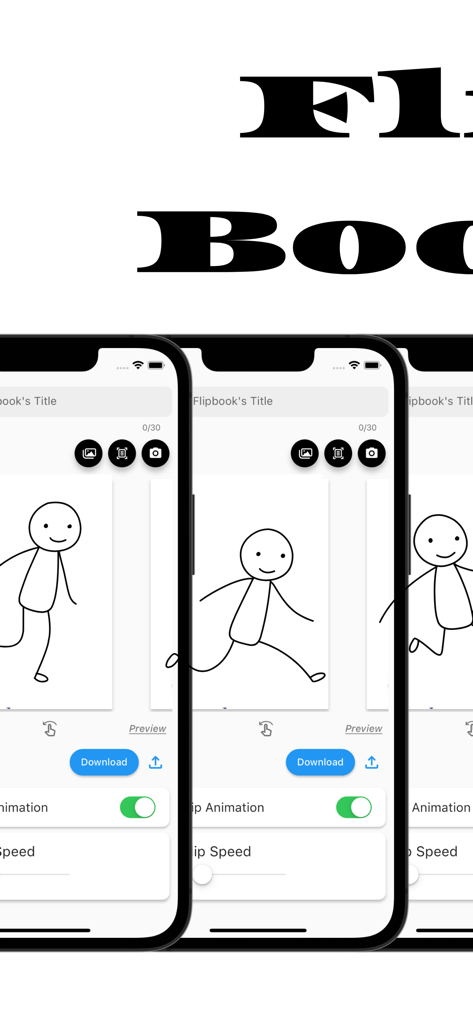
Flipbook Maker .Analog/digital - Interface of the Flipbook Maker app on three iPhone screens showing a stick figure animation and editing tools
Interface of the Flipbook Maker app on three iPhone screens showing a stick figure animation and editing tools

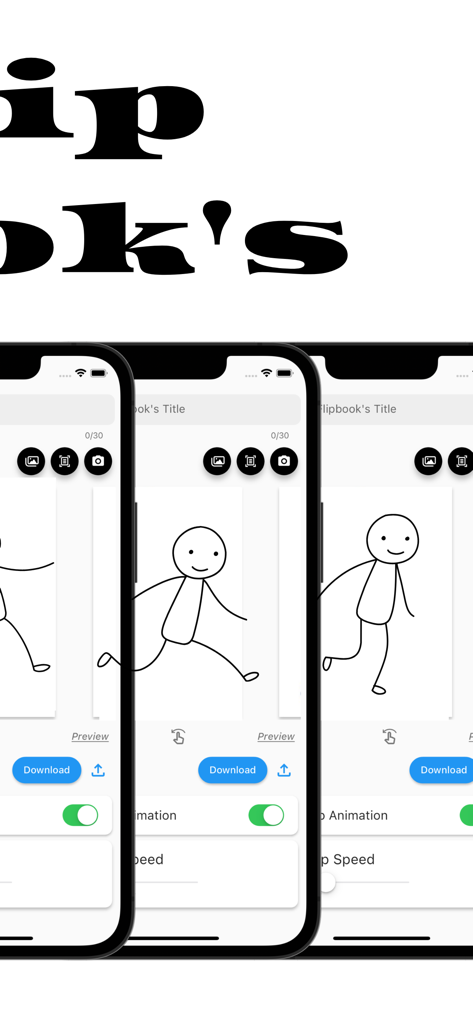
Flipbook Maker .Analog/digital - Interface of the Flipbook Maker app showing a hand-drawn stick figure animation across three iPhone screens

Interface of the Flipbook Maker app showing a hand-drawn stick figure animation across three iPhone screens

Description

The definitive app for creating a Flipbook! With this app, anyone can easily create a Flipbook. It is also possible to scan and photograph hand-drawn Flipbooks to create Flipbook videos! You will be able to make analog -> digital. ■How to create a Flipbook 1. put images into the app Import images into the app. Take a picture with the camera directly from the app. Scan the image using the scanning function in the app. 2. rearrange the inserted images or change the flip speed 3. Press the download button What you can create with the "Flipbook Maker App" 1. handwritten flip book. You can scan analog paper and make it digital. 2. a slideshow-like movie in which images are displayed at regular intervals 3. other things that can be created with the function of showing images at regular intervals ■Functions of Flipbook Maker App 1. image import and capture Importing images into the app Capture images directly from the app with the camera Scanning using the scanning function in the app. 2. Creating a Flipbook Create a cartoon by arranging images in sequence Adjust the order and placement of images as desired Add custom flip animations 3. adjusting flip speed 3. adjust page flip speed 4. previewing and editing Preview your video 5. edit and fine-tune your video to see the final result 6. output and share your video Output high quality video Share videos on social media and messaging apps. ■Use Cases for Flipbook Maker App Of course. Below are some specific use cases for your Flipbook generation app 1. creator's creation of artwork Illustrators and artists import their own illustrations into the app and adjust the flip speed to create their own flip-book cartoons. This allows them to express their art in a dynamic format. 2. digitizing traditional art You can scan your analog illustrations or comics and import them into the app to enjoy them in digital media. This allows traditional art to be shared in a new way. 3. realization of storytelling Novelists and storytellers use the app to create stories by combining text and illustrations. Through character movement and scene transitions, the story is visually conveyed to the reader. 4. teaching and learning tools Teachers and students use apps to animate and illustrate historical events, scientific processes, and more. Incorporating visual elements helps increase comprehension. 5. entertainment and sharing Regular users will use the app to share with friends and followers as a hobby. They create parapara cartoons documenting their travels, highlights of special events, or funny episodes from their daily lives, and share the fun. 6. special gifts and presents Users can create and give personalized parapara manga as gifts for special events such as birthdays, anniversaries, weddings, etc. This can be a wonderful way to express emotions and memories. 7. slide show ・Creating Presentations : Students will utilize slideshows to make effective presentations in business and academic settings. Students will combine images and text to present information and create presentation materials. ・training and education : Trainers and educators use slideshows to illustrate topics and provide training materials. Visual elements are used to communicate concepts clearly and enhance learning. ・Event announcements and announcements : Event organizers use slideshows to provide event details, schedules, and venue information. Organize information with images and text to provide attendees with easy-to-understand directions. ■Finally This application is a creative tool that allows you to easily create a Flipbook Manga comic or slideshow. You can use your own art and photos to create engaging animated works. It also supports analog to digital conversion, allowing you to enjoy your art and ideas in a new way. It is a simple and fun application that will expand your creativity. Please give it a try!

Download

Download on App Store

This page is not an official page of the app or its developer, but an independent editorial publication created for informational and commentary purposes. Unless expressly stated otherwise, neither the app nor its developer is affiliated with, endorsed by, sponsored by, authorized by, or otherwise officially connected with MWM, Apple, Google Play, the app publisher, or the app's developer, and nothing on this page implies that the app was developed using MWM's services. Any trademarks, logos, screenshots, and other content remain the property of their respective owners.








