
This page is not an official page of the app or its developer, but an independent editorial publication created for informational and commentary purposes. Unless expressly stated otherwise, neither the app nor its developer is affiliated with, endorsed by, sponsored by, authorized by, or otherwise officially connected with MWM, Apple, Google Play, the app publisher, or the app's developer, and nothing on this page implies that the app was developed using MWM's services. Any trademarks, logos, screenshots, and other content remain the property of their respective owners.


Floating Clock-Timer&Stopwatch
No more app juggling; it gives users constant command over their time, always in sight.
Downloads
1M+User Rating
Total Ratings
1.6KPublisher
Category
ReferenceLocales
16Latest Version
1.5.2Size
14.9 MBFirst Released
Dec 23, 2020An analytical overview of Floating Clock-Timer&Stopwatch's distinct capabilities for Apple users.
Core Productivity Enhancements
Floating Clock Overlay
The app provides an always-on clock overlay that remains visible over any other application, enabling seamless multitasking and continuous time awareness.
Cross-Device Compatibility
This tool ensures cross-device consistency by being accessible across the Apple ecosystem, including iPhone, iPad, and Mac, facilitating a unified time-tracking experience.
Integrated Stopwatch
It features a robust stopwatch function for precise measurement of elapsed time, catering to activities requiring accurate duration tracking.
Integrated Timer
The app includes a versatile timer capability, allowing users to set countdowns for focused work intervals, breaks, or specific tasks.
Custom Display Styles
It allows users to personalize the clock's appearance through various display styles, enhancing visual integration with their device's interface and personal preferences.
Millisecond Precision Toggle
The app offers a millisecond precision switch, providing granular time tracking for highly sensitive or scientific applications where exact timing is critical.
Frequently Asked Questions
Everything you need to know about Floating Clock-Timer&Stopwatch
What is the Floating Clock app?
Floating Clock is a time application that displays a floating clock, timer, or stopwatch on top of all other applications. It is available on iPhone, iPad, and Mac devices.
Can I display the Floating Clock over other apps?
Yes, the Floating Clock app can display time, a timer, or a stopwatch as a floating overlay on any app interface. This allows you to monitor time while using other applications.
What features does Floating Clock-Timer&Stopwatch include?
Floating Clock-Timer&Stopwatch features a floating clock, stopwatch, timer, millisecond switch, custom display styles, and a flip clock widget. It supports full customization of colors, fonts, and animation.
Is Floating Clock available on Mac?
Yes, Floating Clock is available on Mac, in addition to iPhone and iPad. It offers a consistent time management experience across Apple devices.
Can I customize the display style of Floating Clock?
Yes, Floating Clock offers custom display styles. Users can fully customize text fonts, text colors, background colors, and animation. More color options are also available.
Does Floating Clock have Apple Watch control?
Yes, Floating Clock supports remote control with Apple Watch. You can tap to start/pause and press to restart the timer or stopwatch directly from your Apple Watch.
Does Floating Clock offer a widget?
Yes, Floating Clock includes a flip clock widget. This allows users to display the clock directly on their home screen for quick access and visual appeal.
How does the Unlimited Access Subscription work for Floating Clock?
The Unlimited Access Subscription for Floating Clock is billed monthly or annually. It provides access to all features and content. A one-time payment option is also available.
How do I cancel my Floating Clock subscription?
You can manage your Floating Clock subscription and turn off auto-renewal by going to your Account Settings after purchase. Cancellation must occur 24 hours prior to the current period's end.
What happens if I subscribe during a free trial for Floating Clock?
If you subscribe to Floating Clock before your free trial ends, the remainder of your free trial period will be forfeited upon purchase confirmation. Subscriptions start immediately after the trial ends.
Where can I find the privacy policy for Floating Clock?
The privacy policy for Floating Clock is available at the URL: https://iandrew.space/apps/policy_floating.html. This document outlines how your data is handled.
The following screenshots and description are sourced directly from the app's official store listing and are the property of the app developer.
App Store
Screenshots

See how the app places a compact floating stopwatch on top of other applications, allowing users to multitask seamlessly while keeping track of time.
Floating Time Display

This tool offers a large, clear fullscreen display for both the current time and a dedicated stopwatch, ensuring maximum visibility for time-sensitive tasks.
Immersive Fullscreen View

Discover the flexibility of the floating clock, including options to display milliseconds and easily toggle the date on or off for personalized time tracking.
Clock Customization Options

Users can set custom timers with clear numerical input fields and activate an alert function, ensuring timely notifications for their activities.
Precise Timer Control

The app provides an intuitive stopwatch interface with prominent Reset and Pause buttons, enabling effortless timing of events.
Instant Stopwatch Functionality
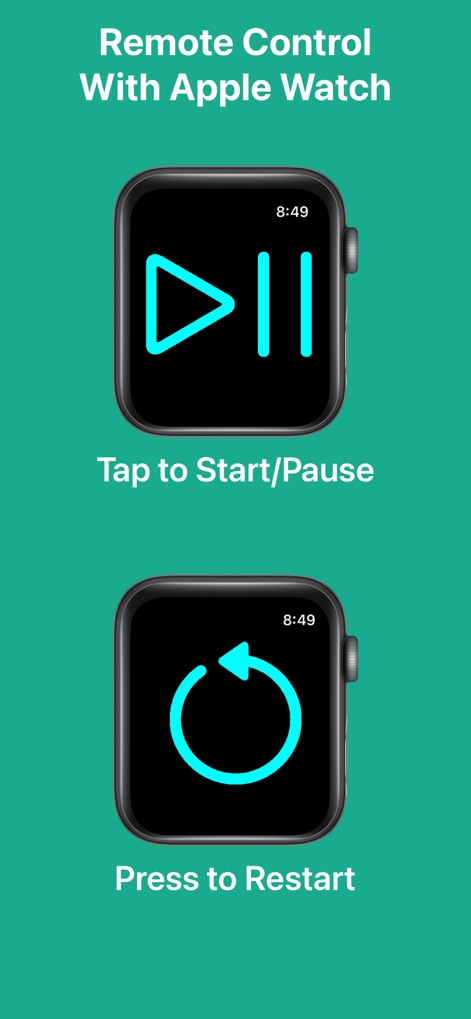
Experience seamless control with the Apple Watch, featuring distinct 'Tap to Start/Pause' and 'Press to Restart' icons for remote operation.
Apple Watch Integration

Explore extensive customization features, including a vibrant color picker for text and background, alongside diverse animation styles to tailor the app's appearance.
Comprehensive Personalization

The app fluidly adapts its display to both portrait and landscape modes, ensuring optimal viewing of the time and controls regardless of device orientation.
Adaptive Orientation

Delve into an expansive color selection interface, offering grid, spectrum, and slider options to perfectly match the app's aesthetic to personal preferences.
Expanded Color Palette

Integrate a stylish flip clock widget directly into the home screen, providing quick access to timekeeping without opening the main application.
Convenient Widget Access
Description
Download
More Like This
Apps with similar features and user experience

This page is not an official page of the app or its developer, but an independent editorial publication created for informational and commentary purposes. Unless expressly stated otherwise, neither the app nor its developer is affiliated with, endorsed by, sponsored by, authorized by, or otherwise officially connected with MWM, Apple, Google Play, the app publisher, or the app's developer, and nothing on this page implies that the app was developed using MWM's services. Any trademarks, logos, screenshots, and other content remain the property of their respective owners.