
This page is not an official page of the app or its developer, but an independent editorial publication created for informational and commentary purposes. Unless expressly stated otherwise, neither the app nor its developer is affiliated with, endorsed by, sponsored by, authorized by, or otherwise officially connected with MWM, Apple, Google Play, the app publisher, or the app's developer, and nothing on this page implies that the app was developed using MWM's services. Any trademarks, logos, screenshots, and other content remain the property of their respective owners.

Flow: Note Taking & Sketchbook
Precision meets limitless canvas. The app turns your Apple Pencil into an unstoppable creative force.
Downloads
5M+User Rating
Total Ratings
7.3KPublisher
Category
Graphics & DesignLocales
12Latest Version
4.2.11Size
198.6 MBFirst Released
Mar 24, 2019An evaluation of key functionalities for creative professionals and Apple ecosystem users.
Flow: Note Taking & Sketchbook - Feature Analysis
Advanced Apple Pencil Integration
It provides highly responsive and natural writing and drawing experience when utilizing the Apple Pencil, enhancing precision and creative flow for digital artists and note-takers.
Infinite Canvas
The app features an infinitely expanding canvas, enabling users to seamlessly extend their creative space horizontally without interruption, ideal for extensive brainstorming or detailed sketches.
Customizable Tool Presets
It allows users to design and save personalized sets of drawing tools, offering flexibility and efficiency to tailor their digital brushes and pens to specific artistic or note-taking needs.
Integrated Versatile Workspace
This tool consolidates note-taking, sketching, journaling, and planning into a single platform, streamlining workflows and providing a comprehensive digital environment for various creative and academic tasks.
Seamless iPad Multitasking
The app fully supports iPad's Split View, Slide Over, and drag-and-drop functionalities, enabling users to efficiently multitask and integrate content from other applications into their Flow documents.
Secure Cloud Sync
The app provides secure cloud storage and real-time synchronization across all user devices, ensuring that documents and custom tools are always backed up and accessible from anywhere.
Customizable Paper Styles
It offers a selection of colored paper with various styles, including dot grid, squared, lined, or blank, allowing users to personalize their document backgrounds to suit different purposes or aesthetic preferences.
Elegant Minimalist Interface
The app features an uncluttered and intuitive user interface designed to maximize focus on content creation, ensuring tools and options are readily accessible without visual distraction.
Frequently Asked Questions
Everything you need to know about Flow: Note Taking & Sketchbook
What is the Flow app used for?
Flow is a note-taking and drawing pad app. It helps users make beautiful notes, sketch, journal, and plan with realistic ink and paper, offering responsive Apple Pencil support.
Does Flow app support Apple Pencil?
Yes, Flow provides advanced Apple Pencil support, ensuring writing and drawing are incredibly responsive. This feature enhances the user's creative experience within the app.
Can I customize tools in Flow: Note Taking, Drawing Pad?
Yes, Flow allows users to create unique sets of drawing tools and customize gestures. The app offers various color palettes and pen tips for personalized creative expression.
Is Flow: Note Taking, Drawing Pad free?
Flow offers a free trial period. After the trial, a subscription is required for continued access to app updates and real-time cloud storage.
What happens if my Flow app subscription ends?
If your Flow subscription lapses, the app remains available in a read-only mode. Users can still view existing documents but cannot create new content or make edits.
Does Flow offer cloud storage and backup?
Yes, Flow membership includes real-time cloud storage and backup. This feature syncs documents and tools across all user devices, ensuring data availability.
Can Flow multitask on an iPad?
Yes, Flow supports multitasking on iPad. It integrates with Split View, Slide Over, and drag-and-drop functionality, enhancing productivity for iPad users.
What awards has Flow received?
Flow has received prestigious recognition. It is an "Apple iPad App of the Year Winner" and an "Apple Design Award Winner," highlighting its quality and design.
How can I export my work from Flow app?
Flow allows users to export their creations. You can export content as images or generate timelapse videos of your drawing process directly from the app.
Does Flow: Note Taking, Drawing Pad have different paper styles?
Yes, Flow offers a variety of paper styles. Users can choose from colored paper with dot grid, squared, lined, or blank options to suit their preferences.
Where is the privacy policy for Flow app?
The official privacy policy for Flow is located on the Bonobo Labs website. Users can access the full details at bonobolabs.com/privacy for transparency.
Does Flow app support layers for drawing?
Yes, Flow supports layers for drawing. This allows users to manage different elements of their artwork, such as pencil, shading, and background, independently for complex designs.
The following screenshots and description are sourced directly from the app's official store listing and are the property of the app developer.
App Store
Screenshots

Discover how Flow provides an expansive canvas for handwritten notes and detailed diagrams, with an intuitive tool palette readily available at the bottom for quick selection.
Digital Note Canvas

This tool allows for stunning digital artwork, showcasing a rich aquatic scene and demonstrating a comprehensive selection of color-specific drawing tools for artistic expression.
Vibrant Creative Palette

Users can achieve meticulous technical drawings with the app's grid system, complemented by a versatile suite of shape recognition and measurement tools for perfect lines and forms.
Precision Drafting Tools

Highlighted here are the prestigious recognitions the app has received, including the coveted "Apple iPad App of the Year" and the esteemed "Apple Design Award," underscoring its excellence.
Award-Winning Design

Observe the app's powerful multitasking capabilities, enabling simultaneous work on creative projects, alongside a highly detailed tool customization interface for precise control over drawing instruments.
Seamless Multitasking Creativity

The app empowers artists with a robust layer management system for complex compositions, complemented by an array of customizable digital drawing tools, visible at the bottom, for varied artistic effects.
Layered Artistic Control
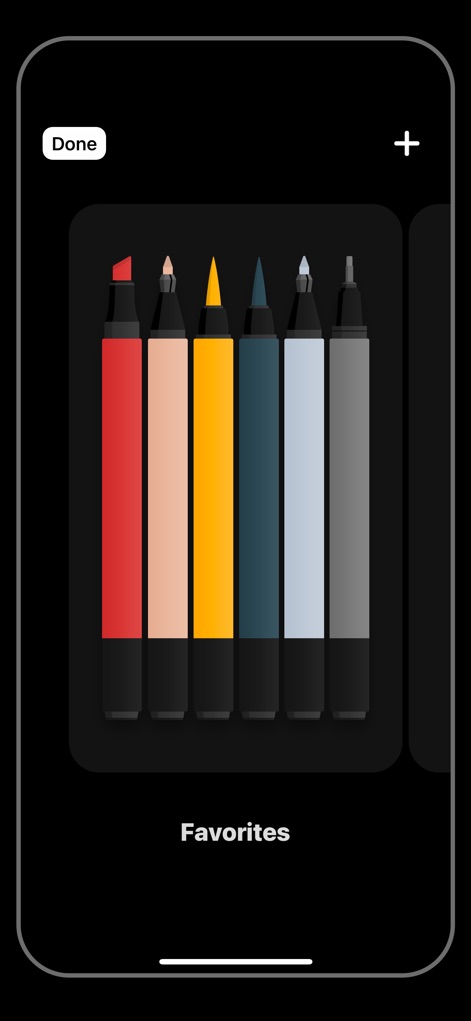
This view demonstrates the convenience of creating personalized 'Favorites' collections, allowing users to quickly access their preferred tool types and specific color palettes for efficient workflow.
Personalized Tool Sets

Explore the app's extensive customization options for individual drawing tools, showcasing a detailed interface for selecting various pen tips and fine-tuning color and thickness with precision sliders.
Custom Tool Precision

This screenshot highlights the app's seamless cross-device versatility, enabling creative work across both iPad and iPhone interfaces, and demonstrates efficient Split View multitasking for enhanced productivity.
Cross-Device Versatility

Witness the app's capability to support detailed artistic workflows, illustrating the step-by-step development from initial sketch to a highly realistic digital rendering of a subject.
Creative Process Unveiled
Description
Download
More Like This
Apps with similar features and user experience

Penned: Private Notes
Edwing H Santos Mena

MindLine Mind Map
Shenzhen Brown Bear Technology Co., LTD

MindNode: Mind Map & Outline
IdeasOnCanvas GmbH

Post-it®
3M Company

MindSpace - Mind Map
佳文 潘

SimpleMind Pro - Mind Mapping
xpt Software & Consulting B.V.

Ayoa MindMaps for Kids
OpenGenius Limited

TouchMind-handwritten mind map
红霞 鲁

Mind Map Maker - Mindomo
Expert Software Applications Srl
This page is not an official page of the app or its developer, but an independent editorial publication created for informational and commentary purposes. Unless expressly stated otherwise, neither the app nor its developer is affiliated with, endorsed by, sponsored by, authorized by, or otherwise officially connected with MWM, Apple, Google Play, the app publisher, or the app's developer, and nothing on this page implies that the app was developed using MWM's services. Any trademarks, logos, screenshots, and other content remain the property of their respective owners.