
This page is not an official page of the app or its developer, but an independent editorial publication created for informational and commentary purposes. Unless expressly stated otherwise, neither the app nor its developer is affiliated with, endorsed by, sponsored by, authorized by, or otherwise officially connected with MWM, Apple, Google Play, the app publisher, or the app's developer, and nothing on this page implies that the app was developed using MWM's services. Any trademarks, logos, screenshots, and other content remain the property of their respective owners.


Post-it®
The app digitalizes your thoughts. It offers instant organization and frictionless sharing, turning fleeting ideas into actionable plans.
Downloads
2.5M+User Rating
Total Ratings
16.7KPublisher
Category
ProductivityLocales
4Latest Version
5.3.9Size
50.0 MBFirst Released
Sep 25, 2014Evaluating functionalities for enhanced digital and hybrid productivity.
Post-it® App: Key Features Analysis
Analog Note Capture
The app allows users to digitize physical Post-it® Notes rapidly, capturing over 200 notes at once using the device's camera, bridging physical and digital workflows.
Seamless Integration & Export
This tool features extensive export options to popular productivity and cloud services like Miro, Trello, Dropbox, PowerPoint, Excel, and PDF, ensuring ideas can be continued digitally across various platforms.
Collaboration & Idea Sharing
It enables users to connect and share ideas effortlessly with co-workers, friends, or classmates, facilitating teamwork, brainstorming sessions, and note dissemination from any location.
Cross-Device Synchronization
The app provides seamless synchronization of notes and boards across all Apple devices via iCloud, allowing users to capture on one device and continue editing or sharing on another without interruption.
Handwriting Recognition
This tool automatically transcribes handwritten notes into digital text, greatly enhancing searchability and facilitating exports for further use and analysis.
Flexible Organization Tools
It allows users to arrange and refine their ideas effectively by grouping them by thought or organizing them on a grid, supporting diverse organizational preferences.
Digital Note Editing
The app offers powerful editing tools, enabling users to draw, erase, type, and change the color of their digital notes, providing full customization for clarity and emphasis.
Home Screen Widget
This tool provides a convenient widget that allows users to place their most important notes directly on their device's home screen for quick and easy access.
Frequently Asked Questions
Everything you need to know about Post-it®
What is the Post-it® App?
The Post-it® App brings the simplicity of Post-it® Notes to iPhone, iPad, and Mac. It supports teamwork, collaboration, reminders, and personal note-taking, helping users to keep momentum going.
How does the Post-it® App help with remote work or learning?
The Post-it® App assists remote workers and students by enabling them to share ideas with co-workers, structure assignments for teachers, or create colorful calendars for friends.
Can I capture analog Post-it® Notes with the Post-it® App?
Yes, the Post-it® App allows users to capture analog notes using their device's camera. It supports capturing more than 200 Post-it® Notes at one time, including all popular note sizes.
Does the Post-it® App support handwriting recognition?
Yes, the Post-it® App includes Handwriting Recognition, which automatically transcribes notes. This feature enhances search capabilities and simplifies exports of your digital notes.
What editing tools are available in the Post-it® App?
The Post-it® App provides powerful editing tools. Users can draw, erase, type text, and change the color of their digital notes to refine and customize their content.
Can I share notes from the Post-it® App with other applications?
Yes, the Post-it® App allows users to share ideas to various apps and cloud services. Supported platforms include Miro, Trello, Dropbox, PowerPoint, Excel, and PDF.
Is there a Post-it® App widget for the home screen?
Yes, the Post-it® App offers a widget. Users can place their most important Post-it® Notes directly onto their home screen for quick and convenient access.
Does the Post-it® App sync across Apple devices?
Yes, the Post-it® App keeps notes and boards in sync across all your Apple devices using iCloud. This allows seamless transitions, like capturing on an iPhone and editing on a Mac.
Can I create new digital notes directly in the Post-it® App?
Yes, users can create new digital notes directly on their device within the Post-it® App. They can also arrange, refine, and organize these ideas as needed.
Can I order physical Post-it® Notes through the Post-it® App?
Yes, the Post-it® App features an option to order physical Post-it® Notes. These notes are designed to work seamlessly with the app for enhanced productivity.
The following screenshots and description are sourced directly from the app's official store listing and are the property of the app developer.
App Store
Screenshots

See how the app streamlines the creative process, showcasing notes neatly categorized by action and the vibrant digital representation of Post-it® Notes.
Digital Idea Flow

Observe the intuitive camera interface designed for rapid digitization and the seamless conversion of multiple physical Post-it® Notes into digital assets.
Effortless Note Capture

Explore the robust editing toolkit, empowering users to draw, type, and change colors, along with the ability to create new, fully customizable digital notes.
Dynamic Note Creation

Witness the powerful organization features, allowing users to group ideas by theme and arrange them precisely on a clean, adaptable grid layout.
Flexible Idea Organization
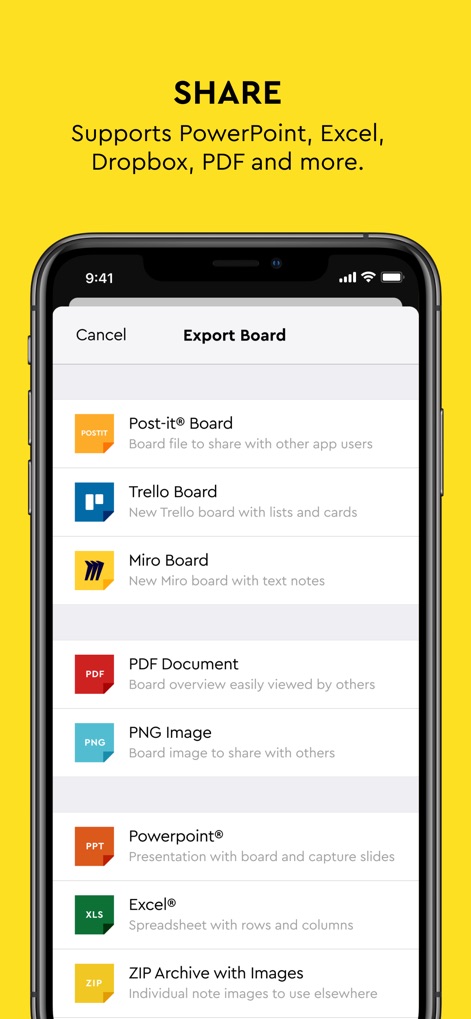
Discover the extensive sharing capabilities, featuring direct export to popular formats like PDF and PNG, and seamless integration with platforms such as Trello and Miro.
Seamless Workflow Integration

Explore the convenient feature allowing users to order physical Post-it® Notes directly, enhancing the seamless connection between analog brainstorming and digital organization.
Bridge Physical & Digital
Description
Download
More Like This
Apps with similar features and user experience

Penned: Private Notes
Edwing H Santos Mena

MindLine Mind Map
Shenzhen Brown Bear Technology Co., LTD

MindNode: Mind Map & Outline
IdeasOnCanvas GmbH

MindSpace - Mind Map
佳文 潘

SimpleMind Pro - Mind Mapping
xpt Software & Consulting B.V.

Ayoa MindMaps for Kids
OpenGenius Limited

TouchMind-handwritten mind map
红霞 鲁

Mind Map Maker - Mindomo
Expert Software Applications Srl

Inkflow Plus Visual Notebook
Qrayon, LLC
This page is not an official page of the app or its developer, but an independent editorial publication created for informational and commentary purposes. Unless expressly stated otherwise, neither the app nor its developer is affiliated with, endorsed by, sponsored by, authorized by, or otherwise officially connected with MWM, Apple, Google Play, the app publisher, or the app's developer, and nothing on this page implies that the app was developed using MWM's services. Any trademarks, logos, screenshots, and other content remain the property of their respective owners.