
This page is not an official page of the app or its developer, but an independent editorial publication created for informational and commentary purposes. Unless expressly stated otherwise, neither the app nor its developer is affiliated with, endorsed by, sponsored by, authorized by, or otherwise officially connected with MWM, Apple, Google Play, the app publisher, or the app's developer, and nothing on this page implies that the app was developed using MWM's services. Any trademarks, logos, screenshots, and other content remain the property of their respective owners.


Focus Stack Camera
Elevate your macro photography with automated 10-layer focus stacking. Capture every intricate detail of flowers, miniatures, and jewelry with professional-grade clarity directly on your iPhone.
Downloads
1K+User Rating
Total Ratings
0Publisher
Category
Photo & VideoLocales
2Latest Version
1.8Size
13.2 MBFirst Released
Jan 8, 2025Professional Sharpness in Every Detail
Bridge the gap between mobile photography and DSLR results with automated focus stacking designed for macro enthusiasts and perfectionists.
Automated Focus Stacking
Capture 10 precise focus levels instantly to create one stunning image that is sharp from the foreground to the background.
Pro-Lens Optimization
Unlock the full potential of your iPhone's Telephoto and Ultra Wide lenses with specialized autofocus support for macro subjects.
Frequently Asked Questions
Everything you need to know about Focus Stack Camera
What is Focus Stack Camera?
Focus Stack Camera is an app that captures ten photos with varying focus levels. It then combines these images to produce a single photograph with sharp focus from front to back, ideal for macro photography.
How does the Focus Stack Camera app work?
The Focus Stack Camera app takes 10 photos consecutively, each with a different focus level. These 10 photos are then merged to create one composite image that achieves sharpness from front to back.
Does Focus Stack Camera support HDR mode?
Yes, Focus Stack Camera supports HDR mode. This feature further improves the image and enhances color sharpness in the final stacked photograph.
Can I use the flashlight with the Focus Stack Camera app?
Yes, the Focus Stack Camera app allows users to turn on the flashlight. It also provides brightness control for the flashlight.
What camera lenses does Focus Stack Camera support?
Focus Stack Camera supports switching between ultrawide, wide-angle, telephoto, and selfie cameras. Compatibility and autofocus capabilities vary by specific iPhone model.
Is an internet connection required to use Focus Stack Camera?
No, an internet connection is not necessary to use Focus Stack Camera. However, an internet connection is recommended for optimal performance.
Does Focus Stack Camera recommend using a tripod?
Yes, Focus Stack Camera recommends using a tripod for stable shots. This suggestion is made to achieve the best possible sharpness when focus stacking photographs.
How many photos does Focus Stack Camera combine?
The Focus Stack Camera app takes and combines 10 photos. Each photo is captured with a different level of focus or sharpness to create a single, fully sharp image.
Can users preview photos taken with Focus Stack Camera?
Yes, Focus Stack Camera provides a preview of photos taken directly within the app. Users can also open a photo album to view their captured images.
What is the maximum zoom available in Focus Stack Camera?
Focus Stack Camera allows users to zoom up to 4x. This feature provides flexibility in framing subjects for focus stacking.
What is the minimum focusing distance for Focus Stack Camera?
The minimum focusing distance for Focus Stack Camera is 2 cm. This allows for very close-up macro photography.
The following screenshots and description are sourced directly from the app's official store listing and are the property of the app developer.
App Store
Screenshots
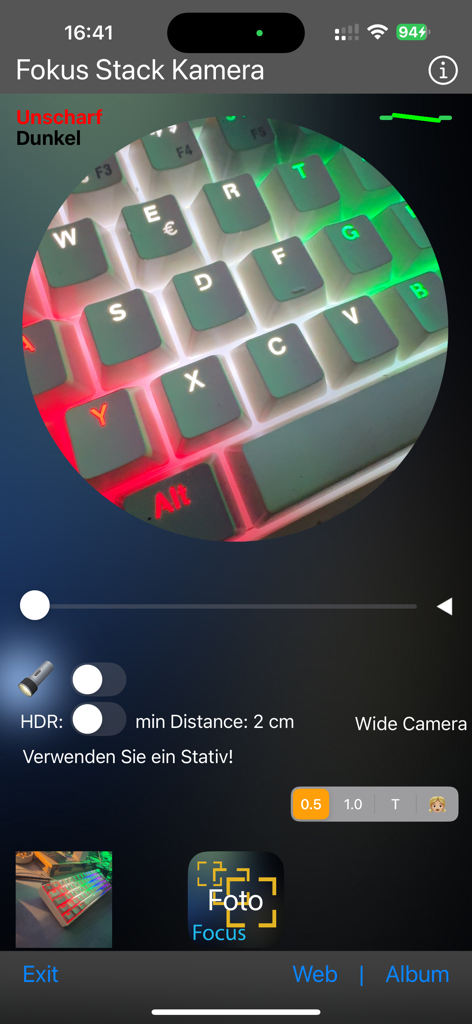
Focus Stack Camera app interface showing a macro photo of a colorful backlit keyboard.
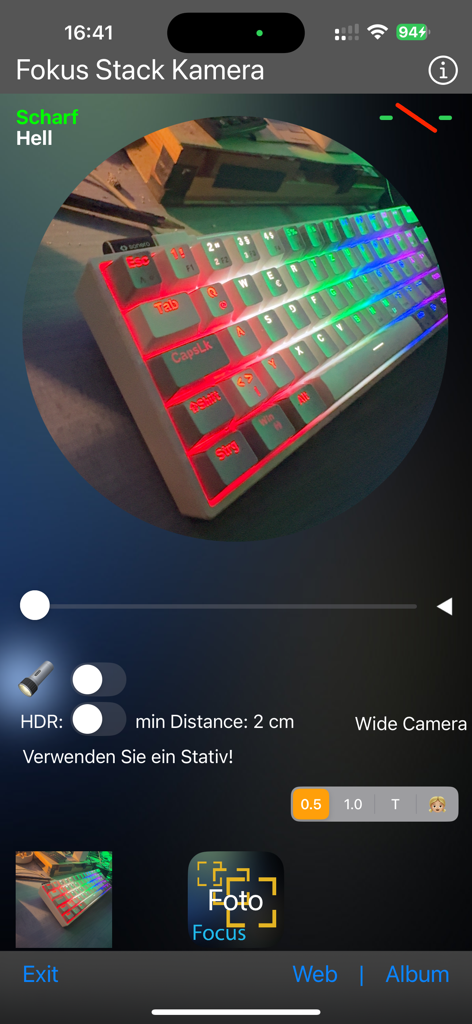
Focus Stack Camera app interface with macro photography controls and a preview of a backlit keyboard
Description
Download
More Like This
Top-ranked apps in the same category

CapCut: Photo & Video Editor
BYTEDANCE PTE. LTD.

Instagram, Inc.

YouTube
Google LLC

Canva: AI Photo & Video Editor
Canva Pty Ltd

Snapchat
Snap, Inc.

快手
Beijing Kwai Technology Co., Ltd.

Edits: Video Editor
Instagram, Inc.

Meitu- AI Photo & Video Editor
Xiamen Meitu Technology Co., Ltd.

Google Photos: Backup & Edit
Google LLC
This page is not an official page of the app or its developer, but an independent editorial publication created for informational and commentary purposes. Unless expressly stated otherwise, neither the app nor its developer is affiliated with, endorsed by, sponsored by, authorized by, or otherwise officially connected with MWM, Apple, Google Play, the app publisher, or the app's developer, and nothing on this page implies that the app was developed using MWM's services. Any trademarks, logos, screenshots, and other content remain the property of their respective owners.