
This page is not an official page of the app or its developer, but an independent editorial publication created for informational and commentary purposes. Unless expressly stated otherwise, neither the app nor its developer is affiliated with, endorsed by, sponsored by, authorized by, or otherwise officially connected with MWM, Apple, Google Play, the app publisher, or the app's developer, and nothing on this page implies that the app was developed using MWM's services. Any trademarks, logos, screenshots, and other content remain the property of their respective owners.


Google Fit: Activity Tracker
This app transforms movement into clear, actionable health metrics.
Downloads
7.5M+User Rating
Total Ratings
9.0KPublisher
Category
Health & FitnessLocales
34Latest Version
1.102Size
288.4 MBFirst Released
Apr 25, 2019An Analytical Review of Key Features for Health-Conscious Users
Google Fit: Core Health Tracking Capabilities
WHO/AHA Heart Points Goals
The app provides health-focused activity goals, known as Heart Points, developed in collaboration with the WHO and AHA, encouraging users to achieve recommended activity levels for improved cardiovascular health, sleep, and mental well-being.
Comprehensive App & Device Integration
It allows users to connect with a wide array of popular third-party fitness and health applications and devices, consolidating all health data into a single, holistic view for comprehensive tracking.
Detailed Workout Performance Metrics
This tool features in-depth tracking for various activities like runs, walks, and bike rides, providing insights into metrics such as heart rate, speed, pace, and route to help users understand and optimize their performance.
Dynamic Goal Monitoring & Adjustment
The app enables users to monitor their daily progress towards Heart Points and step goals, offering the flexibility to easily adjust targets to maintain challenge and support ongoing health improvement.
Centralized Activity History & Data View
It allows users to access a consolidated journal and browse section, offering a quick snapshot and detailed historical view of all activity and wellness data from the app and integrated sources.
Flexible Activity Logging
This tool features a comprehensive activity journal that automatically records movement, and also provides the option for users to manually add any untracked activities, ensuring all physical efforts contribute to their health overview.
Frequently Asked Questions
Everything you need to know about Google Fit: Activity Tracker
What are Heart Points in Google Fit?
Google Fit Heart Points are an activity goal co-developed with the WHO and AHA. You earn points for moderate activities like brisk walking and double points for more intense activities, improving heart health.
How does Google Fit track activity?
Google Fit tracks activities like runs, walks, and bike rides, providing insights such as heart rate, speed, and pace. Users can also manually add any activity to ensure all movement contributes to their health journal.
Can Google Fit track sleep?
Yes, Google Fit tracks sleep. It records duration, time in bed, efficiency, and sleep stages. The app displays sleep data on the home screen and in the journal, providing a detailed overview of your sleep patterns.
Which fitness apps integrate with Google Fit?
Google Fit integrates with popular fitness apps and devices compatible with Apple Health. These include Lifesum, Runkeeper, Strava, MyFitnessPal, and Headspace, offering a holistic view of your health data in one place.
How do I view my activity history in Google Fit?
You can view your activity history in Google Fit's "Journal" or "My activity" sections. These areas provide a snapshot of your tracked activities, including details like steps, distance, duration, and Heart Points earned.
Does Google Fit show heart rate data?
Yes, Google Fit displays heart rate data for activities. For example, during a run, it shows your average heart rate and a graph illustrating fluctuations throughout the activity duration.
Can I adjust my activity goals in Google Fit?
Yes, you can adjust your activity goals in Google Fit. The app allows you to easily modify your daily Heart Points and step targets to continually challenge yourself and maintain a healthy lifestyle.
The following screenshots and description are sourced directly from the app's official store listing and are the property of the app developer.
App Store
Screenshots

This initial screen provides an overview of health metrics, featuring a prominent circular goal tracker for Heart Points and Steps, alongside summaries for "Last sleep" and "Your daily goals".
Daily Progress View
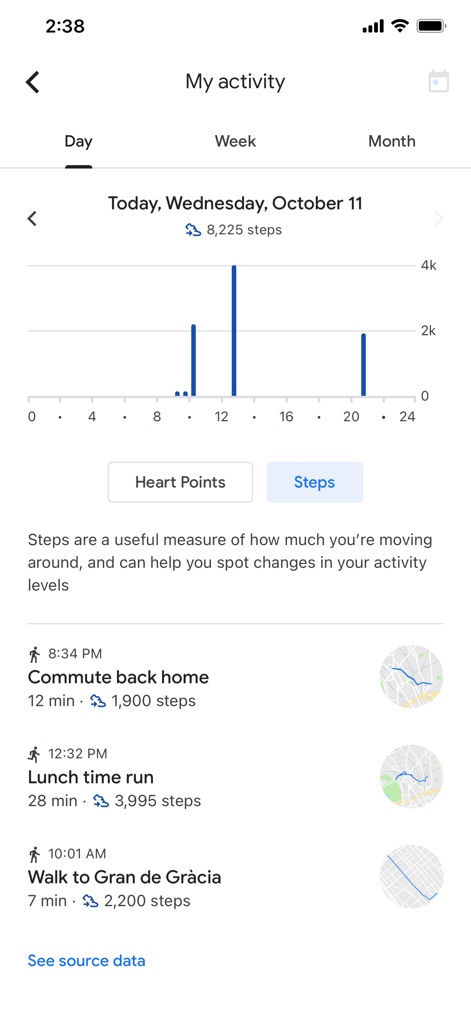
Users can dive into their activity data with a clear daily bar chart visualizing steps over time, complemented by a chronological list of individual activities with corresponding mini-maps.
Detailed Activity Log

The Journal tab centralizes all logged activities, displaying organized categories like Walking, Sleep, Running, and Biking, along with a chronological feed of each event.
Comprehensive Activity Journal

This screen offers a detailed breakdown of specific workouts, including a visual heart rate graph and key metrics such as "Distance" and "Energy expended".
In-Depth Workout Analysis
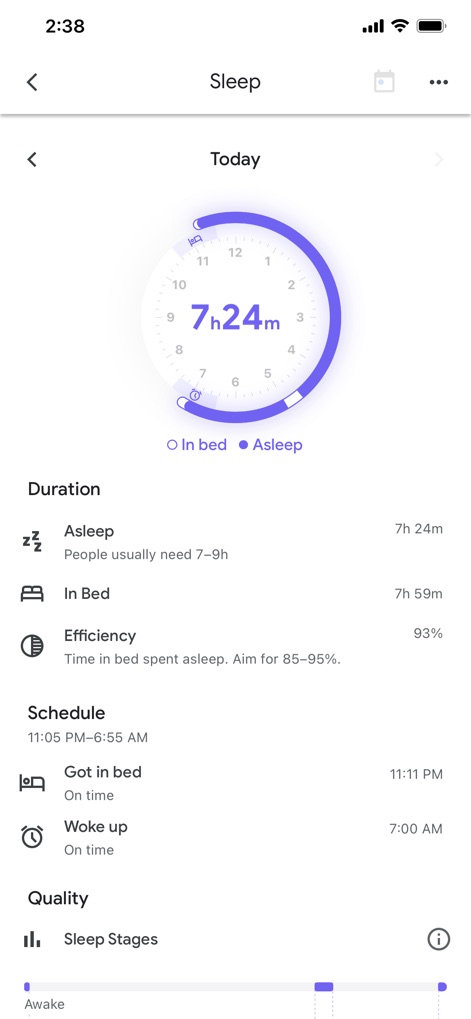
The app provides comprehensive sleep analysis, presenting a circular visual for sleep duration and detailed metrics including "Duration" and "Efficiency".
Sleep Health Insights
Description
Download
More Like This
Apps with similar features and user experience
Pedometer & Step Counter
Leap Health Fitness Limited
Step Tracker · Step Counter
Leap Health Fitness Limited
StepsApp Pedometer
StepsApp GmbH
Pedometer α - Step Counter
ITO Technologies Inc.
Pedometer - Run & Step Counter
Appenvision Ltd
MySteps - Step Counter
Company Next Leap

Step Counter Maipo - Pedometer
Shigeru Nakaya

Step Counter Pedometer doSteps
AK Apptuitive GmbH
The Pedometer
MUTLU ISLER TEKNOLOJI VE ILETISIM HIZMETLERI TICARET LTD STI
This page is not an official page of the app or its developer, but an independent editorial publication created for informational and commentary purposes. Unless expressly stated otherwise, neither the app nor its developer is affiliated with, endorsed by, sponsored by, authorized by, or otherwise officially connected with MWM, Apple, Google Play, the app publisher, or the app's developer, and nothing on this page implies that the app was developed using MWM's services. Any trademarks, logos, screenshots, and other content remain the property of their respective owners.