
This page is not an official page of the app or its developer, but an independent editorial publication created for informational and commentary purposes. Unless expressly stated otherwise, neither the app nor its developer is affiliated with, endorsed by, sponsored by, authorized by, or otherwise officially connected with MWM, Apple, Google Play, the app publisher, or the app's developer, and nothing on this page implies that the app was developed using MWM's services. Any trademarks, logos, screenshots, and other content remain the property of their respective owners.


GoPro Quik
The chaos of raw footage meets its decisive editor. It transforms countless clips into captivating narratives, offering both automated polish and detailed creative control, all securely stored in the cloud.
Downloads
25M+User Rating
Total Ratings
2.6MPublisher
Category
Photo & VideoLocales
12Latest Version
13.31Size
276.7 MBFirst Released
Oct 8, 2012Key Capabilities of GoPro Quik
An analytical review of core functionalities for adventure content creators.
Automatic Highlight Videos
The app intelligently selects the best shots, synchronizes them to music, and adds transitions to automatically create shareable highlight videos.
Seamless GoPro Footage Transfer
It automatically detects connected GoPro cameras and facilitates fast, wired USB transfers of footage.
Unlimited Cloud Backup (100% Quality)
The app provides unlimited cloud storage for all GoPro footage and generous storage for other cameras, maintaining 100% quality for secure backup and accessibility.
Advanced Editing Suite
It features a suite of premium tools allowing users to adjust color and light, trim videos, and add creative elements like stickers for professional-grade edits.
360 Video Reframe & Conversion
This tool allows users to reframe 360 footage into traditional videos or photos, enabling cinematic transitions and diverse perspectives from a single recording.
Cross-Device Sync & Auto Upload
It ensures automatic cloud upload of media and edits, enabling seamless synchronization and content management across all user devices.
Integrated Media Management
The app offers a unified view for managing local, cloud, and camera media, featuring an easy-to-read grid with search filters for efficient organization.
Aspect Ratio & Horizon Adjustment
It provides tools to adjust aspect ratios, level horizons, and rotate or flip media, ensuring optimal framing and presentation for photos and videos.
Frequently Asked Questions
Everything you need to know about GoPro Quik
How does GoPro Quik create automatic highlight videos?
The GoPro Quik app automatically identifies your best shots, syncs them to music, adds transitions, and generates a shareable highlight video. This feature requires a Premium or Premium+ Subscription.
What cloud storage options does GoPro Quik offer?
GoPro Quik offers unlimited cloud storage for all GoPro footage with a Premium or Premium+ subscription. Premium includes up to 100GB for other cameras, while Premium+ provides up to 500GB.
Does GoPro Quik synchronize content across devices?
Yes, GoPro Quik synchronizes content across devices. Photos, videos, and edits automatically upload to the cloud after import, ensuring backup and seamless cross-platform editing and management. This requires a subscription.
What editing capabilities does the GoPro Quik app provide?
The GoPro Quik app provides premium editing tools to adjust color, light, and video length, add stickers, utilize Beat Sync, apply cinematic themes, filters, text overlays, and adjust frames. Many features require a Premium/Premium+ subscription.
Can I save still images from videos using GoPro Quik?
Yes, GoPro Quik allows you to save high-resolution still images from any video. The Frame Grab feature lets you capture a specific frame as a photo.
How does GoPro Quik handle 360-degree video?
GoPro Quik transforms 360-degree footage into traditional video or photos using its Reframe feature. Users can choose views, create cinematic transitions with keyframes, and then export for editing and sharing.
Can I control my GoPro camera with the Quik app?
Yes, the GoPro Quik app allows you to control your GoPro camera directly from your phone. It also automatically detects connected GoPro cameras for fast footage transfer.
Is GoPro Fusion content supported by Quik cloud storage?
No, GoPro Quik cloud storage does not support content captured with GoPro Fusion. Cloud storage is available for other GoPro cameras and limited file types from non-GoPro devices.
The following screenshots and description are sourced directly from the app's official store listing and are the property of the app developer.
App Store
Screenshots
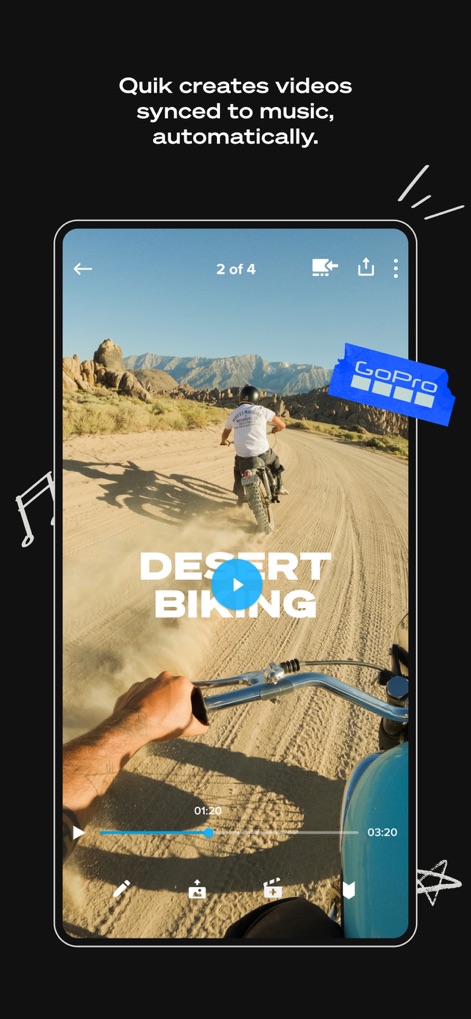
Auto-Created Adventures
The app showcases automatically generated highlight videos, complete with a dynamic text overlay and precise video timeline controls.

Effortless Highlights
Users receive instant notifications when automatic highlight videos are ready, featuring seamlessly edited footage and intuitive playback controls.

Organized Media Hub
This tool provides a structured media library, allowing users to organize content into albums and effortlessly navigate between different media views.

Precision Speed Control
Access advanced editing capabilities, where users can finely adjust video playback speed and manipulate the detailed timeline slider for perfect timing.

Sonic Storytelling
The app empowers users to enhance their narratives by selecting from curated music categories and applying thematic visual styles.

Environment-Specific Filters
Discover exclusive filters tailored for various environments, applied instantly through an intuitive visual selection menu to enhance footage.

High-Res Frame Grab
Users can extract high-resolution still images directly from video footage using a precise frame selection timeline and a clear 'Save Photo' action.

Remote Camera Control
This tool offers comprehensive remote control over GoPro devices, featuring a live camera preview and an easily accessible record button.

360 Video Reframe
The app allows users to transform 360 footage into traditional video, utilizing object tracking within a dynamic reframe interface.
Description
Download
More Like This
Apps with similar features and user experience

LightCut - AI Video Editor
Yue-Jie Innovations Science and Technology Co. , Ltd.

Insta360
Istone Innovation Limited

AKASO GO
AKASO TECH LLC

Myk - for GoPro Video Editing
AI Motion, Inc.

Eklipse.gg
MAINSPRING TECHNOLOGY PTE. LTD.

Insta360 GO
Shenzhen Arashi Vision Co., Ltd.
This page is not an official page of the app or its developer, but an independent editorial publication created for informational and commentary purposes. Unless expressly stated otherwise, neither the app nor its developer is affiliated with, endorsed by, sponsored by, authorized by, or otherwise officially connected with MWM, Apple, Google Play, the app publisher, or the app's developer, and nothing on this page implies that the app was developed using MWM's services. Any trademarks, logos, screenshots, and other content remain the property of their respective owners.