
This page is not an official page of the app or its developer, but an independent editorial publication created for informational and commentary purposes. Unless expressly stated otherwise, neither the app nor its developer is affiliated with, endorsed by, sponsored by, authorized by, or otherwise officially connected with MWM, Apple, Google Play, the app publisher, or the app's developer, and nothing on this page implies that the app was developed using MWM's services. Any trademarks, logos, screenshots, and other content remain the property of their respective owners.


LightCut - AI Video Editor
Complexity? Irrelevant. This app hands users the power of a full editing suite, minus the headache.
Downloads
2.5M+User Rating
Total Ratings
30.9KPublisher
Category
Photo & VideoLocales
14Latest Version
4.100.0Size
354.1 MBFirst Released
Aug 12, 2021An evaluation of core functionalities tailored for mobile-first content creators and DJI enthusiasts.
LightCut - AI Video Editor: Key Feature Analysis
AI One-Tap Video Editing
It automatically transforms selected clips and photos into share-worthy 4K UHD videos, identifying highlight moments and matching them with suitable templates, greatly simplifying the editing process for quick social media content.
Direct DJI Device Integration
It allows direct editing of footage from DJI drones and handheld gimbals (Mavic, Air, Mini, Osmo series) without prior export, saving significant storage space and streamlining the workflow for DJI owners.
Extensive Template Library
The app offers a wide range of easy-to-use, creative templates across various styles (travel, lifestyle, sports, aerials), enabling users to automatically generate eye-catching videos by simply choosing a template and tempo.
Inspire Cam Pro Shooting Guides
It provides convenient step-by-step tutorials on how to shoot professional-looking footage in diverse scenarios, automatically creating a polished video afterward, which empowers users to capture high-quality content.
Comprehensive Manual Editing Suite
This tool provides a full suite of professional editing features, including video trimming, cutting, slow/fast motion, split capabilities, along with various stickers, font styles, filters, effects, and transitions, offering expanded creative control.
AI-Powered Aerial AudioMatch
It automatically adds high-quality sound effects to drone footage based on themes (Forest, Sea, Urban Street), detecting action and suggesting optimized sounds from a library, allowing users to enhance video audio without manual searching.
Frequently Asked Questions
Everything you need to know about LightCut - AI Video Editor
What is LightCut?
LightCut is an AI-powered video editing app designed for easy creation of stylish videos and vlogs. It provides awesome templates, effects, and an AI editor for both beginners and professionals.
Does LightCut support 4K video export?
Yes, LightCut supports 4K UHD video export. Its AI-powered One-Tap Edit feature can automatically transform selected clips and photos into share-worthy 4K UHD videos.
Can LightCut directly edit footage from DJI drones and handheld devices?
Yes, LightCut directly edits footage from DJI drones like Mavic 3 Series and Mini 4 Pro, and handheld devices such as Osmo Mobile and Osmo Action Series, without requiring export.
How does LightCut's AI video editor function?
LightCut's AI video editor analyzes selected video clips and photos. It identifies highlight moments and matches them with suitable templates to automatically create outstanding, share-worthy videos.
What types of creative templates does LightCut offer?
LightCut offers diverse creative templates across various styles. These include themes for travel, road trips, nature, building & city, fashion, lifestyle vlogs, sports, and aerial videos.
Can LightCut automatically add sound effects to drone videos?
Yes, LightCut features Aerial AudioMatch, an AI that automatically adds sound effects to drone footage. It uses themes like Forest or Urban Street and draws from a library of thousands of professional sounds.
Does LightCut offer guidance for shooting professional-looking videos?
Yes, LightCut provides guidance through its Inspire Cam feature. It offers convenient tutorials with step-by-step instructions on how to achieve great shots in a wide range of scenarios.
Is it possible to adjust video speed in LightCut?
Yes, LightCut allows users to adjust video speed with slow/fast motion tools. It also offers advanced speed curve controls with presets like Montage, Hero Moment, and Bullet Time for dynamic effects.
What unique visual effects are available in LightCut?
LightCut provides various visual effects, including filters, transitions, and Tilt-Shift effects. Tilt-Shift gives videos a miniaturized, unique look, particularly effective for urban scenes.
Does LightCut allow users to add text and stickers to videos?
Yes, LightCut enables users to add multiple stickers and diverse font styles. It offers various sticker categories like 3D, Vlog, and Cute for creative text and graphic overlays.
The following screenshots and description are sourced directly from the app's official store listing and are the property of the app developer.
App Store
Screenshots

Discover how LightCut's intuitive interface presents core editing functions and categorized templates for rapid video creation.
AI Editor Overview

Explore the diverse range of trending video templates and easily navigate through categories like "Travel" and "Beats" to find the perfect style.
Template Showcase

This screenshot reveals the app's comprehensive timeline-based editing and granular controls for functions like "Split" and "Speed" adjustments.
Precision Editing Tools

Experience the Inspire Cam feature, offering pro-level shooting options like "Beautify" and direct selection of clips for templates.
Pro Shooting Modes

Users can quickly connect DJI drones and action cameras such as the "DJI Mavic 3 Pro" and "ACTION 3" for direct media transfer and editing.
Seamless Device Sync

This tool offers a curated library of templates tailored for drone and handheld footage, prominently featuring aerial themes like "FLYING HIGHER."
Aerial Template Library

Precisely control video pacing using advanced "Curve" speed adjustments, including presets like "Montage" and "Bullet Time" for dramatic effects.
Dynamic Speed Control

See how the app transforms footage with a wide selection of filters, demonstrated by a before & after comparison and categorized options like "Movie" and "Food."
Enhance Visuals
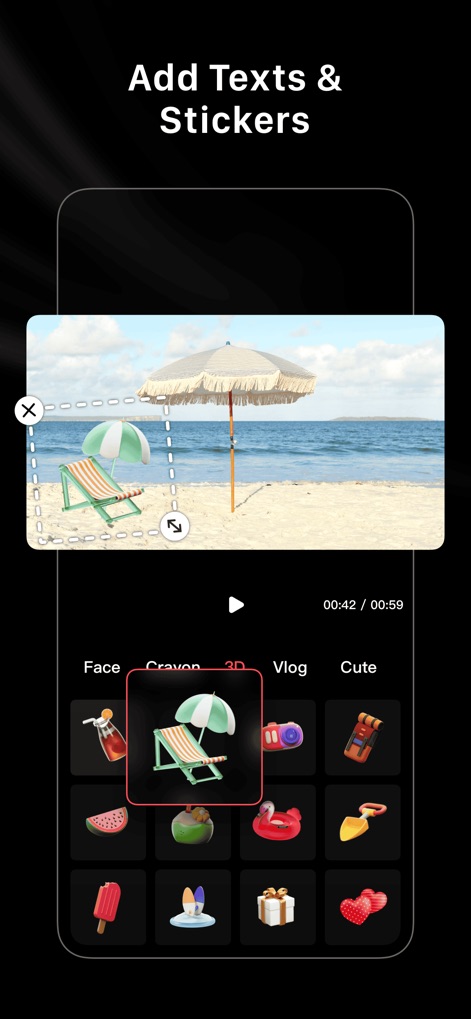
Enhance videos with dynamic text and a rich library of stickers, including interactive "3D" elements and diverse categories like "Vlog."
Creative Overlays

Users can instantly share their finished creative videos directly to popular social media platforms like "Instagram" and "TikTok" with a single tap.
Instant Social Sharing
Description
Download
More Like This
Apps with similar features and user experience






This page is not an official page of the app or its developer, but an independent editorial publication created for informational and commentary purposes. Unless expressly stated otherwise, neither the app nor its developer is affiliated with, endorsed by, sponsored by, authorized by, or otherwise officially connected with MWM, Apple, Google Play, the app publisher, or the app's developer, and nothing on this page implies that the app was developed using MWM's services. Any trademarks, logos, screenshots, and other content remain the property of their respective owners.