GV Connect

GV Connect

Download on App Store
Logo of GV Connect

GV Connect: The Ultimate Power-User App for Google Voice

Take full control of your business communication with automated settings, secure offline access, and a professional iOS interface designed for maximum efficiency.

Publisher

Andreas Amann

Category

Utilities

Downloads

247K+

User Rating

3.3/5

Total Ratings

2K+

Locales

1

Control at a Glance

Discover the interface used by 247K+ users.
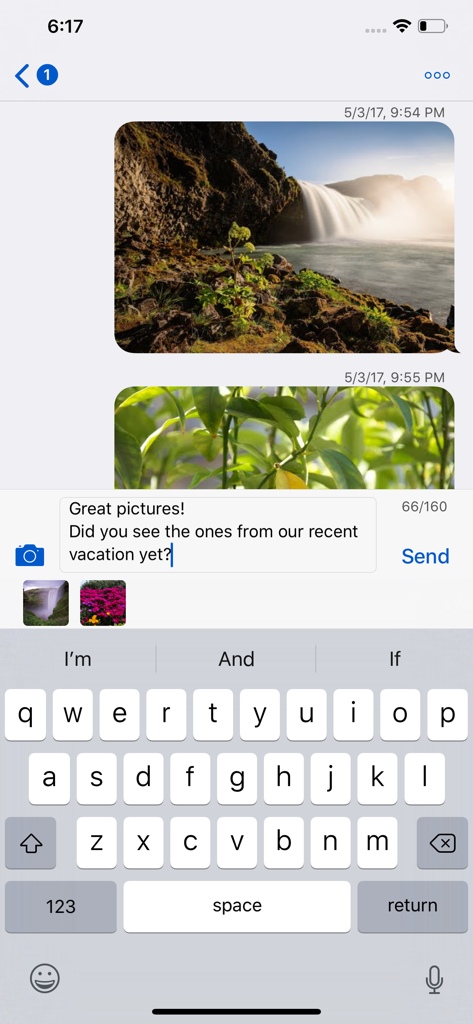
GV Connect app on iPhone showing a text conversation with photo messages and an iMessage like interface.

GV Connect app on iPhone showing a text conversation with photo messages and an iMessage like interface.

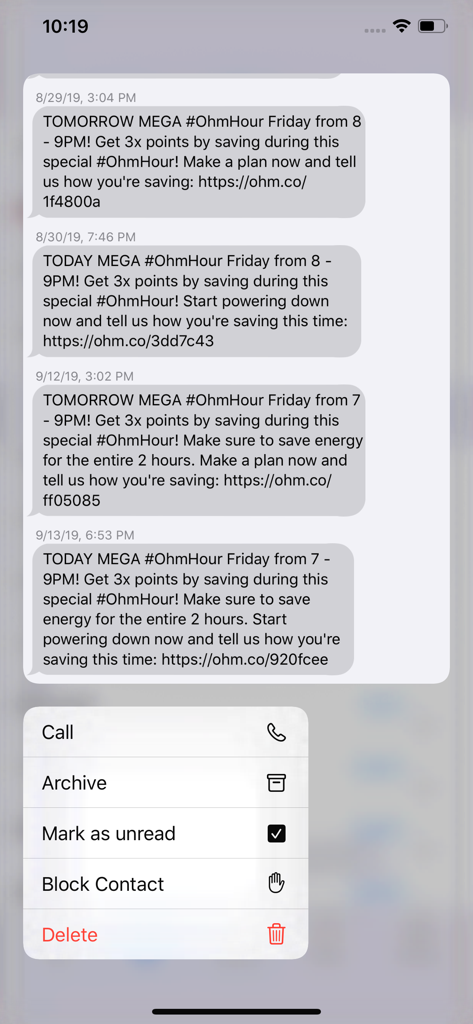
GV Connect mobile app displaying text message history with a context menu for call and archive actions

GV Connect mobile app displaying text message history with a context menu for call and archive actions

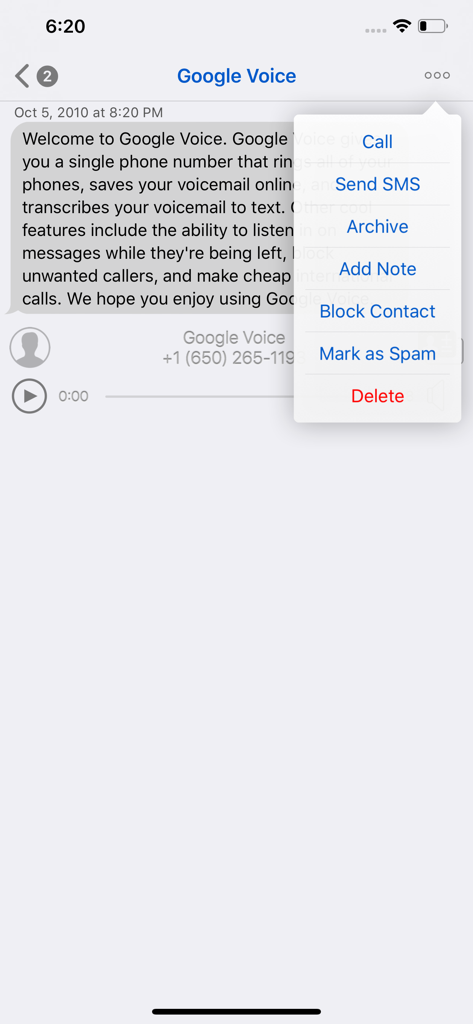
GV Connect app interface showing message details and a popup menu with call, sms, and archive options

GV Connect app interface showing message details and a popup menu with call, sms, and archive options

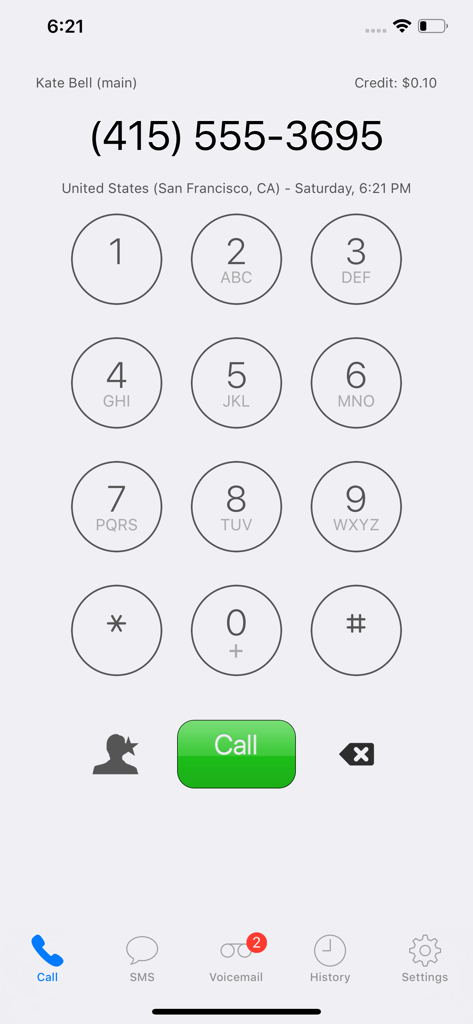
Dialer screen of the GV Connect app showing a phone keypad and call button.

Dialer screen of the GV Connect app showing a phone keypad and call button.

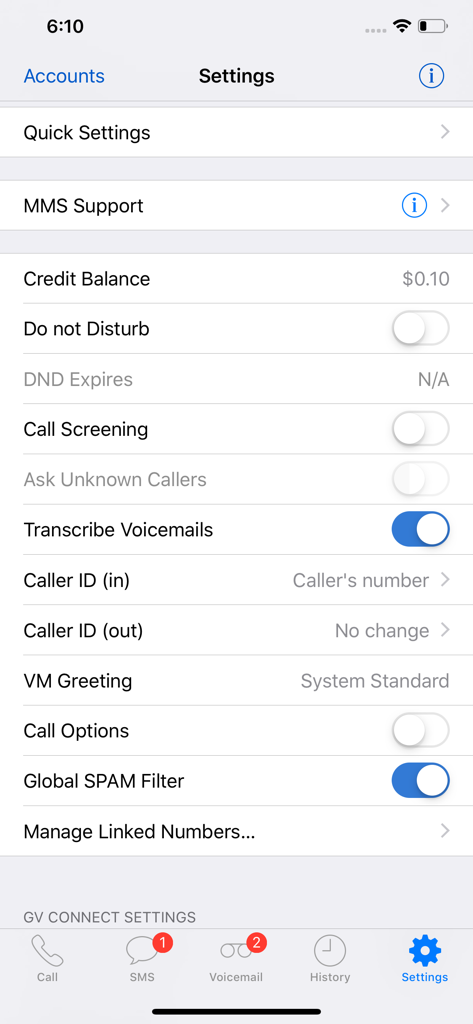
Settings menu of GV Connect app showing Google Voice account management options.

Settings menu of GV Connect app showing Google Voice account management options.

Master Your Workflow with Power-User Controls

The tools that make this app stand out, trusted by 247K+ users.

📍

Location-Aware Automation

Automatically switch your forwarding profiles or set Do Not Disturb to expire when you leave the office or arrive home.

💼

Business-Grade Management

Keep your professional life organized by adding private notes to conversations, archiving threads, and searching your entire history offline.

🛡️

Native iOS Security

Protect your client data with TouchID or FaceID and securely store credentials in your device Keychain for a seamless, private experience.

About the app

Everything you need to know about GV Connect.

Description

GV Connect is the most feature-complete Google Voice application available for your iPhone or iPad — text, call, and interact with your existing GV accounts using a beautiful and streamlined interface that gives you full control over your account settings: • Place calls using your Google Voice number rather than your mobile number - enter number directly, select a contact from your device's contacts, or call back any number in your history. The application supports direct call (iPhone only), callback (Click2Call), and offline calling (see application website for a description of these calling modes) • Send and receive text messages (SMS) from your Google Voice number - including support for long SMS, group messages, picture messages (MMS – available as In-App purchase), and support for non-English messages. Supports in-line replies with an iMessage-like interface • Automatically check for new messages and voicemails - even when the application is in the background • Listen to voicemails and recorded conversations right on your device (allowing you to pause, rewind, or fast forward to any point within the message) - voicemails will show the transcription of the message when available • Un/-archive messages, mark them as un-/read or starred, attach notes to conversations, block/unblock senders, trash or delete conversations • Easily search in your history by contact, message, or note text - supports continuing searches online for messages that have not yet been cached locally • Messages are stored on your device for offline access • Quickly change various Google Voice account settings (call forwarding, do-not-disturb — including the option to have DND automatically expire at a specified time, message notifications, …) • Add, verify, and remove forwarding phone numbers • Quick Settings allow saving and restoring complete account settings (DND, forwarding, …) for easy switching between different profiles • Support for automatic selection of Quick Settings based on current location (available as In-App Purchase) • Direct access to your device's contacts without needing to synchronize them with Google • Quick access to favorite phone numbers for calls and SMS • Universal application which runs optimized on iPhone (including iPhone X), iPod Touch, and iPad (including split-screen multi-tasking on supported devices running iOS 12.0 or later) • Optional application passcode lock (with TouchID/FaceID option on supported devices) • Supports gesture navigation when typing text for easier placement of the cursor: swipe left/right with one or two fingers to move the caret position backwards/forward by character or word. Swipe left/right with three fingers to go to the beginning/end of the existing text * Recipient of an honorable mention in the 2010 Best App Ever Awards * NOTE: An existing Google Voice account with a GV phone number is required to use this application - signup for new Google Voice accounts is currently limited to residents of the US. Please note that GV Connect is NOT a VoIP application and will not allow making or receiving calls from an iPad/iPod Touch without a separate VoIP application. GV Connect stores your account password securely in your device's Keychain for faster login when launching the application. All communication is done exclusively via secure connections (SSL) to the Google Voice servers owned and operated by Google and no contact information (other than the contact's phone number which is required to place a call or send a message) is sent to Google or any other party. All operations are fully synchronized with your Google Voice account. Please read the FAQ section on the application website if you encounter any issues or use the feedback email link in its about screen to ask for support.

Latest Version

3.10.6

Size

6.2 MB

First Released

Sep 17, 2010

The Power User's Google Voice, Perfected.

Take full control of your professional communications with the most feature-rich client for iPhone and iPad. Join over 247,000 users and upgrade your workflow today.

Download on App Store
FAQ

Frequently Asked Questions

Everything you need to know about GV Connect

What is GV Connect?

GV Connect is a feature-complete application for iPhone and iPad. It allows users to text, call, and interact with existing Google Voice accounts, offering full control over account settings.

Can GV Connect make calls using a Google Voice number?

Yes, GV Connect places calls using your Google Voice number, not your mobile number. It supports direct call (iPhone), callback (Click2Call), and offline calling modes.

Does GV Connect support text messaging (SMS)?

Yes, GV Connect supports sending and receiving text messages (SMS) from your Google Voice number. This includes long SMS, group messages, picture messages (MMS), and non-English messages.

Can GV Connect send picture messages (MMS)?

Yes, GV Connect supports sending picture messages (MMS). This feature is available as an In-App Purchase within the application. The settings also show MMS Support.

Does GV Connect support voicemails?

Yes, GV Connect automatically checks for new messages and voicemails. Users can listen to voicemails on their device, with transcription available when provided.

Can I manage Google Voice account settings through GV Connect?

Yes, GV Connect allows users to quickly change various Google Voice account settings. These include call forwarding, do-not-disturb, and message notifications.

Is a Google Voice account required to use GV Connect?

Yes, an existing Google Voice account with a GV phone number is required to use GV Connect. New Google Voice account signups are currently limited to US residents.

Does GV Connect support TouchID or FaceID for security?

Yes, GV Connect offers an optional application passcode lock. This includes TouchID/FaceID options on supported devices for enhanced security.

Does GV Connect store my Google Voice password?

Yes, GV Connect stores your Google Voice account password securely in your device's Keychain for faster login. All communication uses secure SSL connections to Google Voice servers.

Can I block contacts in GV Connect?

Yes, GV Connect allows users to block senders. This functionality is accessible from conversation menus and voicemail options to manage unwanted contacts.

What types of devices does GV Connect support?

GV Connect is a universal application optimized for iPhone (including iPhone X), iPod Touch, and iPad. It supports split-screen multitasking on supported devices running iOS 12.0 or later.

Can I transcribe voicemails with GV Connect?

Yes, voicemails in GV Connect display transcription when available. The application's settings include a toggle for 'Transcribe Voicemails' to enable this feature.

Does GV Connect offer Quick Settings?

Yes, GV Connect includes Quick Settings for saving and restoring complete account settings. It also offers automatic selection based on current location as an In-App Purchase.

Is GV Connect a VoIP application?

No, GV Connect is NOT a VoIP application. It does not allow making or receiving calls from an iPad/iPod Touch without a separate VoIP application.

How can I check my credit balance in GV Connect?

Users can check their credit balance within GV Connect. The balance is visible in the application's settings menu and on the dialpad interface.

App information, icons, screenshots, and descriptions displayed on this page are sourced from the Apple App Store and are the property of their respective developers. Download estimates and rankings are based on MWM's proprietary models and may not reflect actual figures. This page is provided for informational and analytical purposes only.

Believe this page infringes your intellectual property? File a dispute