Highlighted Large Keyboard

Highlighted Large Keyboard


Download on App Store
Logo of Highlighted Large Keyboard

Highlighted Large Keyboard: Typing Made Clear, Big, and Easy

Stop struggling with tiny buttons. Enjoy 37% larger keys, smart predictive hints, and total privacy with no data access required.

Publisher

Huixiu Wu

Category

Utilities

Downloads

43K+

User Rating

3.1/5

Total Ratings

0

Locales

1

Big Keys, Bold Clarity

Discover the interface used by 43K+ users.
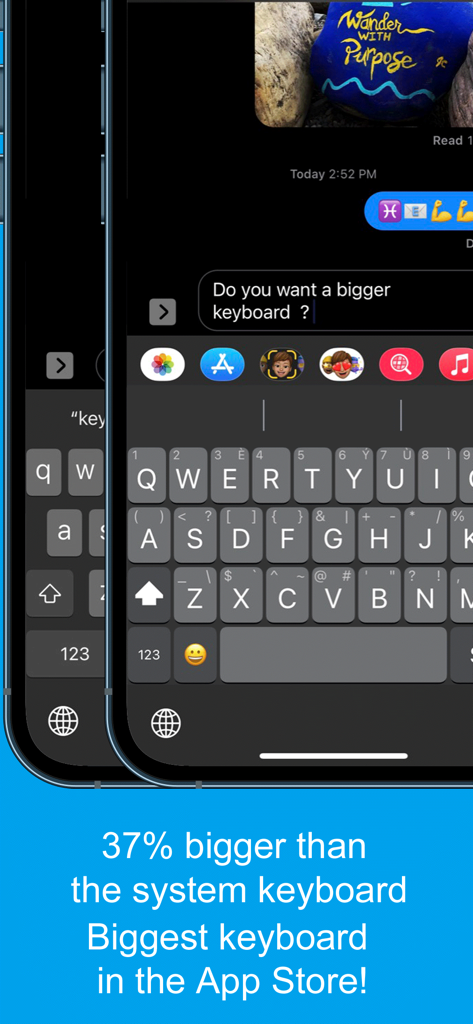
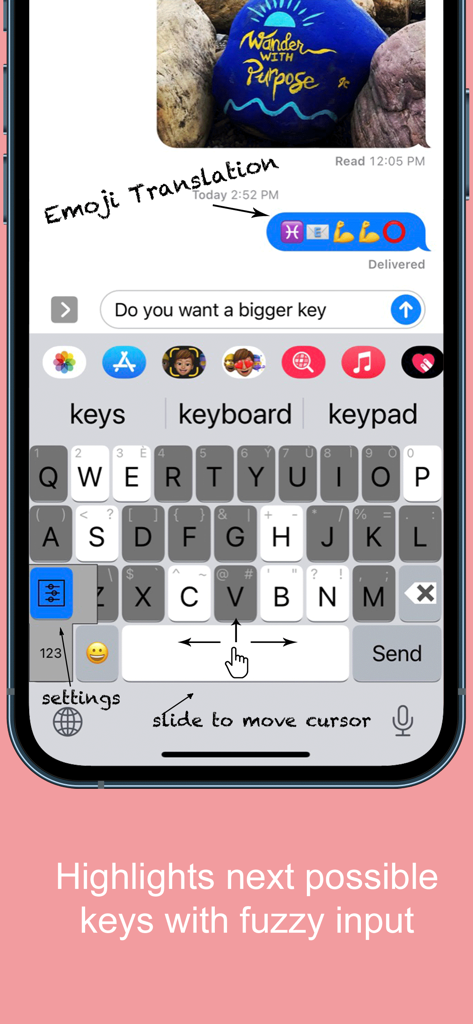
Screenshot of the Highlighted Large Keyboard app showing keys 37 percent bigger than the standard system keyboard for accessibility

Screenshot of the Highlighted Large Keyboard app showing keys 37 percent bigger than the standard system keyboard for accessibility

Highlighted Large Keyboard app interface showing large keys and slide to move cursor feature

Highlighted Large Keyboard app interface showing large keys and slide to move cursor feature

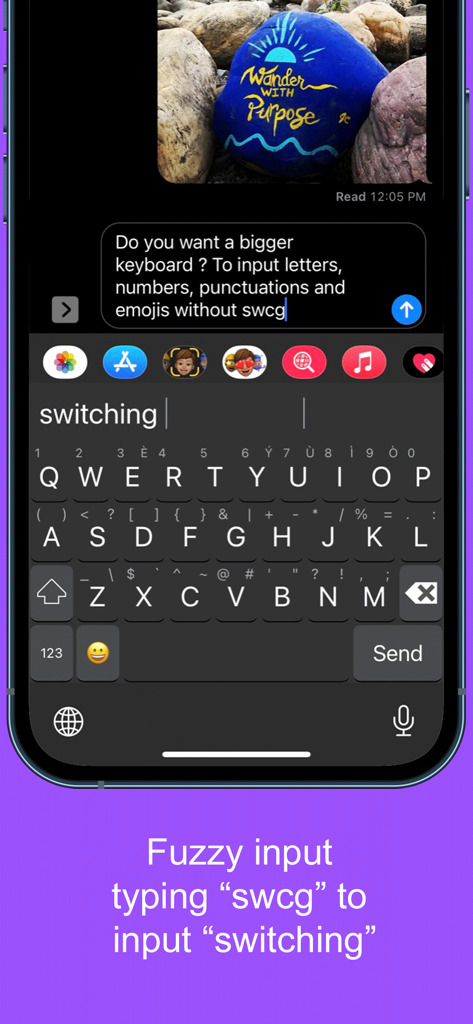
Screenshot showing fuzzy input on the Highlighted Large Keyboard app where typing swcg suggests switching

Screenshot showing fuzzy input on the Highlighted Large Keyboard app where typing swcg suggests switching

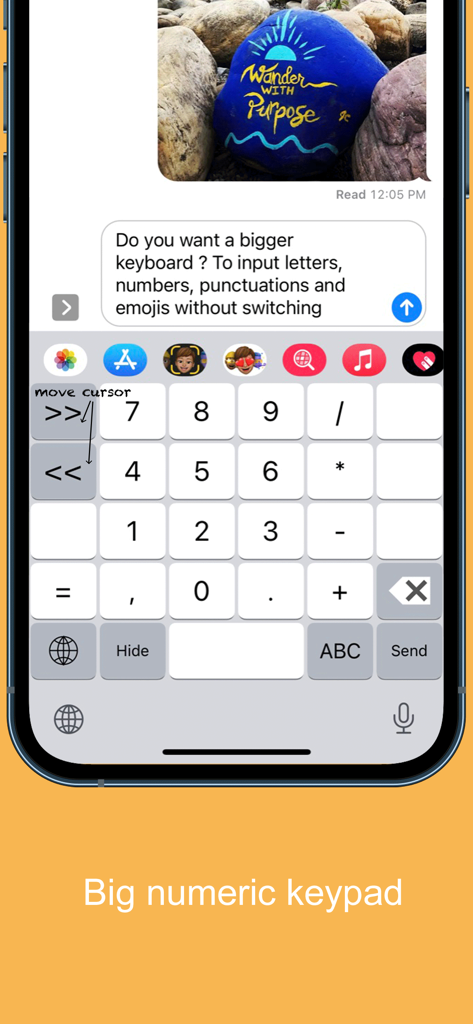
Large numeric keypad interface for the Highlighted Large Keyboard mobile app

Large numeric keypad interface for the Highlighted Large Keyboard mobile app

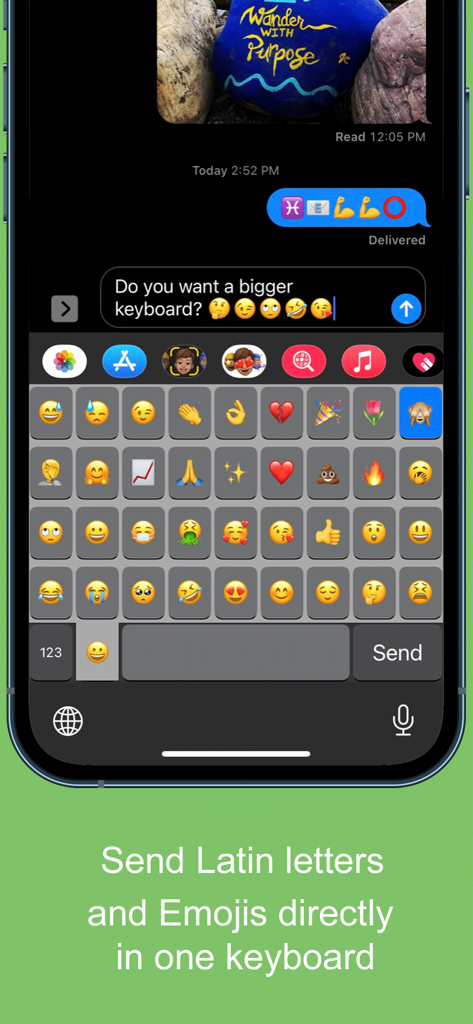
A mobile screenshot showing a large grid of emojis on the Highlighted Large Keyboard app interface.

A mobile screenshot showing a large grid of emojis on the Highlighted Large Keyboard app interface.

Finally, a Keyboard Made for Your Comfort

The tools that make this app stand out, trusted by 43K+ users.

⌨️

37% Larger Keys

Stop struggling with tiny buttons. Our extra-large keys are designed for big thumbs and to be easy on the eyes, reducing typos and frustration.

↔️

Easy Cursor Control

Tired of trying to tap between letters? Simply slide your finger across the spacebar to move the cursor exactly where you need it.

🔒

100% Private & Secure

Your safety is our priority. This keyboard works without requiring 'Full Access,' ensuring your personal messages and data never leave your device.

About the app

Everything you need to know about Highlighted Large Keyboard.

Description

Do you want a bigger keyboard? With the smart highlighted next key hints and fuzzy input? And full Emoji supported? Try out this Biggest keyboard in the App Store! ** Biggest Keyboard in the App Store Keys are 37% bigger than the system keyboard. It is good for people who have big thumbs. Also people who want to preserve their vision will benefit from this keyboard. ** Fuzzy input If you use the Apple's system keyboard to input "determination", you won't see it in the suggestion list until typing "determina". With the highlighted keyboard, you can just type "dtmnn" to have it show in the suggestion bar. Another example is that once I wanted to input "anthropology" but I forgot the spelling, all I remembered was it started with "an" something and ended with "logy", I then typed “anlg” in the Highlighted keyboard and I saw “anthropology” in the suggestion list. ** Highlighted next possible keys After you type one key the keyboard will smartly highlights the possible next keys that you want to input. Also it has the suggestions that you can select from the top of the keyboard. ** Latin letters supported You can type the latin letters directly from the keyboard. You can also type "£" & "€" as well. ** Emoji translation Translate the word that you select in the suggestion bar into Emoji characters. It is a fun way to communicate with your friends and family. It is disabled by default and you need to use the "Keyboard Setting" page to enable this feature. ** Slide to move the input cursor Sliding from the Space key to left/right to move the current input cursor to left or right. Sliding up to move the current cursor to the beginning of the sentence and sliding down to move the current cursor to the end of the sentence. It makes your life much easier when editing text on the iPhone/iPad. ** 36 most common emojis in the same keyboard without switching UI Long press on the "happy face" emoji key and it will popup the36 most common emojis. You can then input directly from there. ** Full Emoji keys supported It is very convenience to input Emoji characters with this keyboard when you are using Facebook, Twitter, iMessage, Wechat, Text Message, SMS, etc. Just long press on the key that has sub-menu and more Emoji characters will pop up. The Emoji characters are well categorized and you can input the Emoji and Text together in one keyboard! ** Numeric Keypad This keyboard supports the traditional numeric keypad layout with big number keys. It is useful for entering long sequences of numbers quickly. ** Keyboard Settings Long press on the "globe"/"123" key to pop up the sub-menu. Select the "Tool" key to launch the setting page. You can enable/disable the Highlight Next key feature. You can also enable/disable the "Emoji translation" feature. ** NO Full Access required ** How to use 1. After install you need to enable it in the "Settings" App in your iPhone/iPad. Launch "Settings", click on "General" -> "Keyboard" -> "Keyboards" -> "Add New Keyboard" -> Select the "HighlightedKeyboard". 2. Switch the keyboard to "Highlighted Keyboard" when you are inputting. 3. Long press on one key to input the keys in the pop-up menu including 0-9 and punctuation marks. You may try to long press on keys to find the hidden sub menus. For example, if you want to hide the keyboard, long press on the "globe" key and the sub-menu will pop up. Keep holding and move to select the "Hide" key. The keyboard will hide after you release your finger. Please send any feedback, bug reports or feature request to: feedback.southfun at gmail.com Thanks for viewing!

Latest Version

1.2.1

Size

1.9 MB

First Released

Nov 12, 2014

Stop Squinting. Start Typing with Confidence.

Join over 43,000 users who have upgraded to 37% larger keys. Experience the App Store’s biggest keyboard—designed for your comfort, vision, and total privacy.

Download on App Store

App information, icons, screenshots, and descriptions displayed on this page are sourced from the Apple App Store and are the property of their respective developers. Download estimates and rankings are based on MWM's proprietary models and may not reflect actual figures. This page is provided for informational and analytical purposes only.

Believe this page infringes your intellectual property? File a dispute