
This page is not an official page of the app or its developer, but an independent editorial publication created for informational and commentary purposes. Unless expressly stated otherwise, neither the app nor its developer is affiliated with, endorsed by, sponsored by, authorized by, or otherwise officially connected with MWM, Apple, Google Play, the app publisher, or the app's developer, and nothing on this page implies that the app was developed using MWM's services. Any trademarks, logos, screenshots, and other content remain the property of their respective owners.


Home Assistant
Take back control. The app grants users absolute mastery over their smart devices, on their terms.
Downloads
1M+User Rating
Total Ratings
18.0KPublisher
Category
LifestyleLocales
31Latest Version
2026.4.0Size
209.4 MBFirst Released
Apr 15, 2017An evaluation of key features impacting comprehensive smart home automation, privacy, and DIY integration for the tech-savvy user.
Home Assistant App: Core Functionality Analysis
Advanced Home Automation
This tool empowers users to create sophisticated automations, allowing all smart devices to work in harmony for scenarios like dynamic lighting or climate control based on presence.
Local Data Privacy & Control
The app ensures that all smart home data remains processed and stored locally, guaranteeing privacy and enabling users to analyze trends without cloud dependency.
Extensive Device Compatibility
It provides a unified platform compatible with thousands of smart devices and services from leading brands, consolidating control into a single interface.
Open Standard & Hardware Integration
The app supports integration with crucial open standards and hardware add-ons like Z-Wave, Zigbee, Matter, and Thread, offering unparalleled flexibility and future-proofing.
Local Voice Assistant Integration
It allows users to leverage a local voice assistant directly on their device, providing a privacy-focused and hands-free method for controlling their smart home setup.
Customizable Home Notifications
This tool delivers fully customizable notifications for critical home events, from security alerts to device status, giving users complete awareness and control.
iOS Shortcuts Integration
The app seamlessly integrates with iOS Shortcuts, enabling tech-savvy users to trigger complex automations and interact with their smart home through custom Siri commands or personal workflows.
Automated Device Discovery & Setup
It streamlines the setup process by automatically discovering and quickly configuring new smart devices, simplifying integration for DIY enthusiasts.
Frequently Asked Questions
Everything you need to know about Home Assistant
What is the Home Assistant Companion app?
The Home Assistant Companion app provides mobile access to your Home Assistant smart home instance. It allows you to control devices, monitor energy, and manage automations from your smartphone or tablet.
Does the Home Assistant Companion app prioritize user privacy?
Yes, the Home Assistant system, including the Companion app, focuses on privacy. It runs locally and keeps your home's data within your home, providing secure and private control over your smart devices.
Can users control smart home devices using the Home Assistant Companion app?
Yes, the Home Assistant Companion app allows users to control their entire home. It connects to thousands of smart devices and services, enabling comprehensive management directly from the app.
What open smart home standards does Home Assistant support?
Home Assistant supports various open standards including Z-Wave, Zigbee, Matter, Thread, and Bluetooth. It integrates with hardware add-ons for extensive device compatibility within your smart home setup.
Can I create custom automations with the Home Assistant Companion app?
Yes, the Home Assistant Companion app allows you to build your own automations. You can set up triggers and actions for devices to work together, like dimming lights or turning off heat.
Does the Home Assistant Companion app support Apple CarPlay?
Yes, the Home Assistant Companion app offers CarPlay functionality. This allows users to control devices, such as opening a garage or disabling a security system, directly from their car's dashboard.
Can I get insights into my home's energy usage with the Home Assistant Companion app?
Yes, the Home Assistant Companion app provides detailed insights into your energy usage. It displays data like gas consumption, energy distribution (solar, gas, grid), and home power usage.
Is the Home Assistant Companion app compatible with Apple Watch?
Yes, the Home Assistant Companion app is compatible with Apple Watch. Users can view home temperatures on a watch face or quickly activate devices directly from their Apple Watch.
Can the Home Assistant Companion app send notifications about my home?
Yes, the Home Assistant Companion app can send notifications about events in your home. You receive alerts for things like detecting leaks or doors left open, giving you full control.
How can I access my Home Assistant instance remotely?
Remote access to Home Assistant is available. The most secure and simple method is through Home Assistant Cloud, which allows you to access your instance when away from home.
The following screenshots and description are sourced directly from the app's official store listing and are the property of the app developer.
App Store
Screenshots

The app provides a comprehensive dashboard, allowing users to monitor device statuses like 'Garden Open 100%' and review detailed energy metrics such as 'Home power 797.86 W' directly from their mobile device.
Unified Smart Control
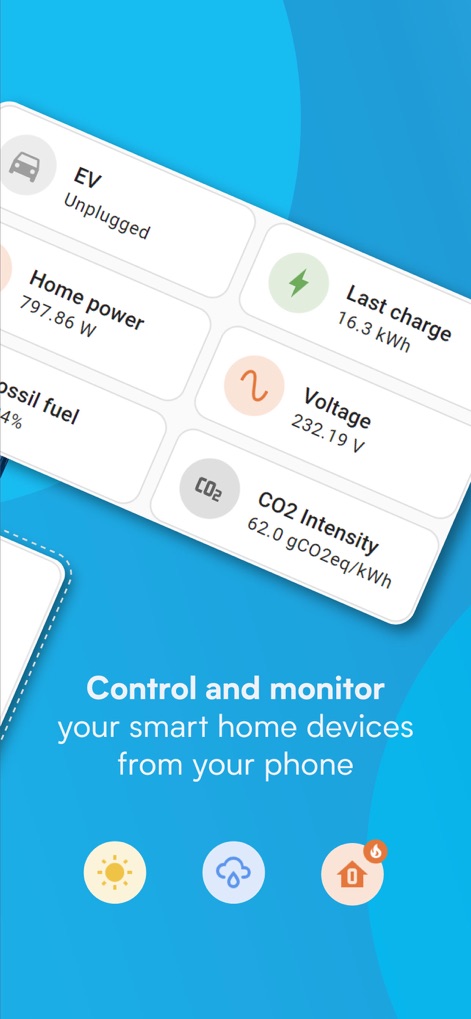
Users gain deep insights into their energy consumption, viewing real-time data for electric vehicles like 'EV Unplugged' and environmental metrics such as 'CO2 Intensity 62.0 gCO2eq/kWh'.
Detailed Energy Insights

This tool offers clear visualizations of energy usage patterns through detailed 'Gas consumption' graphs and an intuitive 'Energy distribution' diagram showcasing solar and grid interaction.
Sustainable Energy Tracking

The platform empowers users to craft sophisticated automations, using an intuitive 'Create new automation' flow and a structured 'When', 'And if', 'Then do' logic for complex scenarios.
Intelligent Automation Builder

Users can effortlessly manage their smart home from multiple interfaces, executing commands like 'Open garage' via Carplay or triggering quick actions such as 'Unlock door' from an Apple Watch.
Seamless Device Integration
Description
Download
More Like This
Apps with similar features and user experience

TP-Link Tapo
TP-Link Systems Inc.

Дом с Алисой
DIRECT CURSUS COMPUTER SYSTEMS TRADING LLC

VeSync
Vesync Technology Corporation

Kasa Smart
TP-Link Systems Inc.

ecobee
ecobee Ltd.

Hubspace
Afero, Inc.

ADT Control ®
ADT LLC

First Alert by Resideo
Resideo Technologies, Inc.

Mibo Smart: Casa Inteligente
Intelbras S.A. Ind. de Telecom. Elet. Brasileira
This page is not an official page of the app or its developer, but an independent editorial publication created for informational and commentary purposes. Unless expressly stated otherwise, neither the app nor its developer is affiliated with, endorsed by, sponsored by, authorized by, or otherwise officially connected with MWM, Apple, Google Play, the app publisher, or the app's developer, and nothing on this page implies that the app was developed using MWM's services. Any trademarks, logos, screenshots, and other content remain the property of their respective owners.