
This page is not an official page of the app or its developer, but an independent editorial publication created for informational and commentary purposes. Unless expressly stated otherwise, neither the app nor its developer is affiliated with, endorsed by, sponsored by, authorized by, or otherwise officially connected with MWM, Apple, Google Play, the app publisher, or the app's developer, and nothing on this page implies that the app was developed using MWM's services. Any trademarks, logos, screenshots, and other content remain the property of their respective owners.


i-FlashDevice HD
Take control of your storage with physical USB backups. Save your photos and contacts instantly to your own drive—no monthly fees, no internet required, and no privacy risks.
Downloads
1M+User Rating
Total Ratings
1K+Publisher
Category
UtilitiesLocales
22Latest Version
1.8.2Size
73.0 MBFirst Released
May 2, 2016Take Back Your Phone's Space
The simple, physical way to manage your files. Skip the monthly cloud fees and internet lag—just plug in your drive and secure your memories instantly.
Stop 'Storage Full' Alerts
Quickly offload thousands of photos and videos to any external USB drive, freeing up space for new memories without deleting a thing.
100% Offline Backups
Perfect for travelers and rural areas. Secure your data on the go without needing Wi-Fi, cell service, or a data plan.
Frequently Asked Questions
Everything you need to know about i-FlashDevice HD
What is the main function of the i-FlashDevice HD app?
The i-FlashDevice HD app primarily connects to a USB drive via a wired connection. It enables users to manage and back up various files and contacts to and from the USB drive.
Can i-FlashDevice HD back up and restore photo albums?
Yes, i-FlashDevice HD allows users to back up photo album files to a connected USB drive. It also supports restoring these files back to the photo album.
Does i-FlashDevice HD support contact backup and restore?
Yes, i-FlashDevice HD supports backing up contacts to a USB drive. Users can also restore their contacts from the USB drive using the app.
Does i-FlashDevice HD require network access for backup?
No, the i-FlashDevice HD app performs backup operations without requiring any network access, ensuring offline functionality.
What types of files can i-FlashDevice HD manage?
The i-FlashDevice HD app manages files such as albums (photos), backups, music, recordings, camera files, and videos, as indicated by its main screen icons.
Does i-FlashDevice HD offer Face ID access for security?
Yes, the i-FlashDevice HD app includes a setting for Face ID Access to enhance user security for the application.
Can i-FlashDevice HD format external drives?
Yes, i-FlashDevice HD provides options to format both external and local storage drives through its settings menu.
Does i-FlashDevice HD support Windows/Mac file sharing?
Yes, i-FlashDevice HD supports file sharing with Windows and Mac systems using Samba, as shown in the app's settings.
Does i-FlashDevice HD show storage information?
Yes, i-FlashDevice HD displays the current capacity and usage for "App Storage" and indicates the status of "Device Storage" on its main screen.
Can i-FlashDevice HD show hidden files?
Yes, the i-FlashDevice HD app includes a setting labeled "Show Hidden File" that users can enable or disable.
The following screenshots and description are sourced directly from the app's official store listing and are the property of the app developer.
App Store
Screenshots
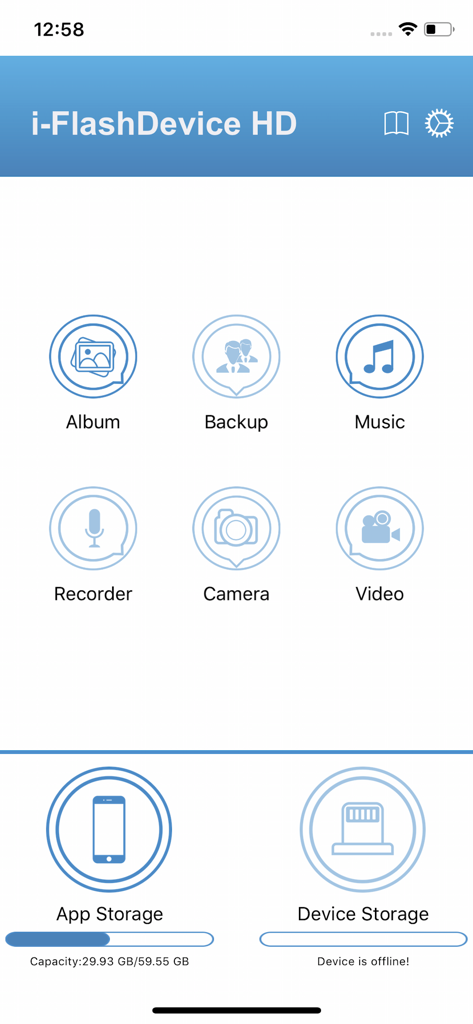
The main dashboard of the iFlashDevice HD app showing storage status and file management icons like Album Backup and Music
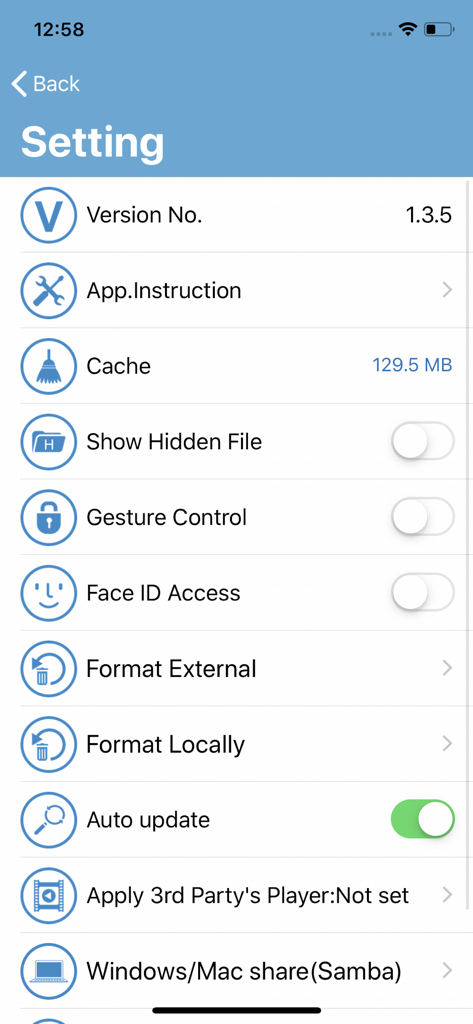
A screenshot of the i-FlashDevice HD app settings screen featuring file management and security options.
Description
Download
More Like This
Apps with similar features and user experience
Qubii Pro
Maktar Inc.

SanDisk Memory Zone
SanDisk Corporation

SanDisk Ixpand™ Charger
SanDisk Corporation

UBackup
Shenzhen Dianzhui Culture Technology Co., Ltd.

Y-Disk
Shenzhen Dianzhui Culture Technology Co., Ltd.

PhotoFast ONE
ALL BOND TECHNOLOGY CO., LTD

CooDisk
天海 何

LinkBack
金铃 梁

iUSB
伟才 韦
This page is not an official page of the app or its developer, but an independent editorial publication created for informational and commentary purposes. Unless expressly stated otherwise, neither the app nor its developer is affiliated with, endorsed by, sponsored by, authorized by, or otherwise officially connected with MWM, Apple, Google Play, the app publisher, or the app's developer, and nothing on this page implies that the app was developed using MWM's services. Any trademarks, logos, screenshots, and other content remain the property of their respective owners.