
This page is not an official page of the app or its developer, but an independent editorial publication created for informational and commentary purposes. Unless expressly stated otherwise, neither the app nor its developer is affiliated with, endorsed by, sponsored by, authorized by, or otherwise officially connected with MWM, Apple, Google Play, the app publisher, or the app's developer, and nothing on this page implies that the app was developed using MWM's services. Any trademarks, logos, screenshots, and other content remain the property of their respective owners.


ID.me Authenticator
Security isn't a suggestion; it's a hard requirement. The app empowers users with unyielding control over their digital identity.
Downloads
5M+User Rating
Total Ratings
101.2KPublisher
Category
ProductivityLocales
1Latest Version
1.5.15Size
30.7 MBFirst Released
Dec 13, 2018An Analytical Review of its Capabilities for Digital Identity Protection
Key Features of ID.me Authenticator
Robust Multi-Factor Authentication
The app provides a critical additional layer of security beyond just a password, significantly protecting user accounts from unauthorized access and cyber threats, which is essential for safeguarding sensitive personal information.
Versatile Verification Methods
It allows users to choose from various secure authentication options, including time-based one-time passwords (TOTP), convenient push notifications, and mobile security keys, accommodating different security preferences and use cases.
Instant Push Notification Approval
This tool simplifies the login process by enabling users to quickly approve identity verification requests with a single tap, offering a highly user-friendly and efficient authentication experience for frequent interactions.
Secure TOTP Code Generation
The app features the generation of unique, time-sensitive verification codes directly on the user's device, ensuring reliable identity confirmation even in scenarios without internet connectivity for code retrieval.
Frequently Asked Questions
Everything you need to know about ID.me Authenticator
What is ID.me Authenticator?
ID.me Authenticator is a free multi-factor authentication (MFA) solution for your ID.me account. It adds an extra layer of security, protecting your account from hackers.
How does ID.me Authenticator provide 2-step verification?
ID.me Authenticator generates secure 2-step verification tokens. This includes time-based one-time passwords (TOTP), push notifications, or mobile security keys to verify user identity.
What methods does ID.me Authenticator use to verify identity?
The ID.me Authenticator verifies identity via push notifications, where users tap 'Yes' to approve, or by entering a generated time-based one-time password (TOTP) code from the app.
Can ID.me Authenticator protect my account from hackers?
Yes, ID.me Authenticator protects your account from hackers. It adds an additional layer of security through multi-factor authentication for your ID.me account.
How do I configure my ID.me Authenticator account?
Users can configure their ID.me Authenticator account by scanning a QR code from the website where they enable Two-Factor Authentication, or by adding an account manually via a secret key.
Does ID.me Authenticator support push notifications for login approval?
Yes, ID.me Authenticator supports push notifications. Users approve a login request by tapping ‘Yes’ on the notification sent to the ID.me Authenticator app.
Can I use ID.me Authenticator to generate time-based one-time passwords (TOTP)?
Yes, ID.me Authenticator generates secure time-based one-time passwords (TOTP). Users enter this verification code from the app to complete the 2-step verification process.
Is the ID.me Authenticator app free to use?
Yes, the ID.me Authenticator app is a free multi-factor authentication (MFA) solution. It provides additional security without cost.
The following screenshots and description are sourced directly from the app's official store listing and are the property of the app developer.
App Store
Screenshots
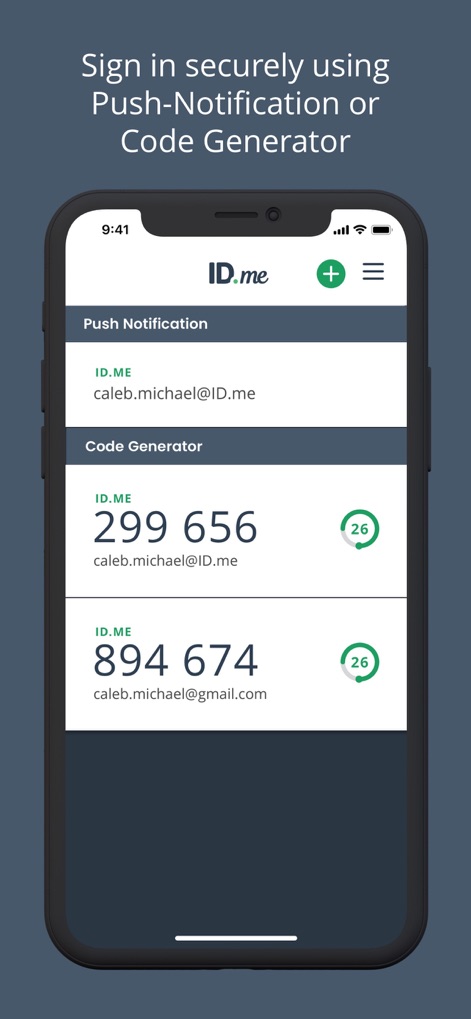
The app provides versatile authentication methods, showcasing both Push Notification prompts and dynamic Code Generator entries for user accounts.
Multi-factor Security Options

Users can swiftly integrate new accounts by utilizing the intuitive 'Scan QR Code' function and the clear visual guide for two-factor authentication.
Effortless Account Setup

For advanced users, this tool enables precise account setup through manual secret key entry and granular control over security parameters like 'Time Based' or 'SHA-256' algorithms.
Manual Configuration Control

Users can quickly verify login attempts, displaying detailed request information including the 'VA.gov' service and the clear 'Yes' or 'No' approval buttons.
Instant Login Approval
Description
Download
More Like This
Apps with similar features and user experience

Google Authenticator
Google LLC

Duo Mobile
Duo Security LLC

Authenticator App - 2FA &. MFA
APPLY DIJITAL HIZMETLER TICARET LIMITED SIRKETI

authenticator . app
Mustafa Uz

SafeNet MobilePASS+
Thales DIS (Singapore) Pte Ltd

Čítačka
Tatra banka, a.s.

Authenticator App - SafeAuth
Brilliant App Limited

Authenticator App - 2FA Auth
UNIVERSE DIJITAL HIZMETLER LIMITED SIRKETI

Authenticator App : Scan & 2FA
XSOFT GLOBAL LIMITED
This page is not an official page of the app or its developer, but an independent editorial publication created for informational and commentary purposes. Unless expressly stated otherwise, neither the app nor its developer is affiliated with, endorsed by, sponsored by, authorized by, or otherwise officially connected with MWM, Apple, Google Play, the app publisher, or the app's developer, and nothing on this page implies that the app was developed using MWM's services. Any trademarks, logos, screenshots, and other content remain the property of their respective owners.