
EasyConnect


Empower your hybrid workforce with seamless access to corporate applications and VDI environments. Stay productive on your iOS device with industry-leading SSL VPN encryption and absolute data protection.
Publisher
Category
BusinessDownloads
4M+User Rating
Total Ratings
4K+Locales
2Discover the interface used by 4M+ users.
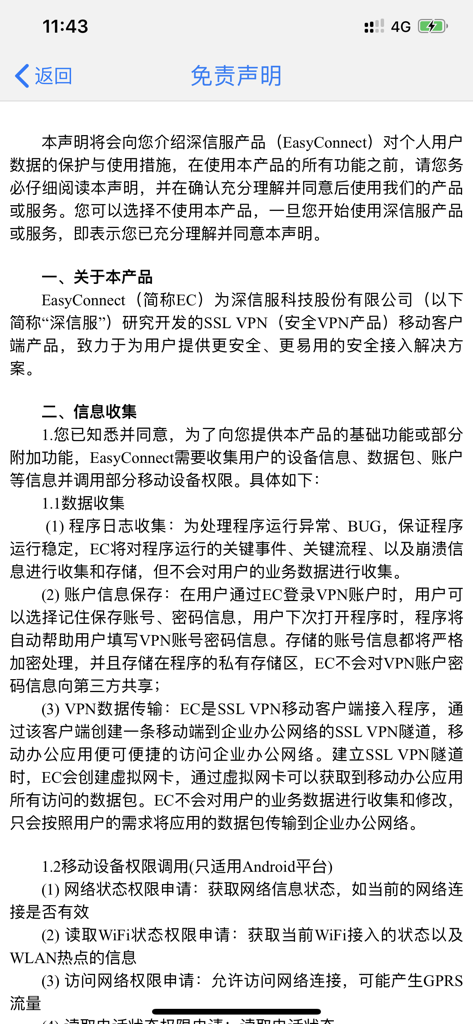
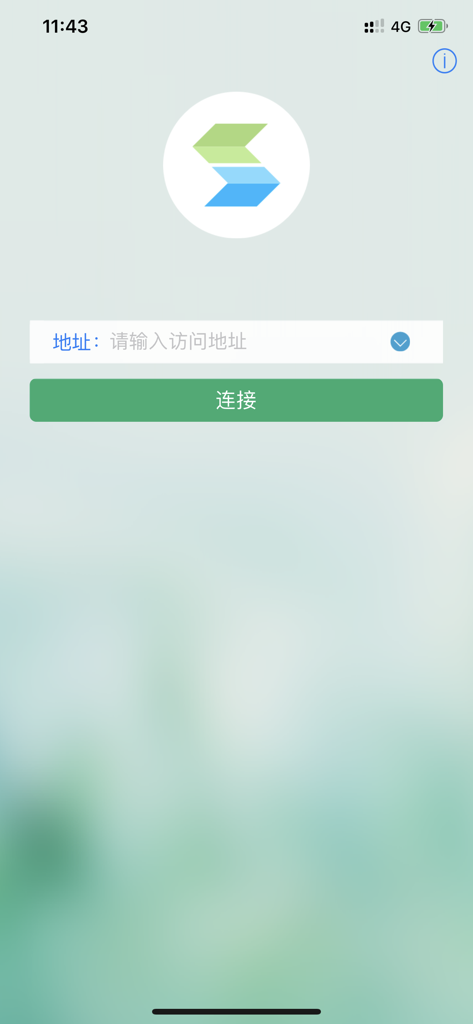
The tools that make this app stand out, trusted by 4M+ users.
Protect your corporate data with robust SSL VPN encryption that ensures absolute privacy and security, even when accessing files over public Wi-Fi.
Transform your iPad or iPhone into a powerful workstation with VDI integration, allowing you to run professional desktop environments on the go.
Eliminate lag with built-in acceleration features that speed up your access to internal HR portals, CRM systems, and proprietary business applications.
Insights from user reviews.
Sentiment Score
Summary
This mobile app receives overwhelmingly negative feedback, primarily due to widespread login and account management issues such as frequent inability to log in, recurring password errors, and the critical absence of password recovery or phone number change options. Users consistently report poor usability and performance, citing the app as laggy, difficult to connect, and generally frustrating to use across multiple devices, including an iPad version with a broken login interface. Specific functionality problems include certain features like the academic system being inaccessible, issues with version information retrieval, and failed CNKI downloads. While one user found the app helpful and another noted its parity with the desktop version, the vast majority of reviews express deep dissatisfaction and label the app as 'garbage', with concerns also raised about privacy and uninstallation difficulties.
Common Themes
Everything you need to know about EasyConnect.
Description
Latest Version
7.6.31
Size
15.1 MB
First Released
Aug 16, 2011
Join 4M+ professionals who rely on EasyConnect for secure, encrypted access to corporate applications and VDI resources, anywhere in the world.
Everything you need to know about EasyConnect
EasyConnect is an SSL VPN mobile client developed by Sangfor Technology. It enables iOS devices to securely access corporate applications and resources from anywhere.
EasyConnect provides secure and reliable SSL VPN access to corporate applications and resources. It accelerates access to business applications and protects against data disclosure.
EasyConnect requires Sangfor SSL VPN 5.2 or later, or VDI 1.0 or later. Users must verify readiness with their corporate IT department before use.
Yes, EasyConnect collects device information, data packets, and account information. It also collects program logs for stability but does not collect user business data.
EasyConnect offers an option to save encrypted account information (username, password) in the app's private storage. It does not share this information with third parties.
No, EasyConnect does not share user account passwords with third parties. It also does not collect or modify user business data, only transmitting it as required.
EasyConnect creates an SSL VPN tunnel between the mobile device and the corporate network. It uses a virtual network card to transmit application data packets without collecting or modifying user data.
To initiate a connection with EasyConnect, users must enter an access address into the designated '地址:' field on the main screen and then tap the '连接' (Connect) button.
Based on the provided documentation, the disclaimer details specific mobile device permission calls only for the Android platform. No specific iOS permissions are listed in the available text.
Apps with similar features and user experience

OpenVPN Inc.
Palo Alto Networks

Pulse Secure LLC

Pickpointio LLC

Shanghai best oray information s&t co.,ltd

Fortinet, Inc

Cisco

Publicroam B.V.

Zscaler inc
App information, icons, screenshots, and descriptions displayed on this page are sourced from the Apple App Store and are the property of their respective developers. Download estimates and rankings are based on MWM's proprietary models and may not reflect actual figures. This page is provided for informational and analytical purposes only.
Believe this page infringes your intellectual property? File a dispute