
This page is not an official page of the app or its developer, but an independent editorial publication created for informational and commentary purposes. Unless expressly stated otherwise, neither the app nor its developer is affiliated with, endorsed by, sponsored by, authorized by, or otherwise officially connected with MWM, Apple, Google Play, the app publisher, or the app's developer, and nothing on this page implies that the app was developed using MWM's services. Any trademarks, logos, screenshots, and other content remain the property of their respective owners.


ieGeek Cam
Security redefined. It offers immediate awareness, transforming how users secure their space. The app proves essential for constant vigilance.
Downloads
750k+User Rating
Total Ratings
10.7KPublisher
Category
LifestyleLocales
17Latest Version
6.0.0Size
242.3 MBFirst Released
Mar 9, 2022An Analytical Overview for Property Security
Key Features of ieGeek Cam
Live Video Monitoring
The app provides real-time video streaming, allowing users to view their property remotely at any moment.
Real-time Alerts
It sends instant push messages to the user's device when motion is detected, ensuring immediate awareness of security events.
Automated Motion Detection & Recording
This tool features an alarm system that automatically detects motion and records events, ensuring incidents are captured for review.
Remote Property Access
The app allows users to access and monitor their security cameras from any location, providing peace of mind whether away from home or business.
Historical Video Playback
It enables users to review recorded footage, allowing for the investigation of past events and continuous monitoring history.
Smart Detection Zones
This tool features customizable smart detection zones, allowing users to define specific areas for motion alerts and reduce false alarms.
Frequently Asked Questions
Everything you need to know about ieGeek Cam
What is ieGeek Cam?
ieGeek Cam is a security camera system surveillance app. It provides live video, motion detection recording, and instant push messages to inform users of their home's security status.
Does ieGeek Cam offer live video surveillance?
Yes, ieGeek Cam offers real-time live video surveillance. Users can view their camera feeds live through the app interface.
How does ieGeek Cam handle motion detection alerts?
ieGeek Cam sends instant push messages via its alarm system when motion is detected. This functionality enables users to take protective measures promptly.
Can I customize motion detection zones in ieGeek Cam?
Yes, ieGeek Cam allows users to customize smart detection zones. This feature helps define specific areas within the camera's view for motion monitoring.
What are the main features of the ieGeek Cam app?
The main functions of ieGeek Cam include real video playing, video image sharing, playback image checking, time and message reminding, and customizable smart detection zones.
Can I share camera access with others using ieGeek Cam?
Yes, ieGeek Cam allows users to share device access. Sharing can be performed by scanning a QR code or by entering an account within the app.
How can I review past events in ieGeek Cam?
ieGeek Cam provides a playback image checking feature to review past events. Users can access a history of motion detection events with corresponding timestamps.
Does ieGeek Cam offer different alarm working modes?
Yes, ieGeek Cam offers Power Saving Mode, Performance Mode, and Custom Mode for alarm working. Each mode features distinct settings for video length, power consumption, and humanoid detection.
How long are video clips in ieGeek Cam's Power Saving Mode?
In ieGeek Cam's Power Saving Mode, the length of video clips does not exceed 10 seconds. People Detection is enabled by default in this mode for efficient monitoring.
Does ieGeek Cam support humanoid detection?
Yes, ieGeek Cam supports humanoid detection. It is enabled by default in Power Saving Mode and can be customized further in the Custom Mode settings.
Where can I find the privacy policy for ieGeek Cam?
The privacy policy for ieGeek Cam is available via the link provided in the app description: "https://meari-us.s3.us-west-1.amazonaws.com/html/audit/81/storage_server.html".
Can I adjust the motion detection sensitivity in ieGeek Cam?
Yes, ieGeek Cam allows users to adjust motion detection sensitivity. The sensitivity can be precisely set on a numerical scale ranging from 1 to 10.
Does ieGeek Cam offer cloud storage?
Yes, ieGeek Cam offers cloud storage capabilities. This feature is indicated by the presence of a dedicated "Cloud" tab within the app's live view interface.
The following screenshots and description are sourced directly from the app's official store listing and are the property of the app developer.
App Store
Screenshots

The app provides real-time video playing of the property and offers direct access to features like motion detection settings for immediate security management.
Live View Control
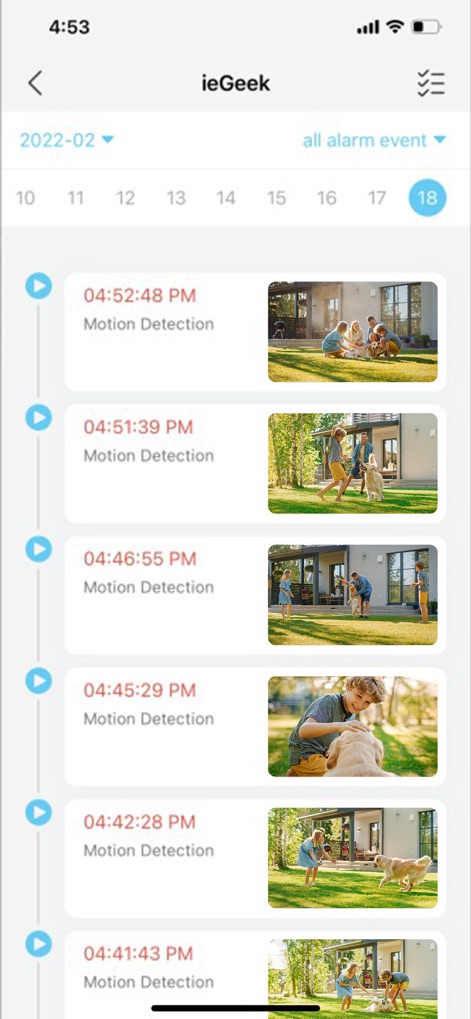
Users can review recorded motion detection events through a clear chronological timeline, providing specific timestamps and visual previews of each alert.
Event Playback History

This interface enables secure sharing of camera access with others by offering convenient options to scan a QR code or enter an account for seamless collaboration.
Secure Device Sharing

The "Me" section provides a centralized hub for managing personal settings, including family access permissions and other critical app configurations.
Account Management Hub

Users gain precise control over security by customizing motion detection sensitivity and defining specific alarm areas within the camera's view.
Custom Detection Settings

The app allows selection from various alarm working modes, including power-saving and custom options, to tailor surveillance performance to specific needs.
Optimize Alarm Modes

This panel offers an organized view of all connected devices and provides quick access to individual camera feeds for real-time monitoring and control.
Device Overview Panel
Description
Download
More Like This
Apps with similar features and user experience

DMSS
Hangzhou Dong Bin Information Technology Co., Ltd.

Joolink
Shenzhen Jooan Technology Company

VicoHome: Smart Home Camera
PHOTON SAIL TECHNOLOGIES PTE. LTD.

Ubox
洪波 王

SimpliSafe Home Security App
SimpliSafe, Inc.

Active Mobile V4
JFL Equipamentos Eletronicos Industria e Comercio Ltda.

Dzees Home
Shenzhen Weixi Technology Co., Ltd

Ring - Always Home
Bot Home Automation, INC

Hik-Connect - for End user
Hangzhou Hikvision Digital Technology Co., Ltd.
This page is not an official page of the app or its developer, but an independent editorial publication created for informational and commentary purposes. Unless expressly stated otherwise, neither the app nor its developer is affiliated with, endorsed by, sponsored by, authorized by, or otherwise officially connected with MWM, Apple, Google Play, the app publisher, or the app's developer, and nothing on this page implies that the app was developed using MWM's services. Any trademarks, logos, screenshots, and other content remain the property of their respective owners.